
How to Get More PC Boxes
◓ Starter Tera Raid: 7☆ Torterra (03/13~03/19)!
✬ Pokemon HOME Dex Completion Shiny Rewards:
┗ Meloetta | Manaphy | Enamorus | Keldeo | Meltan
▶︎ Share codes and team up for Blueberry Quests!
▶︎ Game8 Tera Raid Damage Calculator | Game8 Discord
★ The DLC Epilogue is now available! ▶︎ How to Start
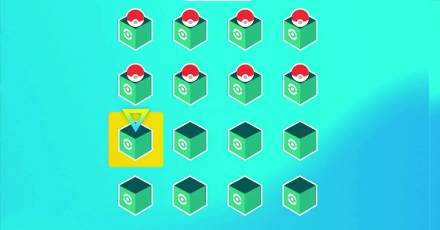
Do you need to increase your PC Box storage in Pokemon Scarlet and Violet (SV)? Put a Pokemon in each PC Box, and see your storage capacity double in size. Here, you'll learn how to get more PC boxes to store all those extra Pokemon in.
How to Get More PC Boxes
Put a Pokemon in Each PC Box
| 1 | 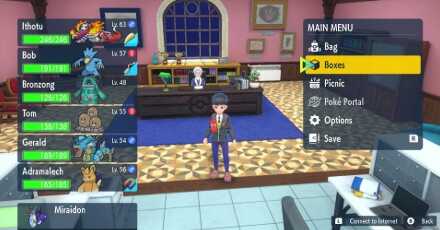 Select the "Boxes" option in the Main Menu. |
|---|---|
| 2 | 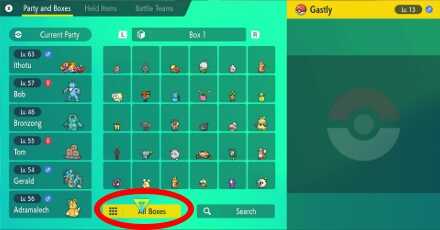 Select the "All Boxes" button at the very bottom of the Boxes menu. |
| 3 | 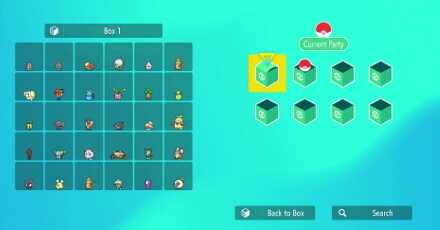 Here, you'll see the number of PC Boxes you currently have. An empty box means there's no Pokemon inside it, a Box with a Pokeball means there are some Pokemon inside it, and a Box that's closed and looks close to bursting means that it's full. |
| 4 | 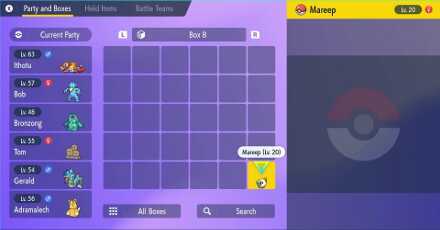 Move at least one Pokemon to each of your empty boxes. |
| 5 |  If you did it correctly, the All Boxes menu should show that all of your current PC Boxes have Pokemon in them. |
| 6 | 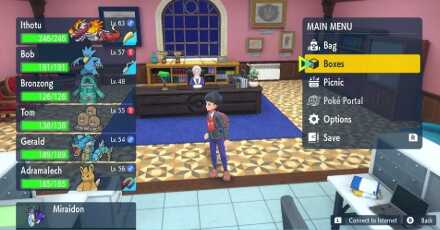 Exit the Boxes Menu and enter it again. |
| 7 | 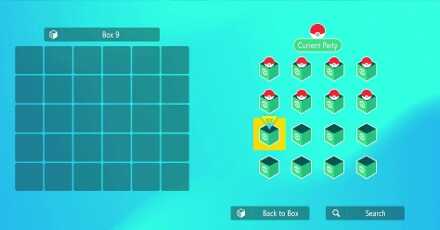 When you check the All Boxes Menu, you should see that you've unlocked 8 more PC Boxes. You can repeat steps 1 to 6 until you get 32 PC Boxes in total. |
How Many PC Boxes Can You Have?
You Can Have Up to 32 PC Boxes

Pokemon Scarlet and Violet players can have up to 32 PC boxes from the start of the game, which can contain a total of 960 Pokemon.
That's a lot of Boxes to fill with Pokemon, so why not get started and catch 'em all?
Pokemon Scarlet and Violet Related Guides

Pokemon Scarlet and Violet Tips and Tricks



Author

How to Get More PC Boxes

Rankings
Gaming News




![Monster Hunter Stories 3 Review [First Impressions] | Simply Rejuvenating](https://img.game8.co/4438641/2a31b7702bd70e78ec8efd24661dacda.jpeg/thumb)
Popular Games

Genshin Impact Walkthrough & Guides Wiki
Honkai: Star Rail Walkthrough & Guides Wiki
Umamusume: Pretty Derby Walkthrough & Guides Wiki
Pokemon Pokopia Walkthrough & Guides Wiki
Resident Evil Requiem (RE9) Walkthrough & Guides Wiki
Monster Hunter Wilds Walkthrough & Guides Wiki
Wuthering Waves Walkthrough & Guides Wiki
Arknights: Endfield Walkthrough & Guides Wiki
Pokemon FireRed and LeafGreen (FRLG) Walkthrough & Guides Wiki
Pokemon TCG Pocket (PTCGP) Strategies & Guides Wiki










Recommended Games
Diablo 4: Vessel of Hatred Walkthrough & Guides Wiki
Cyberpunk 2077: Ultimate Edition Walkthrough & Guides Wiki
Fire Emblem Heroes (FEH) Walkthrough & Guides Wiki
Yu-Gi-Oh! Master Duel Walkthrough & Guides Wiki
Super Smash Bros. Ultimate Walkthrough & Guides Wiki
Pokemon Brilliant Diamond and Shining Pearl (BDSP) Walkthrough & Guides Wiki
Elden Ring Shadow of the Erdtree Walkthrough & Guides Wiki
Monster Hunter World Walkthrough & Guides Wiki
The Legend of Zelda: Tears of the Kingdom Walkthrough & Guides Wiki
Persona 3 Reload Walkthrough & Guides Wiki










All rights reserved
©2022 Pokémon. TM, ®Nintendo.
The copyrights of videos of games used in our content and other intellectual property rights belong to the provider of the game.
The contents we provide on this site were created personally by members of the Game8 editorial department.
We refuse the right to reuse or repost content taken without our permission such as data or images to other sites.