
How to Equip Decorations
★ Arkveld Gamma Armor | MH Stories 3 Collab
☆ Version 1.041: Sororal α Armor | Shatterseal
★ How to Unlock Proof of a Hero Quest
☆ Omega Planetes | Savage Omega | Builds vs Omega
★ Armor Set Search updated for Ver 1.041
☆ HR50+ Builds | Tier List | Weapon Guides
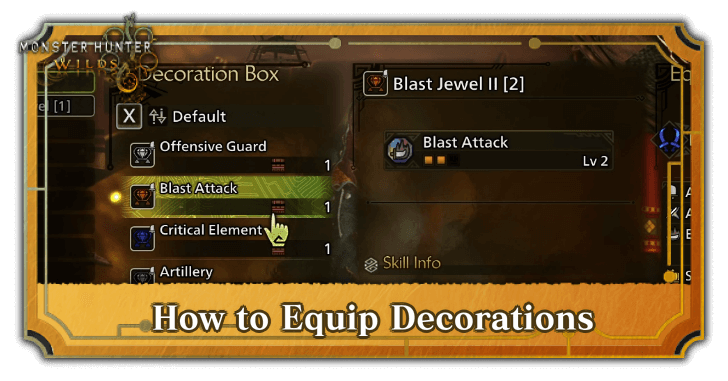
Press right on the D-Pad while viewing your weapon or armor to equip Decorations in Monster Hunter Wilds. Learn the process of how to equip and add Decorations here!
List of Contents
How to Equip and Add Decorations
Press the Right Button on the D-Pad to Equip Decorations
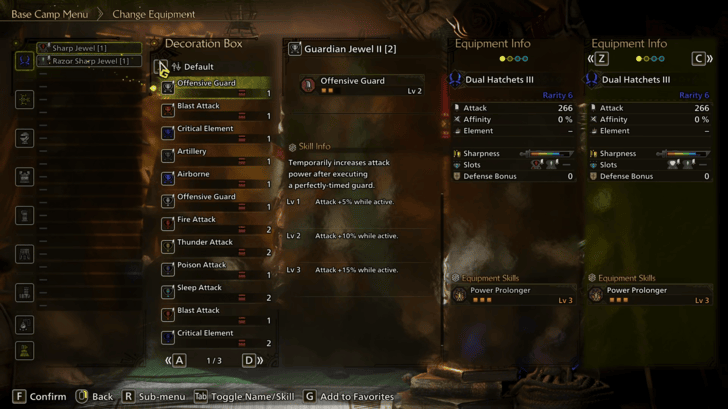
| Controls |  / /  |
|---|
You can equip decorations by pressing the Right Button on your controller's D-Pad, or pressing the D on PC while you are in the Change Equipment menu inside a Tent or at the Smithy.
Decorations Can Only Be Equipped in Gear With Deco Slots
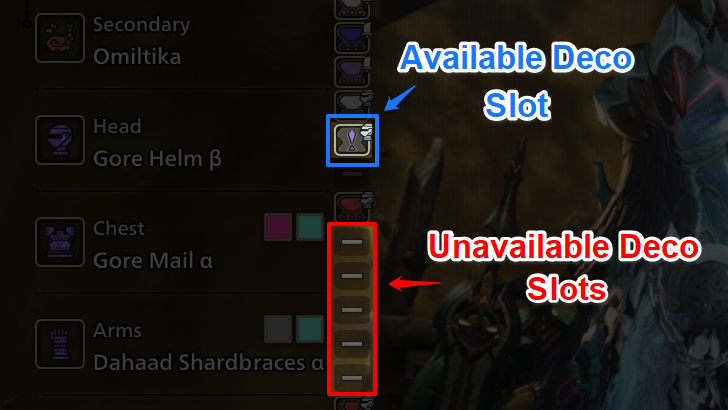
Make sure your equipped gear has a Decoration Slot, represented by a gray hourglass symbol indicating its Decoration Level. If all your gear displays a grayed out "-" symbol, it means decorations cannot be equipped on them.
Pay Attention to Your Decoration's Level
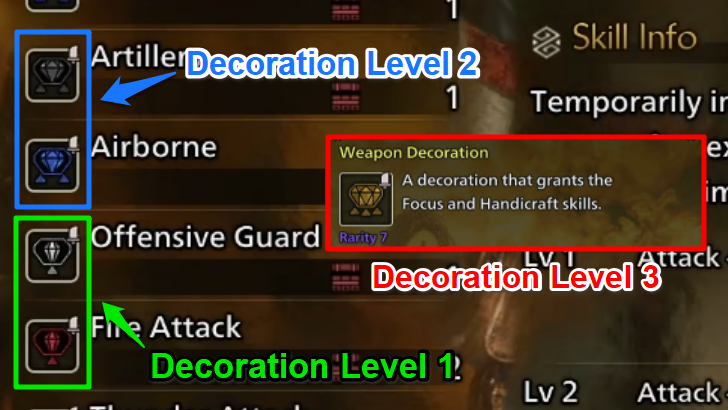
Armor and weapons can have up to 3 Decoration Slots, supporting level 1 to 3 Decorations. A Decoration’s level is shown by triangles beneath its icon or a number next to its name and must match the slot level. Lower rank gear typically supports Level 1 and 2, while Level 3 slots appear more in higher rank gear.
Keep in mind that while lower level Decorations can be placed in higher level slots, higher-level Decorations cannot be placed in lower-level slots. Take this into consideration when organizing your builds!
Armor and Weapon Decorations Are Separate Items
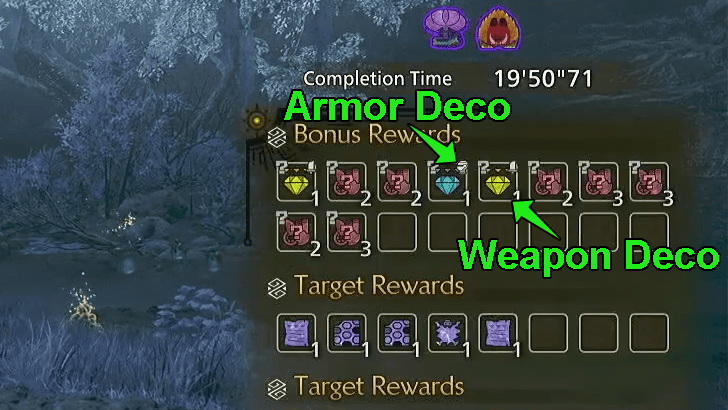
Unlike previous titles, Weapon and Armor Decorations have now been split into two, and can only be slotted into equipment of its corresponding type.
Weapon Decorations will have with a Sword marker at the upper right side of the item's icon, while Armor Decorations will have a Helmet marker.
Monster Hunter Wilds Related Guides
All Tips and Tricks Guides
Comment



Author

How to Equip Decorations

Premium Articles
Rankings
Gaming News



![Monster Hunter Stories 3 Review [First Impressions] | Simply Rejuvenating](https://img.game8.co/4438641/2a31b7702bd70e78ec8efd24661dacda.jpeg/thumb)
Popular Games

Genshin Impact Walkthrough & Guides Wiki
Honkai: Star Rail Walkthrough & Guides Wiki
Umamusume: Pretty Derby Walkthrough & Guides Wiki
Pokemon Pokopia Walkthrough & Guides Wiki
Resident Evil Requiem (RE9) Walkthrough & Guides Wiki
Monster Hunter Wilds Walkthrough & Guides Wiki
Wuthering Waves Walkthrough & Guides Wiki
Arknights: Endfield Walkthrough & Guides Wiki
Pokemon FireRed and LeafGreen (FRLG) Walkthrough & Guides Wiki
Pokemon TCG Pocket (PTCGP) Strategies & Guides Wiki









Recommended Games
Diablo 4: Vessel of Hatred Walkthrough & Guides Wiki
Cyberpunk 2077: Ultimate Edition Walkthrough & Guides Wiki
Fire Emblem Heroes (FEH) Walkthrough & Guides Wiki
Yu-Gi-Oh! Master Duel Walkthrough & Guides Wiki
Super Smash Bros. Ultimate Walkthrough & Guides Wiki
Pokemon Brilliant Diamond and Shining Pearl (BDSP) Walkthrough & Guides Wiki
Elden Ring Shadow of the Erdtree Walkthrough & Guides Wiki
Monster Hunter World Walkthrough & Guides Wiki
The Legend of Zelda: Tears of the Kingdom Walkthrough & Guides Wiki
Persona 3 Reload Walkthrough & Guides Wiki










All rights reserved
©CAPCOM
The copyrights of videos of games used in our content and other intellectual property rights belong to the provider of the game.
The contents we provide on this site were created personally by members of the Game8 editorial department.
We refuse the right to reuse or repost content taken without our permission such as data or images to other sites.