
Should You Join a Lobby?
★ Arkveld Gamma Armor | MH Stories 3 Collab
☆ Version 1.041: Sororal α Armor | Shatterseal
★ How to Unlock Proof of a Hero Quest
☆ Omega Planetes | Savage Omega | Builds vs Omega
★ Armor Set Search updated for Ver 1.041
☆ HR50+ Builds | Tier List | Weapon Guides
Lobbies are online sessions that allow players to connect and hunt with each other in Monster Hunter Wilds. Learn more about the benefits of joining lobbies and how to create and join a lobby here!
List of Contents
Benefits of Joining a Lobby
Online Multiplayer Quests

Joining a lobby in Monster Hunter Wilds will allow you to participate and post Quests that other players in the lobby can join in as well. Although lobbies can have up to 100 players, each quest has a High-Rank Requirement before you can join and can only have a maximum number of 4 players that can participate.
This can help you clear quests easier and is good for new players that are having a hard time defeating monsters.
Multiplayer Guide: How to Play Co-Op
Unlocked after Engaging Chatacabra
When you first start out, Multiplayer and joining lobbies will not be accessible at first until you eventually encounter a Chatacabra in Chapter 1. Progressing past this will allow you to join lobbies and participate in online quests.
How to Create a Lobby
Select Private Lobby
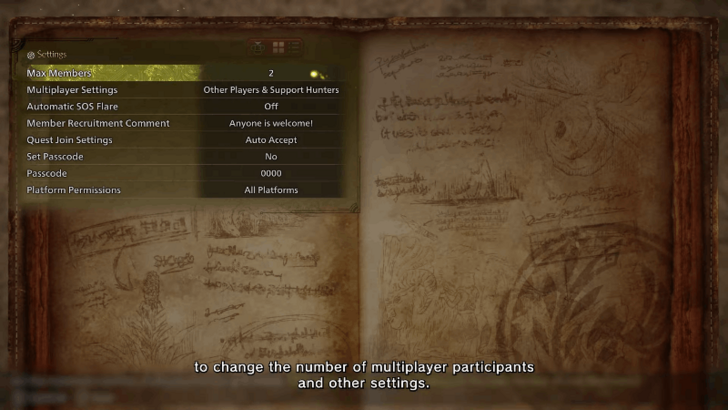
In order to create a lobby, you have to select the Private Lobby option from either the main menu or Alma and change the settings of your lobby to whatever you prefer. This will create a lobby that can hold up to 4 players where you can invite any of your friends to join.
100 Player Lobbies Cannot Be Created For Now
It is currently not possible to create your own 100-Player Lobby and will only allow you to create Private Lobbies. While Recommended Lobbies can hold 100 players, they can only be joined and are always premade.
How to Move Between Lobbies
Talk to Alma at the Base Camp
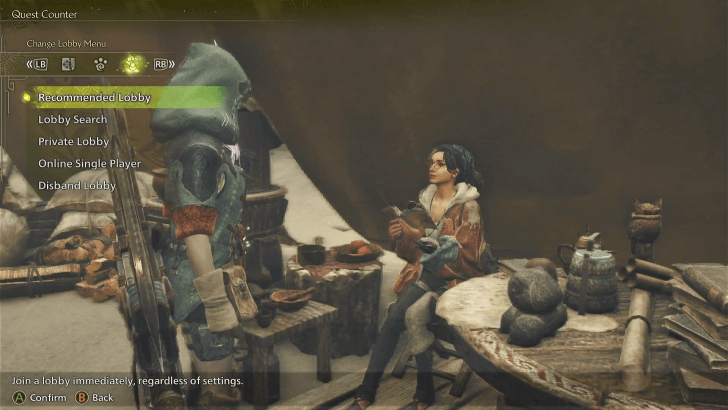
If you are currently already in a lobby and you want to move to a different one, you can talk to Alma at the Base Camp and select the Lobby Navigation Menu. This will provide you with options to either move to a Recommended Lobby or Lobby Search for specific ones.
How to Join a Lobby
| List of Ways to Join a Lobby |
|---|
|
|

How to Join Using Lobby ID
| 1 | 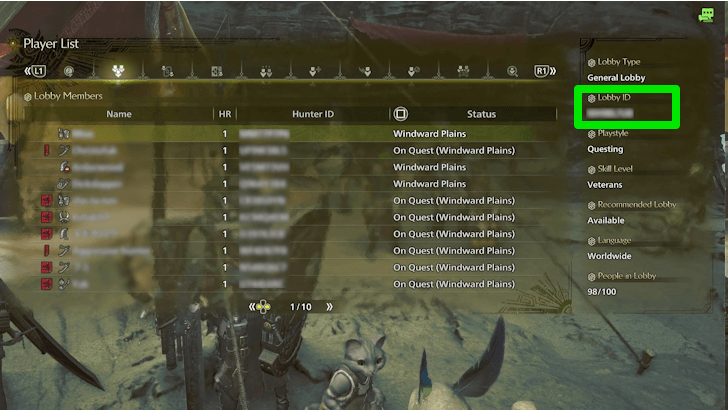 In order to join through Lobby ID, you need to ask your friend what is the Lobby ID they are currently in. This can be found by going to the Player List and checking the right side. Note: Lobby IDs are usually 8 characters made up of numbers and letters. |
|---|---|
| 2 |
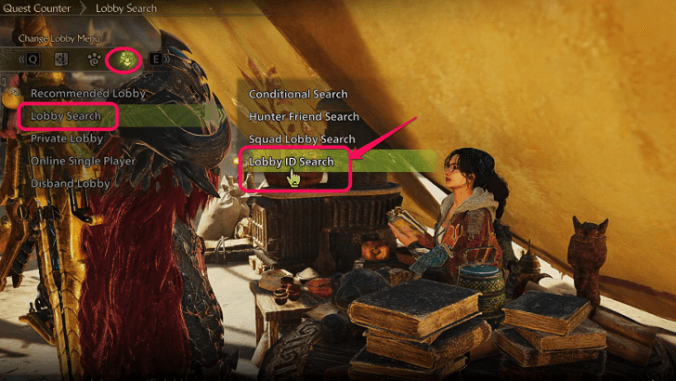 Once you know the Lobby ID you are joining, talk to Alma at the Base Camp and select Lobby Navigation Menu → Lobby Search → Lobby ID Search and input the Lobby ID of the lobby you want to join. |
The best way to join a Lobby even if they are not listed as your Hunter Friend is through the Lobby ID. Just make sure the lobby you are joining is not full or else you will not be able to join.
How to Join Using Hunter Friend Search
| 1 | 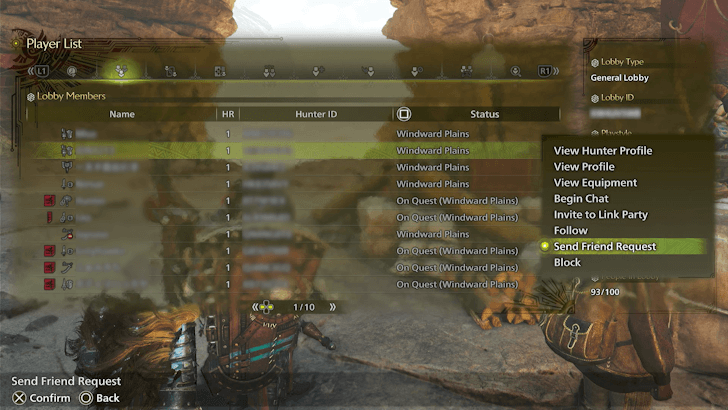 Before searching for a Hunter Friend Lobby, you first have to Send a Friend Request to the player you want to join to. This can be done from the Player List and selecting the player you want to add to show a dropdown menu and send the friend request. |
|---|---|
| 2 |  Once the player has accepted your Friend Request, you can talk to Alma at the Base Camp and select Lobby Navigation Menu → Lobby Search → Hunter Friend Search and you will see a list of all the lobbies your Hunter Friends are currently in. |
This is currently the easiest way to join a lobby as it allows you to join your friend's Lobby in a press of button as long as they are your Hunter Friend. This can also work if you want to join them in the future as they will always be listed down in the Hunter Friends list.
How to Join Environmental Links
| 1 |
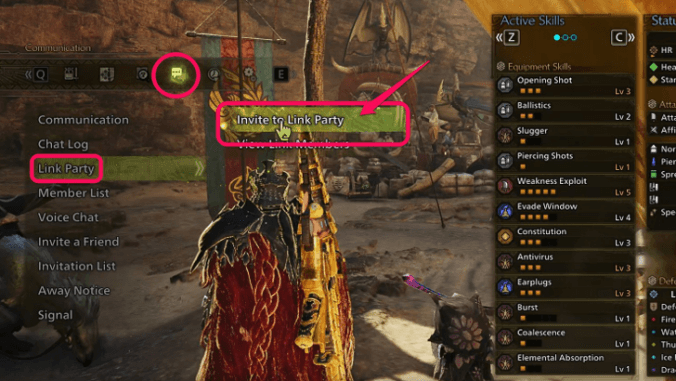 In order to invite someone to your Link Party, head for the Menu Screen → Communication → Link Party → Invite to Link Party. |
|---|---|
| 2 |
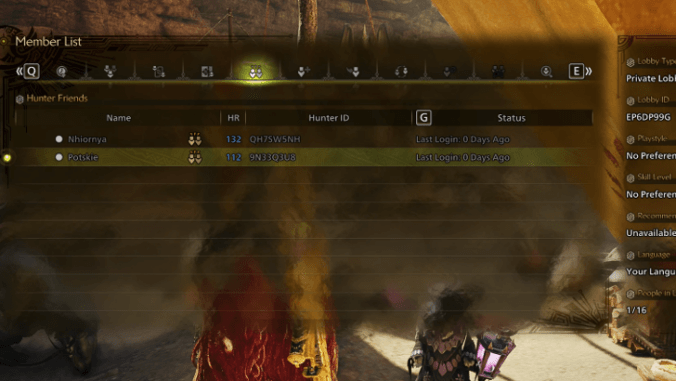 Search for the player you want to invite in your Hunter Friend List and select their name. |
| 3 |
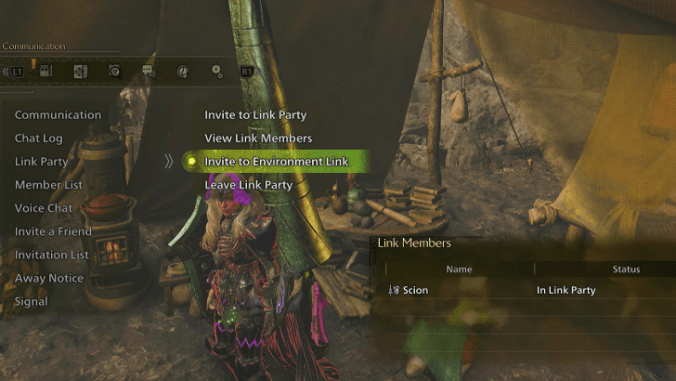
Once the link party is formed, select Menu Screen → Communication → Link Party → Invite All to Environmental Link to form an Environmental Link. |
The Environmental Link system is not necessarily a lobby but they allow you to do consecutive quests together up to a 4-player group without needing to be in the same lobby. Each member will be notified whenever someone posts a quest and will allow you to jump directly to their quest via the Link Member Quests at the Quest Counter.
Monster Hunter Wilds Related Guides
All Tips and Tricks Guides
Comment



Author

Should You Join a Lobby?

Premium Articles
Rankings
Gaming News




![Monster Hunter Stories 3 Review [First Impressions] | Simply Rejuvenating](https://img.game8.co/4438641/2a31b7702bd70e78ec8efd24661dacda.jpeg/thumb)
Popular Games

Genshin Impact Walkthrough & Guides Wiki
Honkai: Star Rail Walkthrough & Guides Wiki
Umamusume: Pretty Derby Walkthrough & Guides Wiki
Pokemon Pokopia Walkthrough & Guides Wiki
Resident Evil Requiem (RE9) Walkthrough & Guides Wiki
Monster Hunter Wilds Walkthrough & Guides Wiki
Wuthering Waves Walkthrough & Guides Wiki
Arknights: Endfield Walkthrough & Guides Wiki
Pokemon FireRed and LeafGreen (FRLG) Walkthrough & Guides Wiki
Pokemon TCG Pocket (PTCGP) Strategies & Guides Wiki









Recommended Games
Diablo 4: Vessel of Hatred Walkthrough & Guides Wiki
Cyberpunk 2077: Ultimate Edition Walkthrough & Guides Wiki
Fire Emblem Heroes (FEH) Walkthrough & Guides Wiki
Yu-Gi-Oh! Master Duel Walkthrough & Guides Wiki
Super Smash Bros. Ultimate Walkthrough & Guides Wiki
Pokemon Brilliant Diamond and Shining Pearl (BDSP) Walkthrough & Guides Wiki
Elden Ring Shadow of the Erdtree Walkthrough & Guides Wiki
Monster Hunter World Walkthrough & Guides Wiki
The Legend of Zelda: Tears of the Kingdom Walkthrough & Guides Wiki
Persona 3 Reload Walkthrough & Guides Wiki










All rights reserved
©CAPCOM
The copyrights of videos of games used in our content and other intellectual property rights belong to the provider of the game.
The contents we provide on this site were created personally by members of the Game8 editorial department.
We refuse the right to reuse or repost content taken without our permission such as data or images to other sites.