
How to Join a Session Mid-Hunt
★ Arkveld Gamma Armor | MH Stories 3 Collab
☆ Version 1.041: Sororal α Armor | Shatterseal
★ How to Unlock Proof of a Hero Quest
☆ Omega Planetes | Savage Omega | Builds vs Omega
★ Armor Set Search updated for Ver 1.041
☆ HR50+ Builds | Tier List | Weapon Guides
Sessions in Monster Hunter Wilds can be joined mid-hunt as long as an SOS flare for that hunt has been sent out. Learn how to join a session mid-hunt and the benefits of doing so!
How to Join a Session Mid-Hunt
Open the Quest Counter
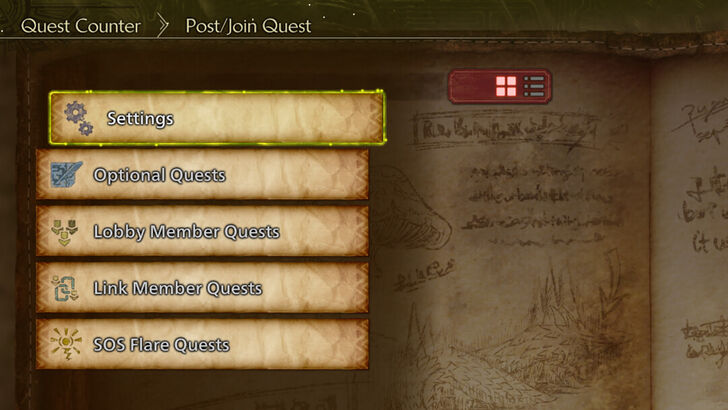
Open the Quest Counter by talking to Alma in the Base Camp or by accessing it in your tent.
Join an Ongoing Quest
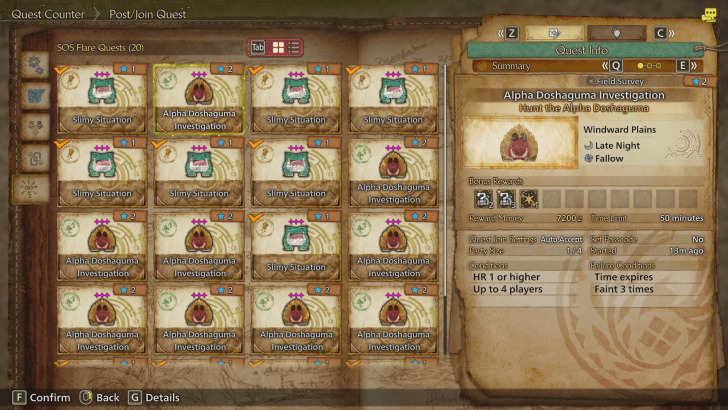
Ongoing quests will be displayed under Lobby Member Quests and Link Member Quests, but only if you are in the same lobby and link party as the requester respectively. Any ongoing quests in SOS Flare Quests can be joined regardless if you are in the same lobby as the requester or not.
Changing Cross-Platform Settings
| # | Steps |
|---|---|
| 1 | By default, Platform Permissions is set to All Platforms. This setting lets you join quests that are from other platforms. In case you want to join quests that are only from your platform, you will need to change your Platform Permissions into Your Platform. |
| 2 |
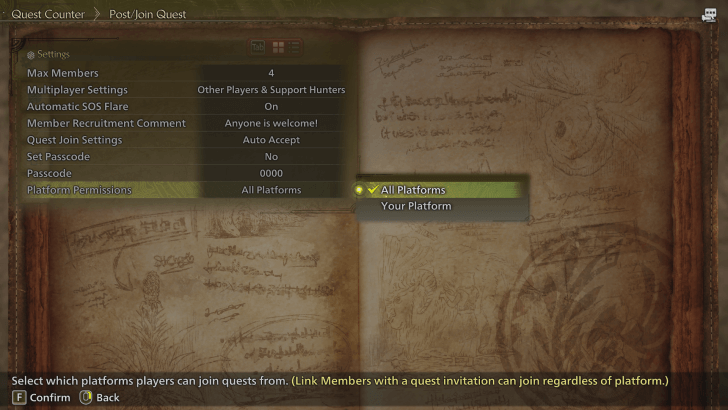 This can be done by going to the Quest Counter, opening Settings, and changing the Platform Permissions. |
| 3 |
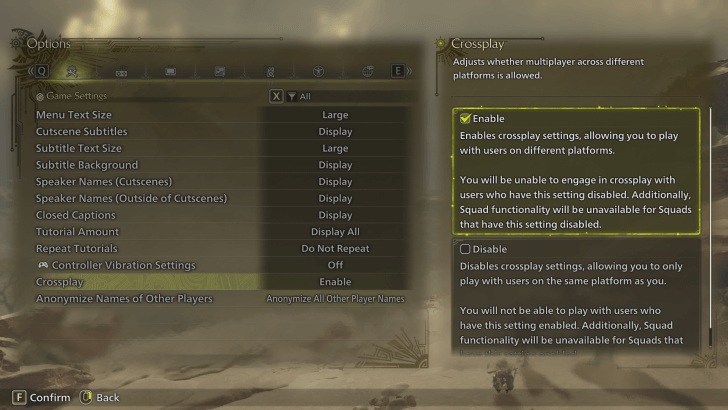 If Platform Permissions cannot be changed, check your Multiplayer Settings, which can also be found under the Quest Counter Settings. If it is set to Only Support Hunters, change it to either Other Players & Support Hunters or Only Other Players. If the Platform Permissions still cannot be changed, check if your Crossplay setting is set to Enable. Crossplay setting can be changed from the Title Screen (Options > Game Settings > Crossplay). |
Benefits of Joining Mid-Hunt Sessions
Bonus Rewards
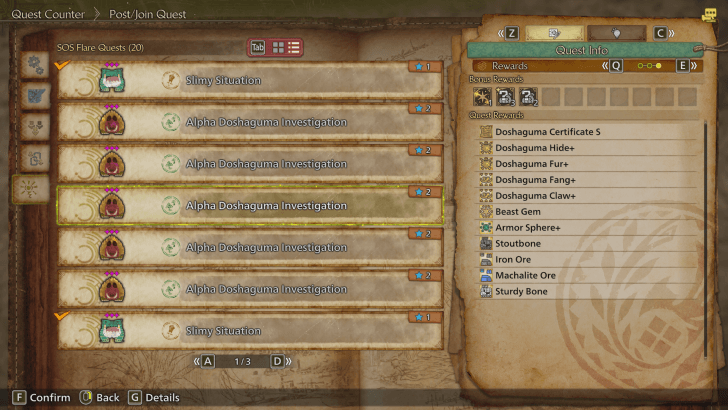
Some quests have bonus rewards on them. These bonus rewards can vary from a monster's gem to the monster's basic materials. If you require a certain material, you would have a better chance at obtaining these materials if you were to join an ongoing quest that guarantees bonus rewards compared to hunting it alone.
Strength in Numbers
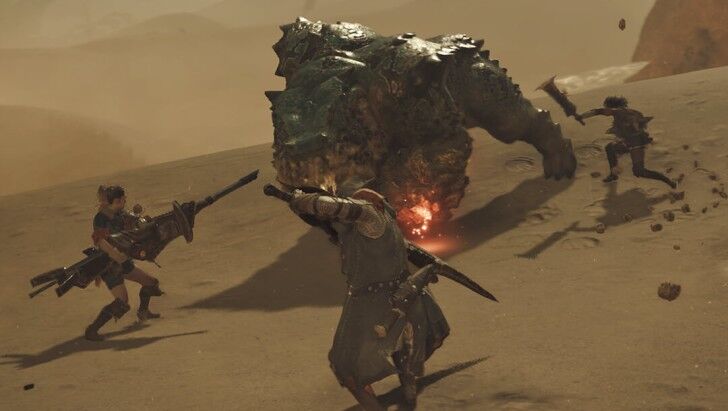
Time is essential in a hunt, especially in hunts where the time limit is as short as 20 minutes. For challenging quests like these, it is recommended to tackle it as a group.
If you cannot form a full lobby, searching and joining quests that are already ongoing is also an option. The monster's health will increase according to the number of players in a hunt, but this is an acceptable drawback. This is because just having another player take the heat off of you for a second makes the hunt a lot easier whether you use that time to sharpen your weapon, drink a potion, or dish out some extra damage without fear of getting attacked.
Multiplayer Guide: How to Play Co-Op
Monster Hunter Wilds Related Guides
All Tips and Tricks Guides
Comment



Author

How to Join a Session Mid-Hunt

Premium Articles
Rankings
Gaming News




![Monster Hunter Stories 3 Review [First Impressions] | Simply Rejuvenating](https://img.game8.co/4438641/2a31b7702bd70e78ec8efd24661dacda.jpeg/thumb)
Popular Games

Genshin Impact Walkthrough & Guides Wiki
Honkai: Star Rail Walkthrough & Guides Wiki
Umamusume: Pretty Derby Walkthrough & Guides Wiki
Pokemon Pokopia Walkthrough & Guides Wiki
Resident Evil Requiem (RE9) Walkthrough & Guides Wiki
Monster Hunter Wilds Walkthrough & Guides Wiki
Wuthering Waves Walkthrough & Guides Wiki
Arknights: Endfield Walkthrough & Guides Wiki
Pokemon FireRed and LeafGreen (FRLG) Walkthrough & Guides Wiki
Pokemon TCG Pocket (PTCGP) Strategies & Guides Wiki









Recommended Games
Diablo 4: Vessel of Hatred Walkthrough & Guides Wiki
Cyberpunk 2077: Ultimate Edition Walkthrough & Guides Wiki
Fire Emblem Heroes (FEH) Walkthrough & Guides Wiki
Yu-Gi-Oh! Master Duel Walkthrough & Guides Wiki
Super Smash Bros. Ultimate Walkthrough & Guides Wiki
Pokemon Brilliant Diamond and Shining Pearl (BDSP) Walkthrough & Guides Wiki
Elden Ring Shadow of the Erdtree Walkthrough & Guides Wiki
Monster Hunter World Walkthrough & Guides Wiki
The Legend of Zelda: Tears of the Kingdom Walkthrough & Guides Wiki
Persona 3 Reload Walkthrough & Guides Wiki










All rights reserved
©CAPCOM
The copyrights of videos of games used in our content and other intellectual property rights belong to the provider of the game.
The contents we provide on this site were created personally by members of the Game8 editorial department.
We refuse the right to reuse or repost content taken without our permission such as data or images to other sites.