
PC Optimization: Best Graphic Settings on PC
★ Arkveld Gamma Armor | MH Stories 3 Collab
☆ Version 1.041: Sororal α Armor | Shatterseal
★ How to Unlock Proof of a Hero Quest
☆ Omega Planetes | Savage Omega | Builds vs Omega
★ Armor Set Search updated for Ver 1.041
☆ HR50+ Builds | Tier List | Weapon Guides
| PC Requirements and Settings | ||
|---|---|---|
| PC Requirements | Best Settings for PC | Best PC Setup |
This is a guide on the best graphic settings in Monster Hunter Wilds for PC players. Learn the best PC Optimization settings to ensure smooth gameplay experience here!
List of Contents
Best Graphic Settings on PC
Best Settings for PC Optimization
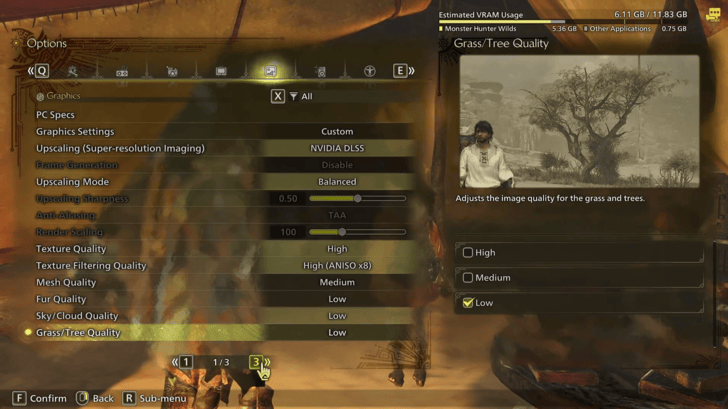
| Upscaling | DLSS (For Nvidia RTX GPUs) FSR or XeSS (For other GPUs) |
|---|---|
| Frame Generation | Enabled (Only available for RTX 40 and RTX 50 Series GPUs.) |
| Upscaling Mode | Balanced |
| Upscaling Sharpness | 0.5 (Available with Upscaling enabled.) |
| Anti-Aliasing | Off (Available with Upscaling enabled.) |
| Render Scaling | Off (Available with Upscaling enabled.) |
| Texture Quality | High |
| Texture Filtering Quality | High |
| Mesh Quality | Medium |
| Fur Quality | Low |
| Sky/Cloud Quality | Low |
| Grass/Tree Quality | Low |
| Grass/Tree Sway | Enable |
| Wind Simulation Quality | Low |
| Surface Quality | Low |
| Sand / Snow / Water Quality | Low |
| Water Effects | Disable |
| Render Distance | High |
| Shadow Quality | Low |
| Distant Shadow Quality | Low |
| Shadow Distance | Near |
| Ambient Light Quality | Medium |
| Contact Shadows | Disable |
| Ambient Occlusion | Medium |
| Bloom | High |
| Motion Blur | Turn on or off based on personal preference. |
| Vignette Effect | Turn On or Off based on personal preference. |
| Screen Space Reflection | Off |
| SSSS Scattering | On |
| Depth of Field | On |
| Volumetric Fog | Low |
| Variable Rate Shading | Balanced |
Balance System Performance and Game Visuals
These optimized graphics settings for PC aim to provide a balanced experience, optimizing performance without exhausting your system's capabilities. By lowering or disabling certain environmental effects while maintaining high-quality textures and model meshes, players can reduce load times and improve overall stability.
The result is smoother gameplay with minimal frame drops, particularly beneficial in multiplayer lobbies where a stable internet connection further enhances responsiveness.
Frame Generation Only Available for RTX 40 and 50 Series GPUs
Frame Generation is a feature exclusive to RTX 40 and RTX 50 Series GPUs, introduced with NVIDIA DLSS 3. Unlike traditional upscaling, Frame Generation reduces GPU workload by constructing additional frames without increasing VRAM usage.
However, this feature is best suited for the single-player experience of Monster Hunter Wilds, as real-time AI-powered frame generation may introduce input lag, potentially making it less stable for multiplayer lobbies.
Download High Resolution Texture Pack
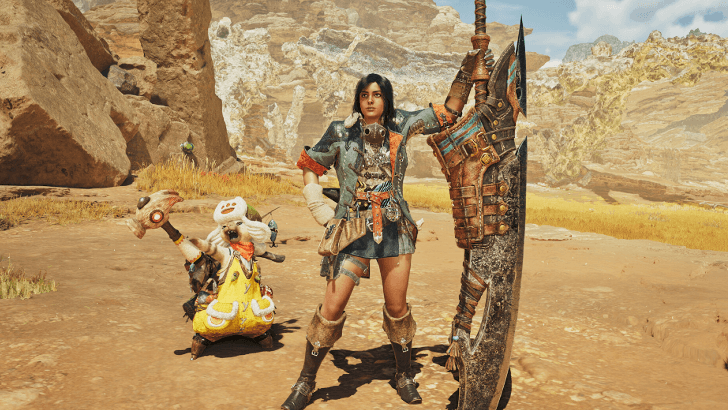
If you want to have higher fidelity textures, you can also download the free High Resolution Texture Pack for Monster Hunter Wilds. Do note that if you want to install this texture pack, you need a GPU that has a VRAM of 16 GB or higher.
PC System Requirements
Recommended System Requirements
| Specs | Recommended |
|---|---|
| CPU |
・i5-10400 ・i3-12100 ・Ryzen 5 3600 |
| GPU |
・RTX 2060 Super (8GB) ・RX 6600 (8GB) |
| Storage | ・75GB SSD |
Thankfully, Monster Hunter Wilds has lowered its recommended system requirements, allowing more players to run the game smoothly even with mid-range hardware.
However, it still requires at least a 10th Gen Intel Core i5 or 12th Gen i3, alongside an RTX 2060 Super or RX 6600, making it moderately demanding. If you're unsure how your PC will handle the game, check out its official Benchmark Tool!
PC Requirements and Recommended Specs
Monster Hunter Wilds Related Guides
All Tips and Tricks Guides
Comment



Author

PC Optimization: Best Graphic Settings on PC

Premium Articles
Rankings
Gaming News



![Monster Hunter Stories 3 Review [First Impressions] | Simply Rejuvenating](https://img.game8.co/4438641/2a31b7702bd70e78ec8efd24661dacda.jpeg/thumb)
Popular Games

Genshin Impact Walkthrough & Guides Wiki
Honkai: Star Rail Walkthrough & Guides Wiki
Umamusume: Pretty Derby Walkthrough & Guides Wiki
Pokemon Pokopia Walkthrough & Guides Wiki
Resident Evil Requiem (RE9) Walkthrough & Guides Wiki
Monster Hunter Wilds Walkthrough & Guides Wiki
Wuthering Waves Walkthrough & Guides Wiki
Arknights: Endfield Walkthrough & Guides Wiki
Pokemon FireRed and LeafGreen (FRLG) Walkthrough & Guides Wiki
Pokemon TCG Pocket (PTCGP) Strategies & Guides Wiki









Recommended Games
Diablo 4: Vessel of Hatred Walkthrough & Guides Wiki
Cyberpunk 2077: Ultimate Edition Walkthrough & Guides Wiki
Fire Emblem Heroes (FEH) Walkthrough & Guides Wiki
Yu-Gi-Oh! Master Duel Walkthrough & Guides Wiki
Super Smash Bros. Ultimate Walkthrough & Guides Wiki
Pokemon Brilliant Diamond and Shining Pearl (BDSP) Walkthrough & Guides Wiki
Elden Ring Shadow of the Erdtree Walkthrough & Guides Wiki
Monster Hunter World Walkthrough & Guides Wiki
The Legend of Zelda: Tears of the Kingdom Walkthrough & Guides Wiki
Persona 3 Reload Walkthrough & Guides Wiki










All rights reserved
©CAPCOM
The copyrights of videos of games used in our content and other intellectual property rights belong to the provider of the game.
The contents we provide on this site were created personally by members of the Game8 editorial department.
We refuse the right to reuse or repost content taken without our permission such as data or images to other sites.