
Monster Hunter Now x Monster Hunter Wilds Collab Event
★ Arkveld Gamma Armor | MH Stories 3 Collab
☆ Version 1.041: Sororal α Armor | Shatterseal
★ How to Unlock Proof of a Hero Quest
☆ Omega Planetes | Savage Omega | Builds vs Omega
★ Armor Set Search updated for Ver 1.041
☆ HR50+ Builds | Tier List | Weapon Guides
Participate in the Monster Hunter Now x Monster Hunter Wilds collaboration event and earn exclusive in-game rewards! Learn how to participate in the collaboration event, what rewards you can get in Monster Hunter Wilds, and how to claim them here!
MH Now x MH Wilds Collaboration Details
Participate in Monster Hunter Now Quests
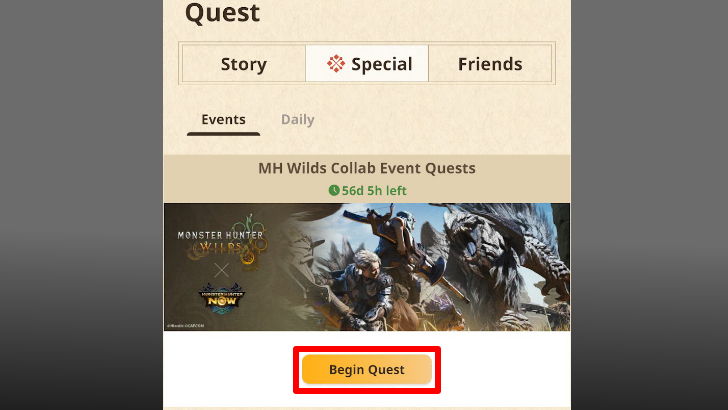
During the event period, participate in varying collaboration Quests within the Monster Hunter Now app. To view them, tap on the Quest bar at the bottom of the screen, then navigate to the Special tab, and select the Begin Quest button under Event.
Redeem Monster Hunter Wilds Gift Code
After completing all of the collab Special Quests, you may now issue a Monster Hunter Wilds Gift Code by following the steps below.
Do note that the code can only be generated and claimed upon the game's release on February 28, 2025 up until March 31, 2025, and will only be available on a first-come first-served basis!
| 1 | 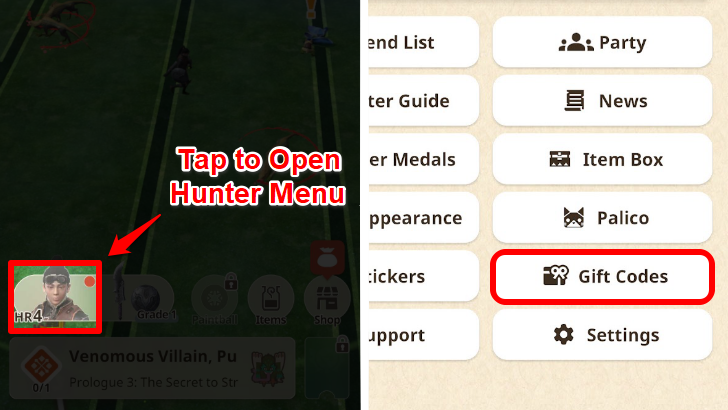 On the Monster Hunter Now app, tap your hunter's portrait on the lower left side of the screen to open your Hunter Menu. Scroll down and select the Gift Codes button to open the Gift Codes menu. |
|---|---|
| 2 | 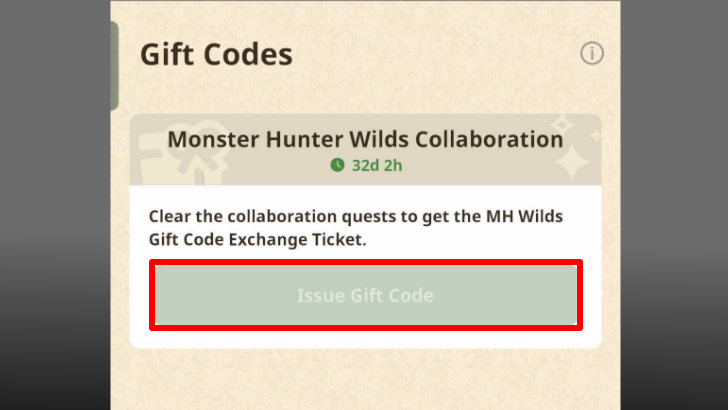 If you have already completed all of the Monster Hunter Now Collab quests, you may tap the Issue Gift Code button to begin the code retrieval process. |
| 3 | Follow the instructions as they appear on-screen, and make sure to choose the correct platform you have purchased Monster Hunter Wilds on. The code will be issued afterward, which will allow you to redeem the rewards from your designated platform's store. ▶ How to Claim Collaboration Event Rewards |
MH Now x MH Wilds Collaboration Rewards
Monster Hunter Wilds Item Pack
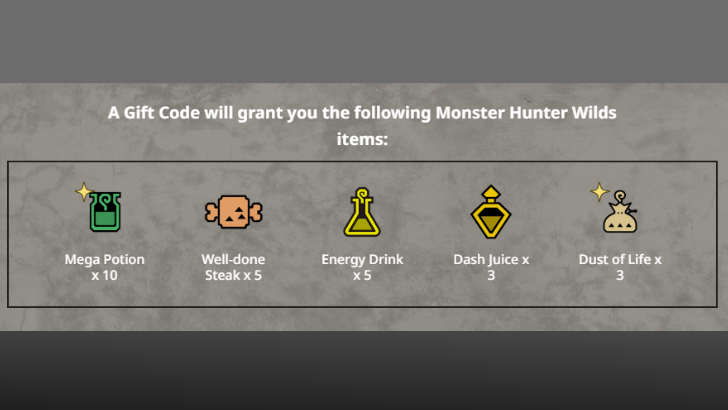 Pack Inclusions: ・
 Mega Potion
x10 Mega Potion
x10 ・
 Well-done Steak
x5 Well-done Steak
x5 ・
 Energy Drink
x5 Energy Drink
x5 ・
 Dash Juice
x3 Dash Juice
x3 ・
 Dust of Life
x3 Dust of Life
x3 |
Completing all of the Collaboration Quests in Phase 1 of the Monster Hunter Now x Monster Hunter Wilds collaboration event will reward you with a free Item Pack for the latter game.
While not as grand as the rewards received within Monster Hunter Now, this handful of items might still prove to be useful during early hunts!
How to Claim Collaboration Event Rewards
| Select a Platform! | ||
|---|---|---|
| PS5 | Xbox | Steam PC |
PlayStation Gift Code Reward Claiming Guide
| 1 | 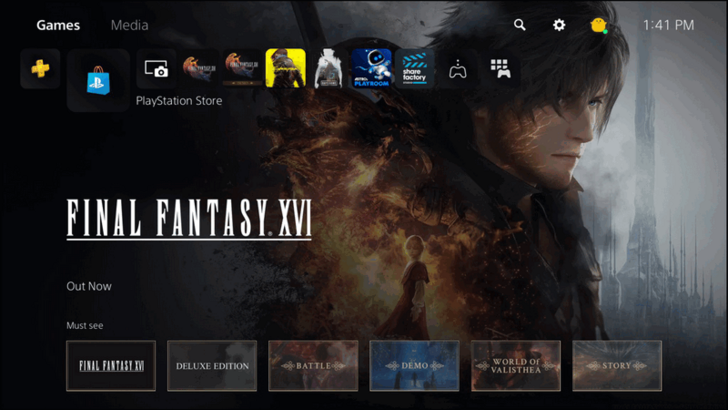 Open the PlayStation Store on your PS5. |
|---|---|
| 2 | 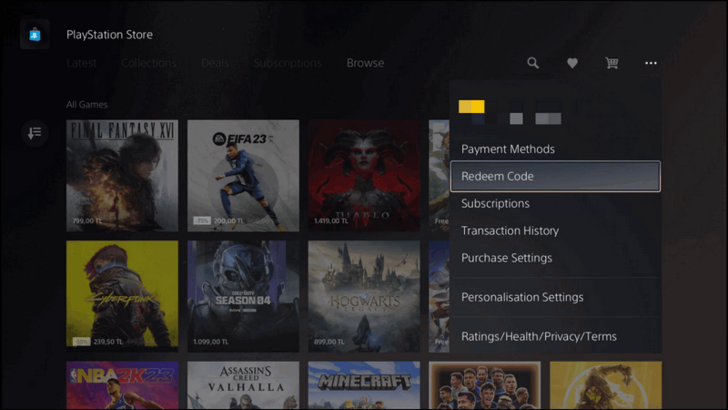 Select the three dotted icon on the top right corner of the PlayStation Store, and select the Redeem Code tab. |
| 3 |  Enter the 12-character code that you receive from Monster Hunter Now, and press redeem. The Item Pack will shortly be downloaded, allowing you to claim the reward from any Support Desk Palico within the game. |
Xbox Gift Code Reward Claiming Guide
| 1 |  Press the Xbox Button on your controller and navigate toward the Store. |
|---|---|
| 2 |  While on the Xbox Store, press the View Button on your controller to open the side bar, and select the Redeem tab. |
| 3 |  Enter the 25-digit code you receive in Monster Hunter Now and press Check Code to redeem your rewards! The Item Pack will be downloaded into Monster Hunter Wilds, and can be claimed through any Support Desk Palico at any Base Camp within the game. |
Steam PC Code Reward Claiming Guide
| 1 | 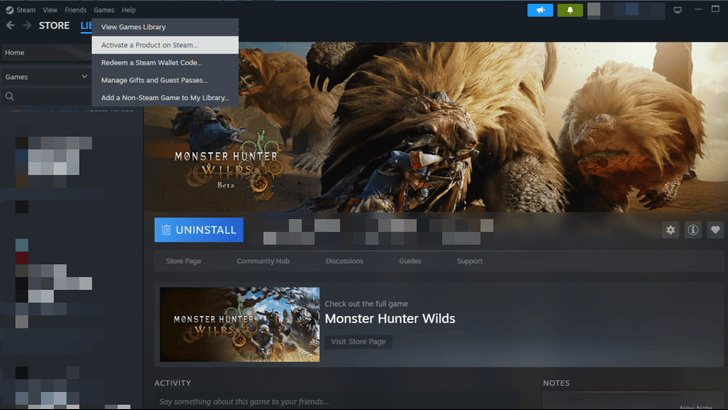 Log-in to your Steam PC Account and select the Game tab on the upper navigation bar. Click the Activate a Product on Steam... option to open the code redemption pop-up. |
|---|---|
| 2 | 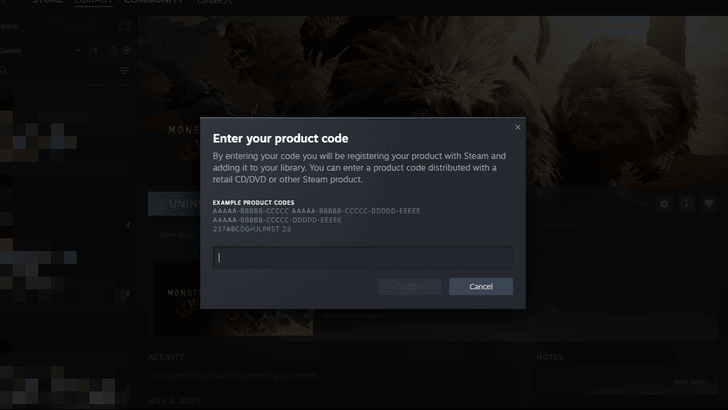 Enter the code you received in Monster Hunter Now and select Confirm to successfully obtain the rewards! The Item Pack will be delivered shortly, and can be claimed through any Support Desk Palico at any Base Camp. |
Monster Hunter Wilds Related News
Title Updates
*Expected dates for US time zones; releases for European and Asian time zones will come the following day.
Latest Patch Notes
| Update 1.041.00.00 | |
|---|---|
|
February 18, 2026 ・Version 1.041.00.00 Release. ・Arch-tempered Arkveld. ・Anniversary Event. ・Various Bug Fixes and Adjustments. |
|
| Update 1.040.00.00 | Update 1.030.01.00 |
| Update 1.030.00.00 | Update 1.021.03.00 |
| Update 1.021.02.00 | Update 1.021.01.00 |
| Update 1.020.02.00 | Update 1.020.01.00 |
| Update 1.020.00.00 | - |
| ▶︎ All Patch Notes and Updates | |
Events & Collaborations
-
![]()
USJ Collab Event Release Date
Updated 3/4/2026
Participate in the event to earn the new Azure Age α armor set, along with new Long Sword and Bow weapons.
-
![]()
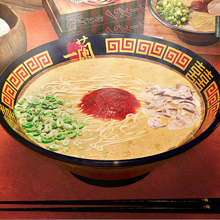
Ichiran Ramen Collab Event Release Date
Updated 2/24/2026
Order Ichiran Ramen from the Grand Hub's Canteen in this collab on February 24th, 2026!
-
![]()
Monster Hunter Stories 3 Collab Release Date
Updated 2/18/2026
MH Wilds will collab with MH Stories 3 on February 2026!
-
![]()
Final Fantasy XIV Collab Release Date
Updated 10/29/2025
MH Wilds will collab with Final Fantasy on late September!
-
![]()
Fender Collab Release Date
Updated 10/8/2025
MH Wilds collabs with Fender on August 26!
| Always Available | |
|---|---|
| Street Fighter 6 Collab | CAPCOM ID Registration Bonus |
Game Information
Pre-Release News and FAQ
Bugs and Error Codes
Comment



Author

Monster Hunter Now x Monster Hunter Wilds Collab Event

Premium Articles
Rankings
Gaming News




![Monster Hunter Stories 3 Review [First Impressions] | Simply Rejuvenating](https://img.game8.co/4438641/2a31b7702bd70e78ec8efd24661dacda.jpeg/thumb)
Popular Games

Genshin Impact Walkthrough & Guides Wiki
Honkai: Star Rail Walkthrough & Guides Wiki
Umamusume: Pretty Derby Walkthrough & Guides Wiki
Pokemon Pokopia Walkthrough & Guides Wiki
Resident Evil Requiem (RE9) Walkthrough & Guides Wiki
Monster Hunter Wilds Walkthrough & Guides Wiki
Wuthering Waves Walkthrough & Guides Wiki
Arknights: Endfield Walkthrough & Guides Wiki
Pokemon FireRed and LeafGreen (FRLG) Walkthrough & Guides Wiki
Pokemon TCG Pocket (PTCGP) Strategies & Guides Wiki









Recommended Games
Diablo 4: Vessel of Hatred Walkthrough & Guides Wiki
Cyberpunk 2077: Ultimate Edition Walkthrough & Guides Wiki
Fire Emblem Heroes (FEH) Walkthrough & Guides Wiki
Yu-Gi-Oh! Master Duel Walkthrough & Guides Wiki
Super Smash Bros. Ultimate Walkthrough & Guides Wiki
Pokemon Brilliant Diamond and Shining Pearl (BDSP) Walkthrough & Guides Wiki
Elden Ring Shadow of the Erdtree Walkthrough & Guides Wiki
Monster Hunter World Walkthrough & Guides Wiki
The Legend of Zelda: Tears of the Kingdom Walkthrough & Guides Wiki
Persona 3 Reload Walkthrough & Guides Wiki










All rights reserved
©CAPCOM
The copyrights of videos of games used in our content and other intellectual property rights belong to the provider of the game.
The contents we provide on this site were created personally by members of the Game8 editorial department.
We refuse the right to reuse or repost content taken without our permission such as data or images to other sites.