
How to Bring Support Hunters in Quests
★ Arkveld Gamma Armor | MH Stories 3 Collab
☆ Version 1.041: Sororal α Armor | Shatterseal
★ How to Unlock Proof of a Hero Quest
☆ Omega Planetes | Savage Omega | Builds vs Omega
★ Armor Set Search updated for Ver 1.041
☆ HR50+ Builds | Tier List | Weapon Guides
Support Hunters are NPCs who help the player in completing their hunt. Find out how to bring Support Hunters in quests, their actions, and more below!
List of Contents
How to Bring Support Hunters in Quests
Change the Quest Counter Settings
| 1 | Open the Settings menu at the Quest Counter |
|---|---|
| 2 | Set the Multiplayer Settings to either "Other Players & Support Hunters" or "Only Support Hunters" |
| 3 | Set Max Members to 2 or more. If this is set to 1, Support Hunters cannot join the quest. |
You can change a quest's multiplayer settings before starting the quest itself. This will allow you to call for Support Hunters whenever you send an SOS flare.
Party Size Can Be Changed While in a Quest
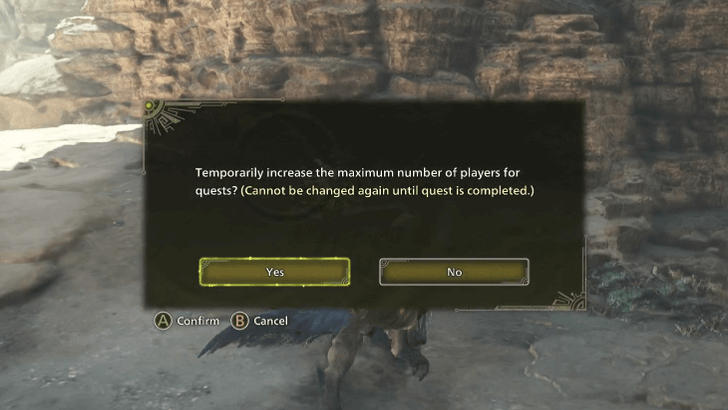
You can also change the party size in the middle of a quest. This can be done by accessing the Expand Party Size option under the Missions & Quests tab in the Settings menu.
Send Out an SOS Flare
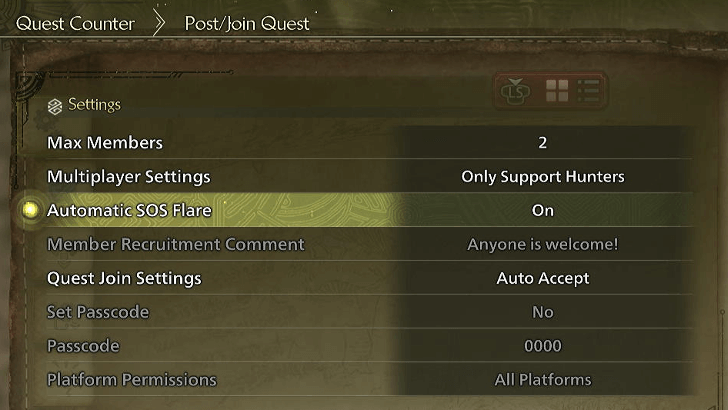
While you are in the quest, you must send out an SOS flare to summon the Support Hunters. If you want the Support Hunters to join as soon as the quest starts, it is recommended to change the Automatic SOS Flare setting to ON. This setting can be found under the Quest Counter Settings.
How to Choose Support Hunters
Choose Support Hunters After Selecting a Quest
| Choose Your Support Hunter | |
|---|---|
| 1 | 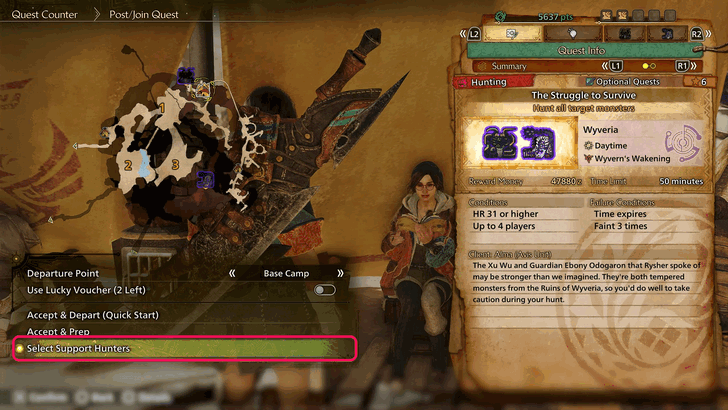 The Select Support Hunters option will show after you select a quest. This can be seen on the bottom part of the left side of your screen. |
| 2 | 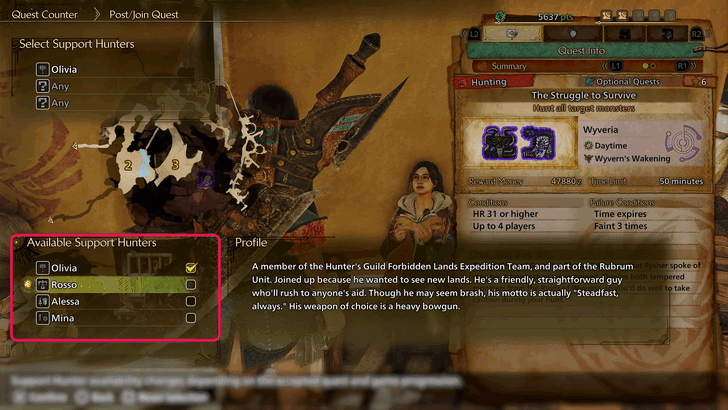 After choosing Select Support Hunters, the list of available support hunters will show up. You can select up to 3 support hunters before starting the hunt. |
Title Update 2 added a new Support Hunter named Mina. With 4 Support Hunters available, players now have an option to choose which 3 Support Hunters to bring.
Support Hunter Overview
Friendly NPC Hunters
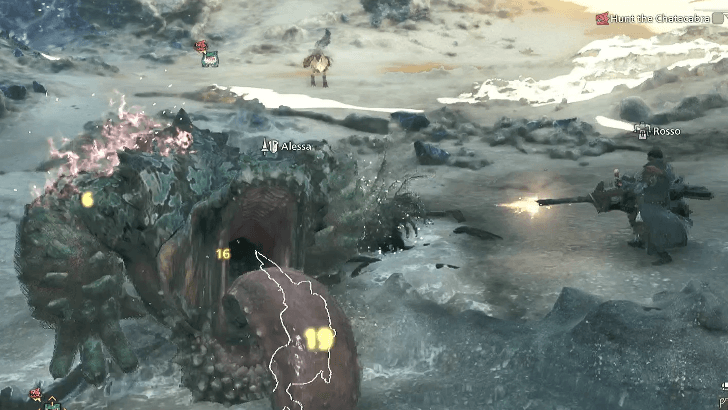
Support Hunters are friendly NPC hunters that you can call upon sending out an SOS flare. These hunters come with their own weapons and will assist you in your hunt.
Performs Same Action as Player
Besides attacking the monster, Support Hunters can do various actions such as placing down traps and mounting the monster. You can set the options for these in the Support Hunter Settings under the Game Settings tab in the Options menu.
Settings for Support Hunters
| Settings | Options |
|---|---|
| Damage Display | Display (With Decimals) Display (Whole Values Only) Does not Display |
| Offset Attacks | Enable Off |
| Power Clash | Enable Off |
| Monster Mounting | Enable Off |
| Slinger | Enable Off |
| Trap Setting | Enable Off |
Only Attacks When Player Attacks
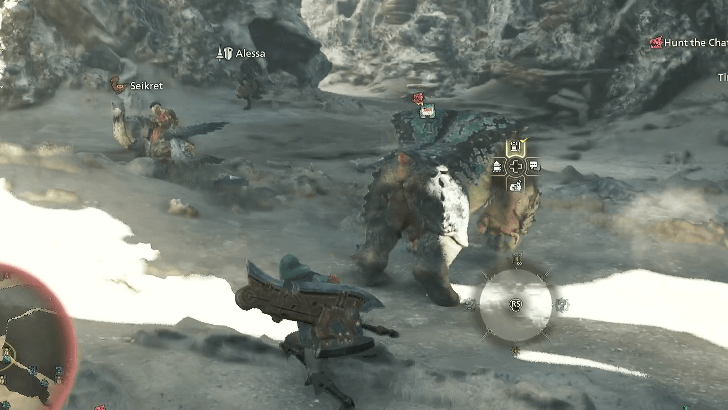
Support Hunters will only attack the monster if the player is also attacking it. The Support Hunters will also eventually stop attacking if the player stops attacking the monster, and even retreat if the player moves to another area.
Fills In Party When No Other Player Joins Hunt
When Multiplayer Settings is set to Other Players & Support Hunters and there is at least one empty slot in the party as the quest begins, Support Hunters will fill in the empty slots as soon as you send out an SOS flare. However, these Support Hunters will give up their slot as soon as another player responds to your SOS flare.
Multiplayer Guide: How to Play Co-Op
Palico Leaves the Party When 3 Support Hunter Joins
Much like a regular hunting group, your Palico will leave the group when 2-3 support hunter joins the team. As Support Hunters will always fill the missing slots of your current group, always know that your palico will not be in the hunt when a group play with support hunters occur.
Will Not Be Able to Kill Target Monster
Alessa will continue attacking but will not be able to kill the target.
Support Hunters will also not be able to kill the target monster in a quest even if it only takes one more hit to defeat the monster. They will continue attacking and fighting the target, but the killing blow needs to come from an actual player.
Monster Health Adjustments
Monster Health Matches Number of Players
| Players | Monster Health |
|---|---|
| 2 | 1.6x |
| 3 | 2x |
| 4 | 2.4x |
The monster's health will increase according to the number of hunters in a quest. Support Hunters count towards the number of hunters in a quest.
If you have all 3 Support Hunters in your party, the monster's health will increase by 2.4 times its usual health. If another hunter leaves while in the middle of a quest, the monster's health will be adjusted accordingly.
Difference of a Support Hunter to a Hunting Assistant
Hunting Assistants Will only do a Specific Task
Hunting Assistants like Gemma and Werner will only do a specific task mid-hunt which varies depending on the Hunting Assistant that's available.
Support Hunters Will Hunt Similar to Other Hunters
Support Hunters will play the game as a hunter similar to other hunters. They will fight the monster together with you which makes them a great companion to have especially during low popularity quests where not a lot of people may want to join you via SoS.
List of Support Hunters
All Available Support Hunters
| Support Hunter | Weapons |
|---|---|
| Alessa |  Lance Lance |
| Olivia |  Hammer Hammer |
| Rosso |  Heavy Bowgun Heavy Bowgun |
| Mina |  Sword and Shield Sword and Shield |
| Fabius | Lance |
| Kai |  Hunting Horn Hunting Horn |
Fabius will only be available to be chosen as a support hunter during certain seasonal events.
Monster Hunter Wilds Related Guides
All Tips and Tricks Guides
Comment
 Anonymous 11 months
Support Hunters CAN NOT kill a monster on any circumstances.... even when you stop attacking, but the AI still continue to attack for like 5-6 seconds....NO DAMAGE will be dealt to the mosnter...if said Monster would have died from only 50 more damage.....This means that AI will never, and can not kill it, leaving it to you, of capture or slay.



Author

How to Bring Support Hunters in Quests

Premium Articles
Rankings
Gaming News




![Monster Hunter Stories 3 Review [First Impressions] | Simply Rejuvenating](https://img.game8.co/4438641/2a31b7702bd70e78ec8efd24661dacda.jpeg/thumb)
Popular Games

Genshin Impact Walkthrough & Guides Wiki
Honkai: Star Rail Walkthrough & Guides Wiki
Umamusume: Pretty Derby Walkthrough & Guides Wiki
Pokemon Pokopia Walkthrough & Guides Wiki
Resident Evil Requiem (RE9) Walkthrough & Guides Wiki
Monster Hunter Wilds Walkthrough & Guides Wiki
Wuthering Waves Walkthrough & Guides Wiki
Arknights: Endfield Walkthrough & Guides Wiki
Pokemon FireRed and LeafGreen (FRLG) Walkthrough & Guides Wiki
Pokemon TCG Pocket (PTCGP) Strategies & Guides Wiki









Recommended Games
Diablo 4: Vessel of Hatred Walkthrough & Guides Wiki
Cyberpunk 2077: Ultimate Edition Walkthrough & Guides Wiki
Fire Emblem Heroes (FEH) Walkthrough & Guides Wiki
Yu-Gi-Oh! Master Duel Walkthrough & Guides Wiki
Super Smash Bros. Ultimate Walkthrough & Guides Wiki
Pokemon Brilliant Diamond and Shining Pearl (BDSP) Walkthrough & Guides Wiki
Elden Ring Shadow of the Erdtree Walkthrough & Guides Wiki
Monster Hunter World Walkthrough & Guides Wiki
The Legend of Zelda: Tears of the Kingdom Walkthrough & Guides Wiki
Persona 3 Reload Walkthrough & Guides Wiki










All rights reserved
©CAPCOM
The copyrights of videos of games used in our content and other intellectual property rights belong to the provider of the game.
The contents we provide on this site were created personally by members of the Game8 editorial department.
We refuse the right to reuse or repost content taken without our permission such as data or images to other sites.
We've added this useful info to the guide. Thank you so much for letting us know!