
All Offset Attacks and How to Use
★ Arkveld Gamma Armor | MH Stories 3 Collab
☆ Version 1.041: Sororal α Armor | Shatterseal
★ How to Unlock Proof of a Hero Quest
☆ Omega Planetes | Savage Omega | Builds vs Omega
★ Armor Set Search updated for Ver 1.041
☆ HR50+ Builds | Tier List | Weapon Guides
Offset Attacks are new moves that can be used to counter and flinch monsters in Monster Hunter Wilds. Learn what it can do and how to use it with different weapons in this guide!
List of Contents
What are Offset Attacks?
Counterattack Available for Some Weapons
Offset Attacks are a powerful new mechanic first introduced in Monster Hunter Wilds. Each weapon that can perform an offset attack has different conditions for using it.
Offset Attacks effectively act as a counterattack, able to parry the monster's move and prevent it from attacking for a short duration. Only a few weapons are capable of Offset Attacks because they are exceptionally strong at interrupting a monster's momentum.
Weapons Guide: All Weapon Types Explained
How to Make Monsters Flinch with Offset Attacks
Keep Hitting Target with Offset Attacks
To make a monster flinch with an Offset Attack, you first need to build up some damage while using your weapon's Offset Attacks. This works the same way as mounting monsters, where you need to deal mounting damage before you can ride a monster.
Once you deal enough damage, you will eventually be able to completely parry a monster's attack, making it flinch and giving you an opportunity to unleash your fury!
Study Your Target's Moves
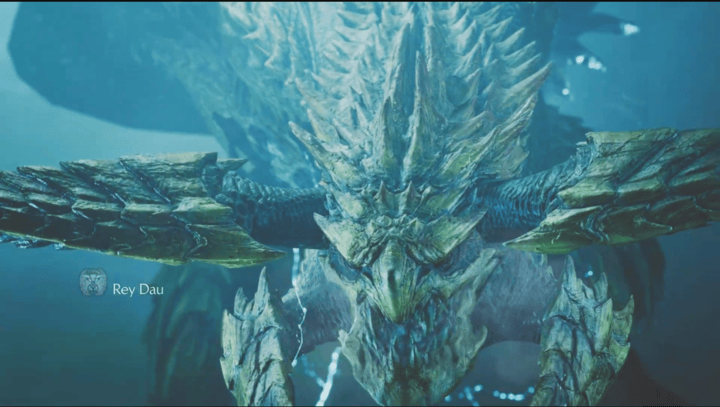
As Offset Attacks are basically counterattacks, you need to be familiar with your target's attack patterns to effectively parry their attacks and not get hit.
Monsters Will Build Resistance to Offset Attacks
Once you successfully make a monster flinch with an Offset Attack, it will be harder to make the monster flinch again with the same technique, so it not recommended to only rely on these moves when hunting.
All Weapons with Offset Attacks
| Weapons With Offset Attack |
|---|
|
|
 Switch Axe
Switch Axe
| Axe Mode: Offset Rising Slash | |
|---|---|
| PC |  + +  or or |
| PS5 |  + +  or or
|
| XBOX |  + +  or or
|
In order to perform an offset attack with the Switch Axe, the weapon must be in Axe mode. Press both standard attack buttons at the same time, as the opponent's attack is about to launch.
After a successful Offset Attack, press any attack button to perform a follow-up heavy slam with the axe.
Switch Axe Weapon Guide and Best Combos
Great Sword
| Great Sword: Offset Rising Slash | |
|---|---|
| PC | + ↓ or |
| PS5 | + ↓ or
|
| XBOX | + ↓ or
|
Successfully executing an offset attack with a Great Sword requires a thorough understanding of the monster's moveset, as the hunter must commit to the weapon's animation, which can be punished severely if timed incorrectly.
Fortunately, the offset attack can be charged for quite some time, giving the player some control over when the attack will land, as they can release the button when they are ready to launch the attack. If the attack lands successfully, players can perform a follow-up cross slash with any of the attack buttons.
Keep in mind that the offset attack will be launched automatically as soon as it reaches the level 3 charge, so make sure to use it wisely!
Great Sword Weapon Guide and New Moves
Hunting Horn
| Hunting Horn: Offset Melody | |
|---|---|
| PC | + → → + → + +  (Special Performance) (Special Performance) |
| PS5 | + → → + → + + (Special Performance) (Special Performance) |
| XBOX | + → → + → + + (Special Performance) (Special Performance) |
| ⓘ Hold Special Performance to delay the Offset Attack. | |
Some Hunting Horns have an offset attack named Offset Melody. This requires the Hunter to have the necessary notes prepared in advance before it can be used. Once readied, perform the Special Performance input to unleash the offset!
You can also hold down the input to delay the offset temporarily. Release the button once you see an oncoming monster attack.
Note that not all Hunting Horns will have a Offset Melody input. Instead, they will have either Resounding Melody or Melody of Life. Make sure to check your Hunting Horn's song list via Equipment Info to see what available melodies they have.
Hunting Horn Weapon Guide and New Moves
Hammer
| Upswing | Spinning Strong Upswing |
| Charged Upswing | Mighty Charge Upswing |
Hammer Upswing
| Hammer: Upswing | |
|---|---|
| PC | + + Hold and Release (Can Delay) |
| PS5 | + + Hold and Release (Can Delay) |
| XBOX | + +
Hold and Release (Can Delay) |
The 1st of Hammer's Offset Attack, the Upswing, comes at the end of it's normal basic attack chain: the 3rd swing. This attack can be held to delay the swing, allowing you to time yourself against an oncoming attack.
Hammer Spinning Strong Upswing
| Hammer: Spinning Strong Upswing | |
|---|---|
| PC | + Spinning Bludgeon → Hold and Release (Can Delay) |
| PS5 | + Spinning Bludgeon → Hold and Release (Can Delay) |
| XBOX | + Spinning Bludgeon → Hold and Release (Can Delay) |
The 2nd Offset Attack of the Hammer is a variation of the Upswing; the Spinning Strong Upswing is chained into when ending a Spinning Bludgeon. A Spinning Bludgeon is chained into from a regular attack or a Charge attack, and can be held and delayed just like the normal Upswing.
Hammer Charged Upswing
| Hammer: Charged Upswing | |
|---|---|
| PC | (Hold) → Release on 2nd Charge |
| PS5 | (Hold) → Release on 2nd Charge |
| XBOX | (Hold) + Release on 2nd Charge
|
The Hammer's 3rd Offset Attack is the Charged Upswing. This attack is done by releasing your Charge at the 2nd charge level, so you will have to wait a bit until the button prompt appears or once you have seen that you have reached that charge level.
Hammer Mighty Charge Upswing
| Hammer: Mighty Charge Upswing | |
|---|---|
| PC | (Hold) → + Mighty Charge → Release Quickly |
| PS5 | (Hold) → + Mighty Charge → Release Quickly |
| XBOX | (Hold) → + Mighty Charge → Release Quickly |
The 4th and last of the Hammer's Offset Attacks is the Mighty Charge Upswing which is done as soon as you release the Mighty Charge after chaining into it from a Charge. Make sure to release the button quickly, since holding it down further will prepare you for a Mighty Charge Slam instead.
Heavy Bowgun
| Heavy Bowgun: Wyverncounter Ignition | |
|---|---|
| PC | ↓  + + |
| PS5 | ↓  + + |
| XBOX | ↓  + + |
Similar to the Great Sword, the Offset Attack of the Heavy Bowgun can be charged for a short duration, and can be released earlier if need be. It does not require a full charge.
Note, however, that the Heavy Bowgun must be set to Ignition Mode to perform the offset attack, as it cannot be used in Normal Mode.
Heavy Bowgun Weapon Guide and New Moves
Insect Glaive
| Insect Glaive: Descending Slash | |
|---|---|
| PC | ↓ |
| PS5 | ↓ |
| XBOX | ↓ |
The Insect Glaive's Descending Slash is an Offset attack that becomes available when all extracts are gathered. It can be charged while moving, offering flexibility in combat as long as you hold the input button.
Releasing it at the right moment allows for a powerful counter, potentially knocking back monsters. However, this is an advanced technique that requires precise timing, as the first slash must connect with the monster's attack to execute properly.
Insect Glaive Weapon Guide and Best Combos
Offset Attack Effects
Monster Will Be Knocked Back
When you successfully hit a monster with an Offset Attack, they will be knocked back. This gives you a great opportunity to deal devastating blows, so make it count!
Use Offset Rising Slash
Great Sword and Switch Axe can chase down a monster after successfully executing an Offset Rising Slash. Note that the move has a long animation time, thus it's best to use it as a counter!
Normal Offset Attack
If you keep using Offset Attacks on the same monster over and over again, a Normal Offset will occur where the monster won't be knocked back. Thankfully you can still choose to do this method because if the monster is hit with normal offsets continously it'll eventually get knocked back!
You'll Take Damage
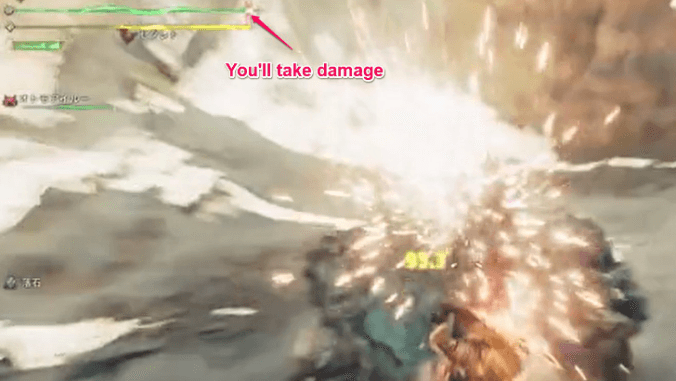
Even if you successfully deal an Offset Attack, there's a chance you could still get damaged! This means it is better to dodge when you're low health, rather than doing Offset Attacks.
Offset Related Skills
Counterstrike Skill
| Counterstrike Skill | |
|---|---|
| Temporarily increases attack power after being knocked back. | |
| Level | Effect |
| 1 | Attack +10 while active. |
| 2 | Attack +15 while active. Moderately extends effect time. |
| 3 | Attack +25 while active. Extends effect time. |
The Counterstrike Skill activates once you use Offset Attack as you are getting knocked back as well. This can be very powerful once you've mastered your weapon's Offset Attacks. Additionally, you can use a Rocksteady Mantle so you could activate the skill without actually being knocked back.
Monster Hunter Wilds Related Guides
All Game Mechanics Guides
Comment
 Walkthrough Team@Game8 11 months
Hello! The Switch Axe's Counter Rising Slash during Sword Mode is not considered to be an Offset Attack. But both moves are counterattack moves!



Author

All Offset Attacks and How to Use

Premium Articles
Rankings
Gaming News




![Monster Hunter Stories 3 Review [First Impressions] | Simply Rejuvenating](https://img.game8.co/4438641/2a31b7702bd70e78ec8efd24661dacda.jpeg/thumb)
Popular Games

Genshin Impact Walkthrough & Guides Wiki
Honkai: Star Rail Walkthrough & Guides Wiki
Umamusume: Pretty Derby Walkthrough & Guides Wiki
Pokemon Pokopia Walkthrough & Guides Wiki
Resident Evil Requiem (RE9) Walkthrough & Guides Wiki
Monster Hunter Wilds Walkthrough & Guides Wiki
Wuthering Waves Walkthrough & Guides Wiki
Arknights: Endfield Walkthrough & Guides Wiki
Pokemon FireRed and LeafGreen (FRLG) Walkthrough & Guides Wiki
Pokemon TCG Pocket (PTCGP) Strategies & Guides Wiki









Recommended Games
Diablo 4: Vessel of Hatred Walkthrough & Guides Wiki
Cyberpunk 2077: Ultimate Edition Walkthrough & Guides Wiki
Fire Emblem Heroes (FEH) Walkthrough & Guides Wiki
Yu-Gi-Oh! Master Duel Walkthrough & Guides Wiki
Super Smash Bros. Ultimate Walkthrough & Guides Wiki
Pokemon Brilliant Diamond and Shining Pearl (BDSP) Walkthrough & Guides Wiki
Elden Ring Shadow of the Erdtree Walkthrough & Guides Wiki
Monster Hunter World Walkthrough & Guides Wiki
The Legend of Zelda: Tears of the Kingdom Walkthrough & Guides Wiki
Persona 3 Reload Walkthrough & Guides Wiki










All rights reserved
©CAPCOM
The copyrights of videos of games used in our content and other intellectual property rights belong to the provider of the game.
The contents we provide on this site were created personally by members of the Game8 editorial department.
We refuse the right to reuse or repost content taken without our permission such as data or images to other sites.
As a hunting horn enjoyer myself, I think it's important to note that not all hunting horns offer the Offset Melody. Those that don't have the Resounding Melody, which itself is a powerful combo attack but isn't an offset. Also, the Offset Melody can be initiated and held for a few seconds before releasing, allowing players to time it precisely to counter an incoming attack.