



This survey will take about 1 minute.
Your answers will help us to improve our website.
Genshin Impact
''Omni-Ubiquity Net'' World Quest Walkthrough and Rewards
✉ Send your thoughts in our Genshin 6.4 Patch Survey!
★ Exclusive: Dive back in time with the Meta History
◆ Hot: Version 6.4, Luna 5 Codes
◆ Builds: Varka, Flins, Skirk, Escoffier
◆ Events: Travelers' Tales, He Who Caught the Wind
◆ Future: Linnea, Version 6.5 Luna VI
''Omni-Ubiquity Net'' is a World Quest in Genshin Impact 2.3. Learn how to unlock Omni-Ubiquity Net through the Bantan Sango Case Files: The Warrior Dog event, the quest locations, a full quest walkthrough, all quest rewards, how to use the Omni-Ubiquity Net, and more in this guide!
List of Contents
Omni-Ubiquity Net Quest Information
Quest Details
| Quest Type | World Quest |
|---|---|
| Location | Inazuma City, Inazuma |
| Required AR | 30 |
| Quest Giver | Sango |
How to Unlock Omni-Ubiquity Net
Complete the Bantan Sango Case Files: The Warrior Dog Event

To unlock the Omni-Ubiquity Net World Quest, you'll need to complete the Bantan Sango Case Files: The Warrior Dog Event! After the event, the quest should unlock!
Bantan Sango Case Files: The Warrior Dog
Omni-Ubiquity Net Walkthrough and Rewards
Omni-Ubiquity Net
Sango says that her friend would like to modify the Ubiquity Net...
Omni-Ubiquity Net Objectives
- Talk to Sango
- Look for Wakamurasaki
- Use the Omni-Ubiquity Net to capture small animals
- Report back to Wakamurasaki
- Talk to Sango
Omni-Ubiquity Net Walkthrough
| Objectives | |
|---|---|
| 1 |  Head to Inazuma City and talk to Sango. |
| 2 | 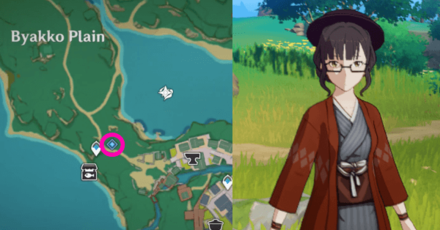 Go down towards Byakko Plain, Inazuma and talk to Wakamurasaki. She will give you one Omni-Ubiquity Net to capture an animal's essence with it! |
| 3 |  Capture a small animal using the Omni-Ubiquity Net. There will be a fox nearby you can capture. You'll also get an achievement for it! Click to jump to the Achievements. |
| 4 |  Report back to Wakamurasaki. |
| 5 | 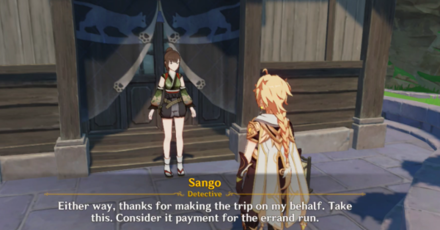 Talk to Sango then finish the conversation to complete the quest! |
Rewards
| Total Rewards | ||
|---|---|---|
 Omni-Ubiquity Net
x10 Omni-Ubiquity Net
x10 |
 Hero's Wit
x3 Hero's Wit
x3 |
 Mora
x30000 Mora
x30000 |
How to Use the Omni-Ubiquity Net
Omni-Ubiquity Net Walkthrough
| Omni-Ubiquity Net Guide Summary | |
|---|---|
| 1 | 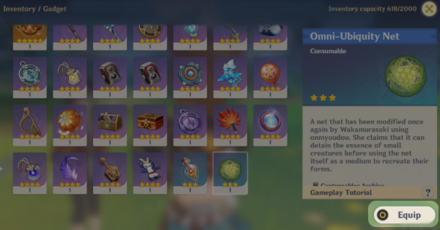 Go to your Inventory and to the Gadgets category. Select the Omni-Ubiquity Net and equip it! |
| 2 |  Tap the Omni-Ubiquity Net, and it will replace your Elemental Skill! |
| 3 |  Get close to a small animal, hold on the Omni-Ubiquity Net button to aim it, and catch the small from a distance! |
Full Omni-Ubiquity Net Item Guide
Buy Omni-Ubiquity Net from Wakamurasaki

After completing the quest, you can buy the Omni-Ubiquity Net from Wakamurasaki! She can only sell a limit of 5 nets but her store refreshes every week so you get more of it.
How to Place Animals Inside the Serenitea Pot

To add animals inside your Serenitea Pot, you only need to acess your placement screen, then select the animals you want to place in your Realm! Note that you can't use the Omni-Ubiquity Net inside the Serenitea Pot.
Omni-Ubiquity Net Achievements
“Trying to Tame Me?” Achievement
| Achievement | Rank | Primogem Reward |
 Trying to Tame Me? Trying to Tame Me?
|
★★★ | 5 Primogems |
|---|---|---|---|
| Objective : Use the Omni-Ubiquity Net Item to capture 1 wild animal. | |||
List of All Achievements and Rewards
Genshin Impact Related Guides

Other Inazuma Quest Guides
Author

''Omni-Ubiquity Net'' World Quest Walkthrough and Rewards

Please participate in our site
improvement survey
03/2026
improvement survey
03/2026
Would you assist in
improving Game8's site?
improving Game8's site?

×
We are listening to our users' valuable opinions and discussing how to act on them.
The information collected through this survey will be used for the purpose of improving our services. In addition, the information will only be disclosed a part of a statistic in a format that will not allow identification of personal information.
Begin Survey
Not Now
×
Please rate each item regarding Game8.co's Advertisements.
Amount of Ads
Very Dissatisfied
Somewhat Dissatisfied
Fine
Somewhat Satisfied
Highly Satisfied
Placement of Ads
Timing of Ad Display
Ad Loading Speed
Safeness of Ads
Content of Ads
×
Please rate each item regarding Game8.co's Quality of Articles.
Amount of information
Very Dissatisfied
Somewhat Dissatisfied
Fine
Somewhat Satisfied
Highly Satisfied
Frequency of updates
Speed of new information
Accuracy of articles
Understandibility of articles
Readability of sentences
×
Please rate each item regarding Game8.co's Usability of the Site.
Ease of finding information
Very Dissatisfied
Somewhat Dissatisfied
Fine
Somewhat Satisfied
Highly Satisfied
Loading Speed
Use of Color
Font Size
Visibility of Images
Easy to Understand Layout
×
Please rate each item regarding Game8.co's Message Boards, Comments.
Ease of Writing
Very Dissatisfied
Somewhat Dissatisfied
Fine
Somewhat Satisfied
Highly Satisfied
Readability
Ease in Finding Information
Comment Quality
Comment Quantity
Admin Response
×
Please rate each item regarding Game8.co's Site's new design.
Please rate our site's new design
Very Dissatisfied
Somewhat Dissatisfied
Fine
Somewhat Satisfied
Highly Satisfied
Do you think that the website's design change makes the site easier to use?
Has the new design made it easier for you to find information on the site?
Has the new design improved the overall visual appeal of the site?
How would you rate your overall satisfaction with the new design of the site?
×
How likely are you to recommend Game8 to someone you know?
Very Unlikely
0
1
2
3
4
5
6
7
8
9
10
Very Likely
If you have other opinions regarding potential improvement to the website, please share them with us. We would appreciate your honest opinion.
Note: This is a free response section, so you can proceed without entering anything.
Note: Please be sure not to enter any kind of personal information into your response.
Note: Please be sure not to enter any kind of personal information into your response.
×
Thank You
×
Thank you for participating in our survey! Your answers will help us to improve the quality of our website and services.
We hope you continue to make use of Game8.
We hope you continue to make use of Game8.
Close
Rankings
- We could not find the message board you were looking for.
Gaming News


![Everwind Review [Early Access] | The Shaky First Step to A Very Long Journey](https://img.game8.co/4440226/ab079b1153298a042633dd1ef51e878e.png/thumb)

![Monster Hunter Stories 3 Review [First Impressions] | Simply Rejuvenating](https://img.game8.co/4438641/2a31b7702bd70e78ec8efd24661dacda.jpeg/thumb)
Popular Games

Genshin Impact Walkthrough & Guides Wiki
Honkai: Star Rail Walkthrough & Guides Wiki
Umamusume: Pretty Derby Walkthrough & Guides Wiki
Pokemon Pokopia Walkthrough & Guides Wiki
Resident Evil Requiem (RE9) Walkthrough & Guides Wiki
Monster Hunter Wilds Walkthrough & Guides Wiki
Wuthering Waves Walkthrough & Guides Wiki
Arknights: Endfield Walkthrough & Guides Wiki
Pokemon FireRed and LeafGreen (FRLG) Walkthrough & Guides Wiki
Pokemon TCG Pocket (PTCGP) Strategies & Guides Wiki









Recommended Games
Diablo 4: Vessel of Hatred Walkthrough & Guides Wiki
Fire Emblem Heroes (FEH) Walkthrough & Guides Wiki
Yu-Gi-Oh! Master Duel Walkthrough & Guides Wiki
Super Smash Bros. Ultimate Walkthrough & Guides Wiki
Pokemon Brilliant Diamond and Shining Pearl (BDSP) Walkthrough & Guides Wiki
Elden Ring Shadow of the Erdtree Walkthrough & Guides Wiki
Monster Hunter World Walkthrough & Guides Wiki
The Legend of Zelda: Tears of the Kingdom Walkthrough & Guides Wiki
Persona 3 Reload Walkthrough & Guides Wiki
Cyberpunk 2077: Ultimate Edition Walkthrough & Guides Wiki










All rights reserved
Copyright© 2012-2024 HoYoverse — COGNOSPHERE. All Rights Reserved.
The copyrights of videos of games used in our content and other intellectual property rights belong to the provider of the game.
The contents we provide on this site were created personally by members of the Game8 editorial department.
We refuse the right to reuse or repost content taken without our permission such as data or images to other sites.
I didnt get the quest even though i already have kageroumaru, can anyone check this out?