
Twitch Drops Account Linking
NEW: Hexi Map | Chapter 3 | Flute Mystic Skill
★ Unfettered and Everspring Build
☆ Liangzhou | Cat Fever | Prismatic Essence
✪ Updated: Best Weapon | Best Builds
☆ WWM Game8 Twitter: New tips daily!
Recruit using our Guild Recruitment Board!
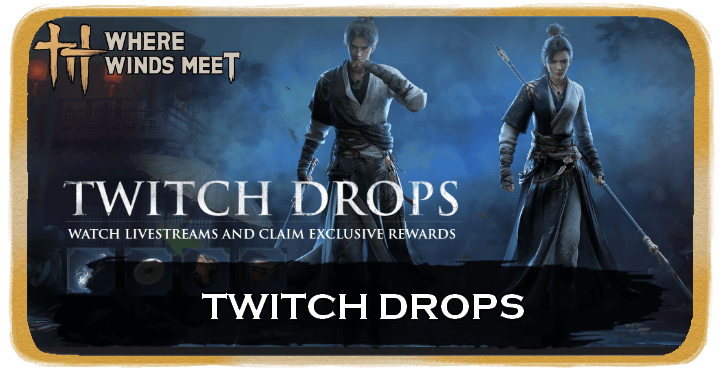
Participate in the Where Winds Meet Account Linking Twitch Drops event to earn rewards. Find out what the date and time of the event is, what the rewards are, and how to claim them in this guide.
List of Contents
Twitch Drops Event Duration and Details
Watch Streamers on Twitch To Earn Rewards
The Twitch Drops Event has ended 11/14/2025, 2:00PM - 12/1/2025 - 1:58PM |
From November 14, 2025, at 2:00 p.m. PT, until December 1, 2025, at 1:58 p.m. PT, players can watch any Twitch streamer to earn rewards. You can watch any streamer from the Where Winds Meet category on Twitch.
Twitch Drop Rewards
List of Rewards and Unlock Requirement
| Reward | View Time Requirement |
|---|---|
| 15-min chest drop | 15 Minutes |
| 20000 coins | 30 Minutes |
| 15 Oscillating Jade, 20 Echo Jade | 60 Minutes |
| 3*Internal Art Note Chest | 1 Hour and 30 Minutes |
| Resonating Melody | 2 Hours and 30 Minutes |
Rewards are cumulative. You will receive all rewards if you have watched any eligible streamer for a total of two hours and thirty minutes.
How to Claim Twitch Rewards
|
|
 Create or Login your Twitch Account
 Create or Login your Twitch Account

You will need a Twitch account that you can link to your game account. Simply log in to your account or create one if you don't have one yet.
Twitch Log In / Sign Up Screen
Choose Your Region
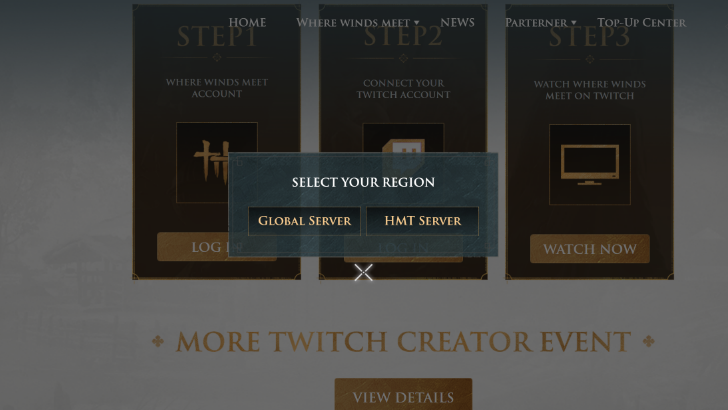
Go to the official Where Winds Meet website and head to the Twitch Drops page. Click Login and select the game server region to which you want to link your account.
Note that HMT and Global region accounts operate independently, and you can only bind one game account per Twitch account.
Link your Game Accounts
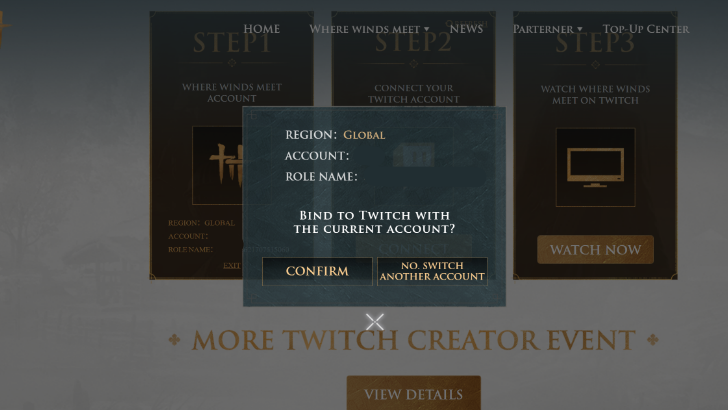
After selecting your region, choose the gaming platform you use and log in. Your account cannot be linked if you have not made a character yet, so make sure that you have already made a character before attempting this step.
Authorize Where Winds Meet on Twitch
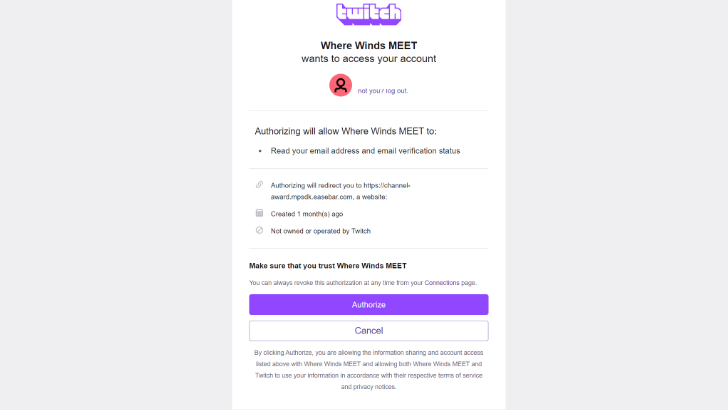
Authorize the link between your accounts, and you will receive a notification if the linking is successful. Once this is done, you can not start watching any eligible streamer in the Where Winds Meet category.
Check Your Progress
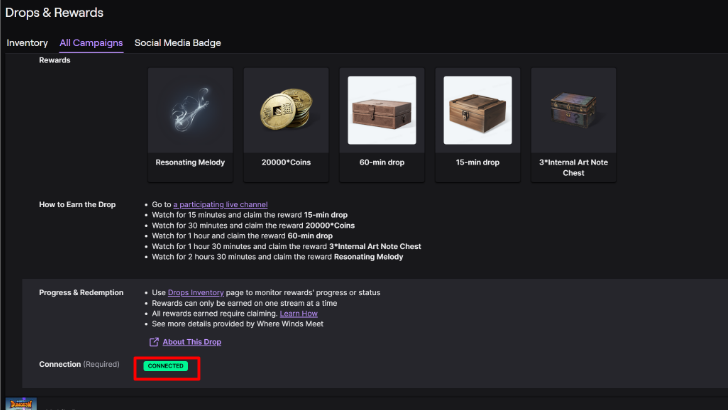
You can check your progression by going to Drops and Rewards page on Twitch while you're logged in to your account. From there, click on the Inventory tab and check your progress.
You will also be able to see if you have been able to succesfully link your accounts, as it will be showon on this page as well. You can return to this page later on to claim your rewards.
Where Winds Meet Related Guides

Comment



Author
Twitch Drops Account Linking

Rankings
Gaming News

![The Liar Princess and the Blind Prince Review [PC] | Lovely to Look at but Tedious to Play](https://img.game8.co/4442586/8d95f5faf05780f1765ce7e0938bd825.jpeg/show)
![Monster Hunter Stories 3 Review [First Impressions] | Simply Rejuvenating](https://img.game8.co/4438641/2a31b7702bd70e78ec8efd24661dacda.jpeg/thumb)

![The Seven Deadly Sins: Origin [First Impressions] | A Promising Start](https://img.game8.co/4440581/584e0bfb87908f12c4eab6e846eb1afd.png/thumb)
Popular Games

Genshin Impact Walkthrough & Guides Wiki
Umamusume: Pretty Derby Walkthrough & Guides Wiki
Pokemon Pokopia Walkthrough & Guides Wiki
Honkai: Star Rail Walkthrough & Guides Wiki
Monster Hunter Stories 3: Twisted Reflection Walkthrough & Guides Wiki
Arknights: Endfield Walkthrough & Guides Wiki
Wuthering Waves Walkthrough & Guides Wiki
Zenless Zone Zero Walkthrough & Guides Wiki
Pokemon TCG Pocket (PTCGP) Strategies & Guides Wiki
Monster Hunter Wilds Walkthrough & Guides Wiki










Recommended Games
Diablo 4: Vessel of Hatred Walkthrough & Guides Wiki
Cyberpunk 2077: Ultimate Edition Walkthrough & Guides Wiki
Fire Emblem Heroes (FEH) Walkthrough & Guides Wiki
Yu-Gi-Oh! Master Duel Walkthrough & Guides Wiki
Super Smash Bros. Ultimate Walkthrough & Guides Wiki
Pokemon Brilliant Diamond and Shining Pearl (BDSP) Walkthrough & Guides Wiki
Elden Ring Shadow of the Erdtree Walkthrough & Guides Wiki
Monster Hunter World Walkthrough & Guides Wiki
The Legend of Zelda: Tears of the Kingdom Walkthrough & Guides Wiki
Persona 3 Reload Walkthrough & Guides Wiki










All rights reserved
©1997-2025 NetEase, Inc. All Rights Reserved
The copyrights of videos of games used in our content and other intellectual property rights belong to the provider of the game.
The contents we provide on this site were created personally by members of the Game8 editorial department.
We refuse the right to reuse or repost content taken without our permission such as data or images to other sites.