
Rotom Catalog Guide: Where to Find and How to Use
★ Mega Dimension DLC & Version 2.0.1 released!
☆ See the Returning Pokemon & New DLC Megas.
★ Make Special Donuts for Legendary Pokemon!
☆ Season 7 runs Feb 19 ~ Mar 12
★ Interactive Map: Screws, TMs, Mint Shops
☆ Find your desired Pokemon at the Trading Board.
Here’s how to get Rotom Catalog and what it does in Pokemon Legends: Z-A. Learn where to get Rotom Catalog, and how to use it in this guide
Rotom Catalog Overview
| Item | Description |
|---|---|
 Rotom Catalog |
Material accidentally dropped by a Pokemon. It seems that Gimmighoul treasure and hoard these. |
How to Get Rotom Catalog
Complete Side Mission 170
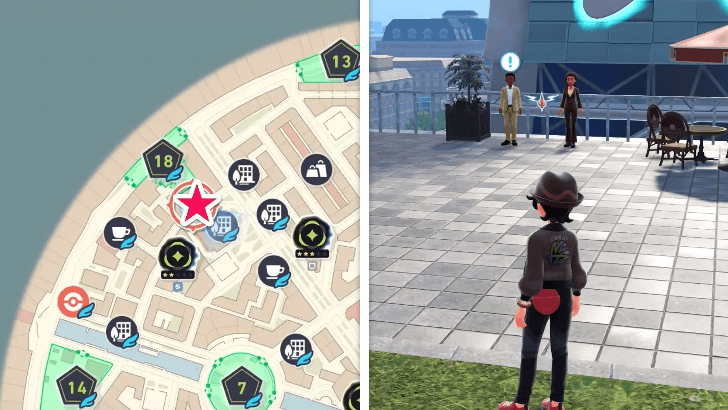
You can get the Rotom Catalog once you complete Side Mission 170: Rotom Showcase! During this mission, you will be required to fight against Rotom's forms.
Once you complete all the battles, you will get the item in your satchel.
Side Missions List: All Rewards and Locations
How to Use Rotom Catalog
Use to Change Rotom's Form
| Rotom Form | Appliance |
|---|---|
 Rotom Rotom


|
Light Bulb |
 Heat Rotom Heat Rotom

|
Microwave |
 Wash Rotom Wash Rotom

|
Washing Machine |
 Frost Rotom Frost Rotom

|
Refrigerator |
 Fan Rotom Fan Rotom

|
Electric Fan |
 Mow Rotom Mow Rotom

|
Lawn Mower |
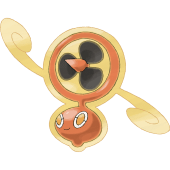
Rotom is a unique Pokemon that can transform into different varieties which resemble appliances. Upon changing forms, it will lose its Ghost typing and get a type that is related to its form.
The Rotom Catalog will allow you to change Rotom's form depending on the appliance you will choose.
Rotom Location, Evolution, and Stats
Pokemon Legends: Z-A Related Guides

All Items
| All Item Types | |||||||||||
|---|---|---|---|---|---|---|---|---|---|---|---|
 Poke Balls Poke Balls |
 Evolution Items Evolution Items |
 TMs TMs |
 Training Items Training Items |
||||||||
 Battle Held Items Battle Held Items |
 Medicine Medicine |
 Berries Berries |
 Treasures Treasures |
||||||||
 Mega Stones Mega Stones |
 Mints Mints |
 Fossils |
 Key Items Key Items |
||||||||
Other Item Guides
| All Other Item Guides | |
|---|---|
| How to Get Apriballs (Apricorn Balls) | All Held Items and Best Held Items |
| What to Do with Mega Shards | |
Comment



Author

Rotom Catalog Guide: Where to Find and How to Use

Rankings
- We could not find the message board you were looking for.
Gaming News
![Neverness to Everness (NTE) Review [Beta Co-Ex Test] | Rolling the Dice on Something Special](https://img.game8.co/4414628/dd3192c8f1f074ea788451a11eb862a7.jpeg/show)



Popular Games

Genshin Impact Walkthrough & Guides Wiki
Honkai: Star Rail Walkthrough & Guides Wiki
Arknights: Endfield Walkthrough & Guides Wiki
Umamusume: Pretty Derby Walkthrough & Guides Wiki
Wuthering Waves Walkthrough & Guides Wiki
Pokemon TCG Pocket (PTCGP) Strategies & Guides Wiki
Abyss Walkthrough & Guides Wiki
Zenless Zone Zero Walkthrough & Guides Wiki
Digimon Story: Time Stranger Walkthrough & Guides Wiki
Clair Obscur: Expedition 33 Walkthrough & Guides Wiki









Recommended Games
Fire Emblem Heroes (FEH) Walkthrough & Guides Wiki
Pokemon Brilliant Diamond and Shining Pearl (BDSP) Walkthrough & Guides Wiki
Diablo 4: Vessel of Hatred Walkthrough & Guides Wiki
Super Smash Bros. Ultimate Walkthrough & Guides Wiki
Yu-Gi-Oh! Master Duel Walkthrough & Guides Wiki
Elden Ring Shadow of the Erdtree Walkthrough & Guides Wiki
Monster Hunter World Walkthrough & Guides Wiki
The Legend of Zelda: Tears of the Kingdom Walkthrough & Guides Wiki
Persona 3 Reload Walkthrough & Guides Wiki
Cyberpunk 2077: Ultimate Edition Walkthrough & Guides Wiki










All rights reserved
©2025 Pokémon. ©1995-2019 Nintendo/Creatures Inc. /GAME FREAK inc.
The copyrights of videos of games used in our content and other intellectual property rights belong to the provider of the game.
The contents we provide on this site were created personally by members of the Game8 editorial department.
We refuse the right to reuse or repost content taken without our permission such as data or images to other sites.