
Asynchronous Trade Explained
Latest: 0.5.0 Release Date
☆ Fate of the Vaal ▶︎ The Last of the Druids
┗ Bonded Mods | 0.4 Mystery Box
★ Druid: Class Overview | Builds
☆ NEW: Disciple of Varashta Ascendancy!
★ Best Class | Best Builds | Leveling Builds
The Merchant NPC and Instant Buyout system in Path of Exile 2 (PoE 2) enables asynchronous trading between players. Learn more about asynchronous trading, how to Instant Buyout and how to sell items in this new trading system.
List of Contents
What is Asynchronous Trade?
Trading via the NPC Merchant

This new system introduces Ange, the Merchant NPC who sells your listed items to other players automatically. This saves time by eliminating the need for direct interaction between players.
Items listed in your Merchant Tab appear on the official trade site and in-game Market Panel, which allows other players to directly purchase items from your Merchant Tabs. Earnings from sales are stored in Ange’s Earnings Tab.
Instantly Purchase Items With the Instant Buyout Option
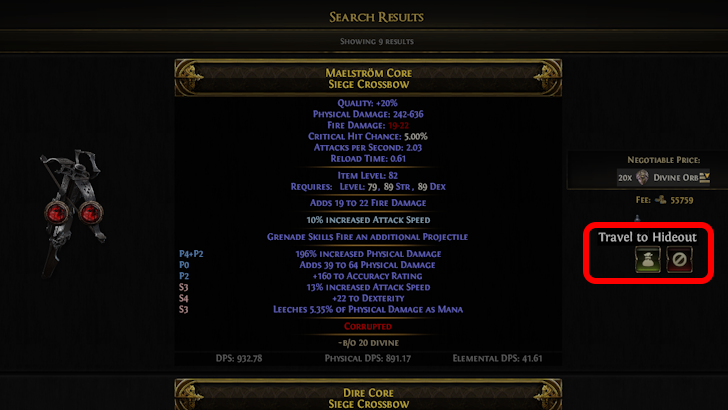
Along with the Merchant NPC feature, the same update also introduces the in-game Market Panel that allows you to search for items listed by other players for trade. You can instantly purchase items you find here by using the Instant Buyout Only filter from the drop down button.
Items listed for In Person Trade are stored in other player's Premium Stash Tabs, and will require in-game, direct player-to-player trading.
How to Access In-Game Market Panel
Press Slash Key (/) on PC
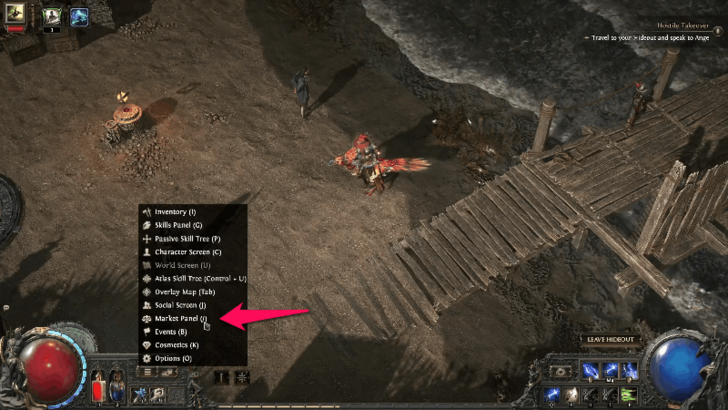
Press the Slash key (/) on PC to open the in-game market panel. From there you can buy and sell items without having to open a browser to use the official trading website.
Access Trade Market from the Radial Menu on Consoles
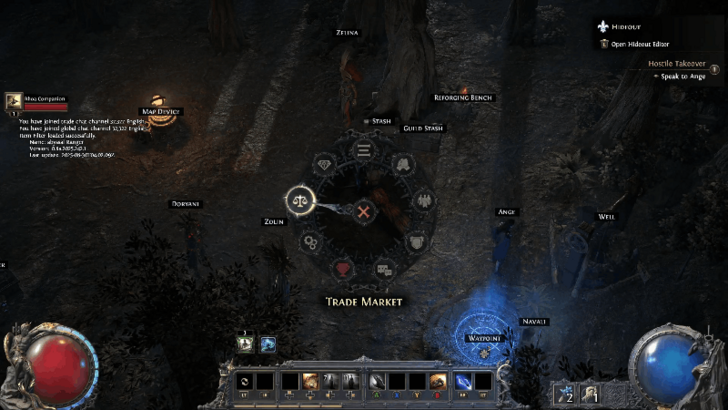
If you are playing on the console, open the Radial Menu by holding down the Touchpad on the PS5 or holding down the View button on the Xbox. Use the Left-Thumbstick to guide the cursor to the Trade Market.
How to Instant Buyout Items
Use the Instant Buyout Option When Searching for Items
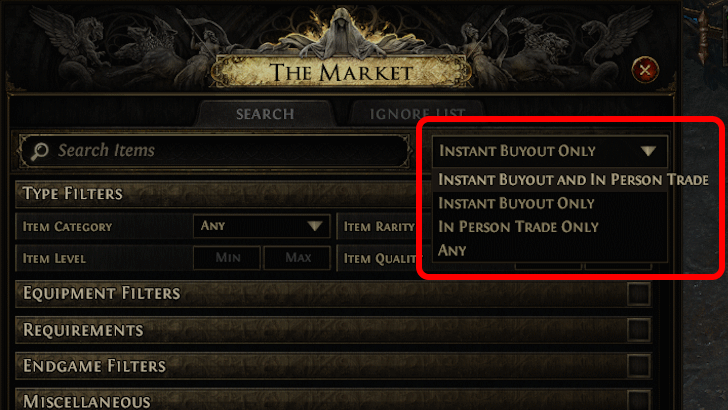
Press the Merchant Panel keybind (/ on PC by default) and use filters to find items you want to purchase. Ensure that the top-right drop-down button is set to Instant Buyout Only. Items you find here can then be purcahsed directly from the other player's Merchant Tabs without needing a response from them.
How to Sell Items Through the Merchant NPC
List Items for Sale in Merchant Tabs
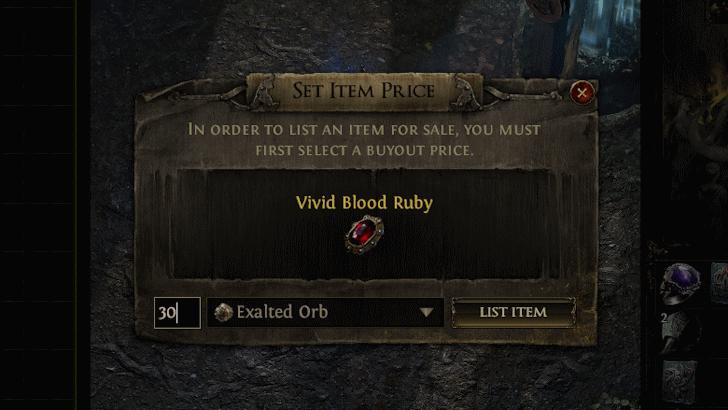
After unlocking Ange, the Merchant NPC, use her Manage Shop dialogue option to open your Merchant Tabs. Here, you can list items with your desired price. As you do other activities or even when your offline, other players can buy your items from Ange, leaving the Currency they traded for in your Earnings Tab.
Note that this requires you purchase at least one Merchant Tab from the Microtransaction Store. However, if you've purchased Premium Stash Tabs before, you may also convert those to Merchant Tabs.
How to Unlock Asynchronous Trade
Have Ange in Your Hideout

An NPC called Ange in Act 4 will act as a Merchant for a new in-game trading system. In your Hideout, you can give her items and set a price. From there, other players can see what you have for sale, teleport to your hideout, and purchase your item with in-game currency and gold.
Players who have Premium Stash Tabs before the release of The Third Edict can also upgrade them to Merchant Tabs if preferred. This change can be done through the official website.
You can change the prices of the items you sell at the cost of a cooldown, and there is no limit to how many Merchant Tabs you can get. To obtain earnings from sold items, simply talk to Ange, open the Manage Shop option, and open the Earnings Tab.
Ange Location and How to Unlock
Path of Exile 2 (PoE 2) Related Guides

Gameplay Mechanics
Game and Character Progression
Gear and Crafting
Stats and Skills Guides
FAQs and Other Guides



Author

Asynchronous Trade Explained

Rankings
- We could not find the message board you were looking for.
Gaming News

![Monster Hunter Stories 3 Review [First Impressions] | Simply Rejuvenating](https://img.game8.co/4438641/2a31b7702bd70e78ec8efd24661dacda.jpeg/show)
![Monster Hunter Stories 3 Review [First Impressions] | Simply Rejuvenating](https://img.game8.co/4438641/2a31b7702bd70e78ec8efd24661dacda.jpeg/thumb)
![The Seven Deadly Sins: Origin [First Impressions] | A Promising Start](https://img.game8.co/4440581/584e0bfb87908f12c4eab6e846eb1afd.png/thumb)

Popular Games

Genshin Impact Walkthrough & Guides Wiki
Umamusume: Pretty Derby Walkthrough & Guides Wiki
Pokemon Pokopia Walkthrough & Guides Wiki
Honkai: Star Rail Walkthrough & Guides Wiki
Monster Hunter Stories 3: Twisted Reflection Walkthrough & Guides Wiki
Arknights: Endfield Walkthrough & Guides Wiki
Wuthering Waves Walkthrough & Guides Wiki
Zenless Zone Zero Walkthrough & Guides Wiki
Pokemon TCG Pocket (PTCGP) Strategies & Guides Wiki
Monster Hunter Wilds Walkthrough & Guides Wiki










Recommended Games
Diablo 4: Vessel of Hatred Walkthrough & Guides Wiki
Cyberpunk 2077: Ultimate Edition Walkthrough & Guides Wiki
Fire Emblem Heroes (FEH) Walkthrough & Guides Wiki
Yu-Gi-Oh! Master Duel Walkthrough & Guides Wiki
Super Smash Bros. Ultimate Walkthrough & Guides Wiki
Pokemon Brilliant Diamond and Shining Pearl (BDSP) Walkthrough & Guides Wiki
Elden Ring Shadow of the Erdtree Walkthrough & Guides Wiki
Monster Hunter World Walkthrough & Guides Wiki
The Legend of Zelda: Tears of the Kingdom Walkthrough & Guides Wiki
Persona 3 Reload Walkthrough & Guides Wiki










All rights reserved
© 2010 - 2024 Grinding Gear Games
The copyrights of videos of games used in our content and other intellectual property rights belong to the provider of the game.
The contents we provide on this site were created personally by members of the Game8 editorial department.
We refuse the right to reuse or repost content taken without our permission such as data or images to other sites.
The price of the merchant tab is it the same as the same type (i.e quad to quad) as a premium tab ?