
120 FPS Supported CPU and GPU
★ Version 3.2 Banners → Livestream Codes
┣ Sigrika → Materials, Weapon, Banner
┣ Qiuyuan → Builds, Materials, Weapon
┗ Phase 2 → Lynae, Zani, Phoebe
★ Tapes of Last Words | Soliskin | 3.1 Trophies
★ Exclusives: Tier Maker | State of the Meta
Select Intel and AMD CPUs can expand your maximum framerate to 120 FPS in Wuthering Waves for PC users. See all 120 FPS supported CPUs and graphics cards, how to unlock 120 FPS, and its release date here!
List of 120 FPS Supported CPU
All Supported Intel CPUs
| Supported Intel CPUs |
|---|
|
✔︎ Core i9 Series ✔︎ Core i7 Series ✔︎ Core i5 Series ✔︎ Xeon Series |
| Series | Compatible CPUs |
|---|---|
| Core i5 | Laptop: 1240P, 1250P, 12500H, 12600H, 12650H, 13500H, 13600H, 13450HX, 13500HX, 13600HX, 14450HX, and 14500HX Desktop: 12600KF, 12600K, 13400T, 13400F, 13400, 13490F, 13500T, 13500, 13600T, 13600, 13600KF, 13600K, 14400T, 14400F, 14400, 14490F, 14500, 14600T, 14600, 14600KF, and 14600K |
| Core i7 | Laptop: 1260P, 1270P, 10870H, 10875H, 11800H, 11850H, 12600H, 12650H, 12700H, 12800H, 12800HX, 12850HX, 13620H, 13705H, 13700H, 13800H, 13650HX, 13700HX, 14650HX, and 14700HX Desktop: 6900K, 7820X, 9800X, 10700KF, 10700K, 11700KF, 11700K, 12700T, 12700F, 12700, 12700KF, 12700K, 13700T, 13700F, 13700, 13700KF, 13700K, 13790F, 14790F, 14700T, 14700F, 14700, 14700KF, and 14700K |
| Core i9 | Laptop: 9880H, 9980HK, 10885H, 10980HK, 11900H, 11950H, 11980HK, 12900H, 12900HK, 12900HX, 12950HX, 13900H, 13905H, 13900HX, 13950HX, 13980HX, and 14900HX Desktop: 7900X, 9820X, 9900X, 9920X, 9940X, 9900KF, 9900K, 9900KS, 10850K, 10900KF, 10900K, 10900X, 10920X, 10940X, 11900KF, 11900K, 12900T, 12900F, 12900, 12900KF, 12900K, 12900KS, 13900T, 13900F, 13900, 13900KF, 13900K, 13900KS, 14900T, 14900F, 14900, 14900KF, 14900K, and 14900KS |
| Xeon | W5-3425, W5-3525X, W7-3445, W7-3455, W7-3465X, W9-3475X, and W9-3495X |
For Intel CPUs, only processors within the Core i9, i7, and i5, as well as the Xeon Series are eligible for the 120 FPS option. Any processor lower or not included within the list will not be able to activate this feature.
All Supported AMD CPUs
| Supported AMD CPUs |
|---|
|
✔︎ Ryzen 7 Series ✔︎ Ryzen 9 Series ✔︎ Ryzen Threadripper / Threadripper PRO Series |
| Series | Compatible CPUs |
|---|---|
| Ryzen 7 | Laptop: 4800U, 4800H, 5700U, 5800U, 5800H, 5800HS, 6800U, 6800H, 6800HS, 7735H, 7745HX, 7840U, 7840H, 8840U, 8840H, and 8845H Desktop: 1700X, 1800X, 2700, 2700X, 3700, 3700X, 3800X, 3800XT, 4700G, 5700G, 5700GE, 5700X, 5800X, 5800X3D, 7700, 7700X, 7800X3D, 8700F, and 8700G |
| Ryzen 9 | Laptop: 4900H, 4900HS, 5900HS, 5900HX, 5980HS, 5980HX, 6900HS, 6900HX, 6980HS, 6980HX, 7845HX, 7940H, 7940HX, 7945HX, and 8945H Desktop: 3900X, 3900XT, 3950X, 5900X, 5950X, 7900, 7900X, 7900X3D, 7950X, and 7950X3D |
| Ryzen Threadripper/ Threadripper PRO | 1900X, 1920X, 1950X, 2920X, 2950X, 3960X, 3970X, 3945WX, 3955WX, 3975WX, 5945WX, 5955WX, 5965WX, 5975WX, 7960X, 7970X, and 7980X |
The AMD Ryzen 7 and 9 Series, as well as CPUs under the Ryzen Threadripper/Threadripper PRO are able to support the 120 FPS cap in the game. Any other processor under a lower series or not included in the list do not have support for the 120 FPS feature.
List of 120 FPS Supported GPU
All Supported NVIDIA GPUs
| Supported NVIDIA GPUs |
|---|
|
✔︎ RTX 50 Series [New!] ✔︎ RTX 40 Series ✔︎ RTX 50 Series |
| Series | Compatible GPUs |
|---|---|
| RTX 50 | TBA |
| RTX 40 | ✔︎ 4090 ✔︎ 4090 D ✔︎ 4080 Super ✔︎ 4080 ✔︎ 4070 Ti SUPER ✔︎ 4070 Ti ✔︎ 4070 SUPER ✔︎ 4070 ✔︎ 4060 Ti ✔︎ 4060 ✔︎ 4050 |
| RTX 30 | ✔︎ 3060 Ti ✔︎ 3060 ✔︎ 3070 Ti ✔︎ 3070 ✔︎ 3080 Ti ✔︎ 3080 ✔︎ 3090 Ti ✔︎ 3090 |
Alongside compatible CPUs, Wuthering Waves supports 120 FPS on NVIDIA GPUs within the RTX 30, 40, and the newly supported 50 Series.
An official list of supported RTX 50 series cards have yet to be announced, though players should consider their CPU requirement as well before deciding on a GPU upgrade for this specific feature.
GPUs lower or outside of these listed series will not be able to run the game at 120 FPS.
All Supported AMD GPUs
| Supported AMD GPUs |
|---|
|
✔︎ RX 7000 Series ✔︎ RX 6000 Series |
| Series | Compatible GPUs |
|---|---|
| RX 7000 | ✔︎ 7900 XTX ✔︎ 7900 XT ✔︎ 7900 GRE ✔︎ 7800 XT ✔︎ 7700XT ✔︎ 7600 XT ✔︎ 7600 |
| RX 6000 | ✔︎ 6950 XT ✔︎ 6900 XT ✔︎ 6800 XT ✔︎ 6800 ✔︎ 6750 XT ✔︎ 6700 XT ✔︎ 6750 GRE |
AMD RX 6000 and 7000 Series GPUs are also eligible for 120 FPS support. Other AMD graphics cards lower or not included within the list are unable to extend the frame limit to 120 FPS.
How to Unlock 120 FPS
Only Available If You Have Both Supported CPU and GPU
Only desktops and laptops equipped with both a supported CPU and GPU from the official hardware list will be able to activate the 120 FPS mode in Wuthering Waves.
If your system includes only one of the supported components (either the CPU or GPU) your framerate will be capped at 60 FPS and will not qualify for the 120 FPS option.
Change Frame Rate Under Graphics Settings
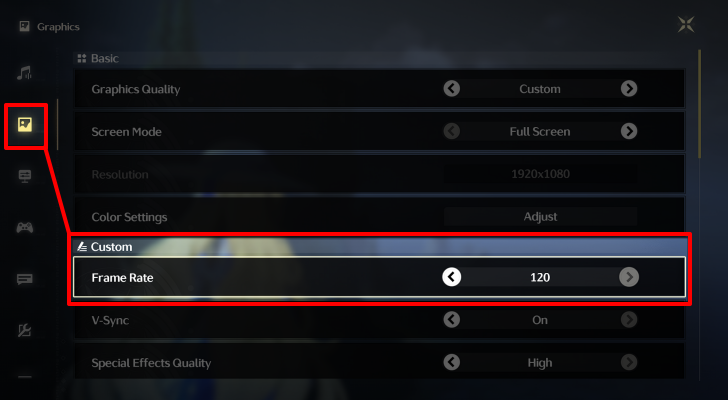
Open the Main Menu and select the cog wheel icon located at the bottom right to access the Settings. Then, navigate to the Graphics Settings by clicking the second icon from the top.
On the Frame Rate setting under the Custom category, click the right arrow button until it displays 120.
Best Settings for PC and Mobile
120 FPS Support Release Date
RTX 50 Series GPU Support in Version 2.1
Following the initial release of 120 FPS availability, the developers have extended its support to the NVIDIA RTX 50 Series graphics cards starting February 13, 2025 on the release of Version 2.1.
Version 2.1 Release Date and Summary
Released in Version 1.2

The ability to extend your frame limit to 120 FPS was initially released in Version 1.2 of Wuthering Waves on August 15, 2024.
Version 1.2 Release Date and Details
Wuthering Waves Related Guides

Latest Version Update
Version 3.0 is Underway!
 For You Who Walk in Snow For You Who Walk in Snow |
|
| Version 3.1 Duration | February 5, 2026 - March 18, 2026 |
|---|---|
3.1 Banners, Release Date, and Summary
Version 3.1 Characters
| 3.1 Featured Resonators | |
|---|---|
| Phase 1 (Feb. 5) |
 Aemeath NEW Aemeath NEW |
| Phase 2 (Feb. 26) |
 Luuk NEW Luuk NEW |
 Chisa
Chisa Lupa
Lupa Galbrena
All Current and Next Banners (Gacha)
Version 3.1 Weapons
| 3.1 Featured Weapons | |
|---|---|
| Phase 1 (Feb. 5) |
|
| Phase 2 (Feb. 26) |
|
 Everbright Polestar
 Kumokiri
 Wildfire Mark
 Daybreaker's Spine
 Lux & Umbra
Absolute Pulsation Weapon Banners
All Version Updates
Version 3.0 Patches
| Version 3.0 Updates | |
|---|---|
| Version 3.0 | Version 3.1 |
| Version 3.2 | Version 3.3 |
Version 2.0 Patches
| Version 2.0 Updates | |
|---|---|
| Version 2.0 | Version 2.1 |
| Version 2.2 | Version 2.3 |
| Version 2.4 | Version 2.5 |
| Version 2.6 | Version 2.7 |
| Version 2.8 | - |
Version 1.0 Patches
| Version 1.0 Updates | |
|---|---|
| Version 1.0 | Version 1.1 |
| Version 1.2 | Version 1.3 |
| Version 1.4 | - |
All Livestream Summary Articles
| Reveal | 1.3 | 2.0 |
| 2.1 | 2.2 | 2.3 |
| 2.4 | 2.5 | 2.6 |
| 2.7 | 2.8 | 3.0 |
| 3.1 | 3.2 | - |
Latest News and Updates
Wuthering Waves Collaborations
 Cyberpunk Collab Cyberpunk Collab |
 Persona Sonic Collab Persona Sonic Collab |
 Muse Dash Collab Muse Dash Collab |
- |
Character and Location Lore



Author

120 FPS Supported CPU and GPU

Premium Articles
Rankings

Gaming News




![Monster Hunter Stories 3 Review [First Impressions] | Simply Rejuvenating](https://img.game8.co/4438641/2a31b7702bd70e78ec8efd24661dacda.jpeg/thumb)
Popular Games

Genshin Impact Walkthrough & Guides Wiki
Honkai: Star Rail Walkthrough & Guides Wiki
Umamusume: Pretty Derby Walkthrough & Guides Wiki
Pokemon Pokopia Walkthrough & Guides Wiki
Resident Evil Requiem (RE9) Walkthrough & Guides Wiki
Monster Hunter Wilds Walkthrough & Guides Wiki
Wuthering Waves Walkthrough & Guides Wiki
Arknights: Endfield Walkthrough & Guides Wiki
Pokemon FireRed and LeafGreen (FRLG) Walkthrough & Guides Wiki
Pokemon TCG Pocket (PTCGP) Strategies & Guides Wiki









Recommended Games
Diablo 4: Vessel of Hatred Walkthrough & Guides Wiki
Cyberpunk 2077: Ultimate Edition Walkthrough & Guides Wiki
Fire Emblem Heroes (FEH) Walkthrough & Guides Wiki
Yu-Gi-Oh! Master Duel Walkthrough & Guides Wiki
Super Smash Bros. Ultimate Walkthrough & Guides Wiki
Pokemon Brilliant Diamond and Shining Pearl (BDSP) Walkthrough & Guides Wiki
Elden Ring Shadow of the Erdtree Walkthrough & Guides Wiki
Monster Hunter World Walkthrough & Guides Wiki
The Legend of Zelda: Tears of the Kingdom Walkthrough & Guides Wiki
Persona 3 Reload Walkthrough & Guides Wiki










All rights reserved
Copyright© 2024-2025 Kuro Games. All Rights Reserved.
The copyrights of videos of games used in our content and other intellectual property rights belong to the provider of the game.
The contents we provide on this site were created personally by members of the Game8 editorial department.
We refuse the right to reuse or repost content taken without our permission such as data or images to other sites.
I love Kuro, but... Ryzen 7 1700X > Ryzen 5 9600X for real bruh?