
How to Use Echo Management
★ Version 3.2 out now!
┣ Sigrika → Builds, Materials, Weapon
┣ Qiuyuan → Builds, Materials, Weapon
┗ Phase 2 → Lynae, Zani, Phoebe
★ Main Story Guide | Side Stories Event
★ Exclusives: Tier Maker | State of the Meta
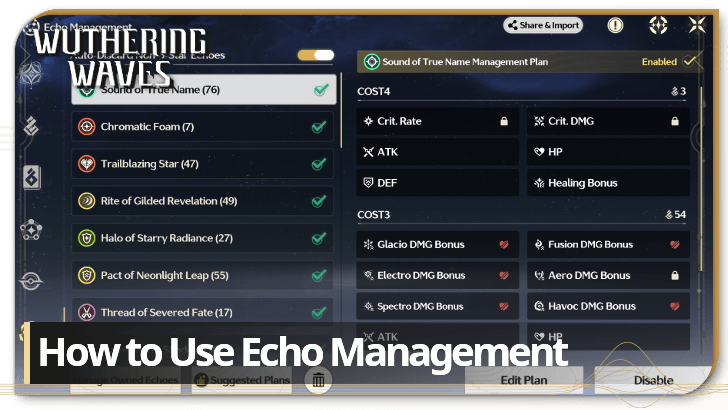
The Echo Management feature is used to set up plans to automatically lock and discard Echoes in Wuthering Waves. Learn more about Wuthering Waves' Echo Management system, how to use it, how to auto lock and auto discard Echoes, and more in this guide!
How to Use Echo Management Feature
| Echo Management Guide |
|---|
|
1. Access the Feature via the Data Bank or Backpack 2. Select a Sonata Effect to Edit 3. Manage Owned Echoes to Confirm Locks and Discards |
1. Access the Feature via the Backpack or Data Bank
| Echo Management Access | |
|---|---|
 |
 |
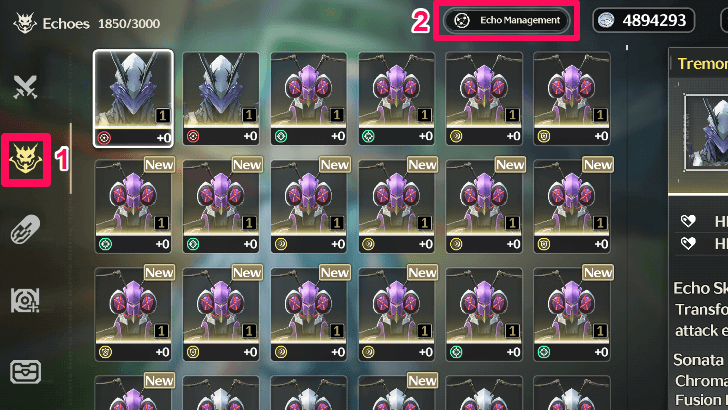
You may access the Echo Management feature in the Backpack or the Data Bank. For the backpack, go to the Echoes tab and click on the Echo Management button on top.
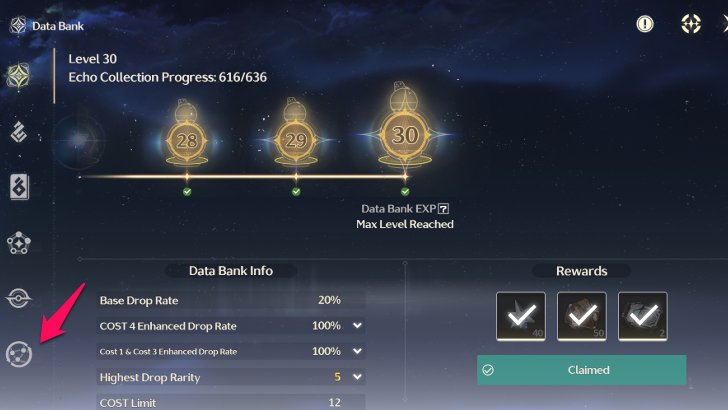
As for the Data Bank, click on the last icon at the bottom to find the Echo Management feature.
2. Select a Sonata Effect to Edit
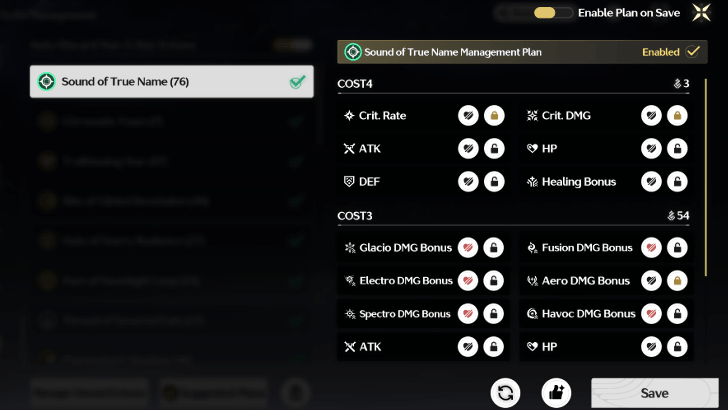
In Version 3.2, Echo management has been optimized to be edited based on Sonata Effect instead of assigning empty plans. Choose a Sonata Effect and edit the plan to choose which attributes to lock or discard.
You can also click the Suggested Plans button to automatically enable plans on all Sonata Effects and lock suggested attributes and discard unwanted ones for each set.
Share or Import Echo Management Plans
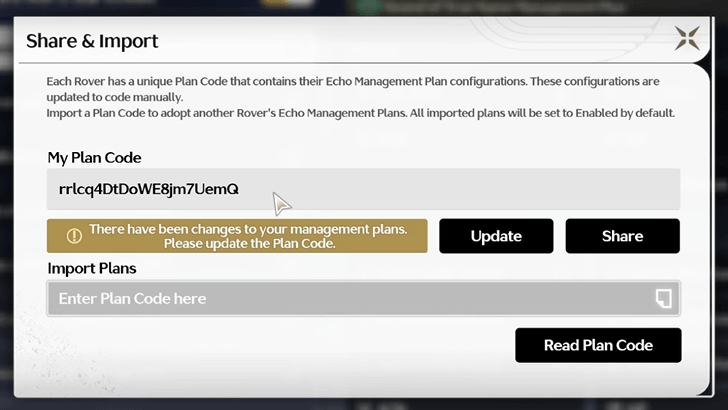
Also added in Version 3.2, players can now share and import Echo management plans via the Share & Import button. You can generate a code of a complete Echo management plan to share it with others.
You can also enter other player's codes to quickly import their plans. After importing, it will overwrite all local plans enabled.
3. Manage Owned Echoes to Confirm Locks and Discards
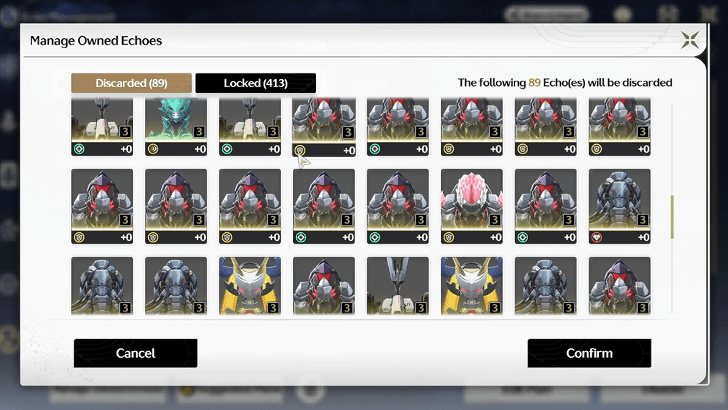
If you are satisfied with the set management plan, you can also batch-process owned Echoes. The Manage Owned Echoes button will either Lock or Discard your Echoes based on the active management plan.
After viewing all Echoes that are to be locked or discarded, click Confirm to proceed with the action.
How Echo Management Works
Auto-Locks Echoes Collected from the Overworld
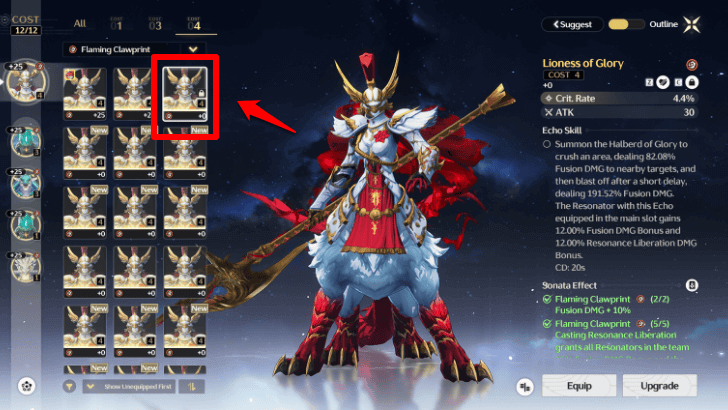
Any Echoes collected from the Overworld can be auto-locked through the Echo Management feature. This feature can be quite useful when you want to build your characters.
Auto-Discards Unwanted Echoes
You can automatically discard Echoes you collect in the Overworld if they happen to have stats that are not preferrable to the set. You can set parameters for each plan, so you can customize and retain only the Echoes you really want.
Wuthering Waves Related Guides
Beginner's Guide: Tips and Tricks
Tips and Tricks
Echo Guides
| Echo Guides | |
|---|---|
| How to Tune Echoes | How to Absorb Echoes |
| How to Unlock Data Merge | Enhanced Drop Rate and Data Bank Level |
| How to Farm Echoes | How to Get Echo EXP |
| Echo Loadout Guide | How to Use the Echo Auto-Lock Feature |
| Nightmare Nest Locations | - |
Puzzle Guides
Utilities
| Utilities | |
|---|---|
| All Utilities | Grappling Hook |
| Sensor | Waypoint |
| Casket Sonar | Levitator |
| Projector | Lootmapper |
| Camera | Ultrasonic Pulse Chip |
| New Flight Mechanics | Expedition Motorbike |
Unmarked Challenges
| Unmarked Challenges | |
|---|---|
| Unmarked Challenge Locations | How to Complete the Backflip Challenge |
| Travel in Jinzhou Gulpuff Challenge | Mingming and Doudou Hide And Seek |
FAQs
Comment



Author

How to Use Echo Management

Premium Articles
Rankings

Gaming News





Popular Games

Genshin Impact Walkthrough & Guides Wiki
Umamusume: Pretty Derby Walkthrough & Guides Wiki
Crimson Desert Walkthrough & Guides Wiki
Monster Hunter Stories 3: Twisted Reflection Walkthrough & Guides Wiki
Honkai: Star Rail Walkthrough & Guides Wiki
Pokemon Pokopia Walkthrough & Guides Wiki
The Seven Deadly Sins: Origin Walkthrough & Guides Wiki
Wuthering Waves Walkthrough & Guides Wiki
Zenless Zone Zero Walkthrough & Guides Wiki
Arknights: Endfield Walkthrough & Guides Wiki









Recommended Games
Fire Emblem Heroes (FEH) Walkthrough & Guides Wiki
Diablo 4: Vessel of Hatred Walkthrough & Guides Wiki
Cyberpunk 2077: Ultimate Edition Walkthrough & Guides Wiki
Yu-Gi-Oh! Master Duel Walkthrough & Guides Wiki
Super Smash Bros. Ultimate Walkthrough & Guides Wiki
Pokemon Brilliant Diamond and Shining Pearl (BDSP) Walkthrough & Guides Wiki
Elden Ring Shadow of the Erdtree Walkthrough & Guides Wiki
Monster Hunter World Walkthrough & Guides Wiki
The Legend of Zelda: Tears of the Kingdom Walkthrough & Guides Wiki
Persona 3 Reload Walkthrough & Guides Wiki










All rights reserved
Copyright© 2024-2025 Kuro Games. All Rights Reserved.
The copyrights of videos of games used in our content and other intellectual property rights belong to the provider of the game.
The contents we provide on this site were created personally by members of the Game8 editorial department.
We refuse the right to reuse or repost content taken without our permission such as data or images to other sites.