
Discord Widget Guide: How to Add and Change Character
★ Version 3.2 out now!
┣ Sigrika → Builds, Materials, Weapon
┣ Qiuyuan → Builds, Materials, Weapon
┗ Phase 2 → Lynae, Zani, Phoebe
★ Upcoming Characters: Hiyuki, Denia
★ Exclusives: Tier Maker | State of the Meta
Discord widget allows you to display your stats and favorite resonators from Wuthering Waves! Learn how to connect Discord and Wuthering Waves, how to add a Discord widget, how to change the displayed character, and more!
How to Add the WuWa Discord Widget
Go to Profile and Game Collection
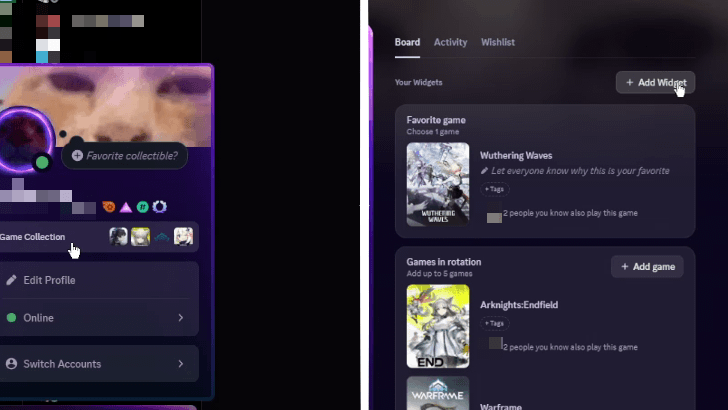
First you'd have to login to Discord via the app and go to your Profile found on the lower left section of the screen. It should show your profile picture and Discord handle.
Afterwards, click on Game Collection then Add Widget to add more Widget to your existing collection.
Go to Edit Profile if First Time
Alternatively, if this is your first time to add Widgets, go to Edit Profile on your Profile, and choose Add Widgets from the pop-up screen.
Add the WuWa Widget
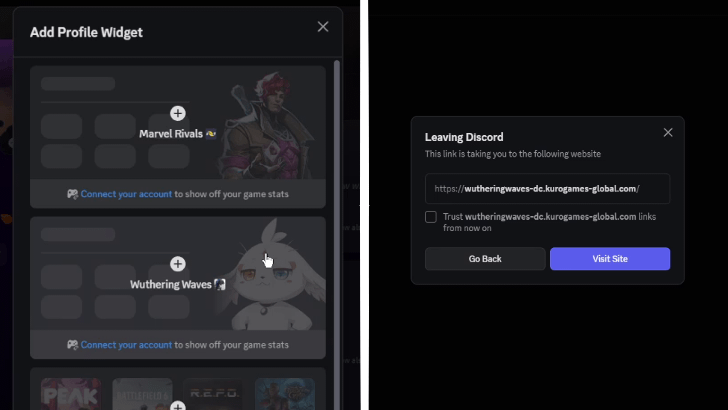
On the Add Profile Widget window, select Wuthering Waves. The widget should, by default, show Abby. If you don't have Wuthering Waves and Discord connected, it will prompt you to do so. If it's already connected, you should have the Widget already.
Note that this will take you to an external site, so always check if the link is suspicious or not. From our experience, the website should be:
| https://wutheringwaves-dc.kurogames-global.com/ |
Link Discord and WuWa
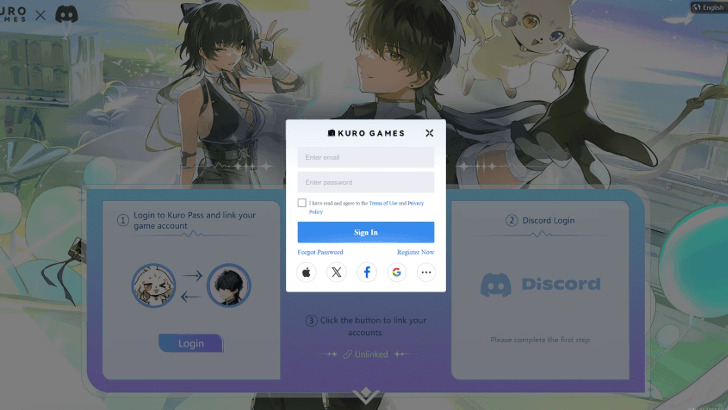
Once on the website, log in to your Kuro Games account, which is basically similar to your login credentials for Wuthering Waves. It will then ask you to link it to your Discord so just confirm.
If you don't have your Discord credentials saved on your browser, it could prompt you to Login to Discord as an extra step.
Confirm Link Account
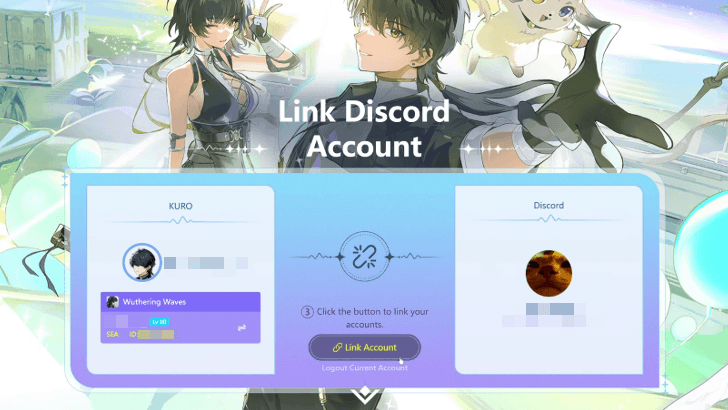
Once both accounts are logged in, hit Link Account to finalize the connection. The site will then prompt you to Select a Resonator to display.
Select the Resonator to Showcase
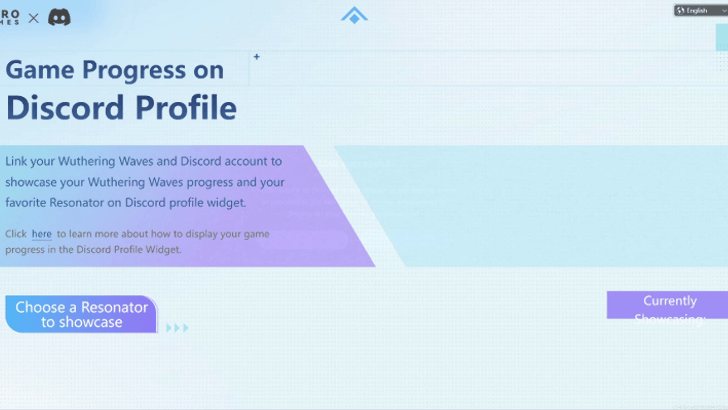
Choose your favorite Resonator as it will show up in your Discord Profile! Ultimately, the choice is up to you!
Check Your Profile to Confirm
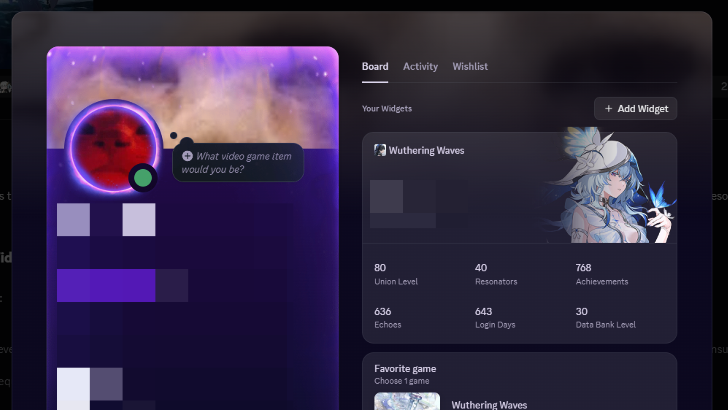
When all the steps are done correctly, go back to Discord and check your Profile again. The Wuthering Waves widget should show up with your in-game stats and the Resonator of your choosing.
The stats may take time to update on the widget, but based on our experience, it should take around a minute to do so, so please be patient!
How to Change Widget Character
Go to the Widget Link
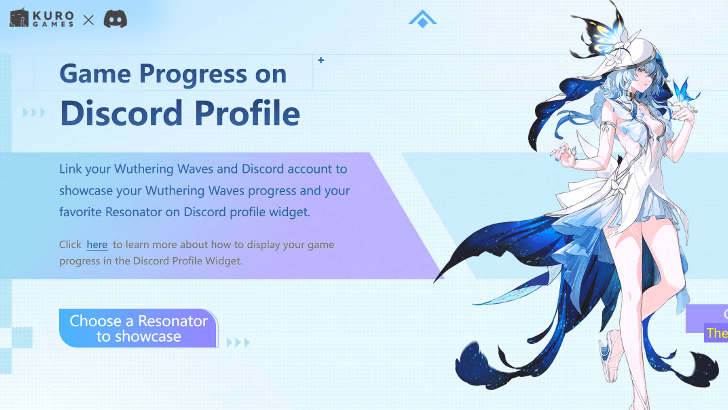
To change characters, you'll have to visit the Discord Widget website that you previously accessed. If you cannot find it anymore, we have linked it below:
https://wutheringwaves-dc.kurogames-global.com/
Scroll Down and Choose Another Resonator
To change characters, scroll down and select Choose Resonator to Showcase on the left side of the screen. Your currently chosen Resonator is displayed on the right for review.
Wuthering Waves (WuWa) Related Guides
Beginner's Guide: Tips and Tricks
Tips and Tricks
Echo Guides
Puzzle Guides
Utilities
| Utilities | |
|---|---|
| All Utilities | Grappling Hook |
| Sensor | Waypoint |
| Casket Sonar | Levitator |
| Projector | Lootmapper |
| Camera | Ultrasonic Pulse Chip |
| New Flight Mechanics | Expedition Motorbike |
Unmarked Challenges
| Unmarked Challenges | |
|---|---|
| Unmarked Challenge Locations | How to Complete the Backflip Challenge |
| Travel in Jinzhou Gulpuff Challenge | Mingming and Doudou Hide And Seek |
FAQs
Comment



Author

Discord Widget Guide: How to Add and Change Character

Premium Articles
Rankings

Gaming News


![Nova Roma Review [Early Access] | Newer, Better, and More Confusing](https://img.game8.co/4455512/2cbf8926e9a1c72a3ff056088f801ef4.png/thumb)


Popular Games

Genshin Impact Walkthrough & Guides Wiki
Umamusume: Pretty Derby Walkthrough & Guides Wiki
Crimson Desert Walkthrough & Guides Wiki
Monster Hunter Stories 3: Twisted Reflection Walkthrough & Guides Wiki
Honkai: Star Rail Walkthrough & Guides Wiki
Pokemon Pokopia Walkthrough & Guides Wiki
The Seven Deadly Sins: Origin Walkthrough & Guides Wiki
Wuthering Waves Walkthrough & Guides Wiki
Zenless Zone Zero Walkthrough & Guides Wiki
Arknights: Endfield Walkthrough & Guides Wiki









Recommended Games
Fire Emblem Heroes (FEH) Walkthrough & Guides Wiki
Diablo 4: Vessel of Hatred Walkthrough & Guides Wiki
Cyberpunk 2077: Ultimate Edition Walkthrough & Guides Wiki
Yu-Gi-Oh! Master Duel Walkthrough & Guides Wiki
Super Smash Bros. Ultimate Walkthrough & Guides Wiki
Pokemon Brilliant Diamond and Shining Pearl (BDSP) Walkthrough & Guides Wiki
Elden Ring Shadow of the Erdtree Walkthrough & Guides Wiki
Monster Hunter World Walkthrough & Guides Wiki
The Legend of Zelda: Tears of the Kingdom Walkthrough & Guides Wiki
Persona 3 Reload Walkthrough & Guides Wiki










All rights reserved
Copyright© 2024-2025 Kuro Games. All Rights Reserved.
The copyrights of videos of games used in our content and other intellectual property rights belong to the provider of the game.
The contents we provide on this site were created personally by members of the Game8 editorial department.
We refuse the right to reuse or repost content taken without our permission such as data or images to other sites.