
How to Use Talent Arts

Talent Arts are powerful Arts that require charging in Xenoblade Chronicles 3. Read on to learn about Talent Arts, how to use, and the best way of charging them!
List of Contents
How to Use Talent Arts
| Talent Arts Guide |
|---|
|
|

Perform Role Actions to Charge Gauge
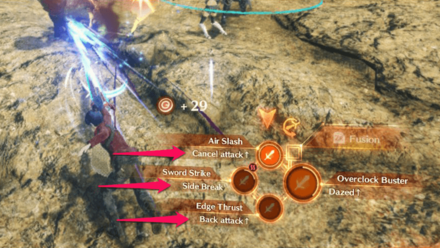
Role Actions are found under your Arts in battle!
Unlike normal Arts, Talent Arts can be used not by waiting for its cooldown, but by charging it by performing Role Actions until the Talent Art gauge is full.
Talent Arts Will Glow Once it Can Be Used
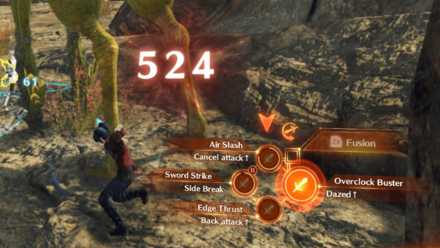
Just like normal Arts, Talent Arts will glow once its gauge is full, signaling that it can finally be used.
Press the A Button Once Gauge is Full

Noah unleashing his Talent Art, Overclock Buster!
Once the Talent Art gauge is full, simply press the A Button and your character will unleash their strong Talent Art!
What are Talent Arts?
Strong Arts Charged by Role Actions

Talent Arts are stronger than normal Arts. A Talent Art can be activated by pressing the A Button once its circular gauge is full.
A Talent Art's gauge is recharged by performing actions expected of a character's role, also called Role Actions. It is recommended to consistently perform Role Actions in order to fill up your Talent Arts gauge quickly.
Arts Guide: List of All Arts and Effects
Xenoblade Chronicles 3 Related Guides

Tips and Tricks



Author
How to Use Talent Arts

Rankings
- We could not find the message board you were looking for.
Gaming News

![Death Stranding 2: On The Beach [PC] Review | A Port That Delivers](https://img.game8.co/4447392/15310a0c9aa1b6843bb713b2ea216930.jpeg/show)



Popular Games

Genshin Impact Walkthrough & Guides Wiki
Umamusume: Pretty Derby Walkthrough & Guides Wiki
Crimson Desert Walkthrough & Guides Wiki
Monster Hunter Stories 3: Twisted Reflection Walkthrough & Guides Wiki
Honkai: Star Rail Walkthrough & Guides Wiki
Pokemon Pokopia Walkthrough & Guides Wiki
The Seven Deadly Sins: Origin Walkthrough & Guides Wiki
Wuthering Waves Walkthrough & Guides Wiki
Zenless Zone Zero Walkthrough & Guides Wiki
Arknights: Endfield Walkthrough & Guides Wiki










Recommended Games
Fire Emblem Heroes (FEH) Walkthrough & Guides Wiki
Diablo 4: Vessel of Hatred Walkthrough & Guides Wiki
Cyberpunk 2077: Ultimate Edition Walkthrough & Guides Wiki
Yu-Gi-Oh! Master Duel Walkthrough & Guides Wiki
Super Smash Bros. Ultimate Walkthrough & Guides Wiki
Pokemon Brilliant Diamond and Shining Pearl (BDSP) Walkthrough & Guides Wiki
Elden Ring Shadow of the Erdtree Walkthrough & Guides Wiki
Monster Hunter World Walkthrough & Guides Wiki
The Legend of Zelda: Tears of the Kingdom Walkthrough & Guides Wiki
Persona 3 Reload Walkthrough & Guides Wiki










All rights reserved
© Nintendo / MONOLITHSOFT
The copyrights of videos of games used in our content and other intellectual property rights belong to the provider of the game.
The contents we provide on this site were created personally by members of the Game8 editorial department.
We refuse the right to reuse or repost content taken without our permission such as data or images to other sites.