
Originium Repair Module Guide and How to Solve
✪ Check Game8 Endfield Twitter for daily tips!
★ Exclusive: Endfield's Connection to Arknights
★ Ver. 1.1: Release Date | Livestream | Maintenance
★ Tangtang (Build | Banner) | Rossi (Build | Banner)
★ Best Builds: Yvonne | Last Rite | Laevatain
★ Hot: Essence Tool | Blueprint | Best Dijiang Setup
Originium Repair Modules are puzzles in Arknights: Endfield. Check out how to solve Originium Repair Module puzzles here!
List of Contents
How to Solve Originium Repair Modules
Originium Repair Module Guide
Use the Components to Fill the Grid
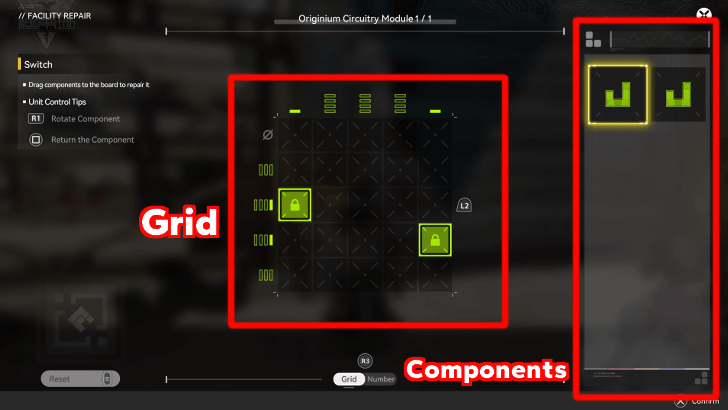
When solving Originium Repair Modules, you will see a grid in the center of the screen and a panel to the right containing usable components.
To solve Originium Repair Modules, you must use all the given components and make them all fit inside the grid.
Find Repair Logics for New Component Styles
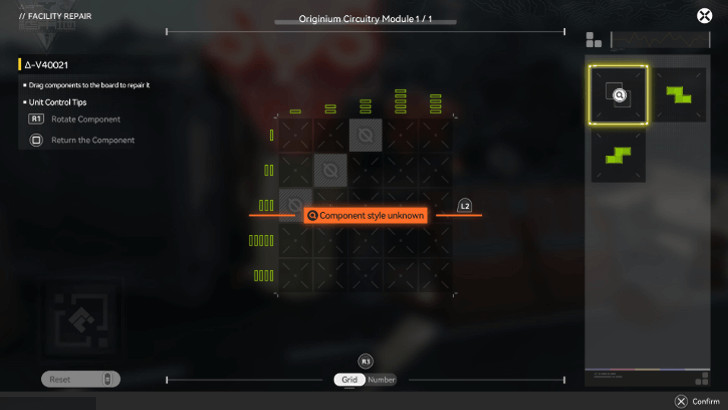
As you progress through the game, some Originium Repair Modules may require components that are not yet in your possession.
When you encounter such a module, you must find the Repair Logic it needs before you can solve it. Finding Repair Logics will add a Component Style to your inventory permanently.
Pay Attention to Block Count
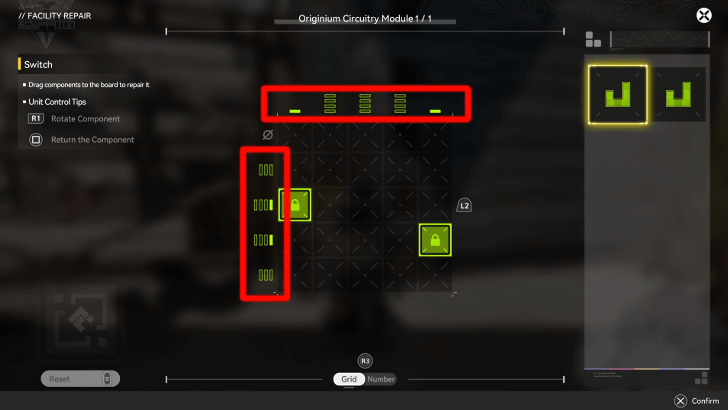
Notice the lines (or numbers if you toggle between the two) surrounding the grid. They indicate the number of blocks that must be present in their respective rows or columns.
Having too many or not enough blocks in a row or column is not allowed. You must rotate and position your components carefully in order to solve the puzzle.
Pay Attention to Tile Restrictions
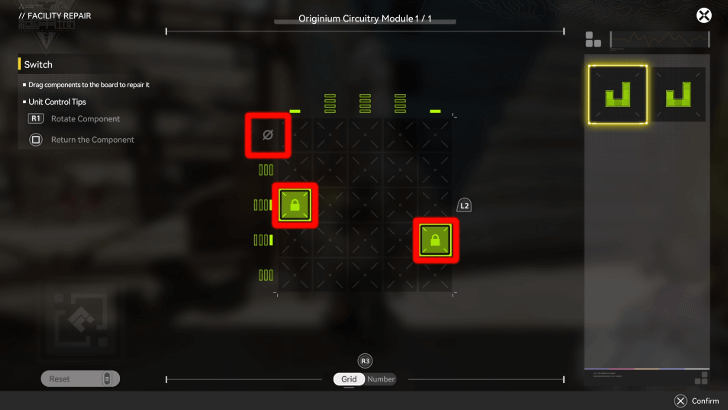
Some Originium Repair Modules may have tile restrictions wherein some tiles are already occupied, or an entire row or column cannot have blocks in them.
Adjust your components accordingly while trying to meet the grid's block requirements to complete the puzzle!
What are Originium Repair Modules?
Building Block Puzzles
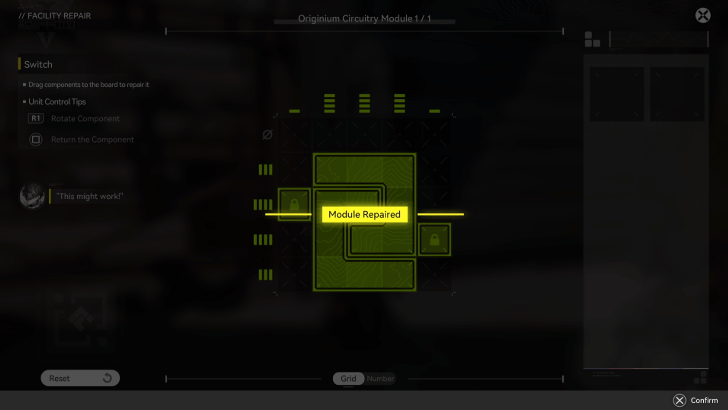
Originium Repair Modules are puzzles in Arknights: Endfield that resemble Tetris games, where they use the same component design. When solving Originium Repair Modules, Endministrators must fit a certain number of components in a grid.
Originium Repair Modules can be found in all sorts of things, ranging from control panels to old encrypted data files to broken Delta Bots that need help.
Arknights: Endfield Related Guides
Beginner Guides
 How to Level Up Fast How to Level Up Fast |
 Best Settings Best Settings
|  Early Game Tips Early Game Tips |
 Level Up Guide Level Up Guide |
 Upgrade Weapons Upgrade Weapons |
- |
Combat Guides
 Arts Reaction Guide Arts Reaction Guide |
 Combat System Tips and Tricks Combat System Tips and Tricks |
 How to Do Perfect Dodge How to Do Perfect Dodge |
 Arts Bursts Guide Arts Bursts Guide |
 Physical Status Guide Physical Status Guide |
 How to Stagger Enemies How to Stagger Enemies |
 How to Use Combo Skills How to Use Combo Skills |
- | - |
General Guides
 Top Up Guide
 Main Character Differences
 Ways to Spend Currency
 Dailies Guide
 Reset Times
  Easter Eggs
 Credit Store Guide
 Clue Room Guide
  Trust Guide
 All Puzzles and How to Solve
 Weeklies and Things to Do Every Week
 How to Recover Sanity
 How to Heal
 Reception Room Guide
 All Roles Explained
Technical Guides
 List of Controls List of Controls |
 Controller Support Controller Support |
 How to Download How to Download |
 How to Link Accounts How to Link Accounts |
- | - |
Frequently Asked Questions
 What is Purity
 Backpack Guide
 How to Change Genders
 How to Revive Allies
 How to Raise Exploration Lv.
 How to Drain Water
 How to Power Aburrey Quarry
 How to Power Originium Science Park
 How to Power Electric Nexus
 How to Increase Inventory
 How to Change Name
 When Do Materials Spawn?
 How to Spray and Change Water Types
 Can You Skip Cutscenes?
 Can You Remove Endministrator's Mask?
 Is There a Death Penalty?
 Can You Climb?
 How to Fast Travel
 How to Repair and Share Facilities
 How to Recover Lost Mail In-Game
 Is Buying the Protocol Pass Worth It?
Comment



Author

Originium Repair Module Guide and How to Solve

Premium Articles
Rankings

Gaming News




![Nova Roma Review [Early Access] | Newer, Better, and More Confusing](https://img.game8.co/4455512/2cbf8926e9a1c72a3ff056088f801ef4.png/thumb)
Popular Games

Genshin Impact Walkthrough & Guides Wiki
Umamusume: Pretty Derby Walkthrough & Guides Wiki
Crimson Desert Walkthrough & Guides Wiki
Monster Hunter Stories 3: Twisted Reflection Walkthrough & Guides Wiki
Honkai: Star Rail Walkthrough & Guides Wiki
Pokemon Pokopia Walkthrough & Guides Wiki
The Seven Deadly Sins: Origin Walkthrough & Guides Wiki
Wuthering Waves Walkthrough & Guides Wiki
Zenless Zone Zero Walkthrough & Guides Wiki
Arknights: Endfield Walkthrough & Guides Wiki









Recommended Games
Fire Emblem Heroes (FEH) Walkthrough & Guides Wiki
Diablo 4: Vessel of Hatred Walkthrough & Guides Wiki
Cyberpunk 2077: Ultimate Edition Walkthrough & Guides Wiki
Yu-Gi-Oh! Master Duel Walkthrough & Guides Wiki
Super Smash Bros. Ultimate Walkthrough & Guides Wiki
Pokemon Brilliant Diamond and Shining Pearl (BDSP) Walkthrough & Guides Wiki
Elden Ring Shadow of the Erdtree Walkthrough & Guides Wiki
Monster Hunter World Walkthrough & Guides Wiki
The Legend of Zelda: Tears of the Kingdom Walkthrough & Guides Wiki
Persona 3 Reload Walkthrough & Guides Wiki










All rights reserved
Copyright © 2022 - 2025 GRYPHLINE. All Rights Reserved.
The copyrights of videos of games used in our content and other intellectual property rights belong to the provider of the game.
The contents we provide on this site were created personally by members of the Game8 editorial department.
We refuse the right to reuse or repost content taken without our permission such as data or images to other sites.