
How to Repair and Share Facilities
✪ Check Game8 Endfield Twitter for daily tips!
★ Exclusive: Endfield's Connection to Arknights
★ Ver. 1.1: Release Date | Livestream | Maintenance
★ Tangtang (Build | Banner) | Rossi (Build | Banner)
★ Best Builds: Yvonne | Last Rite | Laevatain
★ Hot: Essence Tool | Blueprint | Best Dijiang Setup
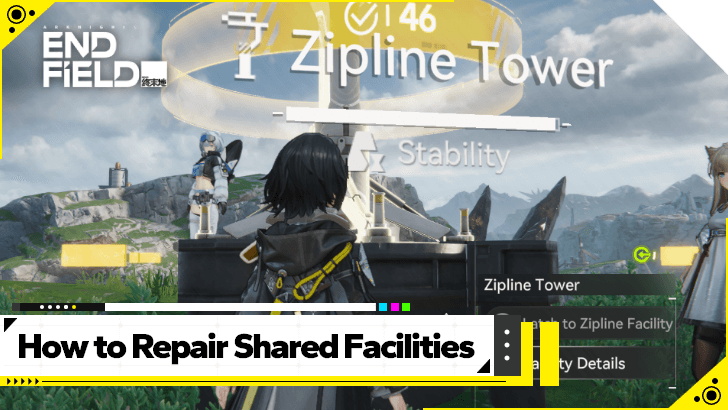
The facilities of other players in Arknights: Endfield will sometimes appear in your version of Talos-II as a Shared Facility, and they can remain there longer by repairing them. See how to repair Shared Facilities, and how to share your own here!
How to Repair Shared Facilities

Check if the Facility is Yours
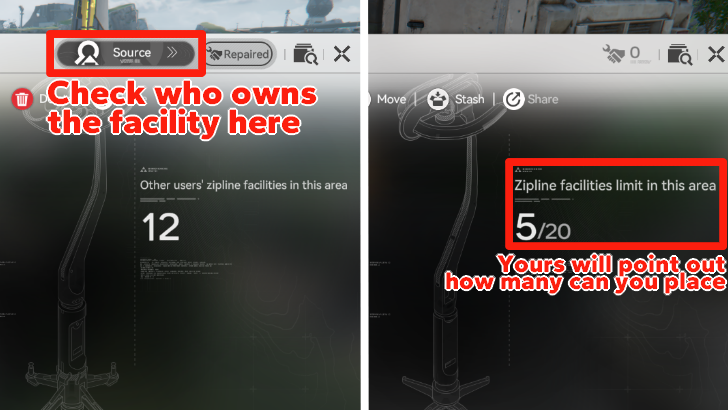
When you go to a facility, you can easily check if the Facility belongs to you by selecting Facility Details. Yours will show how many more of the same facility you can place in the sub-region, while a Shared Facility will show how many there are on the map that belong to other players.
You can check who owns that specific Facility by looking at the source in the top-right area of the pop-up window.
Blue Facility Markers in the Map are Shared
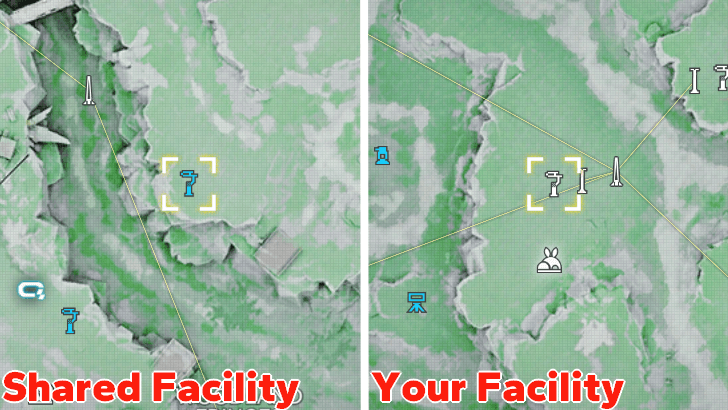
You can also check out the map in your Protosync Menu to see which ones are yours. Shared Facilities will be colored blue for visibility and will show the player who owns that facility.
Approach and Repair the Facility
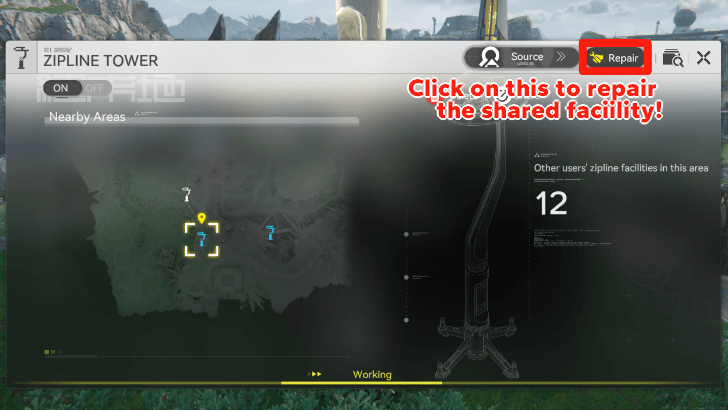
Simply go to a Shared Facility and click the Repair button on the pop-up menu to repair it. This should make it last longer in your own map.
Press Hotkey While Nearby Facility
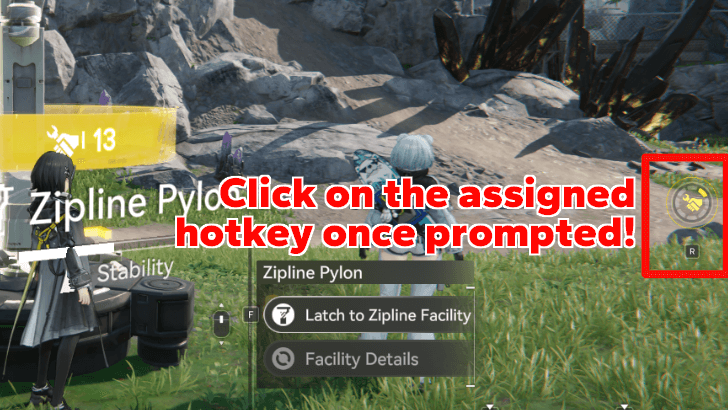
Players can also immediately repair the Shared Facility without looking up Facility Details once this Tool icon shows up on the left side of the screen. If this icon is colored yellow, the Facility can be repaired.
Repairing Does Not Cost Anything
As of writing, repairing Shared Facilities does not cost anything from your resources. You can keep repairing them for free as long as their Stability meter has already been reduced.
How to Share Facilities
Set Up Your Facilities Like Normal
For the most part, facilities will be shared automatically with other players as you set them up in your own version of Talos-II. You do not need to have friends for this to happen; the game randomly decides to make your facilities available to their versions of the game.
Certain Facilities Can Be Shared to Friends
The Ziplines, Signboards, Turrets, and Easy Stashes can all be shared to your friends, like they can be shared by them and other players to you.
If a Shared Facility can be repaired, your own facilities of those types can be shared to other players as well.
Access the Share Button in Your Facilities
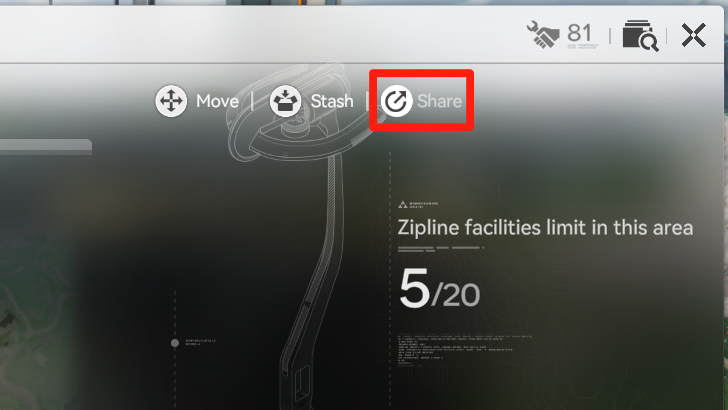
To share your facilities with your friends, go to the specific facility you want to share and press Facility Details. Click on the Share button that is found right beside the Stash function.
Share Your Facilities to Your Friends
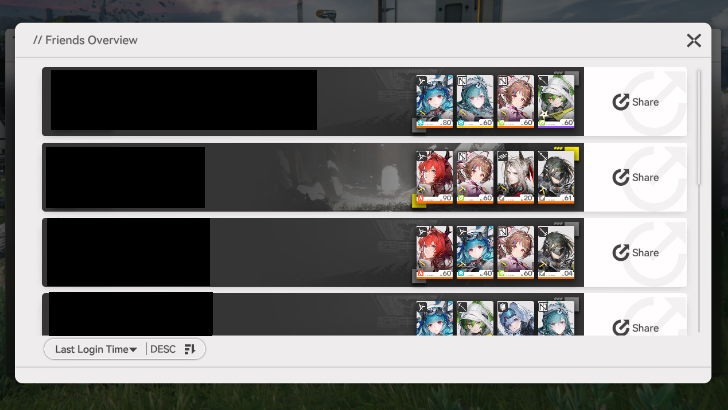
This will lead you to your Friends list, which you can opt to share with each one manually. Once you share, the chosen Facility should begin to show up in the exact same location in their version of Talos-II.
Which Shared Facilities Can Be Repaired?
Zipline Pylons and Towers
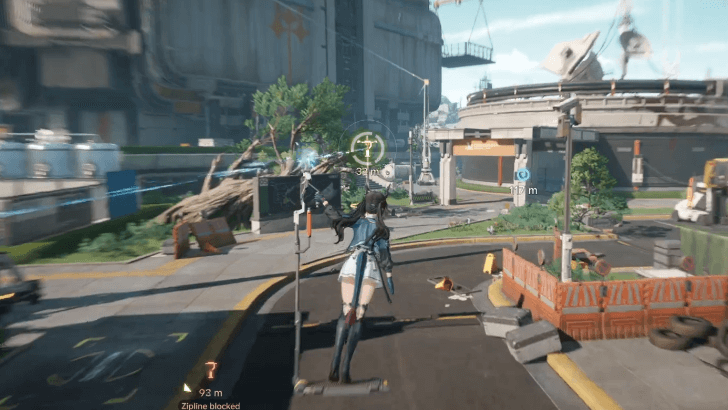
The most prominent Shared Facility you can see across the map are Zipline Pylons and Towers. You can make use of them alongside your own Zipline system to get to other locations faster!
Signboards
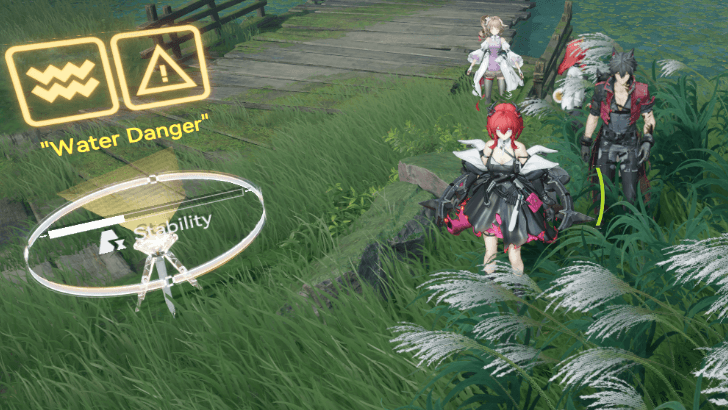
Signboards are often put up as a warning or as a reminder of what a certain location can have. For example, a certain place can be mined for items and materials, or it could have a certain path hidden by obstacles.
Just be careful when taking note of Shared Signboards. There is a chance some players may prank others with these signs, telling them to do something that will put the player in a bad situation.
Turrets
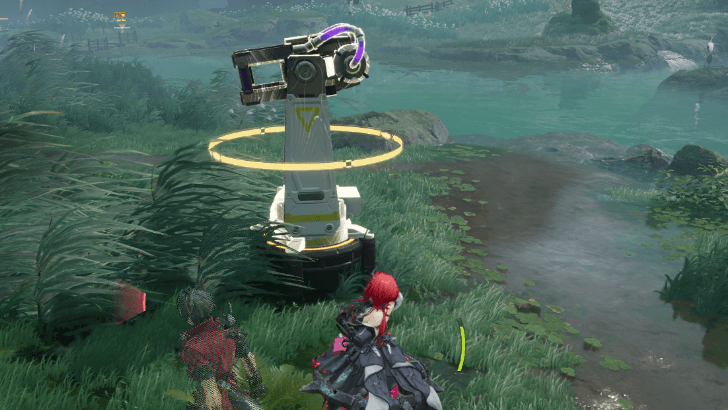
Turrets are also one of the possible Shared Facilities that can pop up in the overworld. These operate independently, without a power source.
They will attack any enemy that comes close to its perimeter, so take full advantage of this and bring enemies near it to let it attack them!
Easy Stash
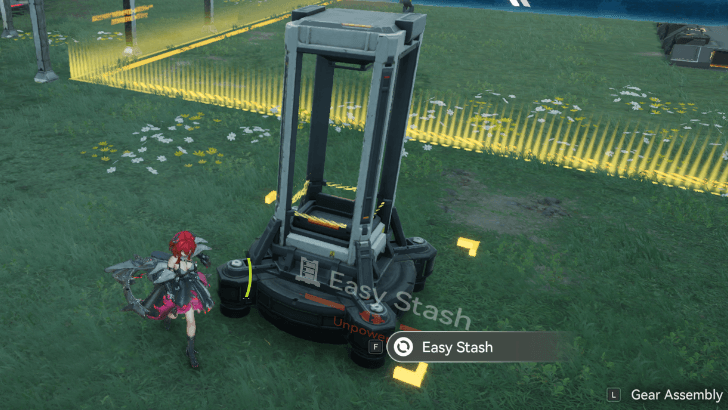
Easy Stashes work as a mobile depot that lets you quickly access the Depot menu remotely, without having to go back to your main base.
Other players' Easy Stashes may appear on the map, but when interacting, the items that will appear are yours in your own Easy Stash.
Arknights: Endfield Related Guides
Beginner Guides
 How to Level Up Fast How to Level Up Fast |
 Best Settings Best Settings
|  Early Game Tips Early Game Tips |
 Level Up Guide Level Up Guide |
 Upgrade Weapons Upgrade Weapons |
- |
Combat Guides
 Arts Reaction Guide Arts Reaction Guide |
 Combat System Tips and Tricks Combat System Tips and Tricks |
 How to Do Perfect Dodge How to Do Perfect Dodge |
 Arts Bursts Guide Arts Bursts Guide |
 Physical Status Guide Physical Status Guide |
 How to Stagger Enemies How to Stagger Enemies |
 How to Use Combo Skills How to Use Combo Skills |
- | - |
General Guides
 Top Up Guide
 Main Character Differences
 Ways to Spend Currency
 Dailies Guide
 Reset Times
  Easter Eggs
 Credit Store Guide
 Clue Room Guide
  Trust Guide
 All Puzzles and How to Solve
 Originium Repair Module Guide
 Weeklies and Things to Do Every Week
 How to Recover Sanity
 How to Heal
 Reception Room Guide
 All Roles Explained
 Growth Chamber Guide
Technical Guides
 List of Controls List of Controls |
 Controller Support Controller Support |
 How to Download How to Download |
 How to Link Accounts How to Link Accounts |
- | - |
Frequently Asked Questions
 What is Purity
 Backpack Guide
 How to Change Genders
 How to Revive Allies
 How to Raise Exploration Lv.
 How to Drain Water
 How to Power Aburrey Quarry
 How to Power Originium Science Park
 How to Power Electric Nexus
 How to Increase Inventory
 How to Change Name
 When Do Materials Spawn?
 How to Spray and Change Water Types
 Can You Skip Cutscenes?
 Can You Remove Endministrator's Mask?
 Is There a Death Penalty?
 Can You Climb?
 How to Fast Travel
 How to Recover Lost Mail In-Game
 Is Buying the Protocol Pass Worth It?
Comment



Author

How to Repair and Share Facilities

Premium Articles
Rankings

Gaming News


![Monster Hunter Stories 3 Review [First Impressions] | Simply Rejuvenating](https://img.game8.co/4438641/2a31b7702bd70e78ec8efd24661dacda.jpeg/thumb)
![The Seven Deadly Sins: Origin [First Impressions] | A Promising Start](https://img.game8.co/4440581/584e0bfb87908f12c4eab6e846eb1afd.png/thumb)

Popular Games

Genshin Impact Walkthrough & Guides Wiki
Umamusume: Pretty Derby Walkthrough & Guides Wiki
Pokemon Pokopia Walkthrough & Guides Wiki
Honkai: Star Rail Walkthrough & Guides Wiki
Monster Hunter Stories 3: Twisted Reflection Walkthrough & Guides Wiki
Arknights: Endfield Walkthrough & Guides Wiki
Wuthering Waves Walkthrough & Guides Wiki
Zenless Zone Zero Walkthrough & Guides Wiki
Pokemon TCG Pocket (PTCGP) Strategies & Guides Wiki
Monster Hunter Wilds Walkthrough & Guides Wiki









Recommended Games
Fire Emblem Heroes (FEH) Walkthrough & Guides Wiki
Diablo 4: Vessel of Hatred Walkthrough & Guides Wiki
Cyberpunk 2077: Ultimate Edition Walkthrough & Guides Wiki
Yu-Gi-Oh! Master Duel Walkthrough & Guides Wiki
Super Smash Bros. Ultimate Walkthrough & Guides Wiki
Pokemon Brilliant Diamond and Shining Pearl (BDSP) Walkthrough & Guides Wiki
Elden Ring Shadow of the Erdtree Walkthrough & Guides Wiki
Monster Hunter World Walkthrough & Guides Wiki
The Legend of Zelda: Tears of the Kingdom Walkthrough & Guides Wiki
Persona 3 Reload Walkthrough & Guides Wiki










All rights reserved
Copyright © 2022 - 2025 GRYPHLINE. All Rights Reserved.
The copyrights of videos of games used in our content and other intellectual property rights belong to the provider of the game.
The contents we provide on this site were created personally by members of the Game8 editorial department.
We refuse the right to reuse or repost content taken without our permission such as data or images to other sites.