
Bugs and Known Issues
✪ Check Game8 Endfield Twitter for daily tips!
★ Exclusive: Endfield's Connection to Arknights
★ Ver. 1.1: Release Date | Livestream | Maintenance
★ Tangtang (Build | Banner) | Rossi (Build | Banner)
★ Best Builds: Yvonne | Last Rite | Laevatain
★ Hot: Essence Tool | Blueprint | Best Dijiang Setup
Here is a list of all bugs, errors, and known issues in Arknights: Endfield. See all the crashes, bugs, as well as the potential fixes here in this guide!
List of Current In-Game Issues
All Version 1.0 Known Issues
| List of Currently Known Issues |
|---|
|
|

Entering Abnormal Areas
There are instances where Operators may end up entering abnormal areas that are usually unreachable, and cause the game to freeze.
The developers have suggested using a TP Point nearby to get out of the weird location. Alternatively, players can go to the Settings Menu, choose Controls and click on the Unstuck button.
Third-Party Apps Freeze
Some third-party applications that apply filters or make use of AI Frame Interpolation can cause Arknights: Endfield to freeze during the middle of gameplay.
It is suggested to disable the relevant functions in these programs if problems persist.
Weird Progress in Missions or Tutorials
Certain actions during Missions or Tutorials can cause the game to cause abnormal progressions that can negatively impact the player.
The suggested course of action is to restart the game and continue to advance the current Mission.
PS5 Storage Error
There is a chance that installing Arknights: Endfield on the PlayStation 5 will cause an error stating that it needs more available space during download and/or installation, despite having more than enough storage.
Uninstalling and reinstalling the game should fix this error.
In-Game Web Page PC Error
For PC players, there is a chance they may encounter an error code stating “PlatformProcess Not Responding” when opening web pages within Arknights: Endfield itself.
Try closing the program first, then re-open the page afterwards as a fix.
Origeometry and Oroberyl Prompt Error
Sometimes, acquiring items such as Origeometry and Oroberyl within the Acquisition Center can cause a delay acquisition prompt after obtaining them.
There is currently no known fix to this error, but items should still be credited to your inventory.
Voice Error
Some Endministrators have encountered issues where certain voices in the game stop all of a sudden.
This can be easily fixed simply by closing the game and restarting it.
Fixed Top Up Issue
It was reported that the PayPal payment method was temporarily unavailable due to maintenance and upgrades. The issue has been fixed.
Stuck in Releasing Resources
While loading the game on PC, there is a chances that the game will get stuck indefinitely while Releasing Resources during the game's loading into the title screen.
For a temporary fix against this bug, open Arknights: Endfield using Run as Administrator. This has been reported to fix this issue.
List of General Fixes
| General Troubleshooting Tips and Fixes |
|---|
|
|
Check Official Notices for Bugs and Fixes
If you ever encounter any issues or glitches within Arknights: Endfield, make sure to check the official sources from the game and its developers, GRYPHLINE!
Official Social Media
The most accessible social media account for the game is found on X (formerly Twitter). They post quite frequently, including updates and announcements involving Arknights: Endfield.
Official X Account of Arknights Endfield
Official Website
Players can also head over to the official Arknights: Endfield website and check their News section to see the latest news, which should include potential bug fixes and updates.
Official Website of Arknights Endfield
In-Game Notices
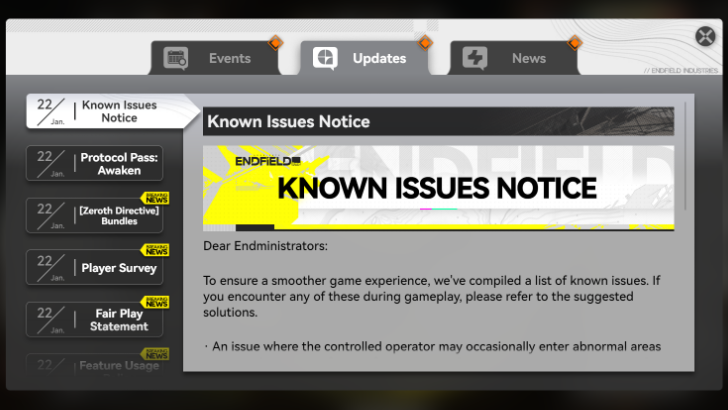
The list of known issues are also announced in-game though the News section under the Updates category as Known Issues Notice.
Restart The Game
Giving the game a quick restart is a common yet effective way to fix a number of issues you may encounter. You can also try to forcefully end the game via the Task Manager as an alternative, if players cannot close the game through normal means.
Check Game Integrity
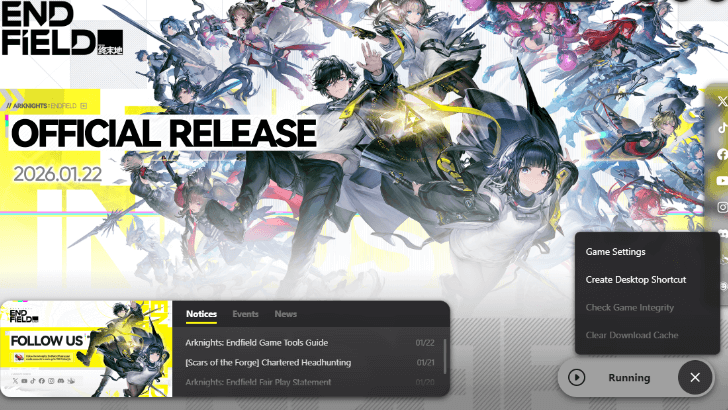
PC Players can check for any weird alterations to the game files by using the GRYPHLINE client and choose Check Game Integrity.
You can only choose this option while the game itself is not running; make sure to close the game first in order to do this option.
Restart Your Device
If restarting the game doesn't solve the issue you can try restarting your PC, console or phone. This can also help improve the game's performance on your respective system.
Update Your Device
Depending of the specs of your device, playing the game below the minimum requirements may also cause a number of errors. Make sure both hardware and software are up to par when available to see if it may resolve the issues you are encountering.
Update Your Graphics Card Drivers
If you are playing on PC, you will also need to check if your graphics card drivers are up-to-date. Using outdated drivers can also be the root of certain issues.
Open PC Client via Run as Administrator
For PC players, they have the option to run of Arknights: Endfield via the GRYPHLINK account client using Run as Administrator. This should provide security while playing the game, as well as fix some bugs and errors that could show up while not protected under administrator privileges.
Arknights: Endfield Related Guides

Arknights: Endfield Wiki Front
Guides by Category
 News and Game Info
 Characters
 Tips and Tricks
 Items
Items Weapons
 Gear
Gear AIC (Factory)
 Banners
 Missions
 All Events & Schedule
 Message Board
 Interactive Map
 Bosses
 Enemies
 Etchspace Salvage
 Umbral Monument
 Regional Development Management
 Delver of the Cryptic
 Achievements
All Tier Lists and Meta Guides
 Characters Tier List
 Reroll Guide and Tier List
 Best Team Comps
 Team Building Guide
 All Character Builds
 Weapons Tier List
 All Stats and Explanation
 Best Weapons Per Character
 Best Gear Sets Per Character
All Helpful Tools
 Tier List Maker Tier List Maker |
 Team Builder Tool Team Builder Tool |
 Weapon Essence Checker Weapon Essence Checker |
All Recommended Guides
 Gacha System Explained
 Protocol Pass Details
 Server Status and Times
 Medals and Achievements
 All Weapon Supply Guides
 Imminent Incursion Guide
 Etchspace Salvage Guide
 How to Farm Plants and Unlock Planting
 All Races In-Game
 Is Amiya in Endfield?
 List of All Bosses
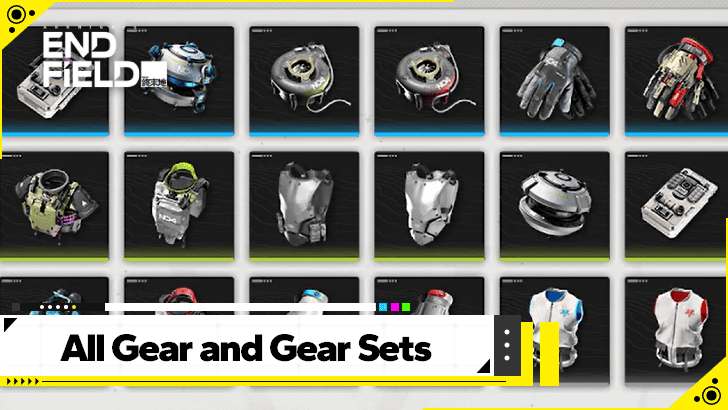 All Gear and Gear Set Effects List
 Best Blueprint Codes Sharing Codes
 Explosives Guide
 Best Banner To Pull On
 All Protocol Space Locations
 Delver of the Cryptic Guide
 How to Upgrade Gear
 Gear System Crafting Guide
 Metastorage Transfer Guide
 Essence Guide: How to Farm Essence
 How to Upgrade Essence
 All Dried Originium Slug Locations
 Best Characters for Each Outpost
 How to Farm T-Creds
 Best Clue Room Characters
 Best Characters for OMV Dijiang


Author

Bugs and Known Issues

Premium Articles
Rankings

Gaming News




![Nova Roma Review [Early Access] | Newer, Better, and More Confusing](https://img.game8.co/4455512/2cbf8926e9a1c72a3ff056088f801ef4.png/thumb)
Popular Games

Genshin Impact Walkthrough & Guides Wiki
Umamusume: Pretty Derby Walkthrough & Guides Wiki
Crimson Desert Walkthrough & Guides Wiki
Monster Hunter Stories 3: Twisted Reflection Walkthrough & Guides Wiki
Honkai: Star Rail Walkthrough & Guides Wiki
Pokemon Pokopia Walkthrough & Guides Wiki
The Seven Deadly Sins: Origin Walkthrough & Guides Wiki
Wuthering Waves Walkthrough & Guides Wiki
Zenless Zone Zero Walkthrough & Guides Wiki
Arknights: Endfield Walkthrough & Guides Wiki









Recommended Games
Fire Emblem Heroes (FEH) Walkthrough & Guides Wiki
Diablo 4: Vessel of Hatred Walkthrough & Guides Wiki
Cyberpunk 2077: Ultimate Edition Walkthrough & Guides Wiki
Yu-Gi-Oh! Master Duel Walkthrough & Guides Wiki
Super Smash Bros. Ultimate Walkthrough & Guides Wiki
Pokemon Brilliant Diamond and Shining Pearl (BDSP) Walkthrough & Guides Wiki
Elden Ring Shadow of the Erdtree Walkthrough & Guides Wiki
Monster Hunter World Walkthrough & Guides Wiki
The Legend of Zelda: Tears of the Kingdom Walkthrough & Guides Wiki
Persona 3 Reload Walkthrough & Guides Wiki










All rights reserved
Copyright © 2022 - 2025 GRYPHLINE. All Rights Reserved.
The copyrights of videos of games used in our content and other intellectual property rights belong to the provider of the game.
The contents we provide on this site were created personally by members of the Game8 editorial department.
We refuse the right to reuse or repost content taken without our permission such as data or images to other sites.
"Releasing Files" stuck at 0% due to stale temporary file conflicts. I suggest adding, as a temporary fix, the cleaning of the WINDOWS+R "TEMP" folder on Windows, and also %appdata% .../LOCAL/TEMP