
Metastorage Transfer Guide
✪ Check Game8 Endfield Twitter for daily tips!
★ Exclusive: Endfield's Connection to Arknights
★ Ver. 1.1: Release Date | Livestream | Maintenance
★ Tangtang (Build | Banner) | Rossi (Build | Banner)
★ Best Builds: Yvonne | Last Rite | Laevatain
★ Hot: Essence Tool | Blueprint | Best Dijiang Setup
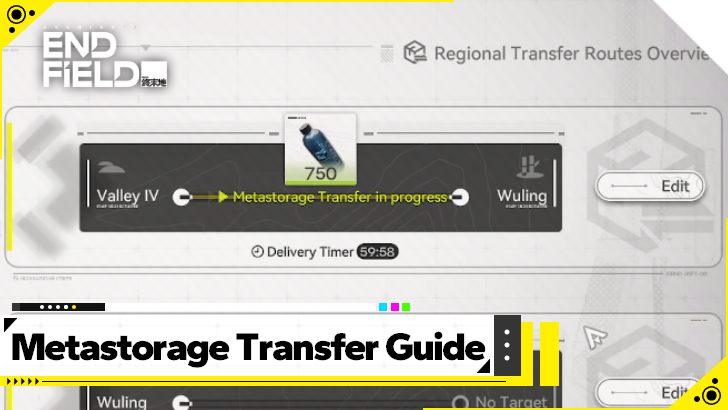
Metastorage Transfers allow the transfer of items within a region in Arknights: Endfield without having to transport them. Learn how to do a Metastorage Transfer, as well as the differences between a Regional Transfer and a Metastorage Transfer here!
How to Metastorage Transfer
- Select Regional Transfer
- Select a Region for Destination
- Click Metastorage and Choose Destination
- Select Item and Amount to Begin Transfer
- Wait for the Transfer to Finish
Select Regional Transfer
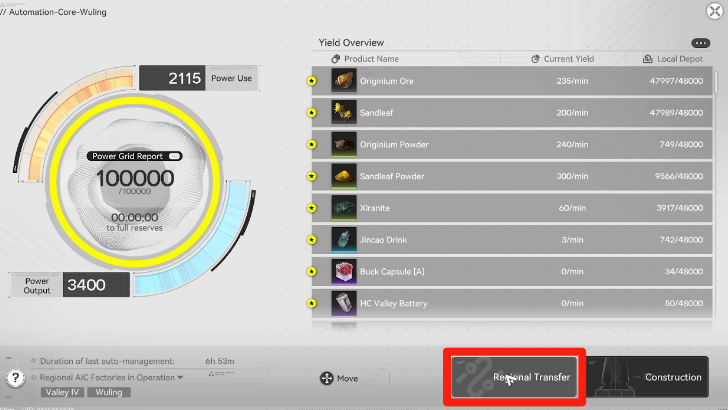
To begin the Metastorage Transfer, go into your Core AIC Zone and interact with it to access Protocol Management.
From there, select Regional Transfer, which is found on the lower area of the menu.
Select a Region as Source
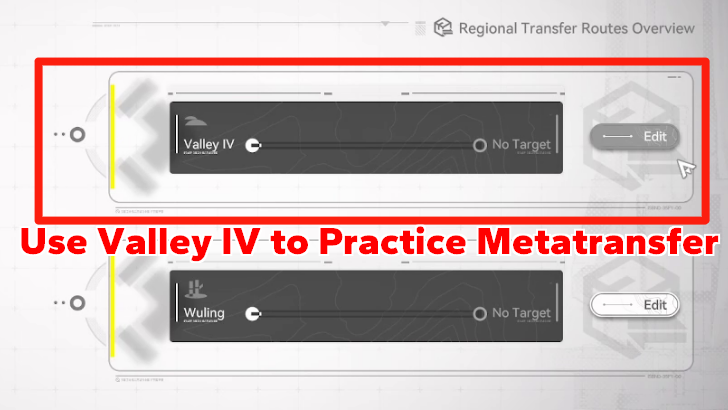
Once prompted to select the route, choose the region you want to use as Source. Valley IV is the only region at the moment that can use Metastorage Transfers.
Click Metastorage and Choose Destination
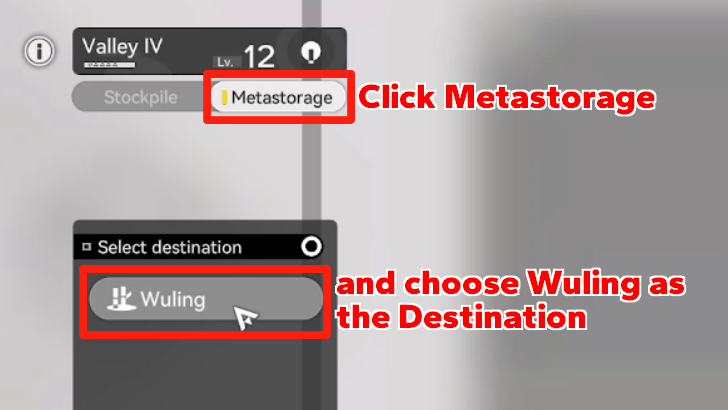
Afterewards, choose Metastorage instead of Stockpile for the type of transfer. Then, choose a different region like Wuling to transfer items to via Metastorage Transfer.
Select Item and Amount to Begin Transfer
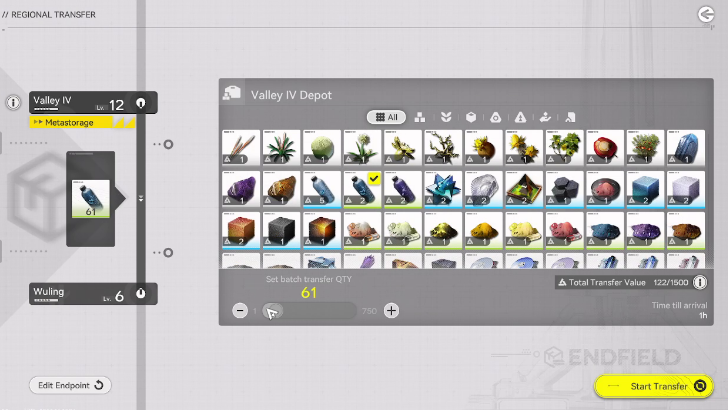
Here, choose the item you want to transfer, and the number of pieces of said item that you want to move. There is a limit based on the number of items and the value of the item you want to transfer, just like normal Regional Transfers.
Once you have details finalized, click Start Transfer on the bottom-right corner of the screen.
Wait for the Transfer to Finish
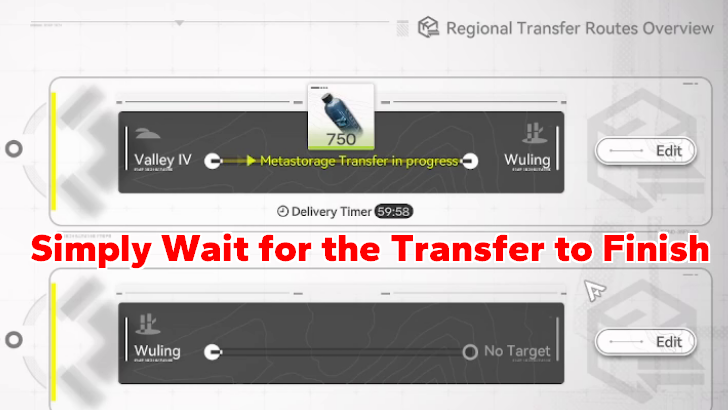
The final step is to simply wait out the Transfer to finish. This progresses in real time instead of in-game time, so transferring items will take a while.
Once it finishes, you can simply repeat the process again.
What is Metastorage Transfer?
Transfer Items Without Taking From Depot
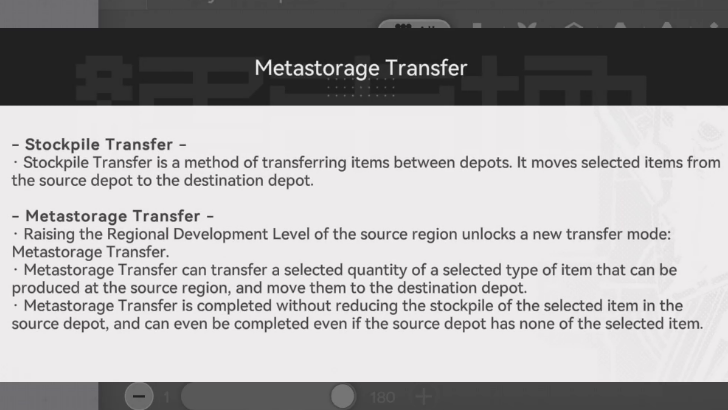
Regional Transfers and Metastorage Transfers are actually similar in method, but the effect and result is different.
The chosen item to be transferred does not need to be in your stash, as it is more akin to having the item be created in the middle of transfer being completed even if the source depot has none of the item!
Deliver Items From Host Region
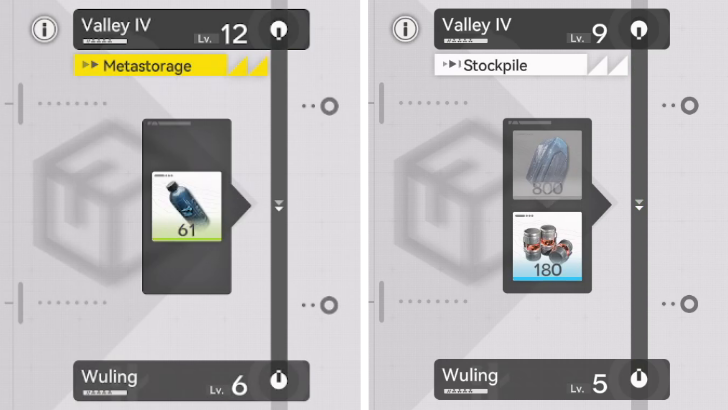
One restriction that the Metastorage Transfer has compared to Regional Transfers is that you can only deliver items that come from its home region.
For example, you want to do a Metastorage Transfer from Valley IV to Wuling; you cannot Metastorage Transfer an item that is exclusive to Wuling like Xiranite, even if you have Xiranite currently in your stash.
Arknights: Endfield Related Guides
All Tier Lists and Meta Guides
 Characters Tier List
 Reroll Guide and Tier List
 Best Team Comps
 Team Building Guide
 All Character Builds
 Weapons Tier List
 All Stats and Explanation
 Best Weapons Per Character
 Best Gear Sets Per Character
All Helpful Tools
 Tier List Maker Tier List Maker |
 Team Builder Tool Team Builder Tool |
 Weapon Essence Checker Weapon Essence Checker |
All Recommended Guides
 Gacha System Explained
 Protocol Pass Details
 Server Status and Times
 Bugs and Known Issues
 Medals and Achievements
 All Weapon Supply Guides
 Imminent Incursion Guide
 Etchspace Salvage Guide
 How to Farm Plants and Unlock Planting
 All Races In-Game
 Is Amiya in Endfield?
 List of All Bosses
 All Gear and Gear Set Effects List
 Best Blueprint Codes Sharing Codes
 Explosives Guide
 Best Banner To Pull On
 All Protocol Space Locations
 Delver of the Cryptic Guide
 How to Upgrade Gear
 Gear System Crafting Guide
 Essence Guide: How to Farm Essence
 How to Upgrade Essence
 All Dried Originium Slug Locations
 Best Characters for Each Outpost
 How to Farm T-Creds
Comment



Author

Metastorage Transfer Guide

Premium Articles
Rankings
- We could not find the message board you were looking for.

Gaming News

![The Liar Princess and the Blind Prince Review [PC] | Lovely to Look at but Tedious to Play](https://img.game8.co/4442586/8d95f5faf05780f1765ce7e0938bd825.jpeg/show)
![Monster Hunter Stories 3 Review [First Impressions] | Simply Rejuvenating](https://img.game8.co/4438641/2a31b7702bd70e78ec8efd24661dacda.jpeg/thumb)
![The Seven Deadly Sins: Origin [First Impressions] | A Promising Start](https://img.game8.co/4440581/584e0bfb87908f12c4eab6e846eb1afd.png/thumb)

Popular Games

Genshin Impact Walkthrough & Guides Wiki
Umamusume: Pretty Derby Walkthrough & Guides Wiki
Pokemon Pokopia Walkthrough & Guides Wiki
Honkai: Star Rail Walkthrough & Guides Wiki
Monster Hunter Stories 3: Twisted Reflection Walkthrough & Guides Wiki
Arknights: Endfield Walkthrough & Guides Wiki
Wuthering Waves Walkthrough & Guides Wiki
Zenless Zone Zero Walkthrough & Guides Wiki
Pokemon TCG Pocket (PTCGP) Strategies & Guides Wiki
Monster Hunter Wilds Walkthrough & Guides Wiki









Recommended Games
Fire Emblem Heroes (FEH) Walkthrough & Guides Wiki
Diablo 4: Vessel of Hatred Walkthrough & Guides Wiki
Cyberpunk 2077: Ultimate Edition Walkthrough & Guides Wiki
Yu-Gi-Oh! Master Duel Walkthrough & Guides Wiki
Super Smash Bros. Ultimate Walkthrough & Guides Wiki
Pokemon Brilliant Diamond and Shining Pearl (BDSP) Walkthrough & Guides Wiki
Elden Ring Shadow of the Erdtree Walkthrough & Guides Wiki
Monster Hunter World Walkthrough & Guides Wiki
The Legend of Zelda: Tears of the Kingdom Walkthrough & Guides Wiki
Persona 3 Reload Walkthrough & Guides Wiki










All rights reserved
Copyright © 2022 - 2025 GRYPHLINE. All Rights Reserved.
The copyrights of videos of games used in our content and other intellectual property rights belong to the provider of the game.
The contents we provide on this site were created personally by members of the Game8 editorial department.
We refuse the right to reuse or repost content taken without our permission such as data or images to other sites.