
List of Controller and Mouse Mode Controls
★ Tip: Use Frames to organize your Storage.
☆ Build Habitats with Ditto's Moves.
★ Build Houses and Structures for your Pokemon
☆ Increase Comfort & Environment Levels.
★ Redeem Mystery Gifts for free items & furniture.
☆ Limited Time Event: Befriend Hoppip until 3/24!
Here is a list of all Controller and Mouse Mode controls in Pokemon Pokopia. Learn how to move around and change your control buttons here!
List of Contents
List of Controls
| Jump to a Section! | |||
|---|---|---|---|
| Main Controls | Furniture Placement | Inventory | Mouse Mode |
Main Controls
| Button | Controls |
|---|---|
 |
Move |
 |
Change target Run |
 |
Move the camera |
 |
View habitat borders Change camera distance (in buildings) |
 |
Interact |
 |
Put Away Surf |
Hold |
Run |
 |
Open your Bag |
 |
Pick up items |
Hold |
Inhale loose items |
 |
Ask Pokemon to follow you |
Hold |
Part ways with following Pokemon |
 |
Emotes or Messages |
 and and  |
Swap active move Handy Bag Controls |
 |
Use move |
Hold  |
Strafe |
 |
Jump Glide |
 |
Set move |
 |
Main Menu |
 |
Use Camera Photo Mode |
The Main Controls are the controls that you will use throughout the Pokemon Pokopia. These will help you navigate the world and access different tools in the game.
Beginner's Guide to Pokopia: Tips and Tricks
Furniture Placement Controls
| Button | Controls |
|---|---|
|
Spit Out: Adjust Height Up |
|
Spit Out: Adjust Height Down |
|
Spit Out: Rotate Counterclockwise |
|
Spit Out: Rotate Clockwise |
The Furniture Placement Controls adjust the orientation and placement of furniture when you place them down on a block. You can use these controls to rotate or adjust the height of items that you place down.
Inventory Controls
| Button | Controls |
|---|---|
|
Show/Hide Handy Bag |
|
Spit Out/Take Out Put in Container |
|
Back |
|
Swap Out |
Hold |
Sort |
|
Transfer All |
|
Transfer Half |
|
Show/Hide Headers |
|
Show/Hide Headers |
|
Drop |
|
Info |
The Inventory Controls are controls that you use when navigating the Inventory screen. You can adjust these to make accessing items easier.
Mouse Mode Controls
| Button | Controls |
|---|---|
| (Right Mouse) |
Place Items |
| (Right Mouse) |
Rock Smash |
| (Left Mouse) |
Place Items |
| (Left Mouse) |
Rock Smash |
When you use mouse mode, the only move you can use is Rock Smash. You can use the cursor to aim for specific blocks that you want to destroy or place items on.
How to Change Controls
Change Button Assignments in Game Settings
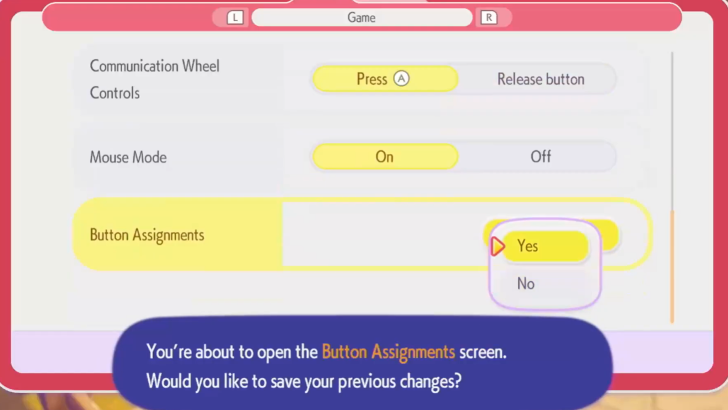
You can change your button assignments under the Game screen in your Settings. Here you can manually adjust your button controls, except for the ones that are greyed out. Greyed out buttons cannot be changed.
Turn Mouse Mode On in Game Settings
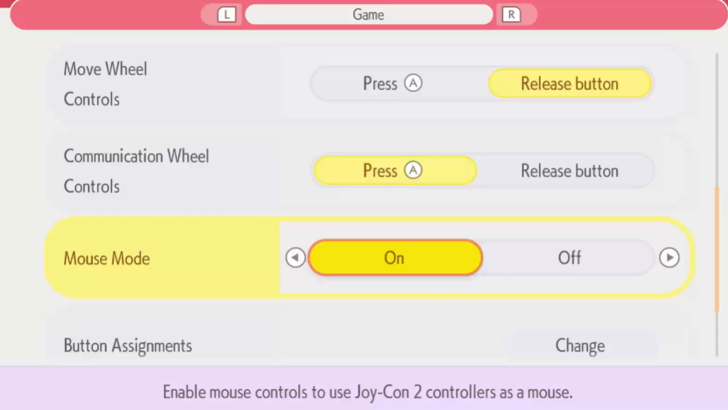
Activate Mouse Mode in your settings under the Game screen, then use your preferred controller as a mouse.
You can either use the Left Controller or the Right Controller as the mouse, but keep in mind that the button functions will switch depending on the active mouse.
For instance, if the Right Controller is being used as a mouse, then R and Zr will be the main buttons. If you use the Left Controller, then the main buttons will be L and Zl.
Pokemon Pokopia Related Guides

Beginner's Guide to Pokopia: Tips and Tricks
All Tips and Tricks
Comment



Author

List of Controller and Mouse Mode Controls

Rankings
- We could not find the message board you were looking for.

Gaming News




![Nova Roma Review [Early Access] | Newer, Better, and More Confusing](https://img.game8.co/4455512/2cbf8926e9a1c72a3ff056088f801ef4.png/thumb)
Popular Games

Genshin Impact Walkthrough & Guides Wiki
Umamusume: Pretty Derby Walkthrough & Guides Wiki
Crimson Desert Walkthrough & Guides Wiki
Monster Hunter Stories 3: Twisted Reflection Walkthrough & Guides Wiki
Honkai: Star Rail Walkthrough & Guides Wiki
Pokemon Pokopia Walkthrough & Guides Wiki
The Seven Deadly Sins: Origin Walkthrough & Guides Wiki
Wuthering Waves Walkthrough & Guides Wiki
Zenless Zone Zero Walkthrough & Guides Wiki
Arknights: Endfield Walkthrough & Guides Wiki









Recommended Games
Fire Emblem Heroes (FEH) Walkthrough & Guides Wiki
Diablo 4: Vessel of Hatred Walkthrough & Guides Wiki
Cyberpunk 2077: Ultimate Edition Walkthrough & Guides Wiki
Yu-Gi-Oh! Master Duel Walkthrough & Guides Wiki
Super Smash Bros. Ultimate Walkthrough & Guides Wiki
Pokemon Brilliant Diamond and Shining Pearl (BDSP) Walkthrough & Guides Wiki
Elden Ring Shadow of the Erdtree Walkthrough & Guides Wiki
Monster Hunter World Walkthrough & Guides Wiki
The Legend of Zelda: Tears of the Kingdom Walkthrough & Guides Wiki
Persona 3 Reload Walkthrough & Guides Wiki










All rights reserved
©2025 Pokémon. ©1995–2025 Nintendo / Creatures Inc. / GAME FREAK inc. ©KOEI TECMO GAMES
The copyrights of videos of games used in our content and other intellectual property rights belong to the provider of the game.
The contents we provide on this site were created personally by members of the Game8 editorial department.
We refuse the right to reuse or repost content taken without our permission such as data or images to other sites.