
Teleport Specialty Guide and How to Use
★ Tip: Use Frames to organize your Storage.
☆ Build Habitats with Ditto's Moves.
★ Build Houses and Structures for your Pokemon
☆ Increase Comfort & Environment Levels.
★ Redeem Mystery Gifts for free items & furniture.
☆ Limited Time Event: Befriend Hoppip until 3/24!
The Teleport Specialty can help you search for a Pokemon that seems to be missing around in the biome in Pokemon Pokopia. See the list of Pokemon with Teleport Specialty and how to use it here in this guide!
List of Teleport Specialty Pokemon
All Pokemon With Teleport Specialty
Where to Find Teleport Pokemon
Set Up New Habitats
Set up habitats that can attract Pokemon with the Teleport Specialty, with the easiest one being the Seaside tall grass Habitat! Thishabitat can attract either Slowbro or Slowking.
How to Build Every Type of Habitat
Relocate Pokemon to Other Areas
Players can relocate Teleport Pokemon and their Habitats to other areas to help Ditto restore other wastelands.
However, we do recommend having at least one Teleport Pokemon in each area instead of having them relocate every time you move to another area. This is to reduce the hassle and keep you engaged in finding new Pokemon to befriend.
How to Use Teleport Specialty
Locate a Missing Pokemon
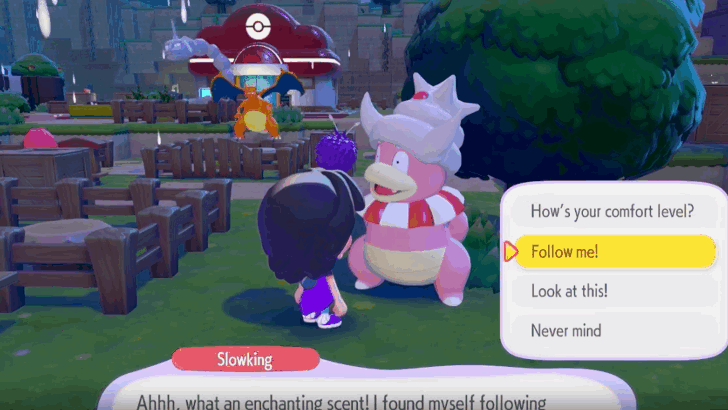
Players can use a Pokemon's Teleport specialty when looking for a missing Pokemon that cannot be found anywhere in the current biome.
This is done by making a Teleport Pokemon follow you, then opening the Pokedex, then pressing the Plus (+) button to search for a missing Pokemon, and talking to the Pokemon with the Teleport Specialty to fast travel to the missing Pokemon.
How to Use Teleport Specialty Step-by-Step Guide
| How to Use Teleport Specialty Walkthrough | |
|---|---|
| 1 | Approach a Pokemon with the Teleport Specialty and make them follow you. |
| 2 | 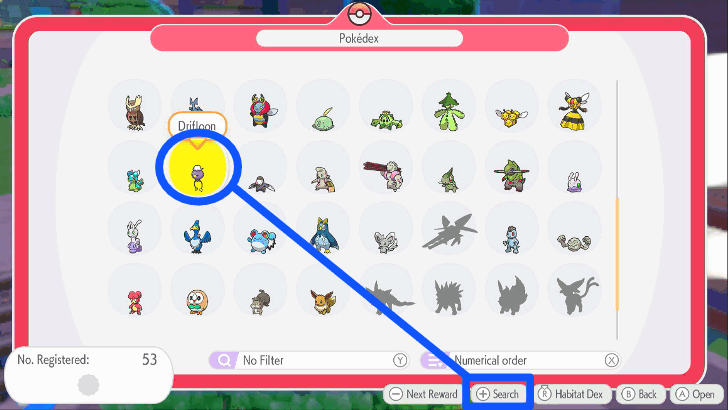 Open up the Pokedex and look for the Pokemon that you are trying to find. Once you do click on the Plus (+) button to start searching for it. |
| 3 | 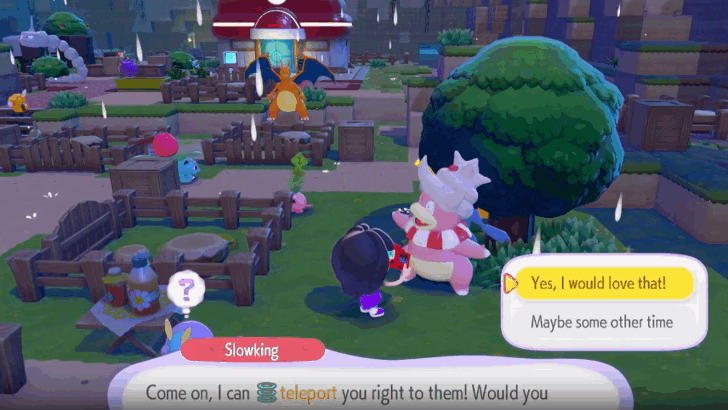 Then, talk to the Pokemon with the Teleport Specialty to fast travel to the Pokemon you are currently looking for. |
Go to a Pokemon's Habitat
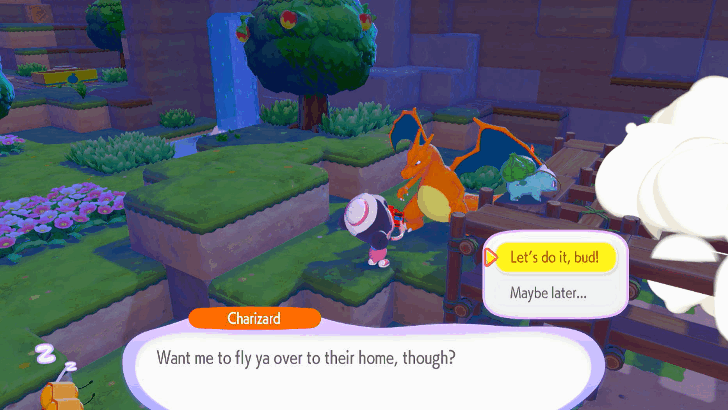
If by any chance the missing Pokemon cannot be seen anywhere, the Pokemon with the Teleport Specialty will teleport you to the missing Pokemon's current habitat instead. Then, you can use Honey near the missing Pokemon's habitat to make it reappear.
Fast Travel to a Specific Area
You can use the Teleport Specialty to fast travel Pokemon to a specific area of your choosing. This is done by assigning at least one Pokemon to a specific area, such as a construction site, house, or Habitat, and using the Teleport Specialty to search and fast travel to that Pokemon.
This mechanic of the Teleport Specialty is very useful when looking for the Pokemon required in construction areas, such as houses and Pokemon Center, area far away or lives in another biome.
How to Teleport Pokemon to a Specific Area Step-by-Step Guide
| How to Teleport Pokemon to a Specific Area | |
|---|---|
| 1 | 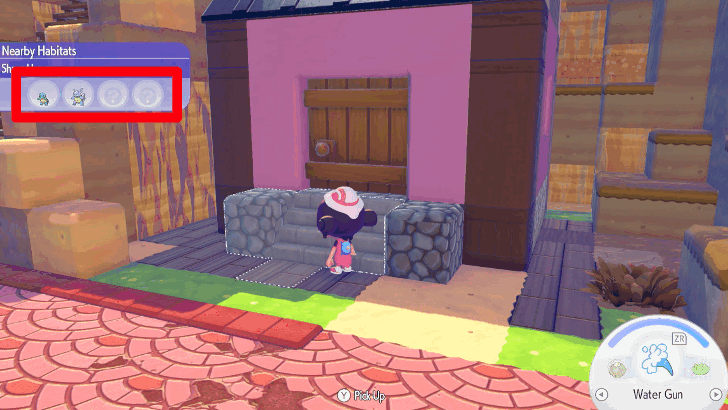 Assign at least one Pokemon to a specific area, such as a construction site, house, or Habitat. |
| 2 |  Make a Pokemon with Teleport Specialty follow you. |
| 3 | 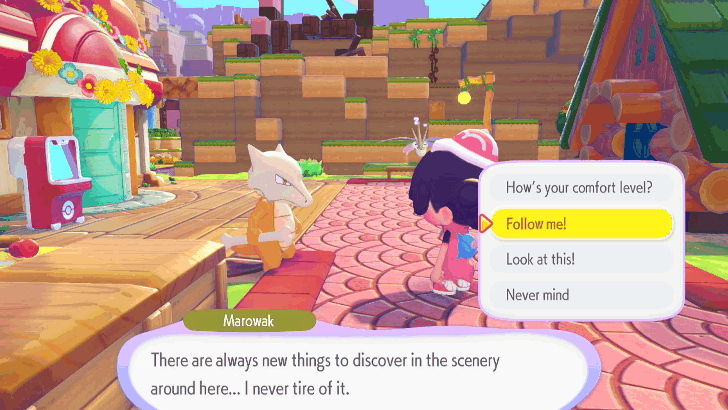 Search for the Pokemon you want. Keep in mind you can only have a maximum of five Pokemon to follow you. |
| 4 | 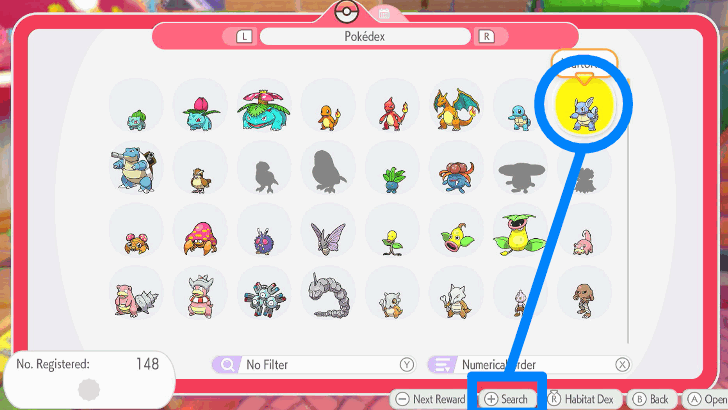 Look for the Pokemon in the Pokedex you initially assigned to the specific area before. Once that's done, talk to the Pokemon with Teleport Specialty to fast travel to the specific location. |
How to Use Teleport Specialty Step-by-Step Guide
Pokemon Pokopia Related Guides

List of Pokemon by Specialties
All Pokemon Specialties
| All Specialties |
 Appraise Appraise
|
 Build Build
|
 Bulldoze Bulldoze
|
|---|---|---|
 Burn Burn
|
 Chop Chop
|
 Collect Collect
|
 Crush Crush
|
 DJ DJ
|
 Dream Island Dream Island
|
 Eat Eat
|
 Engineer Engineer
|
 Explode Explode
|
 Fly Fly
|
 Gather Gather
|
 Gather Honey Gather Honey
|
 Generate Generate
|
 Grow Grow
|
 Hype Hype
|
 Illuminate Illuminate
|
 Litter Litter
|
 Paint Paint
|
 Party Party
|
Rarify |
 Recycle Recycle
|
 Search Search
|
 Storage Storage
|
 Teleport Teleport
|
 Trade Trade
|
 Transform Transform
|
 Water Water
|
 Yawn Yawn
|
||
Comment



Author

Teleport Specialty Guide and How to Use

Rankings
- We could not find the message board you were looking for.

Gaming News




![Nova Roma Review [Early Access] | Newer, Better, and More Confusing](https://img.game8.co/4455512/2cbf8926e9a1c72a3ff056088f801ef4.png/thumb)
Popular Games

Genshin Impact Walkthrough & Guides Wiki
Umamusume: Pretty Derby Walkthrough & Guides Wiki
Crimson Desert Walkthrough & Guides Wiki
Monster Hunter Stories 3: Twisted Reflection Walkthrough & Guides Wiki
Honkai: Star Rail Walkthrough & Guides Wiki
Pokemon Pokopia Walkthrough & Guides Wiki
The Seven Deadly Sins: Origin Walkthrough & Guides Wiki
Wuthering Waves Walkthrough & Guides Wiki
Zenless Zone Zero Walkthrough & Guides Wiki
Arknights: Endfield Walkthrough & Guides Wiki









Recommended Games
Fire Emblem Heroes (FEH) Walkthrough & Guides Wiki
Diablo 4: Vessel of Hatred Walkthrough & Guides Wiki
Cyberpunk 2077: Ultimate Edition Walkthrough & Guides Wiki
Yu-Gi-Oh! Master Duel Walkthrough & Guides Wiki
Super Smash Bros. Ultimate Walkthrough & Guides Wiki
Pokemon Brilliant Diamond and Shining Pearl (BDSP) Walkthrough & Guides Wiki
Elden Ring Shadow of the Erdtree Walkthrough & Guides Wiki
Monster Hunter World Walkthrough & Guides Wiki
The Legend of Zelda: Tears of the Kingdom Walkthrough & Guides Wiki
Persona 3 Reload Walkthrough & Guides Wiki










All rights reserved
©2025 Pokémon. ©1995–2025 Nintendo / Creatures Inc. / GAME FREAK inc. ©KOEI TECMO GAMES
The copyrights of videos of games used in our content and other intellectual property rights belong to the provider of the game.
The contents we provide on this site were created personally by members of the Game8 editorial department.
We refuse the right to reuse or repost content taken without our permission such as data or images to other sites.