
How to Fix Top Down Camera View
★ All Updates for Patch 5
☆ Beginner Guides for All Starter Players
★ Simple Character Creation Guide for beginners
☆ A Full Guide to Multiclassing
★ All Side Quests and Event Points
☆ All Races and Subraces
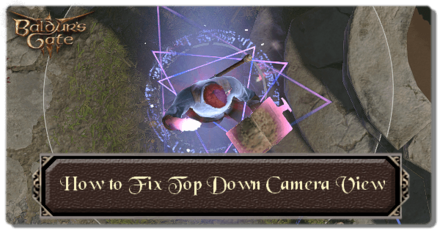
The Tactical Camera provides Top Down Camera View in Baldur's Gate 3 (BG3) that you can cancel anytime by pressing O. Read on to learn more about this Top Down Camera View and how to enable and disable it during your playthrough.
List of Contents
How to Fix Top Down Camera View
| How to Fix Top Down Camera View in Baldur's Gate 3 |
|---|

Exit the Tactical Camera View by Pressing O
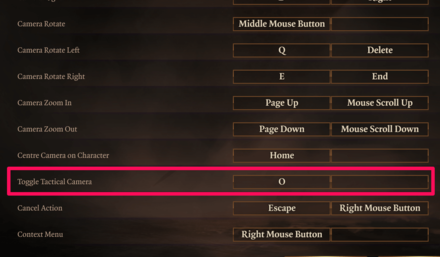
The Tactical Camera is one of the camera view options that allows you to enter a Top Down Camera View mode. You can enter and exit this mode by Pressing O.
Check Keybind Changes

You can also check your Keybind options to see if there were any changes with the Toggle Tactical Camera key. If you found any changes, click on it and change it back to O or to any key of your preference. You can also press reset to revert all keybind changes to normal.
Disable Mods
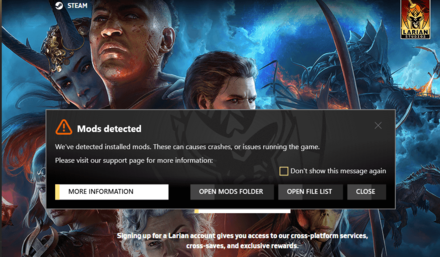
If you're running mods, it is also possible that one of them could be a causing a glitch to lock you in this Top Down Camera View. Try removing them to see if it fixes the issue.
Mod Guide: How to Mod Your Game
Baldur's Gate 3 Related Guides

Baldur's Gate 3 Beginner's Guide
Comment



Author
How to Fix Top Down Camera View

Rankings
Gaming News



![Monster Hunter Stories 3 Review [First Impressions] | Simply Rejuvenating](https://img.game8.co/4438641/2a31b7702bd70e78ec8efd24661dacda.jpeg/thumb)
Popular Games

Genshin Impact Walkthrough & Guides Wiki
Honkai: Star Rail Walkthrough & Guides Wiki
Umamusume: Pretty Derby Walkthrough & Guides Wiki
Pokemon Pokopia Walkthrough & Guides Wiki
Resident Evil Requiem (RE9) Walkthrough & Guides Wiki
Monster Hunter Wilds Walkthrough & Guides Wiki
Wuthering Waves Walkthrough & Guides Wiki
Arknights: Endfield Walkthrough & Guides Wiki
Pokemon FireRed and LeafGreen (FRLG) Walkthrough & Guides Wiki
Pokemon TCG Pocket (PTCGP) Strategies & Guides Wiki










Recommended Games
Diablo 4: Vessel of Hatred Walkthrough & Guides Wiki
Cyberpunk 2077: Ultimate Edition Walkthrough & Guides Wiki
Fire Emblem Heroes (FEH) Walkthrough & Guides Wiki
Yu-Gi-Oh! Master Duel Walkthrough & Guides Wiki
Super Smash Bros. Ultimate Walkthrough & Guides Wiki
Pokemon Brilliant Diamond and Shining Pearl (BDSP) Walkthrough & Guides Wiki
Elden Ring Shadow of the Erdtree Walkthrough & Guides Wiki
Monster Hunter World Walkthrough & Guides Wiki
The Legend of Zelda: Tears of the Kingdom Walkthrough & Guides Wiki
Persona 3 Reload Walkthrough & Guides Wiki










All rights reserved
© 2023 Larian Studios. All rights reserved. Larian Studios is a registered trademark of arrakis nv, affiliate of Larian Studios Games ltd. All company names, brand names, trademarks and logos are the property of their respective owners. © 2020 Wizards of the coast. All rights reserved. Wizards of the coast, Baldur’s Gate, Dungeons & Dragons, D&D, and their respective logos. Are registered trademarks of wizards of the coast LLC
The copyrights of videos of games used in our content and other intellectual property rights belong to the provider of the game.
The contents we provide on this site were created personally by members of the Game8 editorial department.
We refuse the right to reuse or repost content taken without our permission such as data or images to other sites.