
Movement Guide
★ 17 active SHiFT Codes as of March 14, 2026
☆ Black Market Location
★ Elemental Weakness Chart
☆ Legendary Weapons
★ Builds: Vex | Amon | Rafa | Harlowe
Borderlands 4 expanded the series' movement mechanics by adding new actions that players can do. Learn all the new and important movement mechanics along with the tips on how to do it by continuing below!
List of Contents
Movement Guide
| Movement Tips and Tricks |
|---|

Chain Different Movement Mechanics
In Borderlands 4, you can quickly chain different movement mechanics to gain an advantage over your enemies. This allows you to reposition yourself to gain a better angle or to retreat if you have to.
Glide to Get a Better Angle Against Enemies
Gliding in the game can get you a better angle when dealing with enemies. This can help you target weakspots or throw grenades at grouped enemies.
Utilize the Grapple's Speed Boost
Depending on the grappling point, your character can have a speed boost after grappling. You can utilize this boost to slide or glide depending on the situation!
Grapple View Tilt Setting
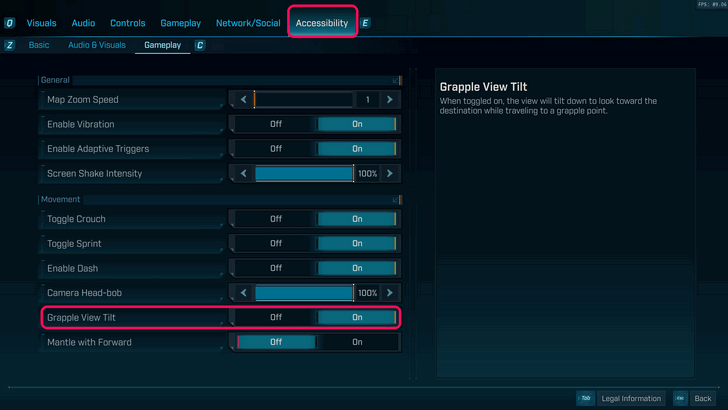
| Grapple View Tilt On | Grapple View Tilt Off |
|---|---|
You can view the Grapple View Tilt setting in the accessibility tab in the options menu. Leaving this option on will make your camera look down on where you're landing after a grapple, while leaving this option off will let you take full control of the camera after grappling.
Cancel Sliding With Other Moves
You can cancel out of the sliding animation by performing other movement options. This includes jumping, sprinting, and grappling.
Slide to Carry Momentum
Similarly, you can slide right after doing other moves to carry its momentum. This includes jumping, grappling, and dashing.
Use the Ground Slam to Recover From Throw Attacks
While the Ground Slam is not a powerful offensive move, you can use this to quickly recover back on your feet if an enemy attack throws you away.
Exit Your Vehicle to Carry Momentum
You can carry your vehicle's forward momentum when driving off a cliff. You can then chain this into a glide if you're planning to reach a far destination!
All Movement Mechanics
| All Movement Mechanics | |
|---|---|
| Grappling | Allows you to reach high places or gives you a speed boost. |
| Gliding | Allows you stay airborne longer to reach far places or to get better angles. |
| Dashing | Gives you a quick burst of movement to dodge or reposition yourself. |
| Double Jump | Can be used to dodge grounded attacks and gives access to Ground Slams. |
| Ground Slam | Quickly set your foot on the ground while dealing small splash damage. |
| Sliding | Allows you to slip in and out of combat quickly. |
| Vehicle Powerslide | Used to drift while driving. Also charges three boosts when done correctly. |
Grappling
| Grappling Button Input | ||
|---|---|---|
 PlayStation |
 Xbox |
 PC |
Grappling is one of the new movement mechanics introduced in Borderlands 4. Grappling allows you to move vertically or horizontally depending on the grapple point's angle.
Gliding
| Gliding Button Input (Hold) | ||
|---|---|---|
 PlayStation |
 Xbox |
 PC |
Gliding allows you to remain airborne as you reach far places. This movement mechanic is important to use in both exploration and combat!
Dashing
| Dashing Button Input | ||
|---|---|---|
 PlayStation |
 Xbox |
 PC |
Dashing allows you to move in a quick burst to reposition yourself. Ground dashes will only allow you to dash sideways and backwards, while air dashes allows you to dash at any direction.
Perform Air Dash to Dash Forward
| Air Dash Button Input | ||
|---|---|---|
| + PlayStation |
+ Xbox |
+ PC |
If you wish to perform a forward dash, you must be airborne. Gliding and dashing can be combined together to easily perform a forward dash.
Double Jump
| Double Jump Button Input (Press Twice) | ||
|---|---|---|
PlayStation |
Xbox |
PC |
Double jumping is essential to exploration as this move lets you reach and mantle high places. In addition, double jumping can also be used to avoid grounded attacks while in combat!
Ground Slam
| Ground Slam Button Input (after a double jump) | ||
|---|---|---|
PlayStation |
Xbox |
 PC |
You can do a Ground Slam after performing a double jump. This move makes you quickly land on the ground while dealing splash damage in the area.
Sliding
| Sliding Button Input | ||
|---|---|---|
 + + |
 + + |
+ |
Sliding lets you get in and out of combat quickly. This can be used as a gap closer or as a movement option to retreat behind a cover. This move is also important in exploration as it makes traversal faster.
Backwards Sliding is Not Possible
Sliding backwards in the game is not possible even with momentum.
Vehicle Powerslide
| Powerslide Button Input (Hold) | ||
|---|---|---|
 PlayStation |
 Xbox |
PC |
Powersliding is the term used for drifting in Borderlands 4. If done correctly, your vehicle can charge up to 3 boosts that will activate once you let go of the powersliding button!
Spawn Vehicle Mid-air
| Spawn Vehicle Button Input | ||
|---|---|---|
 PlayStation |
 Xbox |
 PC |
You can spawn your vehicle while falling or gliding to make traversal faster.
Borderlands 4 Related Guides

Beginner's Guide to Borderlands 4: Tips and Tricks
Tips and Tricks Guides
Comment



Author
Movement Guide

Rankings
- We could not find the message board you were looking for.
Gaming News

![Monster Hunter Stories 3 Review [First Impressions] | Simply Rejuvenating](https://img.game8.co/4438641/2a31b7702bd70e78ec8efd24661dacda.jpeg/show)


![Monster Hunter Stories 3 Review [First Impressions] | Simply Rejuvenating](https://img.game8.co/4438641/2a31b7702bd70e78ec8efd24661dacda.jpeg/thumb)
Popular Games

Genshin Impact Walkthrough & Guides Wiki
Umamusume: Pretty Derby Walkthrough & Guides Wiki
Pokemon Pokopia Walkthrough & Guides Wiki
Honkai: Star Rail Walkthrough & Guides Wiki
Monster Hunter Stories 3: Twisted Reflection Walkthrough & Guides Wiki
Arknights: Endfield Walkthrough & Guides Wiki
Wuthering Waves Walkthrough & Guides Wiki
Zenless Zone Zero Walkthrough & Guides Wiki
Pokemon TCG Pocket (PTCGP) Strategies & Guides Wiki
Monster Hunter Wilds Walkthrough & Guides Wiki










Recommended Games
Diablo 4: Vessel of Hatred Walkthrough & Guides Wiki
Cyberpunk 2077: Ultimate Edition Walkthrough & Guides Wiki
Fire Emblem Heroes (FEH) Walkthrough & Guides Wiki
Yu-Gi-Oh! Master Duel Walkthrough & Guides Wiki
Super Smash Bros. Ultimate Walkthrough & Guides Wiki
Pokemon Brilliant Diamond and Shining Pearl (BDSP) Walkthrough & Guides Wiki
Elden Ring Shadow of the Erdtree Walkthrough & Guides Wiki
Monster Hunter World Walkthrough & Guides Wiki
The Legend of Zelda: Tears of the Kingdom Walkthrough & Guides Wiki
Persona 3 Reload Walkthrough & Guides Wiki










All rights reserved
©2025 Gearbox Software. Published by 2K Games. Developed by Gearbox. Gearbox, Borderlands, and related logos are all trademarks of Gearbox Software, LLC. 2K and the 2K logo are trademarks of Take-Two Interactive Software, Inc. All other marks and trademarks are the property of their respective owners. All rights reserved.
The copyrights of videos of games used in our content and other intellectual property rights belong to the provider of the game.
The contents we provide on this site were created personally by members of the Game8 editorial department.
We refuse the right to reuse or repost content taken without our permission such as data or images to other sites.