What can you do as a free member?

Member benefits illustration

Create your free account today and unlock all our premium features and tools to enhance your gaming experience.

Member benefits illustration

Create your free account today and save articles to your watchlist and get notified when they're updated with new information.

Member benefits illustration

Create your free account today and save your favorite games for quick access later, synced across all your devices.

Member benefits illustration

By creating a Game8 account and logging in, you'll receive instant notifications when someone replies to your posts.

Comment rating feature illustration

By creating a Game8 account and logging in, you can make use of convenient features in the comments section, such as rating and sorting comments.

Premium archive feature illustration

By creating a Game8 account and logging in, you can access Premium articles that are exclusively available to members.

Site Interface

Guest
Free Member
Article Watchlist
Game Bookmarks
Cross-device Sync
Light/Dark Theme Toggle
User Profiles
Direct Feedback
Comment Rating

Game Tools

Guest
Free Member
Interactive Map Access
Interactive Map Pins
Interactive Map Comments
Interactive Map Pins Cross-Device
Check List
Event Choice Checker
Deck Builder Cross-Device
Message Board Notification
Message Board Cross-Device
Build Planner
Stat Calculator
Diagnostic Tool
Weapon/Armor Wishlist

Want more information?Learn more

Borderlands 4

Can You Change POV?

Add to Watchlist

Borderlands 4 - Can You Change POV
There is no option to play in the Third Person POV in Borderlands 4. Learn all about the First Person POV and when the POV changes in-game.

Can You Change POV?

There is No Third Person POV Available

Borderlands 4 - First Person View
Borderlands 4 is locked to first person perspective, and there is no option to switch to a third person POV.

Certain Skill Can Shift POV

Borderlands 4 - Third Person View
Some Vault Hunter action skills temporarily change the camera angle when activated, making it a third person view. This shift in perspective only lasts for the duration of the skill, after which the view will automatically return to first person view.

Riding the Digirunner Uses Third Person POV
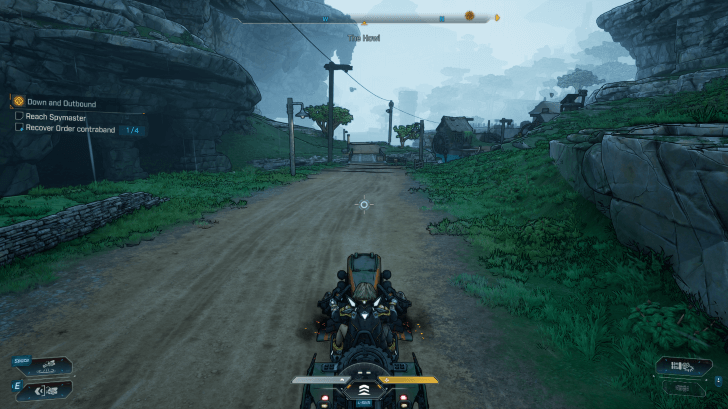
Borderlands 4 - Digirunner POV
When riding vehicles, the camera automatically shifts to third person view. Driving the Digirunner gives you a wider view for aiming and maneuvering, making it easier to handle combat and navigation. Once you exit the vehicle, the view reverts back to first person.

Increase FOV for a Wider View

FOV Comparison

90 FOV

110 FOV

Raising your FOV widens your peripheral vision, giving you a clearer look at the battlefield and making it easier to track enemies around you. You can change this anytime in the game’s settings to find the view that feels most comfortable.

Can You Change FOV?

Borderlands 4 Related Guides

TIPS & TRICKS

Beginner's Guide to Borderlands 4: Tips and Tricks

Tips and Tricks Guides

Progression Guides
What to Do First Level Cap: What is the Max Level?
How to Farm Bosses How to Level Up Fast
How to Farm and Use Eridium How to Get More SDU Tokens
How to Crush Jamming Device When Do You Get a Vehicle?
How to Unlock More Weapon Slots How to Increase Inventory Capacity
How to Get Stronger Weapons Can You Upgrade Weapons?
Red Chest Farm Location Should You Do Side Quests?
What is Ultimate Vault Hunter? How to Increase UVH Level
Legendary Enhancements Farm How to Unlock UVH 2
How to Get Into Dominion -
General Guides
How to Sell Items How to Respec Skill Tree
Golden Keys Guide All Bank Locations
How to Store and Transfer Items How to Drop Items
How to Claim Deluxe Edition Items How to Fast Travel
Can You Duel? Pearlescent Rarity
Level Scaling Explained How to Summon Vehicle
How to Link 2K Account Weapon Rarity vs Level
Lost Loot Machine Explained Weapons Levels Explained
Weapon Rarity Explained Fishing Guide
What to Spend Money On Movement Guide
Moxxi's Tip Jar Guide: Location and Rewards Should You Save on Golden Keys?
Legendary Vending Machine Locations Should You Wait on Opening Vaults?
Throwing Knife Farm All Secrets, Easter Eggs, and References
How to Farm Firmware How to Transfer Firmware
Settings Guides
List of All Controls Matchmaking Guide
Difficulty Differences and How to Change Can You Change Character?
Best and Recommended Settings Can You Change FOV?
Can You Change POV? Compiling Shaders Fix
How to Save and Recover Lost Saves Is There a Minimap?
How to Clear Shader Cache -
Combat Guides
Death Penalty: What Happens When You Die? Elemental Weaknesses Guide
Incendiary Damage Guide Shock Damage Guide
Cryo Damage Guide Radiation Damage Guide
Corrosive Damage Guide One Shot Exploit

Author

    Please participate in our site
    improvement survey
    12/2025
    Would you assist in
    improving Game8's site?
    ×
    This survey will take about 1 minute.
    Your answers will help us to improve our website.
    We are listening to our users' valuable opinions and discussing how to act on them.
    The information collected through this survey will be used for the purpose of improving our services. In addition, the information will only be disclosed a part of a statistic in a format that will not allow identification of personal information.
    Begin Survey

    All rights reserved

    Guide Index