
Beginner's Guide to Outer Worlds 2: Tips and Tricks
This is a beginner's guide for The Outer Worlds 2 that focuses on tips and tricks to help you in your journey in the Arcadia system. Learn the basics, covering of the essential tips in combat, exploration, builds, along with some advanced tips!
Beginner's Guide
| Beginner's Guide |
|---|
|
|

Character Customization
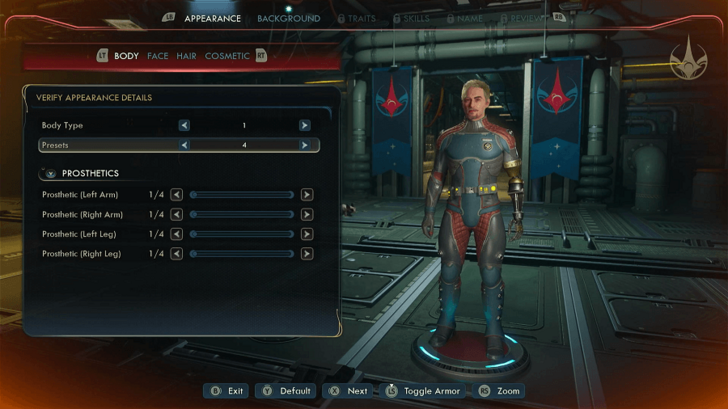
The Outer Worlds 2 features an extensive character customization system that offers plenty of freedom to shape your character. You can choose from six Backgrounds (or backstories) for your agent, select Traits that significantly impact combat, dialogue, crafting, and story, and specialize in two Skills to define your playstyle from the start.
Note that you cannot change your character’s appearance or background, and you’ll only have one opportunity to respec your Traits and Skills after the prologue.
Exploit Your Traits
| Best Traits | |||||||||||||||||||||||||||||||||||||||||||||||||||||||||||
|---|---|---|---|---|---|---|---|---|---|---|---|---|---|---|---|---|---|---|---|---|---|---|---|---|---|---|---|---|---|---|---|---|---|---|---|---|---|---|---|---|---|---|---|---|---|---|---|---|---|---|---|---|---|---|---|---|---|---|---|
 Brilliant Brilliant |
 Brawny Brawny |
 Resilient Resilient |
 Nimble Nimble |
||||||||||||||||||||||||||||||||||||||||||||||||||||||||
 Witty Witty |
 Sickly Sickly |
 Dumb Dumb |
|||||||||||||||||||||||||||||||||||||||||||||||||||||||||
As you create your character in The Outer Worlds 2, you can select Traits or characteristics that best describe your agent. Traits provide both positive and negative effects that influence how you perform in combat and interact with the world, so choose Traits that fit your playstyle.
Make Use of Flaws
| Best Flaws | ||
|---|---|---|
| Consumerism | Overprepared | Flawed |
One of the series’ more unique RPG systems, Flaws, makes a return in The Outer Worlds 2. Flaws apply permanent negative effects to your character but also comes with permanent positive benefits. Whenever you meet the requirement for a Flaw, a pop-up will appear, giving you the option to either accept or reject it.
It’s easy to be risk-averse and reject Flaws as they appear, but we recommend weighing their pros and cons carefully. Some Flaws may actually end up being more of a blessing to your character than a curse.
Adjust Settings to Your Liking
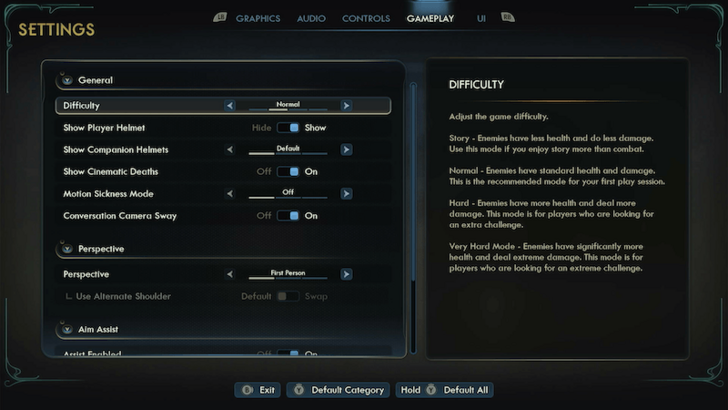
You can tailor the game’s settings to your liking; from the difficulty to accessibility. The Outer Worlds 2 offers four difficulty modes: Story, Normal, Hard, and Very Hard. Normal is pretty much the intended experience, but we recommend Hard for experienced players familiar with the action RPG genre, and Story for those who just want to enjoy the narrative with minimal combat challenge.
The game also includes several quality-of-life settings you can toggle. We recommend turning on Show Base Item Stats and setting Tooltip Damage Display to DPS under the UI Settings to see how much damage your weapon can cause per second when continuously fired.
Follow an Early Game Build
The Outer Worlds 2’s Backgrounds allow you to shape your character to fit any playstyle you want. We recommend checking out our Builds to find the best combination of Traits, Skills, and equipment to maximize your potential early in the game.
Understand the Equipment Stats
The Outer Worlds 2 has a wide variety of weapons and armor to collect. It’s easy to go with equipment with big numbers and high stats, but it's important to know that your character’s traits, skills, and even playstyle all influence how effectively you can use or wear them.
Choose Weapons According to Your Build
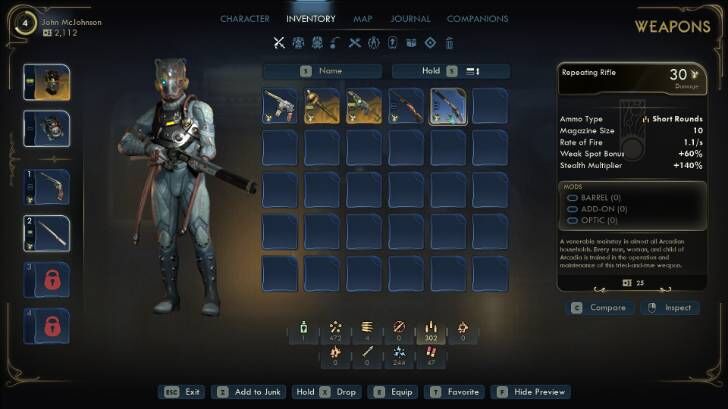
Choose the right type of weapon that fits your character build. Your combat effectiveness will be reliant not only on your stats but on your build and how you use the weapons you have equipped.
If you are focused on a Stealth build, for example, we recommend using weapons such as pistols, revolvers, or, if playing safe, long-range weapons to take advantage of your stealth-oriented gameplay.
Equip the Right Armor Type
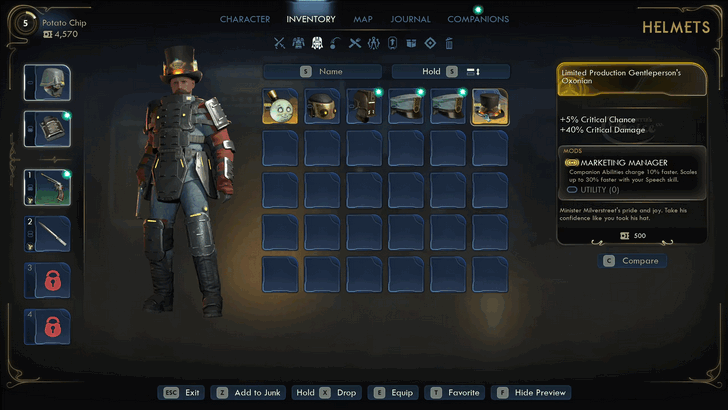
There are 3 types of body armor: Light, Medium, and Heavy. Each type provides an advantage that can assist your specific build, while Head armor also provides its own set of passive effects. Make sure to pick your armor wisely and tailor it your desired playstyle!
Fast Travel to Save Time

You’ll be traveling across the Arcadia system and visiting different colonies throughout your journey in The Outer Worlds 2. Unlock fast travel points by exploring Landmarks and Local Areas, then fast travel to them by opening your Map and selecting the blue compass icon.
It’s best to make the most of the game’s fast travel feature and use it whenever you need to move between distant locations or planets.
Backgrounds Come With Unique Outcomes
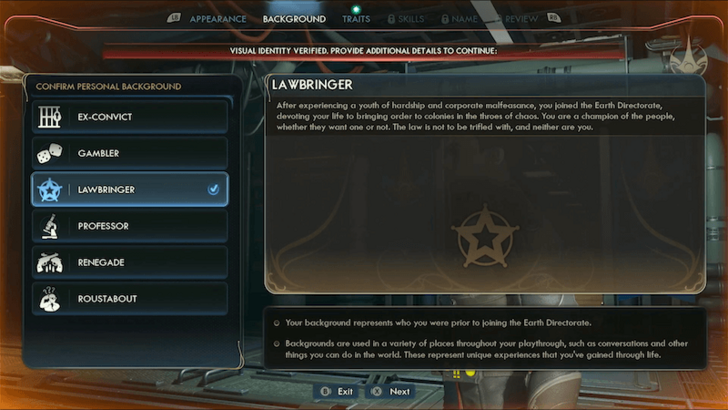
During character creation, you can choose a Background or backstory for your agent. Backgrounds provide additional dialogue options in certain conversations. Some of these options can lead to great outcomes, while others can make your reputation worse.
Players are encouraged to select options that their Background provides for the full experience. This is, however, not required, especially if choosing said option will prevent you from accomplishing things the way you want to.
Align With Factions
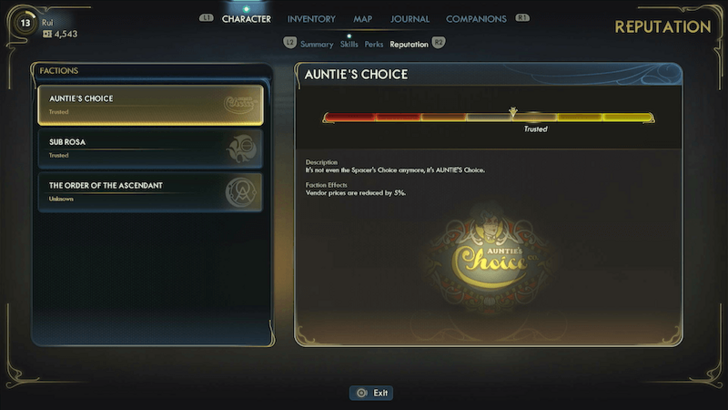
You can align with different Factions in The Outer Worlds 2. Joining a Faction will give you access to Faction-specific questlines, and completing more of their missions will earn you vendor discounts within their territory.
Explore Each Crevice of a Planet

The Arcadia system in The Outer Worlds 2 is larger and more expansive than the Halcyon system from the first game. Explore each map as thoroughly as possible so you don’t miss out on hidden loot, secret side activities, and even Easter eggs!
Watch Your Resources
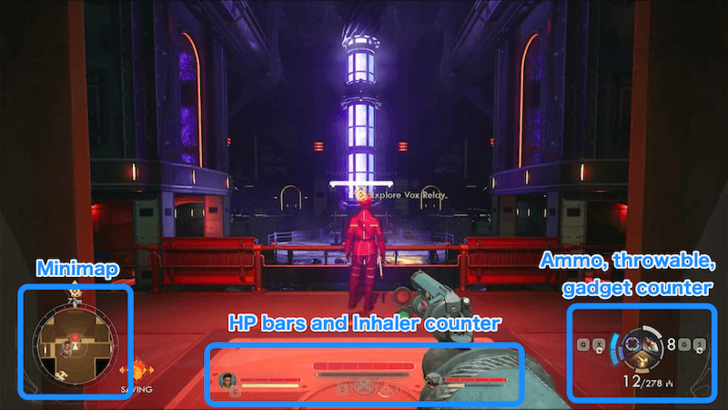
You’ll often find yourself in intense gunfights, so it’s important to keep track of your vitals and resources. The Outer Worlds 2 updates its HUD from the first game, moving most key elements to the bottom of the screen. Your and your Companions’ HP bars are now displayed at the bottom center, along with the number of Inhalers you have left.
Your ammo, throwables, and gadgets are now grouped together at the bottom left, while a minimap has been added to the bottom right.
Essential Tips
| Essential Tips |
|---|
|
|
Exploit Damage Types
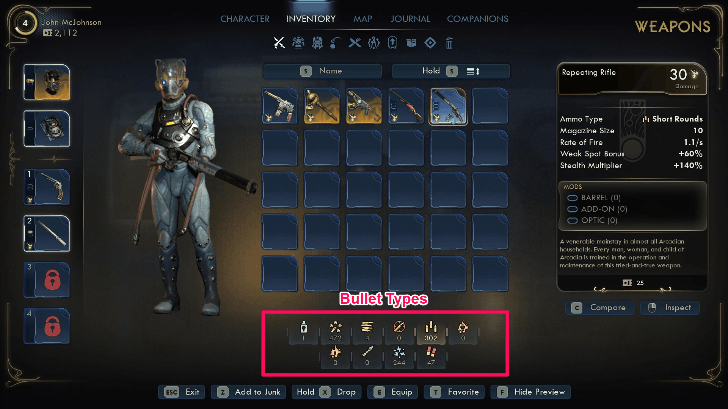
Weapons in The Outer Worlds 2 use different ammo types depending on the gun's features and caliber. Make sure to pick up as much as you can to continue rocking in the wastelands!
Some of the ammunition in-game are pretty common, such as Short Rounds and Compact Rounds, while special ammo such as Bio-Mass Canisters might be uncommon and harder to find. Melee weapons, meanwhile, do not have ammo and can be used repeatedly. Certain enemies are also weak to some types. For example, Automechs are weak against Shock.
Focus on a Select Few Skills
| Best Skills | ||
|---|---|---|
 Guns Guns |
 Melee Melee |
 Science! Science! |
 Lockpick Lockpick |
 Engineering Engineering |
 Hack Hack |
 Medical Medical |
 Speech Speech |
 Sneak Sneak |
There are 12 Skills that your character can choose from in The Outer Worlds 2. You can also specialize in two Skills. Specialized Skills immediately receive two Skill points, giving you a head start in those areas.
We recommend focusing on 2-3 major stats, while also investing a few points in bypass skills such as Lockpick or Hack.
Favorite Perks You Are Aiming For
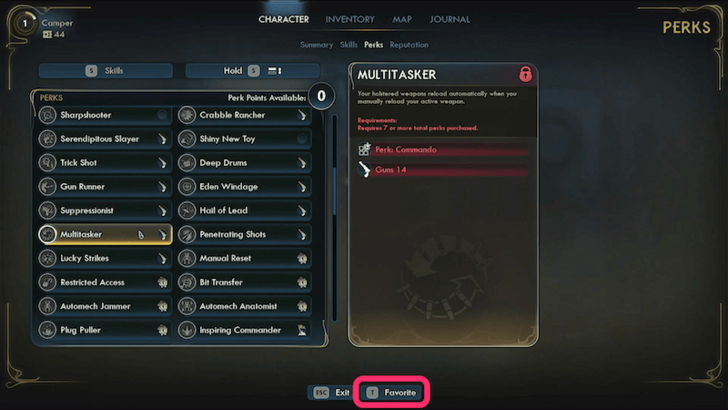
Perks provide various stat bonuses to your character such as adding critical damage or improving defenses.
You can mark favorite on perks you’re aiming for, making leveling up more organized and smooth. This helps you focus on the perks you actually want to unlock as you level up.
Get the Double Jump as Soon as Possible
Unlock the Double Jump ability as soon as possible. To get it, progress through the Perilous Journey to the Grove mission and start A Final Death for Gravity. Having the Double Jump increases your vertical mobility, allowing you to leap across high areas and reach places that would otherwise be inaccessible with a normal jump.
Make Use of the Minimap
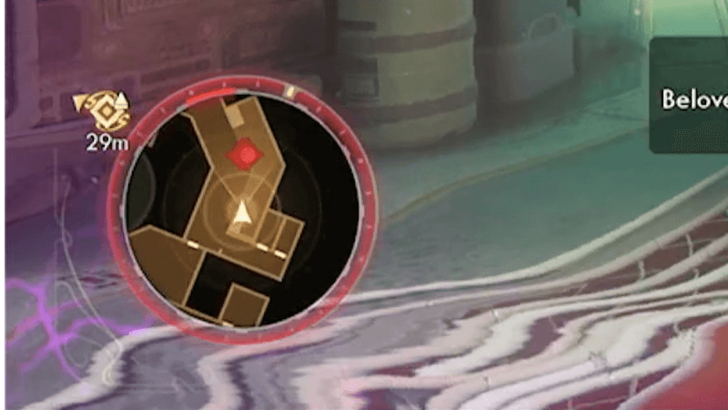
A new quality-of-life feature in The Outer Worlds 2 is the addition of a minimap in the HUD. You can track enemy positions by watching for red areas, which indicate their general location. With the Tracker Perk, however, you’ll be able to see their exact positions in the area.
Prepare for Missions
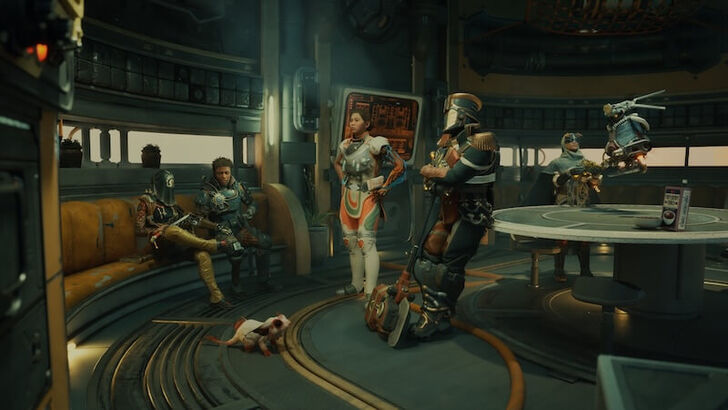
It’s important to prepare before taking on any mission, whether main or side. Replenish your ammo and resources, sell or breakdown any junk or old equipment, and pick Companions best suited for the task.
Keep in mind also that some missions present choices with consequences and rewards. Read dialogue options carefully, consider your actions and their possible effects, or you can just check our Walkthroughs to prepare for the choices you may encounter.
Actively Use Gadgets
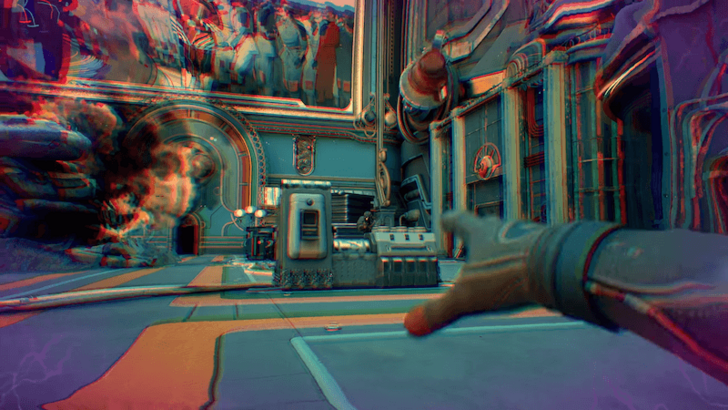
In addition to weapons, you also have an arsenal of gadgets and throwables to use in combat. Make the most of them and use gadgets and throwables often to mix up your fights. Don’t forget to take advantage of your Companions’ Abilities as well!
All Tips and Tricks Guides
The Outer Worlds 2 Related Guides

The Outer Worlds 2 Guides
| Outer Worlds 2 Wiki Contents | |
|---|---|
 Main Quests Main Quests |
 Side Quests Side Quests |
 Collectible Quests Collectible Quests |
 Tasks Tasks |
 Companion Quests Companion Quests |
 Companions Companions |
 Puzzles Puzzles |
 Choices Choices |
 Weapons Weapons |
 Mods Mods |
 Armor Armor |
 Helmets Helmets |
 Builds Builds |
 Resources Resources |
 Gadgets Gadgets |
 Inhalers Inhalers |
 Skills Skills |
 Perks Perks |
 Traits Traits |
 Flaws Flaws |
 Maps Maps |
 Tips and Tricks Tips and Tricks |
 Factions Factions |
 Faction Quests Faction Quests |
 Items Items |
 Ship Pets Ship Pets |
 Trophies Trophies |
 News and Game Info News and Game Info |
Recommended Guides
Comment



Author
Beginner's Guide to Outer Worlds 2: Tips and Tricks

Rankings
- We could not find the message board you were looking for.
Gaming News


![Monster Hunter Stories 3 Review [First Impressions] | Simply Rejuvenating](https://img.game8.co/4438641/2a31b7702bd70e78ec8efd24661dacda.jpeg/thumb)
![The Seven Deadly Sins: Origin [First Impressions] | A Promising Start](https://img.game8.co/4440581/584e0bfb87908f12c4eab6e846eb1afd.png/thumb)

Popular Games

Genshin Impact Walkthrough & Guides Wiki
Umamusume: Pretty Derby Walkthrough & Guides Wiki
Pokemon Pokopia Walkthrough & Guides Wiki
Honkai: Star Rail Walkthrough & Guides Wiki
Monster Hunter Stories 3: Twisted Reflection Walkthrough & Guides Wiki
Arknights: Endfield Walkthrough & Guides Wiki
Wuthering Waves Walkthrough & Guides Wiki
Zenless Zone Zero Walkthrough & Guides Wiki
Pokemon TCG Pocket (PTCGP) Strategies & Guides Wiki
Monster Hunter Wilds Walkthrough & Guides Wiki










Recommended Games
Diablo 4: Vessel of Hatred Walkthrough & Guides Wiki
Cyberpunk 2077: Ultimate Edition Walkthrough & Guides Wiki
Fire Emblem Heroes (FEH) Walkthrough & Guides Wiki
Yu-Gi-Oh! Master Duel Walkthrough & Guides Wiki
Super Smash Bros. Ultimate Walkthrough & Guides Wiki
Pokemon Brilliant Diamond and Shining Pearl (BDSP) Walkthrough & Guides Wiki
Elden Ring Shadow of the Erdtree Walkthrough & Guides Wiki
Monster Hunter World Walkthrough & Guides Wiki
The Legend of Zelda: Tears of the Kingdom Walkthrough & Guides Wiki
Persona 3 Reload Walkthrough & Guides Wiki










All rights reserved
© 2025 Obsidian Entertainment, Inc. Obsidian Entertainment, the Obsidian Entertainment logo, The Outer Worlds 2, and The Outer Worlds 2 logos are trademarks or registered trademarks of Obsidian Entertainment, Inc. All rights reserved.
The copyrights of videos of games used in our content and other intellectual property rights belong to the provider of the game.
The contents we provide on this site were created personally by members of the Game8 editorial department.
We refuse the right to reuse or repost content taken without our permission such as data or images to other sites.