
How to Use Auto-Continue Feature
★ Tier Lists: Characters | Weapons | Demon Wedges
★ Builds: Kezhou | Fushu | Fina | Lynn | Psyche
★ Version 1.2 Summary | Characters: Zhiliu | Yuming
┗ Mechanics: Mount | Gifting | Reputation | Accessory Customization
★ How to Get Characters | Mystic Maze | Redeem Codes
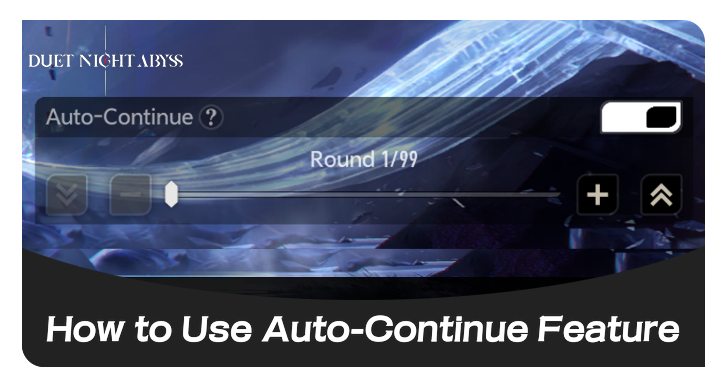
Auto-Continue is a new feature that can help players automatically progress through waves in Commissions ∞ in Duet Night Abyss (DNA). Learn how to unlock Auto-Continue, how to use it, its rules and conditions, what it is, and tips for using Auto-Continue.
List of Contents
How to Unlock Auto-Continue
Automatically Unlocked
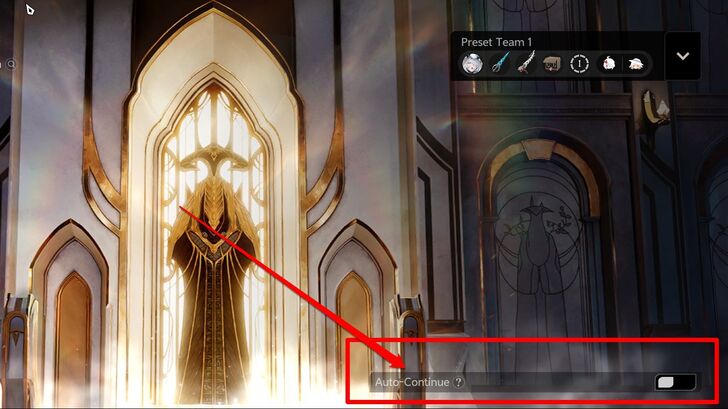
The Auto-Continue feature is automatically unlocked for endless commissions following the The Wind Awakening Part 2 update.
How to Use Auto-Continue
Used in Excavation ∞, Exploration ∞, or Defense ∞
| 1 | 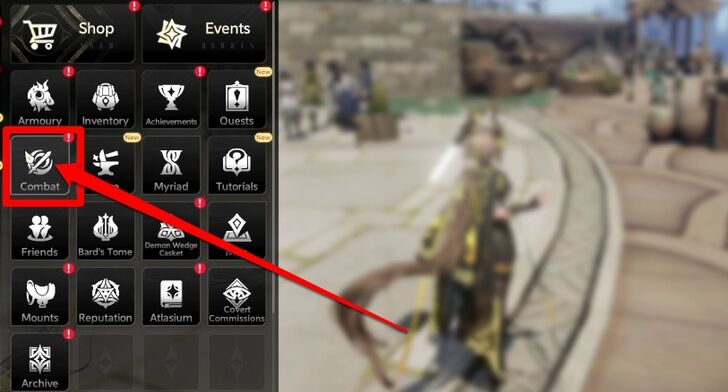 Go to Combat Tab and Click Commissions. |
|---|---|
| 2 | 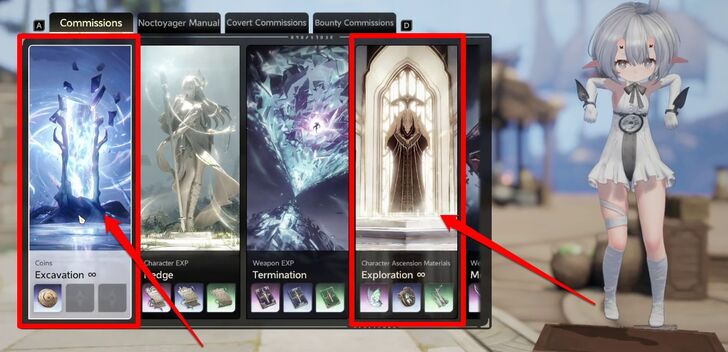 Click on Excavation ∞, Exploration ∞, or Defense ∞. |
| 3 | 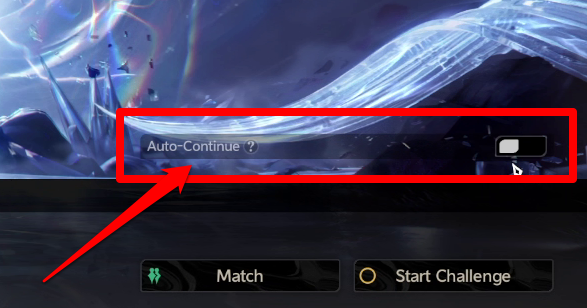 Press the auto-continue feature located at the bottom right to the top of Start Challenge. |
| 4 | 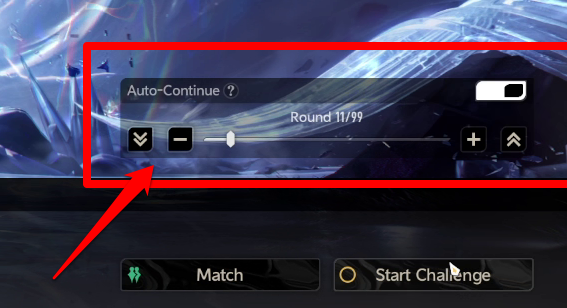 You can enable Auto-Continue from Round 1 through Round 99. |
| 5 | 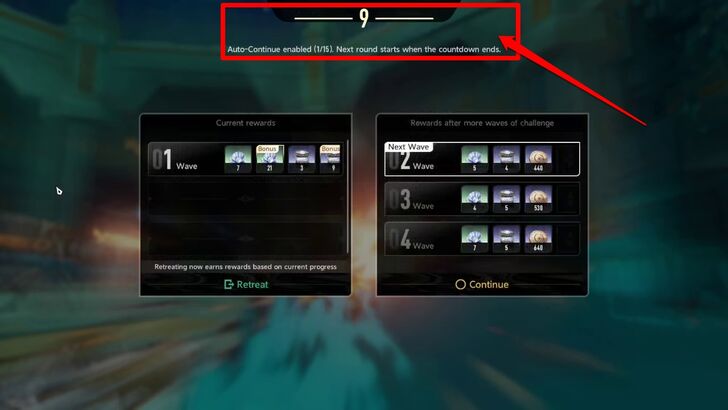 After completing a wave, a 9-second countdown will begin, allowing you time to wait (you can still manually press Continue or Retreat if desired), followed by another 9-second countdown that uses the previously selected Commission Manual. You can manually change the Commission Manual if needed. If you change your selection during a round, the new manual will be used from the next round onward. |
| 6 | 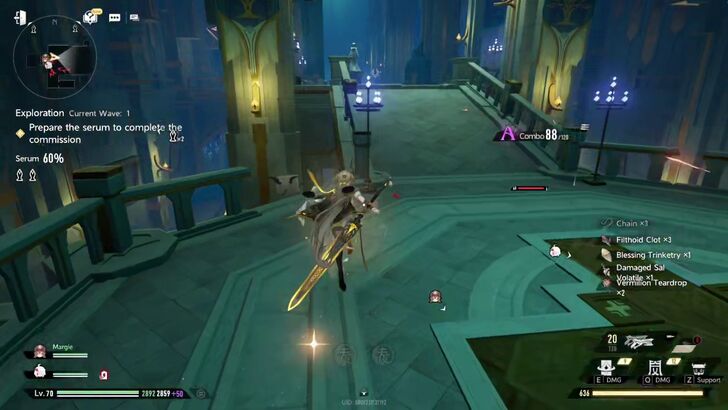 Once this countdown ends, you will automatically proceed to the next wave. |
Auto-Continue Rules and Conditions
| Rules and Conditions |
|---|
| • Maximum of 99 Waves per Auto-Continue session |
| • Manual changes to Manuals or Secret Letters apply throughout the commissions; they are applicable after being set. |
| • Secret Letter rewards default to the first option unless manually change befor the countdown ends |
| • Auto-Continue only works in Solo Mode for endless commissions |
Tips For Using Auto-Continue
| Customization Options for Accessories |
|---|
|
|

Use Auto-Continue to Farm Secret Letters
Auto-Continue is a useful feature for farming Secret Letter clues for characters and weapons, especially when aiming to reach a specific amount. It eliminates the need for manual input and prevents mistakes from accidentally selecting the wrong Secret Letter.
Use Commission Manuals to Farm For Resources
Auto-Continue is a great feature when you have a lot of Commission Manuals, making it ideal for farming materials and resources efficiently. It’s especially convenient for grinding through multiple rounds without constant manual input.
Run Excavation and Exploration to Farm Geniemon and Lunoloot
We recommend running Excavation and Exploration commissions with Auto-Continue enabled when farming for Geniemons and Lulu Lunoloot.
These commissions can randomly trigger Commission Occurrences such as “H…H…Hands in the Air”, which spawns Lulu Lunoloot, and “Rescue the Geniemon”, where you rescue a Geniemon from enemies.
Since these events can occur in any wave, Auto-Continue allows runs to progress continuously without the need to confirm continuation.
What is the Auto-Continue Feature?
Automatically Progresses Through Endless Commission Waves
Auto-Continue makes endless commissions easier by removing the need to manually confirm progression after each wave.
It automatically advances through stages and selects the secret letter and commission manual players chose at the start, allowing players to farm more efficiently—especially during long grinding sessions.
Duet Night Abyss Related Guides

Tips and Tricks: Beginner's Guide
All Tips and Tricks
Comment



Author

How to Use Auto-Continue Feature
Rankings
Gaming News




![Forza Horizon 6 Review [Preview] | Beautiful Roads With a Whole Lot of Oversteer](https://img.game8.co/4460981/a7254c24945c43fbdf6ad9bea52b5ce9.png/thumb)
Popular Games

Genshin Impact Walkthrough & Guides Wiki
Crimson Desert Walkthrough & Guides Wiki
Umamusume: Pretty Derby Walkthrough & Guides Wiki
Honkai: Star Rail Walkthrough & Guides Wiki
Monster Hunter Stories 3: Twisted Reflection Walkthrough & Guides Wiki
Wuthering Waves Walkthrough & Guides Wiki
The Seven Deadly Sins: Origin Walkthrough & Guides Wiki
Pokemon TCG Pocket (PTCGP) Strategies & Guides Wiki
Pokemon Pokopia Walkthrough & Guides Wiki
Zenless Zone Zero Walkthrough & Guides Wiki










Recommended Games
Monster Hunter World Walkthrough & Guides Wiki
Fire Emblem Heroes (FEH) Walkthrough & Guides Wiki
Pokemon Brilliant Diamond and Shining Pearl (BDSP) Walkthrough & Guides Wiki
Super Smash Bros. Ultimate Walkthrough & Guides Wiki
Diablo 4: Vessel of Hatred Walkthrough & Guides Wiki
Cyberpunk 2077: Ultimate Edition Walkthrough & Guides Wiki
Yu-Gi-Oh! Master Duel Walkthrough & Guides Wiki
Elden Ring Shadow of the Erdtree Walkthrough & Guides Wiki
The Legend of Zelda: Tears of the Kingdom Walkthrough & Guides Wiki
Persona 3 Reload Walkthrough & Guides Wiki










All rights reserved
Game Copyright©Pan Studio All Rights Reserved.
The content we provide on this site were created personally by members of the Game8 editorial department.
We refuse the right to reuse or repost content taken without our permission such as data or images to other sites.
©Pan Studio (Provider)