
List of Key Controls
★ Tier Lists: Characters | Weapons | Demon Wedges
★ Builds: Kezhou | Fushu | Fina | Lynn | Psyche
★ Version 1.2 Summary | Characters: Zhiliu | Yuming
┗ Mechanics: Mount | Gifting | Reputation | Accessory Customization
★ How to Get Characters | Mystic Maze | Redeem Codes
This is a list of key controls, bindings, and functions that support keyboard and controller in Duet Night Abyss (DNA). Check out the basic controls, how to change controls, and other controller options in this guide!
List of Basic Controls
Basic Functions for Controls
| Function | Keyboard/Mouse |
|---|---|
| Move - Forward |  |
| Move - Backward |  |
| Move - Left |  |
| Move - Right |  |
| Helix Leap |  |
| Jump |  Spacebar |
| Rotate Camera |  Rotate Mouse |
| Normal Attack |  Left Click |
| Ranged Attack |  Right Click |
| Lock onto the Target |  Middle Click |
| Slide/Crouch |  Left Ctrl |
| Dodge |  Left Shift |
| Item Info |  Tab Key |
Chat | 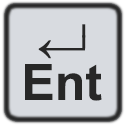 Enter |
| Pick Up/Interact |  |
| Reload |  |
| DMG Skill |  |
| Buff Skill |  |
| Bag/Inventory |  |
| Open Map |  |
| Open Menu |  |
| Events Page |  |
| Battle Pass | 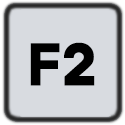 |
| Open Myriad Screen |  |
| Armoury |  |
| Forgery |  |
| Tactical Backpack |  |
| Tutorials |  |
| Navigate |  |
| Quit Challenge |  |
How to Change Settings
Open Menu and Select Settings Option
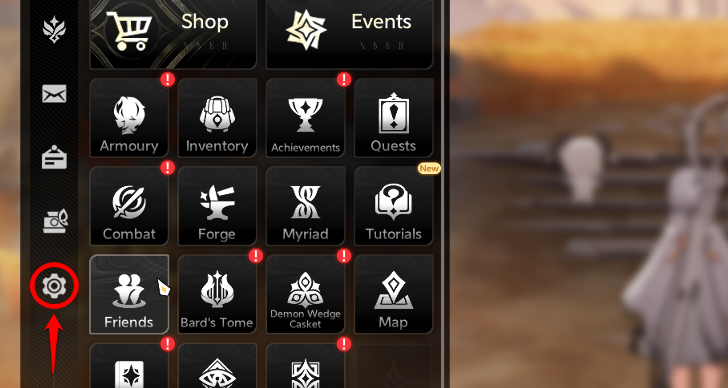
Players can open the menu and choose the gear icon at the bottom left of the sidebar. Do note that some settings may vary for each available platform. Clicking this will show various settings options that you can change!
Players Can Change Key Bindings
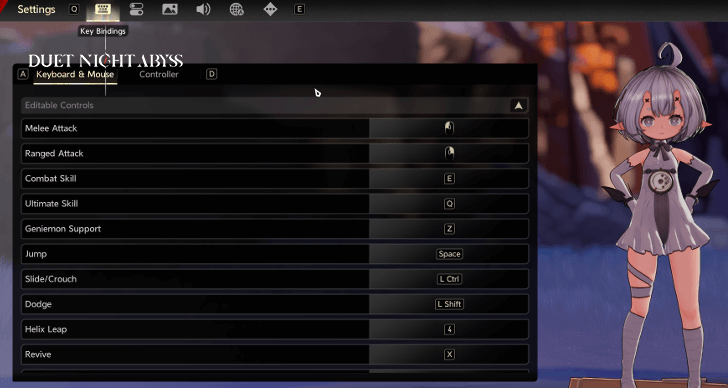
The game gives players the option to change the controls to their preference. You can switch around key bindings and functions to better suit your playstyle!
Currently, players can only change the key binding functions for keyboard and mouse on PC; we recommend using these devices for control and gameplay.
Different Controller Options
Can Choose From 4 Different Profiles
| Profile 1 | 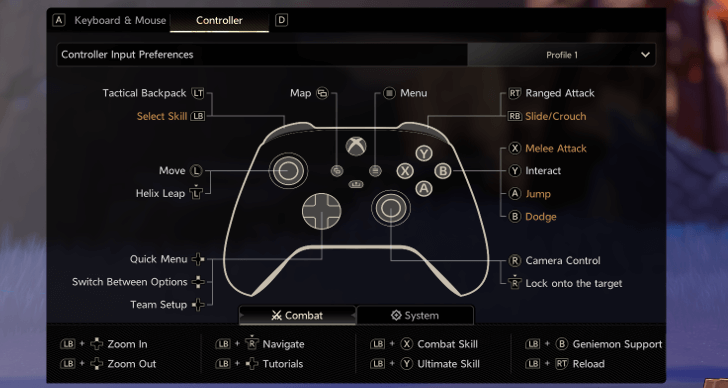 |
|---|---|
| Profile 2 | 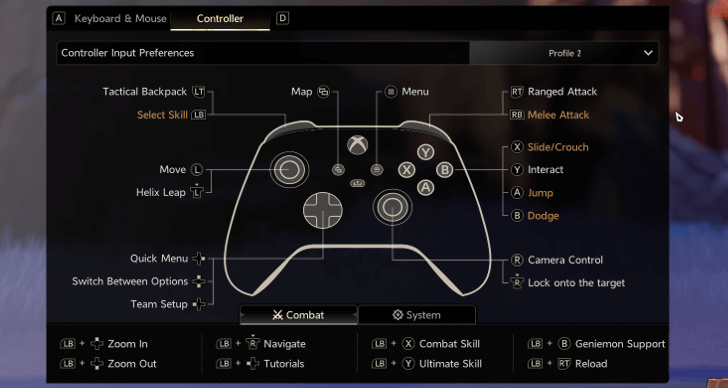 |
| Profile 3 | 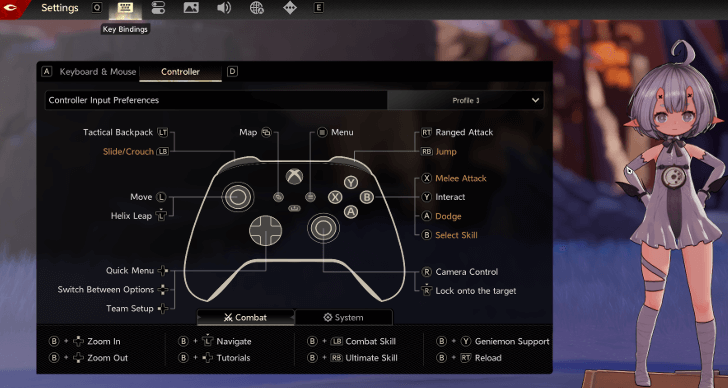 |
| Profile 4 | 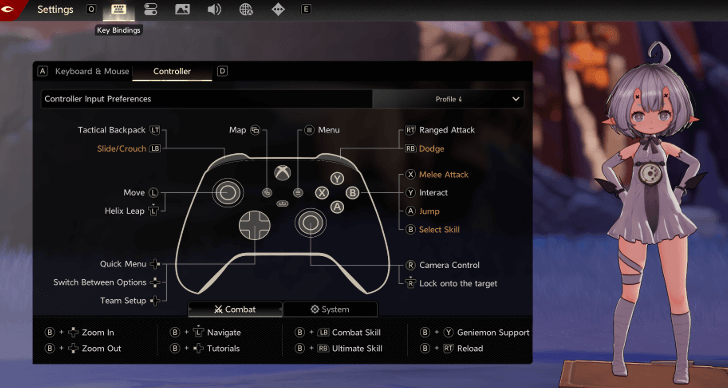 |
These are the current set of different key controller profiles available in Duet Night Abyss. Check out the list of supported controllers here!
Controller Support Guide
Duet Night Abyss Related Guides

Tips and Tricks: Beginner's Guide
All Tips and Tricks



Author

List of Key Controls
Rankings
Gaming News




![Forza Horizon 6 Review [Preview] | Beautiful Roads With a Whole Lot of Oversteer](https://img.game8.co/4460981/a7254c24945c43fbdf6ad9bea52b5ce9.png/thumb)
Popular Games

Genshin Impact Walkthrough & Guides Wiki
Crimson Desert Walkthrough & Guides Wiki
Umamusume: Pretty Derby Walkthrough & Guides Wiki
Honkai: Star Rail Walkthrough & Guides Wiki
Monster Hunter Stories 3: Twisted Reflection Walkthrough & Guides Wiki
Wuthering Waves Walkthrough & Guides Wiki
The Seven Deadly Sins: Origin Walkthrough & Guides Wiki
Pokemon TCG Pocket (PTCGP) Strategies & Guides Wiki
Pokemon Pokopia Walkthrough & Guides Wiki
Zenless Zone Zero Walkthrough & Guides Wiki










Recommended Games
Monster Hunter World Walkthrough & Guides Wiki
Fire Emblem Heroes (FEH) Walkthrough & Guides Wiki
Pokemon Brilliant Diamond and Shining Pearl (BDSP) Walkthrough & Guides Wiki
Super Smash Bros. Ultimate Walkthrough & Guides Wiki
Diablo 4: Vessel of Hatred Walkthrough & Guides Wiki
Cyberpunk 2077: Ultimate Edition Walkthrough & Guides Wiki
Yu-Gi-Oh! Master Duel Walkthrough & Guides Wiki
Elden Ring Shadow of the Erdtree Walkthrough & Guides Wiki
The Legend of Zelda: Tears of the Kingdom Walkthrough & Guides Wiki
Persona 3 Reload Walkthrough & Guides Wiki










All rights reserved
Game Copyright©Pan Studio All Rights Reserved.
The content we provide on this site were created personally by members of the Game8 editorial department.
We refuse the right to reuse or repost content taken without our permission such as data or images to other sites.
©Pan Studio (Provider)
Yeah I call bullshit. There’s just an option to turn on controller vibration: there’s no key mapping or controller setup options on my phone or iPad. If this is just for pc then say it’s just for pc.