
How to Fix Fatal Error on PC
★ Tier Lists: Characters | Weapons | Demon Wedges
★ Builds: Kezhou | Fushu | Fina | Lynn | Psyche
★ Version 1.2 Summary | Characters: Zhiliu | Yuming
┗ Mechanics: Mount | Gifting | Reputation | Accessory Customization
★ How to Get Characters | Mystic Maze | Redeem Codes
Fatal Error occurs upon launching the game through Duet Night Abyss' (DNA) official launcher using PC. Learn more about how to fix the Fatal Error and what it is!
List of Contents
How to Fix Fatal Error on PC Launcher
- Perform a Repair Scan
- Launch With DirectX 11
- Open the Launcher Offline
- Launch Through the Game File Directly
- Contact Customer Support
- Report Bugs on the Official Discord
Perform a Repair Scan
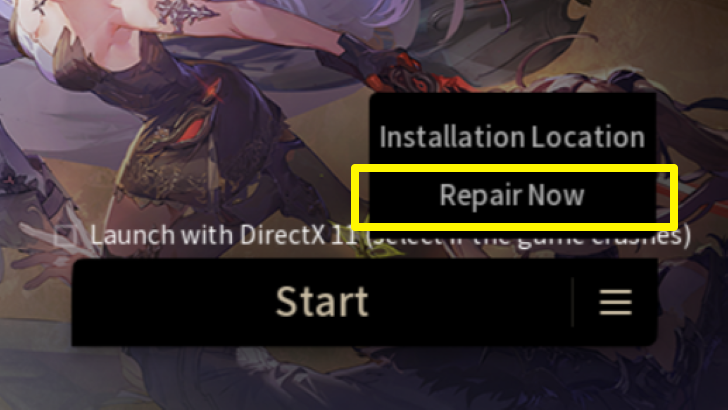
Select the button to the right side of the launcher’s Start button and select Repair Now. Press Confirm when asked to perform a scan on your game files. The launcher will show the verification and scanning progress. Once complete, you can try booting up the game.
Launch With DirectX 11
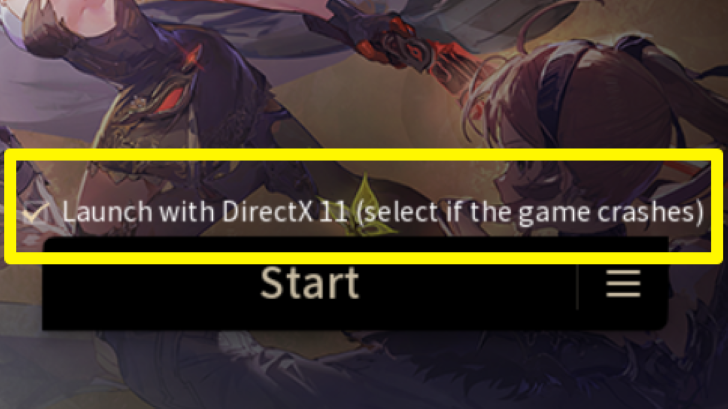
Before selecting the Start button in the game’s official launcher, tick the Launch with DirectX 11 checkbox above it. Make sure to have the latest version of DirectX 11 installed before attempting to launch the game with this setting on.
Open the Launcher Offline
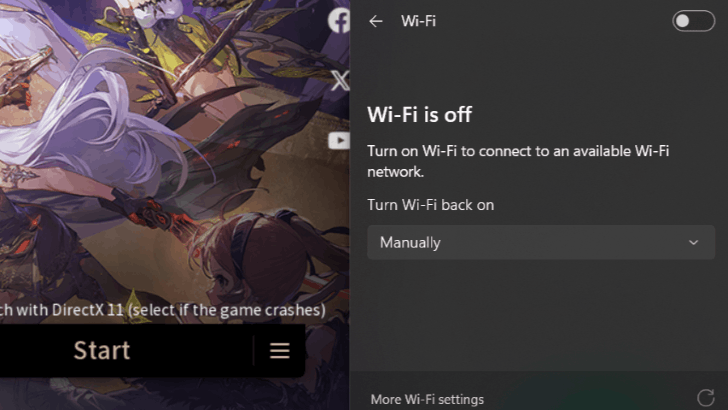
Some users reported that opening the launcher offline and then connecting should fix the error. Toggle your internet connection (WiFi or ethernet) off from your device and open the launcher file. Once it’s open, toggle your internet connection back on and launch or download the game.
Launch Through the Game File Directly
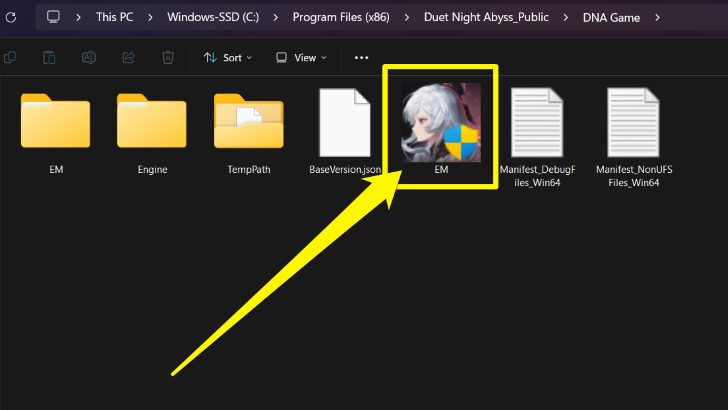
Some users reported success launching the game without the launcher file, bypassing the Fatal Error pop-up. To do this, find and open the EM.exe file inside the DNA Game folder in the installation location, which is usually in ‘C:\Program Files (x86)\Duet Night Abyss\DNA Game\EM.exe’ by default.
Contact Customer Support
The team has mentioned that they are aware and are currently fixing some of the known crashes. If players are still experiencing game-breaking bugs, it is best to contact their Customer Support below.
Report Bugs on the Official Discord
It's best to report any bugs or issues you encounter to the official Duet Night Abyss Discord server below. Be sure to format the bug report properly once you send it to the bug-report channel.
This allows the developers to quickly acknowledge and hopefully address them.
What is Fatal Error?
A Launcher Pop-up Window
Fatal Error is a pop-up that appears when trying to launch the game. It seems that the error stems from an issue with the game’s launcher and internet connectivity, according to reports.
Duet Night Related Guides

Latest News and Updates
 Version 1.3 Livestream Summary Version 1.3 Livestream Summary |
 Version 1.3 Release Date and Characters Version 1.3 Release Date and Characters |
All Version Updates
 Version 1.1 Release Date Version 1.1 Release Date |
 A Rainbow-Coloured Dream Release Date A Rainbow-Coloured Dream Release Date |
 Version 1.1 Livestream Version 1.1 Livestream |
 Version 1.2 Release Date and Summary Version 1.2 Release Date and Summary |
All News and Updates
 All Redeem Codes
 How to Download
 System Requirements
 All Available Platforms
 Global Launch Livestream Schedule
 Is There Crossplay?
 Is There Multiplayer?
 Is There Gacha?
 Is There Character Creation?
 Is Duet Night Abyss Free to Play?
 Controller Support Guide
 Mobile Release Date
 Preload Guide
 Server Status Guide
 Available Countries
 Is There PvP?
 Release Times and Countdown
 When Does Duet Night Abyss Release on Steam?
All Bugs and Errors
 How to Fix Loading Circle Error How to Fix Loading Circle Error |
How to Fix Fatal Error |
 How to Fix Controller Bug How to Fix Controller Bug |
 How to Fix Network Error How to Fix Network Error |
 How to Fix Download Failed Error How to Fix Download Failed Error |
 How to Fix Network Error How to Fix Network Error |
List of All Patch Notes
 Version 1.0 Version 1.0 |
- |



Author
How to Fix Fatal Error on PC
Rankings
Gaming News


![Forza Horizon 6 Review [Preview] | Beautiful Roads With a Whole Lot of Oversteer](https://img.game8.co/4460981/a7254c24945c43fbdf6ad9bea52b5ce9.png/thumb)
Popular Games

Genshin Impact Walkthrough & Guides Wiki
Crimson Desert Walkthrough & Guides Wiki
Umamusume: Pretty Derby Walkthrough & Guides Wiki
Honkai: Star Rail Walkthrough & Guides Wiki
Monster Hunter Stories 3: Twisted Reflection Walkthrough & Guides Wiki
Wuthering Waves Walkthrough & Guides Wiki
The Seven Deadly Sins: Origin Walkthrough & Guides Wiki
Pokemon TCG Pocket (PTCGP) Strategies & Guides Wiki
Pokemon Pokopia Walkthrough & Guides Wiki
Zenless Zone Zero Walkthrough & Guides Wiki










Recommended Games
Monster Hunter World Walkthrough & Guides Wiki
Fire Emblem Heroes (FEH) Walkthrough & Guides Wiki
Pokemon Brilliant Diamond and Shining Pearl (BDSP) Walkthrough & Guides Wiki
Super Smash Bros. Ultimate Walkthrough & Guides Wiki
Diablo 4: Vessel of Hatred Walkthrough & Guides Wiki
Cyberpunk 2077: Ultimate Edition Walkthrough & Guides Wiki
Yu-Gi-Oh! Master Duel Walkthrough & Guides Wiki
Elden Ring Shadow of the Erdtree Walkthrough & Guides Wiki
The Legend of Zelda: Tears of the Kingdom Walkthrough & Guides Wiki
Persona 3 Reload Walkthrough & Guides Wiki










All rights reserved
Game Copyright©Pan Studio All Rights Reserved.
The content we provide on this site were created personally by members of the Game8 editorial department.
We refuse the right to reuse or repost content taken without our permission such as data or images to other sites.
©Pan Studio (Provider)
None of that works. Can't even click "Repair" off the launcher because you can't click anything if that "Fatal Error" Box appears, and once you close it, the whole launcher closes with it.