
How to Use Photo Mode
☽ DK Island and Emerald Rush DLC out now!
☽ Learn how to solve Banandiumtone's Puzzles.
☽ All Collectibles: Banandium Gems and Fossils
☽ Learn How to Skip Layers Entirely!
☽ How to Beat the Final Boss
☽ Post-Game: Rehearsal Halls | Secret Ending
Donkey Kong Bananza has its own Photo Mode feature where you can capture pictures with DK. Learn all about the game's Photo Mode feature and controls as well as how to use it.
List of Contents
How to Use Photo Mode
Initiate Photo Mode by Pressing the Down D-Pad Button
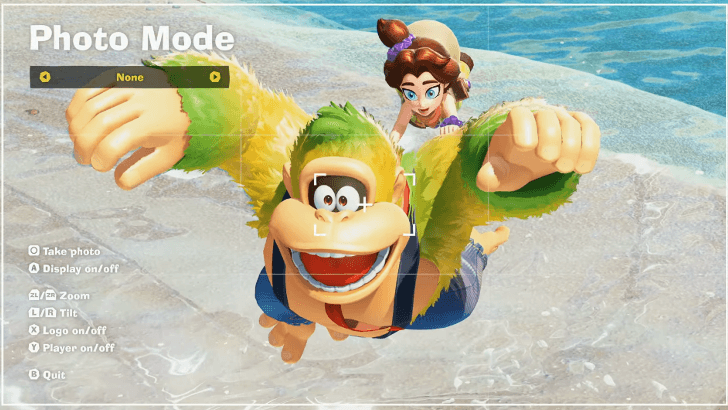
Donkey Kong Bananza's Photo Mode can be accessed by pressing the Down D-Pad Button. Once you enter Photo Mode, the action pauses allowing you to move the camera around, apply effects, and reframe for the perfect shot.
Press Capture Button to Shoot
To get the photo of what you set up in Photo Mode, simply press the Capture Button found on the Left Joy-Con or under the - button on the Pro Controller. This will save the photo in your Nintendo Switch 2's gallery.
Can Capture Any Action
You can open up Photo Mode anytime, even during certain animations and movements. You can use this to capture all sorts of DK's wacky faces!
Photo Mode Controls
All Photo Mode Controls
| Controls | Features |
|---|---|
 / /  |
Photo effects |
| Capture Button | Take photo |
 |
Display guide and HUD on/off |
 / /  |
Zoom camera |
 / /  |
Tilt camera |
 |
Toggle logo on/off |
 |
Toggle player on/off |
 |
Quit Photo Mode |
 |
Move camera |
 |
Rotate camera |
These are the controls that you can use once you open Photo Mode. You can cycle through camera effects with the left and right directional buttons and adjust the camera position with the control sticks.
Donkey Kong Bananza Related Guides

Beginner's Guide to Donkey Kong Bananza
All How-To Guides
Comment



Author

How to Use Photo Mode

Rankings
- We could not find the message board you were looking for.
Gaming News





Popular Games

Genshin Impact Walkthrough & Guides Wiki
Umamusume: Pretty Derby Walkthrough & Guides Wiki
Crimson Desert Walkthrough & Guides Wiki
Monster Hunter Stories 3: Twisted Reflection Walkthrough & Guides Wiki
Honkai: Star Rail Walkthrough & Guides Wiki
Pokemon Pokopia Walkthrough & Guides Wiki
The Seven Deadly Sins: Origin Walkthrough & Guides Wiki
Wuthering Waves Walkthrough & Guides Wiki
Zenless Zone Zero Walkthrough & Guides Wiki
Arknights: Endfield Walkthrough & Guides Wiki










Recommended Games
Fire Emblem Heroes (FEH) Walkthrough & Guides Wiki
Diablo 4: Vessel of Hatred Walkthrough & Guides Wiki
Cyberpunk 2077: Ultimate Edition Walkthrough & Guides Wiki
Yu-Gi-Oh! Master Duel Walkthrough & Guides Wiki
Super Smash Bros. Ultimate Walkthrough & Guides Wiki
Pokemon Brilliant Diamond and Shining Pearl (BDSP) Walkthrough & Guides Wiki
Elden Ring Shadow of the Erdtree Walkthrough & Guides Wiki
Monster Hunter World Walkthrough & Guides Wiki
The Legend of Zelda: Tears of the Kingdom Walkthrough & Guides Wiki
Persona 3 Reload Walkthrough & Guides Wiki










All rights reserved
© Nintendo. Games are property of their respective owners. Nintendo of America Inc.
The copyrights of videos of games used in our content and other intellectual property rights belong to the provider of the game.
The contents we provide on this site were created personally by members of the Game8 editorial department.
We refuse the right to reuse or repost content taken without our permission such as data or images to other sites.