
Best PC Settings and Keyboard Bindings
★Version 3.3 is now live: Firecracker Rin | Banner
┗ Skill Cards | New Year's Light Banner | LNY Event
☆ Version 3.2.2 is now live: Matoi | Banner
┗ Throne | Entropy Banner | Take Your Love
★Tier Lists: Characters | Personas | Rerolls
☆Boards: Companio | Friends | Toy Trading
Here is the best PC settings and keyboard bindings in Persona 5: The Phantom X (P5X). See the best settings for PC and learn how to change the settings in this guide!
Best PC Settings
Camera and Cursor Settings
| All Camera and Cursor Settings |
|---|
| ・Camera Mode (Classic or RPG) ・Classic Camera Sensitivity ・Classic Camera Zoom Sensitivity ・RPG Mode Camera Sensitivity ・RPG Mode Camera Zoom Sensitivity ・Camera Inversion ・Mouse Right-Click Settings ・Gamepad Camera Sensitivity ・Gamepad Zoom Sensitivity ・Gamepad Cursor Mode ・Vibration ・Cursor Speed ・Auto-Adjust Camera |
Choose Between RPG or Classic Mode
You can choose between Classic or RPG Camera Mode when playing with a Mouse and Keyboard. Classic mode allows you to control the camera by swiping through the screen, while RPG mode uses your mouse movement to control the camera.
You can choose the RPG mode if you have more experience with modern games with the same camera movement. If you're more familiar with mobile camera control, you can opt for the Classic mode.
Combat Settings
| Settings | More Animations | Fast Playthrough |
|---|---|---|
| Change Personas in Auto-Battle | On | On |
| Highlights in Auto-Battle | On | On |
| Support Phantom Thief Skills in Auto-Battle | On | On |
| Auto-Select 1 More Target | On | On |
| Simplify Battle Results | Off | On |
| Skip Battle Animations | Off | On |
| Support Phantom Thieves Animations | 1st Time Only | Simplified |
| Highlight Animations | 1st Time Only | Simplified |
If you'd like more animations and better combat experience, choose to turn on every animations effect on the settings menu. If you want a faster playthrough, turn on all Auto-Battle settings and turn off all the animation settings.
Graphics Settings
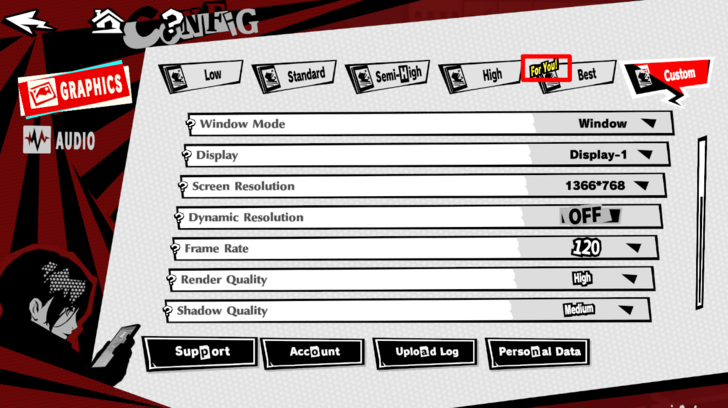
| Graphic Settings Preset | ・Low ・Standard ・Semi-High ・High ・Best |
|---|
For the best gaming experience, you can choose the best graphics preset as long as your system can handle it. Otherwise, choose the recommended graphics settings if your system can't handle the highest setting by selecting the preset with the "For You!" text.
You don't have to choose from the presets and fully customize the settings to your desire!
System Requirements and Recommended Specs
All Graphics Settings
| Settings | Options |
|---|---|
| Window Mode | Window / Full Screen / Borderless |
| Display | Applicable if you have multiple monitors |
| Screen Resolution | Depends on your monitor and system specs |
| Dynamic Resolution | On / Off |
| Frame Rate | 30 FPS / 60 FPS / 120 FPS |
| Render Quality | Low / Medium / High |
| Shadow Quality | Low / Medium / High |
| Effects Quality | Low / Medium / High / Best |
| Texture Quality | Low / High |
| Level of Detail | Low / Medium / High |
| Post-Processing Effects | Low / Medium / High |
| Party Following | On / Off |
| Lens Flare | On / Off |
| Ambient Lighting | On / Off |
| Reflections | On / Off |
| Bloom Effects | On / Off |
| Fog Effects | On / Off |
| Volumetric Lighting | On / Off |
| VSync | On / Off |
| Render Scale | Low / Medium / High / Best |
| Anti-Aliasing | Low / Medium / High / Best |
| FSR | On / Off |
| HDR | On / Off |
The Bold Text options give the best playing experience for the game.
Keyboard Bindings
| Keyboard Bindings | ||||
|---|---|---|---|---|
| General | City Life | Infiltration | ||
| Battle | Activities | - | ||
General
| Action | Key |
|---|---|
| Raise Volume | PgUp |
| Lower Volume | PgDn |
| Move Forward | W |
| Move Back | S |
| Move Right | A |
| Explanation | D |
| Swap to Running | Not assigned by default. Choose one by clicking on the "Not set" text. |
City Life
| Action | Key |
|---|---|
| City Life Action | Spacebar |
| Open Current Map | M |
| Open Map | Tab |
| Open Train Map | P |
| Open Phantom Thieves | C |
| Open Party | T |
| Open Phantom Pass | F2 |
| Open Contracts | F3 |
| Open Goals | F4 |
| Open Event | F5 |
| Open Synergy | K |
| Open Mail | I |
| Open Missions | J |
| Open City Life | Z |
| Open Goals | F3 |
| Open Address Book | O |
| Open Camera | G |
| Open Trophies | U |
| Open Chat | Enter |
| Open Social Media | N |
| Return to City Life Main Screen | Home |
| Open Metaverse | X |
| Mission Tracking | V |
| Show Cursor | ALT |
| Open Shop | F1 |
| Exploration Items | E |
| Thieves' Den | R |
| Wheel Menu | 1 |
Infiltration
| Action | Key |
|---|---|
| Dash | Shift |
| Action | Spacebar |
| Third Eye | Q |
| Open Area Progress | L |
| Hideout | F |
Battle
| Action | Key |
|---|---|
| Gun | W |
| Persona / Item | E |
| Changing Personas | Tab |
| Melee Attack | Spacebar |
| Guarding | C |
| All-Out Attack | Spacebar |
| Settings / Cancel | Esc |
| Dash | F |
| Auto-battle | Z |
| Change Target | A / D |
| Call for Support | G |
| Switch | Tab |
Activities
| Action | Key |
|---|---|
| Baseball Third Eye | Q |
| Swing | Spacebar |
How to Change Settings
From the Menu (Phone)
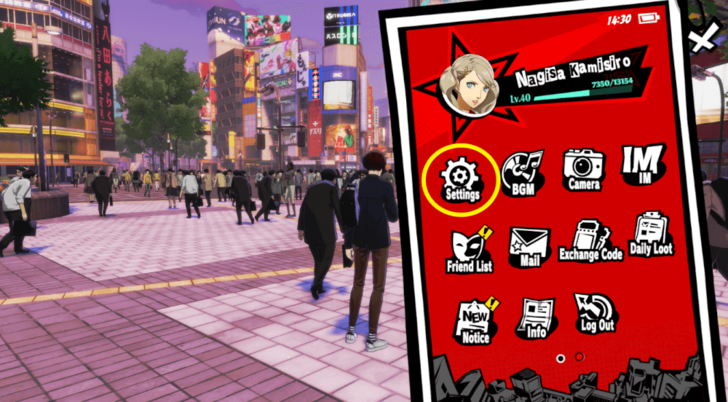
You can change the settings by going through your phone and clicking the Settings icon from the options. You will have to swipe to the left to see it as it will be on the second screen.
Persona 5: The Phantom X Related Guides
Game Mechanics
Combat Guides
City Life Activity Guides
| Activities Guide: How Does the Calendar Work? | Shichi-kun Quiz Answers and Rewards |
| How to Read Books | Cooking Guide: Best Food Recipes |
| Fortune Telling Guide: Effects and Schedule | - |
Minigame Guides
| Batting Cage Guide: How to Hit A Home Run | Soccer Club Guide |
| Music Club Guide | Fishing Guide |
| Tycoon Guide | - |
Currency Guides
| Battle Pass Guide: Should You Buy The Pass? | Lufel's Business Plan Guide and Rewards |
| Daily Login Guide: Events and Rewards | Money Guide: How to Get Yen Fast |
| How to Get Konpaku Gems | All Free Items |
FAQs
Comment



Author

Best PC Settings and Keyboard Bindings

Rankings
- We could not find the message board you were looking for.
Gaming News




Popular Games

Genshin Impact Walkthrough & Guides Wiki
Umamusume: Pretty Derby Walkthrough & Guides Wiki
Crimson Desert Walkthrough & Guides Wiki
Monster Hunter Stories 3: Twisted Reflection Walkthrough & Guides Wiki
Honkai: Star Rail Walkthrough & Guides Wiki
Pokemon Pokopia Walkthrough & Guides Wiki
The Seven Deadly Sins: Origin Walkthrough & Guides Wiki
Wuthering Waves Walkthrough & Guides Wiki
Zenless Zone Zero Walkthrough & Guides Wiki
Arknights: Endfield Walkthrough & Guides Wiki










Recommended Games
Fire Emblem Heroes (FEH) Walkthrough & Guides Wiki
Diablo 4: Vessel of Hatred Walkthrough & Guides Wiki
Cyberpunk 2077: Ultimate Edition Walkthrough & Guides Wiki
Yu-Gi-Oh! Master Duel Walkthrough & Guides Wiki
Super Smash Bros. Ultimate Walkthrough & Guides Wiki
Pokemon Brilliant Diamond and Shining Pearl (BDSP) Walkthrough & Guides Wiki
Elden Ring Shadow of the Erdtree Walkthrough & Guides Wiki
Monster Hunter World Walkthrough & Guides Wiki
The Legend of Zelda: Tears of the Kingdom Walkthrough & Guides Wiki
Persona 3 Reload Walkthrough & Guides Wiki










All rights reserved
©Perfect World Adapted from Persona5 ©ATLUS. ©SEGA.
The copyrights of videos of games used in our content and other intellectual property rights belong to the provider of the game.
The contents we provide on this site were created personally by members of the Game8 editorial department.
We refuse the right to reuse or repost content taken without our permission such as data or images to other sites.