
How to Link Your Account and its Benefits
★Version 3.3 is now live: Firecracker Rin | Banner
┗ Skill Cards | New Year's Light Banner | LNY Event
☆ Version 3.2.2 is now live: Matoi | Banner
┗ Throne | Entropy Banner | Take Your Love
★Tier Lists: Characters | Personas | Rerolls
☆Boards: Companio | Friends | Toy Trading
You can link your account across platforms in Persona 5: The Phantom X (P5X) by binding it to any personal and secure credentials such as your email. Find out more about linking your account and the benefits of doing it here!
| Linking Guides | |
|---|---|
| Is Cross-Progression Available? | How to Link Your Account |
How To Link Your Account
Bind Your Account to a Secure Credential
| Instructions | |
|---|---|
| 1 | When starting the game after a fresh install, the player will start with a guest account. |
| 2 | 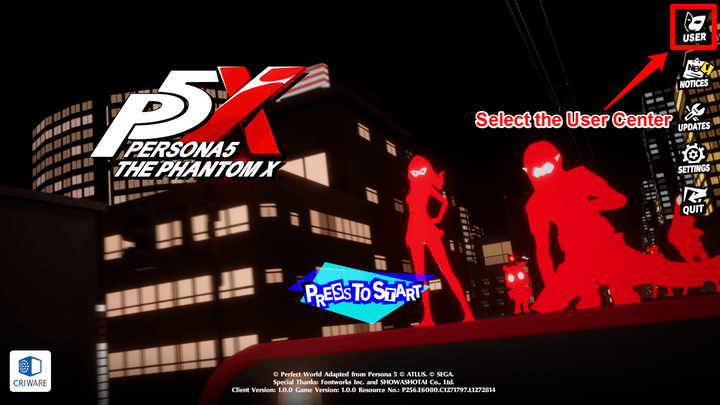 To link your account select the User Center. |
| 3 | 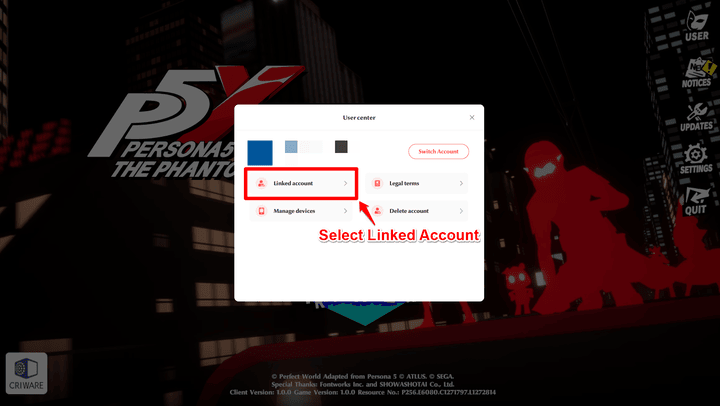 Select the Linked Account Button to see the options of what accounts you can bind. |
| 4 | 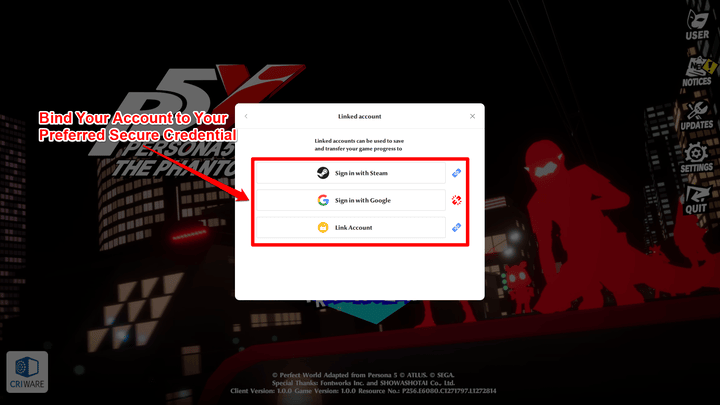 Select which secure account you would like to use and enter your credentials. After doing this, your account should be successfully linked together. |
Check Which Devices Have Access to Your Account
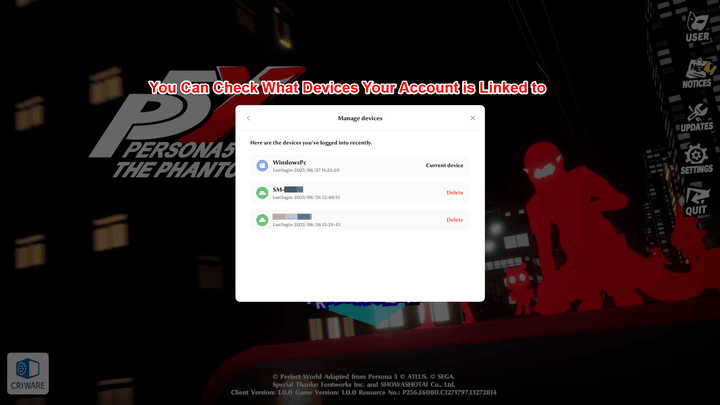
You can check which devices your game account is linked to by selecting Manage Devices from the User Center. You can also delete those devices from this window.
Benefits of Linking Your Account
Allows Cross-Platform Playing and Progress Sync
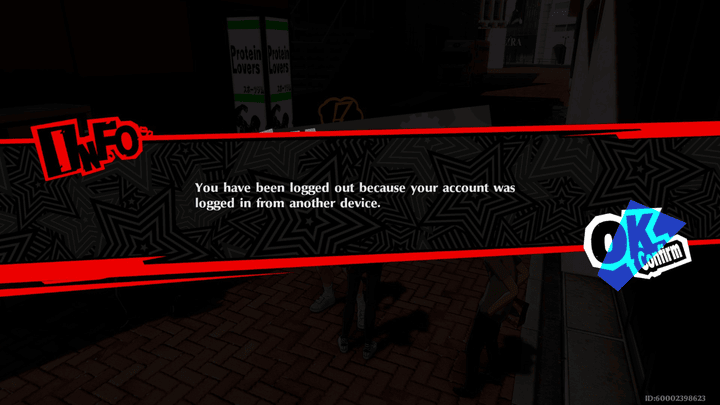
Linking your game to an account will allow you to play on different devices. Game progress will be synced across separate devices as long as they are logged into the same account.
Make sure that when you are playing on separate devices that it is only running on one device, if you try to log in to another device while playing, you will automatically be logged out of the first device.
Secures Your Game Data
Linking your game saves your progress on your account, securing it from data loss in case you lose access to your current devices.
Persona 5: The Phantom X Related Guides

Game Mechanics
Combat Guides
City Life Activity Guides
| Activities Guide: How Does the Calendar Work? | Shichi-kun Quiz Answers and Rewards |
| How to Read Books | Cooking Guide: Best Food Recipes |
| Fortune Telling Guide: Effects and Schedule | - |
Minigame Guides
| Batting Cage Guide: How to Hit A Home Run | Soccer Club Guide |
| Music Club Guide | Fishing Guide |
| Tycoon Guide | - |
Currency Guides
| Battle Pass Guide: Should You Buy The Pass? | Lufel's Business Plan Guide and Rewards |
| Daily Login Guide: Events and Rewards | Money Guide: How to Get Yen Fast |
| How to Get Konpaku Gems | All Free Items |
FAQs
Comment



Author

How to Link Your Account and its Benefits

Rankings
Gaming News





Popular Games

Genshin Impact Walkthrough & Guides Wiki
Umamusume: Pretty Derby Walkthrough & Guides Wiki
Crimson Desert Walkthrough & Guides Wiki
Monster Hunter Stories 3: Twisted Reflection Walkthrough & Guides Wiki
Honkai: Star Rail Walkthrough & Guides Wiki
Pokemon Pokopia Walkthrough & Guides Wiki
The Seven Deadly Sins: Origin Walkthrough & Guides Wiki
Wuthering Waves Walkthrough & Guides Wiki
Zenless Zone Zero Walkthrough & Guides Wiki
Arknights: Endfield Walkthrough & Guides Wiki










Recommended Games
Fire Emblem Heroes (FEH) Walkthrough & Guides Wiki
Diablo 4: Vessel of Hatred Walkthrough & Guides Wiki
Cyberpunk 2077: Ultimate Edition Walkthrough & Guides Wiki
Yu-Gi-Oh! Master Duel Walkthrough & Guides Wiki
Super Smash Bros. Ultimate Walkthrough & Guides Wiki
Pokemon Brilliant Diamond and Shining Pearl (BDSP) Walkthrough & Guides Wiki
Elden Ring Shadow of the Erdtree Walkthrough & Guides Wiki
Monster Hunter World Walkthrough & Guides Wiki
The Legend of Zelda: Tears of the Kingdom Walkthrough & Guides Wiki
Persona 3 Reload Walkthrough & Guides Wiki










All rights reserved
©Perfect World Adapted from Persona5 ©ATLUS. ©SEGA.
The copyrights of videos of games used in our content and other intellectual property rights belong to the provider of the game.
The contents we provide on this site were created personally by members of the Game8 editorial department.
We refuse the right to reuse or repost content taken without our permission such as data or images to other sites.