
Saved Data and Data Value Guide
NEW: Season 2 | Refinement | Arena
✪ Tiphera: Build | Cards | Banner
☆ Tiana: Partner Guide | Banner
✪ Nine: Build | Cards | Banner
See our Endgame Mode Tier List (Season 2 Updated!)
☆ Tier Lists: Character | Partner | Cards

Saved Data are the data you obtain and retain after exploring Chaos Manifestation and Chaos Zones in Chaos Zero Nightmare (CZN). Learn about Saved Data in this guide, including an explanation about the Save Data Value Range on Chaos Manifestation exploration.
List of Contents
Save Data Value Guide
With the Season 2 balance patch, previous scoring rules for the Save Data storage process will be removed, and points will instead be calculated based on the final saved results. Along with this come new changes regarding how saved data points are granted:
Save Data Points Changes (Season 2)
| Deck Actions | Previous Points | Adjusted Points |
|---|---|---|
| Add Neutral Card | 20 when obtaining the card + 10 for Epiphany | 20 regardless whether an Epiphany has been applied |
| Add Monster Card | 80 | 20/50/80 depending on the newly set grades, regardless whether an Epiphany has been applied |
| Remove a Card | 0 → 10 → 30 → 50 → 70 5th card removed and onward costs 70 points |
Removing cards other than Starting Cards will not grant points. |
| Remove a Combatant's Card | 20 Any of the Starting or Epiphany Cards of a Character. Points will apply in addition to the points of removing cards. |
20 per Starting Card Removal of Combatant's Unique cards will no longer grant points. |
| Duplicate a Card | 0 → 10 → 30 → 50 → 70 5th card duped and onward costs 70 points |
0 → 0 → 40 → 40 Max duplicate is now set to 4 per deck |
| Epiphany of Combatant Cards | No Points | No Points |
| Neutral and Monster Card Epiphany | +10 | No additional points |
| Divine Epiphany (All Cards) |
+20 | +20 |
| Card Conversion | 20 With certain exceptions depending on the type of the card it was converted to |
Now counts as card removal, which will not grant points unless a Starting Card was converted |
| Add Forbidden Card | 20 Always saved even if it exceeds the tier cap |
20 Saved before other Memories |
In addition to the adjusted point system, a few other changes were added with the new patch:
- When a Duplicated card is transformed into another card or removed, it will no longer be calculated as a duplicate.
- A maximum of 5 removals is allowed per Save Data. If this limit is exceeded, the oldest removal records will be stored first.
- Effects added through Refinement or God’s Hammer will be calculated at 10 points, and are saved before other Memories.
Adding Neutral and Monster Cards
Adding a Neutral Card will now give you a fixed points of 20 regardless of whether or not the card received an Epiphany. With this change, players will have more breathing room with every Neutral card added to the deck.
Monster cards are also now divided using a new grading system: 20 points (Common), 50 points (Rare), and 80 points (Legendary), which is determined based on how powerful the card is. This is to balance the hefty cost of 80 points for all Monster cards in the previous seasons.
Removing Cards
Removing cards other than Starting cards will no longer grant you points, encouraging card removal for Unique cards or other cards obtained during Chaos runs that will not benefit the deck. However, there is now a set limit to how many cards can be removed per Save Data, effectively preventing the possibility of having Save Data with no Character cards.
Each Starting card removed from the deck will yield 20 points, making it a total of 60 points to remove all of a character's Starting cards.
Duplicating Cards
Duplicating your first two cards will no longer grant any points, but more duplication exceeding that will now add 40 points each. There is also a new cap that prevents players from getting more than 4 duplicates on any card per Save Data.
Epiphany and Divine Epiphany Cards
Combatant, Neutral, and Monster cards that gain base Epiphany effects do not grant any points; however gaining a Divine Epiphany adds 20 points regardless of the card.
For example, adding a Neutral card to your deck grants 20 points. If the card later gains a Divine Epiphany, it adds another 20 points (Base Epiphany + Divine), for a total of 40 points.
Card Conversion
Card Conversion refers to Events or Fates that replace a player's current card with a different card. For example, the Leadership Fate converts 3 Starting Cards into random Rare Neutral Cards, and this grants 40 points (20 points for removing a Starting Card and 20 points for obtaining a Neutral Card) for each card converted.
Forbidden Cards
Forbidden cards cost 20 points when added to a player's deck, and they will be retained in the Save Data because they are saved before other Memories.
Caps the Amount of Data You Can Retain
| Tier | Normal Chaos Run Cap | Nightmare Mode Cap |
|---|---|---|
| 1 | 30 | 40 |
| 2 | 40 | 50 |
| 3 | 50 | 60 |
| 4 | 60 | 70 |
| 5 | 70 | 80 |
| 6 | 80 | 90 |
| 7 | 90 | 100 |
| 8 | 100 | 110 |
| 9 | 110 | 120 |
| 10 | 120 | 130 |
| 11 | 130 | 140 |
| 12 | 140 | 150 |
| 13 | 150 | 160 |
| 14 | 160 | 170 |
| 15 | 170 | 180 |
The Save Data Value is a limit to the amount of Data you can save after a Chaos Exploration. Once you exceed this limit, your character will fail to save the rest of the Epiphanies, duplicated cards, and may even cause removed cards to return to your deck.
The first tier begins with a 30-point cap and increases the cap by 10 points for each subsequent tier. Running Deep Trauma/Nightmare Mode adds 1 tier to the current run, effectively adding an additional 10 points to the cap.
With the release of Season 2, five additional tiers are being added into the game, raising the maximum Save Data limit to 180 points on the highest tier with Nightmare Mode activated.
Save Data Priorities
| Save Data Common Saving Priorities | |
|---|---|
| 1 | Monster Cards are removed |
| 2 | Divine Epiphany Effects gets removed |
| 3 | Neutral Cards gets removed |
| 4 | Removed Cards are returned |
While the exact priorities and randomizer are not yet confirmed, here are some of the team's results obtained based on multiple test runs and the new balance patch dropping with Season 2. This table is sorted by priority, with the first entries being the ones that have a higher chance of not being saved compared to others on the lower priorities.
Equipment is always retained, and the new Refinement or God’s Hammer feature is saved before other memories. Forbidden cards are also saved before other memories, making them guaranteed cards. The higher the priority, the more Save Data is also added to your deck, which makes retaining those cards much more difficult.
How to Maximize Save Data
|
|

Run the Highest Tier Chaos Zones You can Clear
The changes to dhe Duplication mechanics in Chaos runs make pushing for the highest chaos tier the ideal strategy. Since you can now choose which Combatant receives a duplicate, manipulating RNG by removing teammates' Unique cards is no longer necessary, allowing for better team building and higher clears.
Pick Divine Epiphany Upgrades Only if Needed
A Divine Epiphany on a Combatant card gives you 20 points, but you don’t have to take it if the effect isn’t useful or if it's not what you're looking for. Skipping it lets you save those 20 points for something more valuable.
Save Data Explained
|
|
Loadout Your Characters Can Use Outside Chaos Manifestation
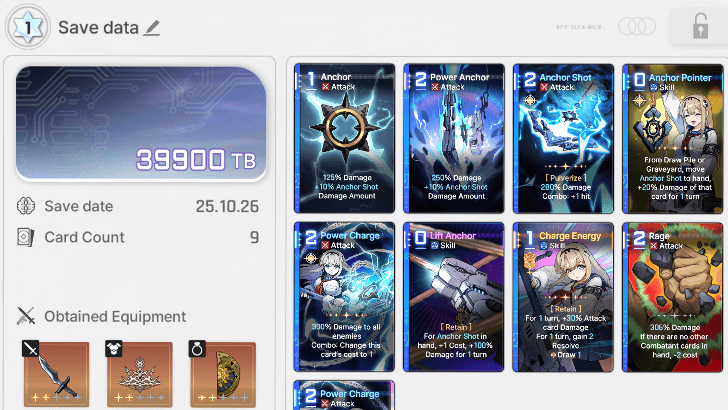
Save Data are loadouts you can use for other content, other than Chaos Manifestation areas. These include zones such as the game's Missions, Simulations, the Basin of Hyperspace, and more.
These save data will include equipment, cards, and epiphanies saved from one of your Chaos Manifestation runs.
Obtainable On Chaos Manifestation Zones
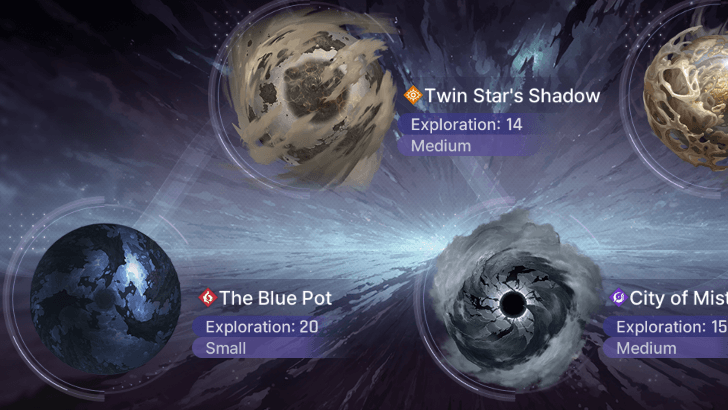
Save Data is primarily obtained in Chaos Zones. These can be through the game's Chaos Manifestation or during the game's missions that involve Chaos Zones. Once you clear or escape the Chaos Zone, you'll be able to save your data and use the new loadout you have for other content.
Save Data Can Also Be Obtained on Story Mode Chaos Zones
An alternative way to get Save Data is by doing Main Missions and participating in missions that involve Chaos Zones. These runs will still generate Save Data for your characters , but this is not recommended as these runs are much shorter and have fewer epiphanies, weapons, and bonuses than Chaos Manifestation zones.
Data Can Be Corrupted From a Mental Breakdown
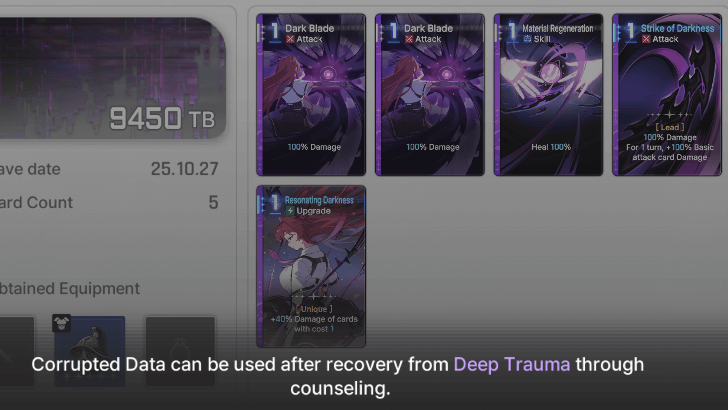
If your character suffered from a Mental Breakdown during your Chaos Run, there will be a chance that their Save Data will be corrupted after exiting the Chaos Zone. The Save Data will become inaccessible and cannot be equipped in the Save Data menu on your Combatant.
Not All Data Can Be Saved Depending on the Saved Data Value of Your Run
When you do a run, the amount of Save Data you can retain is limited based on the Save Data Value of your current Chaos Manifestation run. This will cause you to lose certain cards with Divine Epiphanies, monster cards, and even regain cards that have been removed from your deck.
To avoid this, tackle higher difficulty chaos as well as enabling the Chaos Manifestation's nightmare mode by clicking the purple toggle on the upper right part of the menu.
Save Data Can be Decorated for Easier Identification
As every Chaos Run will generate a Save Data for your character, you can decorate the Save Data you really like and mark them as favorites while putting in stickers and labeling them. This will let you easily differentiate certain Save Data for different builds on your chosen character.
How to Recover Corrupted Save Data
Treat Combatants via Deep Counseling
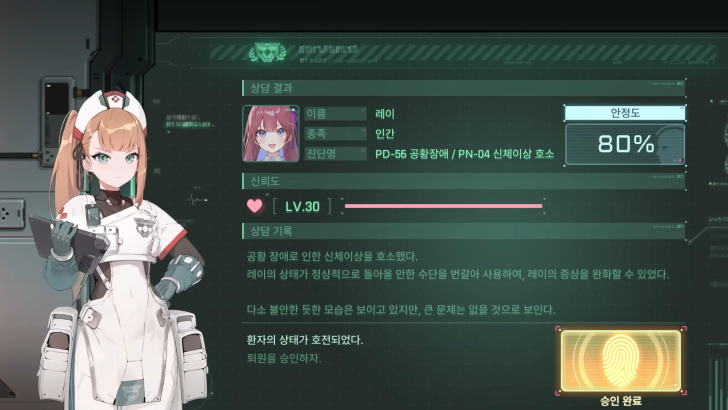
Treating the character in the Epinoe Center in Ark City via Psychotherapy (Deep Counseling) is the only way to recover corrupted Save Data.
Take note, however, that a single treatment session will cost one Communication Pass, which is the same pass used for Excursions.
How to Change Save Data
Change on The Combatants Menu
| 1 |  Open the Combatants menu and choose change |
|---|---|
| 2 | 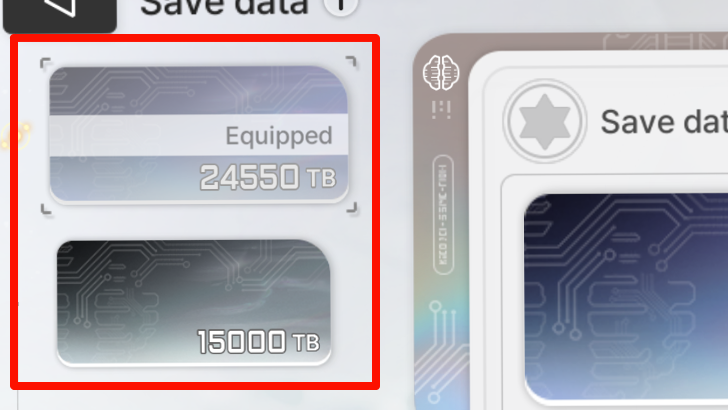 You'll see the Save Data your chosen Combatant has. Choose one and then click the save button on the lower right of the screen to change your Save Data. |
Changing your Save Data can be done in two easy steps on the Combatant Menu. It is extremely important to lock and mark as favorite your best Save Data to avoid losing it via deletion or forgetting which one is the Data you're using for your character.
Chaos Zero Nightmare (CZN) Related Guides

Beginner's Guide: All Tips and Tricks
All Tips and Tricks
Comment



Author

Saved Data and Data Value Guide

Premium Articles
Rankings
- We could not find the message board you were looking for.

Gaming News

![Monster Hunter Stories 3 Review [First Impressions] | Simply Rejuvenating](https://img.game8.co/4438641/2a31b7702bd70e78ec8efd24661dacda.jpeg/show)
![Monster Hunter Stories 3 Review [First Impressions] | Simply Rejuvenating](https://img.game8.co/4438641/2a31b7702bd70e78ec8efd24661dacda.jpeg/thumb)
![The Seven Deadly Sins: Origin [First Impressions] | A Promising Start](https://img.game8.co/4440581/584e0bfb87908f12c4eab6e846eb1afd.png/thumb)
![The Liar Princess and the Blind Prince Review [PC] | Lovely to Look at but Tedious to Play](https://img.game8.co/4442586/8d95f5faf05780f1765ce7e0938bd825.jpeg/thumb)
Popular Games

Genshin Impact Walkthrough & Guides Wiki
Umamusume: Pretty Derby Walkthrough & Guides Wiki
Pokemon Pokopia Walkthrough & Guides Wiki
Honkai: Star Rail Walkthrough & Guides Wiki
Monster Hunter Stories 3: Twisted Reflection Walkthrough & Guides Wiki
Arknights: Endfield Walkthrough & Guides Wiki
Wuthering Waves Walkthrough & Guides Wiki
Zenless Zone Zero Walkthrough & Guides Wiki
Pokemon TCG Pocket (PTCGP) Strategies & Guides Wiki
Monster Hunter Wilds Walkthrough & Guides Wiki










Recommended Games
Diablo 4: Vessel of Hatred Walkthrough & Guides Wiki
Cyberpunk 2077: Ultimate Edition Walkthrough & Guides Wiki
Fire Emblem Heroes (FEH) Walkthrough & Guides Wiki
Yu-Gi-Oh! Master Duel Walkthrough & Guides Wiki
Super Smash Bros. Ultimate Walkthrough & Guides Wiki
Pokemon Brilliant Diamond and Shining Pearl (BDSP) Walkthrough & Guides Wiki
Elden Ring Shadow of the Erdtree Walkthrough & Guides Wiki
Monster Hunter World Walkthrough & Guides Wiki
The Legend of Zelda: Tears of the Kingdom Walkthrough & Guides Wiki
Persona 3 Reload Walkthrough & Guides Wiki










All rights reserved
© Smilegate. All Rights Reserved.
The copyrights of videos of games used in our content and other intellectual property rights belong to the provider of the game.
The contents we provide on this site were created personally by members of the Game8 editorial department.
We refuse the right to reuse or repost content taken without our permission such as data or images to other sites.