
Combat Guide
NEW: Season 2 | Refinement | Arena
✪ Tiphera: Build | Cards | Banner
☆ Tiana: Partner Guide | Banner
✪ Nine: Build | Cards | Banner
See our Endgame Mode Tier List (Season 2 Updated!)
☆ Tier Lists: Character | Partner | Cards
Chaos Zero Nightmare (CZN) has basic and complex combat mechanics in the game. Learn how combat works, how to prepare, and what to do during combat!
List of Contents
Combat Mechanics
| All Combat Mechanics and Tips |
|---|
|
|

Build a Team According to Recommended Attributes
All of the contents with combat have recommended attribute when viewing them. You should try to build a team according the recommended attributes, so you can clear the contents faster.
You should also pick the characters with the best save file to make the combat a lot easier.
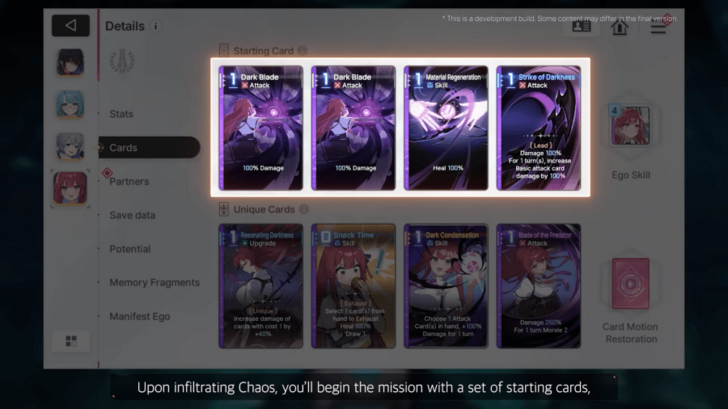
Setting Up Cards
Characters' actions are indicated by their cards. You can have 4 starting cards and another 4 cards for their uniques to make up a deck for a character.
It's best to balance the cards' AP cost when selecting cards for a character to ensure you can use them effectively in battle.
Building and Managing Your Deck
A deck is the composition of all the characters' cards you set up before the battle. However, their numbers can increase depending on your run in the Chaos Manifestation. Events and enemies can also add cards with negative effects, increasing the difficulty of the run as you progress.
You can remove these cards through the shop or by playing them during combat.
Use Cards to Attack, Defend, or Heal
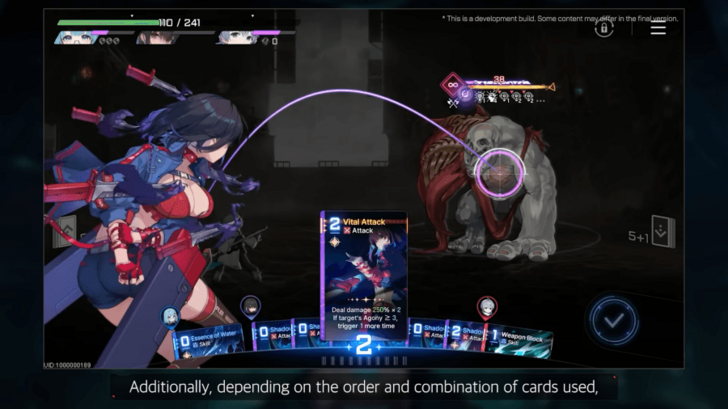
During combat, you will always draw 5 cards each turn and you can play them using Action Points (AP). You can recover AP and draw new cards at the end of the turn. If you can't draw new cards, cards from the graveyard, except for the ones discarded entirely, will go back to your deck.
Cards have synergies that you can trigger by playing the correct order and card types during a turn. Triggering a Card Synergy will have bonus effects, like increased damage, more healing, stronger shield, and enhanced debuffs.
End Turn to Remove and Draw New Cards
You can forcefully end your turn by clicking on the Blue Check Button to the right of the draw pile. This will put the current cards you have to the graveyard, and get new cards to play from your deck.
Note that the APs you currently have will also be removed when you force to end your turn, unless you activated a card that lets your AP stay even after the turn.
Activate Epiphany for Stronger Cards

Epiphany can unlock better cards for your characters during combat. It randomly spawns while in battle, which you will know if you see a yellow glint on the card and a light bulb icon on the character.
Playing the Epiphany-affected card will cost no Action Points, but will still progress the enemies' turn.
Use Ego to Unleash Ultimate Skills
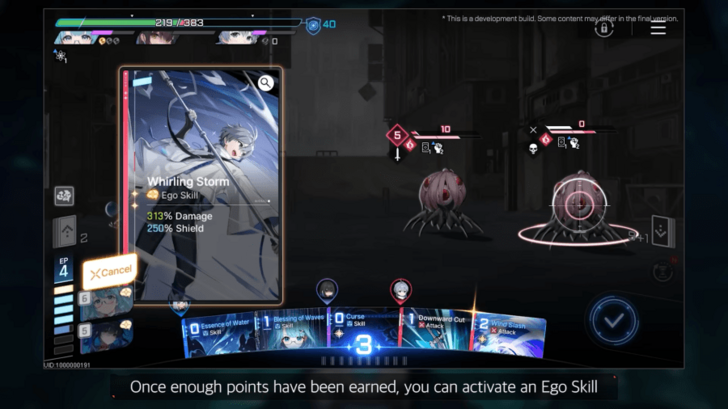
All characters have Ego that you can use in battle. Ego can be used once you accumulate enough Ego Points that can be seen on the bottom left of the screen.
Ego can only be used once in battle, unless a character enters a Mental Breakdown and conquer it.
Exploit Attribute Weakness and Tenacity
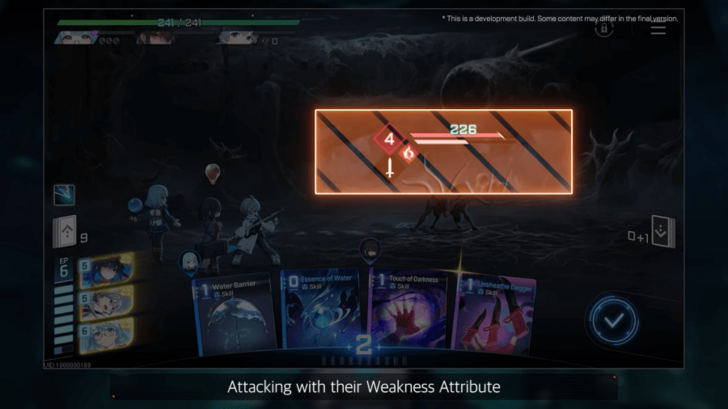
All enemies have attribute weakness and you can attack them with the specified attribute to increase the damage you inflict on them. You can see the attribute weakness of an enemy on the bottom right of their turn indicator.
Some enemies, usually the stronger ones, have a Tenacity Bar. Tenacity slightly absorbs damage and can cause enemies to go into Ravage State once depleted. Once an enemy goes into Ravage State, your team will earn 1 AP, accumulate less Stress, and the enemy will have an increased turn number.
Turn Order and Enemy Turn Type
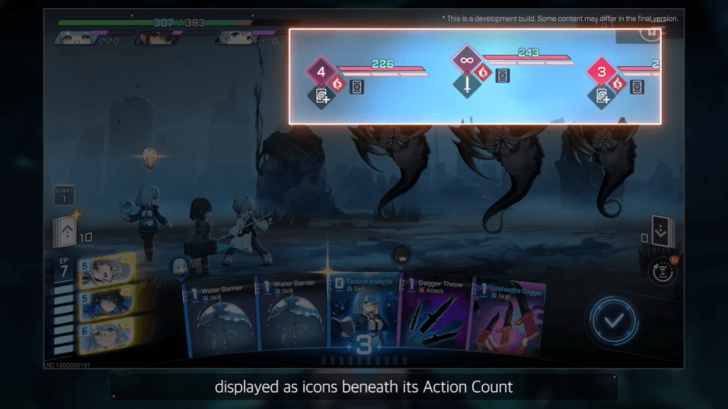
Enemies have separate turn order that is indicated by the number on the left of their HP bar. Those numbers will decrease each time you play a card until it reaches 0. Once it reaches 0, enemies will attack according to the icon below their turn number.
Use Protos Skill to Undo the Last Move
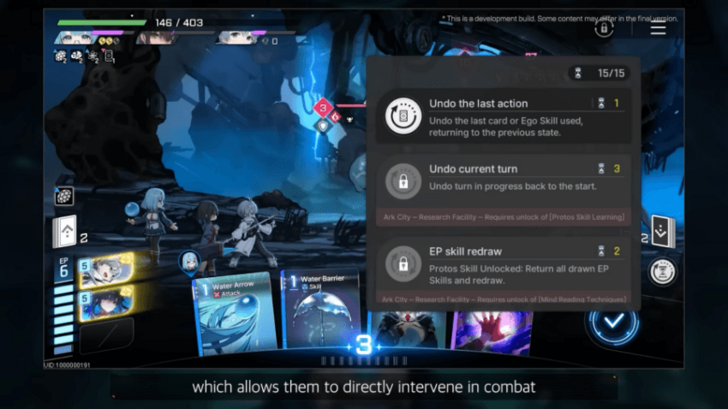
You can use the Protos Skill (Sandglass Icon) on the right side to undo your last action. It can help you go back and try a different approach on a difficult battle.
There are multiple options when choosing to revert your last action during combat, and you can unlock them in the Research Facility of Ark City. Protos Skill uses Sands of Time, and you can only use 15 Sands of Time in a match.
Manage Stress and Mental Breakdown
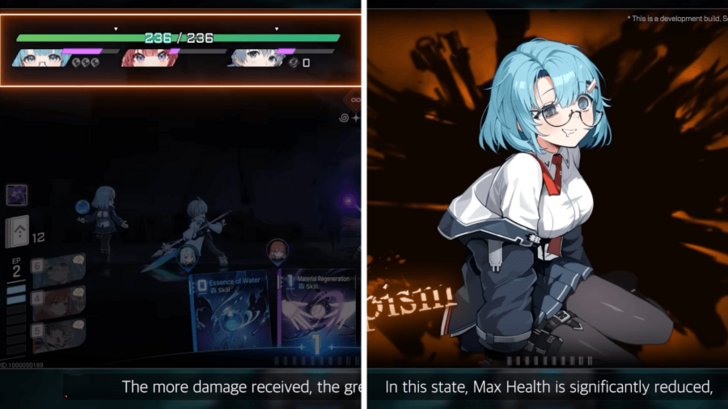
Stress and Mental Breakdown will cause some negative effects on the character and the team. The third of the team's HP will be blocked once a character's Stress filled up and then goes into breakdown. The character in the breakdown will also be immobilized until they recover using Breakdown Cards.
The cards of the character who goes into Mental Breakdown will be converted into Breakdown Cards, which you can play to help the character recover. Once recovered, the character will have reduced EP cost and the third of the team's HP will return to normal, but you will only recover half of what you've lost.
You can prevent the Stress from building up by applying shields and using healing cards.
Chaos Zero Nightmare (CZN) Related Guides
Beginner's Guide: All Tips and Tricks
All Tips and Tricks
Comment



Author


Premium Articles
Rankings
- We could not find the message board you were looking for.

Gaming News

![The Liar Princess and the Blind Prince Review [PC] | Lovely to Look at but Tedious to Play](https://img.game8.co/4442586/8d95f5faf05780f1765ce7e0938bd825.jpeg/show)

![Monster Hunter Stories 3 Review [First Impressions] | Simply Rejuvenating](https://img.game8.co/4438641/2a31b7702bd70e78ec8efd24661dacda.jpeg/thumb)
![The Seven Deadly Sins: Origin Review [First Impressions] | A Promising Start](https://img.game8.co/4440581/584e0bfb87908f12c4eab6e846eb1afd.png/thumb)
Popular Games

Genshin Impact Walkthrough & Guides Wiki
Umamusume: Pretty Derby Walkthrough & Guides Wiki
Pokemon Pokopia Walkthrough & Guides Wiki
Honkai: Star Rail Walkthrough & Guides Wiki
Monster Hunter Stories 3: Twisted Reflection Walkthrough & Guides Wiki
Arknights: Endfield Walkthrough & Guides Wiki
Wuthering Waves Walkthrough & Guides Wiki
Zenless Zone Zero Walkthrough & Guides Wiki
Pokemon TCG Pocket (PTCGP) Strategies & Guides Wiki
Monster Hunter Wilds Walkthrough & Guides Wiki










Recommended Games
Fire Emblem Heroes (FEH) Walkthrough & Guides Wiki
Diablo 4: Vessel of Hatred Walkthrough & Guides Wiki
Cyberpunk 2077: Ultimate Edition Walkthrough & Guides Wiki
Yu-Gi-Oh! Master Duel Walkthrough & Guides Wiki
Super Smash Bros. Ultimate Walkthrough & Guides Wiki
Pokemon Brilliant Diamond and Shining Pearl (BDSP) Walkthrough & Guides Wiki
Elden Ring Shadow of the Erdtree Walkthrough & Guides Wiki
Monster Hunter World Walkthrough & Guides Wiki
The Legend of Zelda: Tears of the Kingdom Walkthrough & Guides Wiki
Persona 3 Reload Walkthrough & Guides Wiki










All rights reserved
© Smilegate. All Rights Reserved.
The copyrights of videos of games used in our content and other intellectual property rights belong to the provider of the game.
The contents we provide on this site were created personally by members of the Game8 editorial department.
We refuse the right to reuse or repost content taken without our permission such as data or images to other sites.