
Preload Guide | Will Preload be Available?

This is a guide on preloading Outriders. Read on to know if you can preload the game ahead of its scheduled release date.
Will Preload be Available?
Preloading is available for Xbox users starting March 25th and for PlayStation users starting March 29th. Preloading for PC is available starting March 31st.
Preloading (pre-downloading) allows players to download the game in advance, and while the game is not playable until April 1st, players can avoid long download times by taking advantage of preloading.
Pre-Order Guide and All Pre-Order Bonuses
How to Preload Outriders
PC Preload

For PC user who pre-ordered using Steam, simply go to your Library, click on the Outriders game title, and Click Install.
PS4 Preload
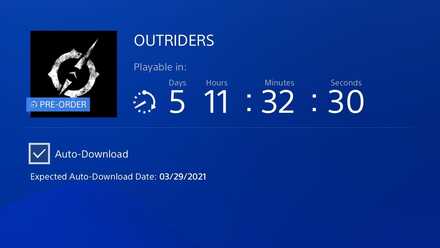
For PS4 players, a screen similar to the one above appears upon preloading the game.
In order to pre-download the game, be sure to check the Auto-Download box shown – otherwise, the game will not download ahead of time automatically.
Xbox One Preload
For Xbox One players, go to the management section of Outriders in My games & apps. Select Outriders again and choose Manage installation on Internal or wherever you have the game saved. From there, check the base game then save your changes to begin preloading Outriders.
Outriders Related Links
| All Outriders News Articles | |
|---|---|
| Release Date | Pre-Order Guide and All Pre-Order Bonuses |
| Patch Notes | Preload Guide |
| How to Check Server Status | Community Appreciation Package |
| DLC Release Date and Expansions | |



Author

Preload Guide | Will Preload be Available?

Rankings
- We could not find the message board you were looking for.
Gaming News




![Monster Hunter Stories 3 Review [First Impressions] | Simply Rejuvenating](https://img.game8.co/4438641/2a31b7702bd70e78ec8efd24661dacda.jpeg/thumb)
Popular Games

Genshin Impact Walkthrough & Guides Wiki
Honkai: Star Rail Walkthrough & Guides Wiki
Umamusume: Pretty Derby Walkthrough & Guides Wiki
Pokemon Pokopia Walkthrough & Guides Wiki
Resident Evil Requiem (RE9) Walkthrough & Guides Wiki
Monster Hunter Wilds Walkthrough & Guides Wiki
Wuthering Waves Walkthrough & Guides Wiki
Arknights: Endfield Walkthrough & Guides Wiki
Pokemon FireRed and LeafGreen (FRLG) Walkthrough & Guides Wiki
Pokemon TCG Pocket (PTCGP) Strategies & Guides Wiki










Recommended Games
Diablo 4: Vessel of Hatred Walkthrough & Guides Wiki
Cyberpunk 2077: Ultimate Edition Walkthrough & Guides Wiki
Fire Emblem Heroes (FEH) Walkthrough & Guides Wiki
Yu-Gi-Oh! Master Duel Walkthrough & Guides Wiki
Super Smash Bros. Ultimate Walkthrough & Guides Wiki
Pokemon Brilliant Diamond and Shining Pearl (BDSP) Walkthrough & Guides Wiki
Elden Ring Shadow of the Erdtree Walkthrough & Guides Wiki
Monster Hunter World Walkthrough & Guides Wiki
The Legend of Zelda: Tears of the Kingdom Walkthrough & Guides Wiki
Persona 3 Reload Walkthrough & Guides Wiki










All rights reserved
OUTRIDERS © 2021 Square Enix Limited. All rights reserved. Developed by PCF Group S.A. SQUARE ENIX and the SQUARE ENIX logo are registered trademarks or trademarks of Square Enix Holdings Co., Ltd. OUTRIDERS is a registered trademark or trademark of Square Enix Ltd. People Can Fly and the People Can Fly logo are registered trademarks of PCF Group S.A. “PlayStation” and the “PS” Family logo are registered trademarks and “PS5, PS4” are trademarks of Sony Interactive Entertainment Inc.
The copyrights of videos of games used in our content and other intellectual property rights belong to the provider of the game.
The contents we provide on this site were created personally by members of the Game8 editorial department.
We refuse the right to reuse or repost content taken without our permission such as data or images to other sites.