
Village Bonuses Guide
★ Characters and Gifts Guide
☆ All 16 Romance Options
★ Boss Taming Guide and Best Items to Give
☆ Check our Daily Routine Guide for your daily tasks!
★ Walkthrough and Complete Story Guide
☆ Village Building Guide
Village bonuses can be increased by placing buildings and decorations in the villages of Rune Factory: Guardians of Azuma (RFGoA). Check out all the village bonuses in the game, how to get village bonuses in each village, and the limitations of village bonuses through this guide!
List of Contents
Village Bonuses Guide
All Village Bonuses
| Village Bonuses | |
|---|---|
| Farming | Logging |
| Fishing | Mining |
| Herding | Trading |
| Stat Bonuses | |
| Max HP | Max RP |
| STR | VIT |
| INT | MND |
Most buildings and decorations can increase a village's efficiency as well as your own personal stats. Each village can gain its own set of village bonuses, but the stat bonuses generated by a village are in effect regardless of where you currently are.
The village bonuses of the village you're currently at are visible on the left side of the screen when the Terra Tiller is equipped. These can also be viewed through the Villages menu.
How to Get Village Bonuses
Decorate Village Development Zones
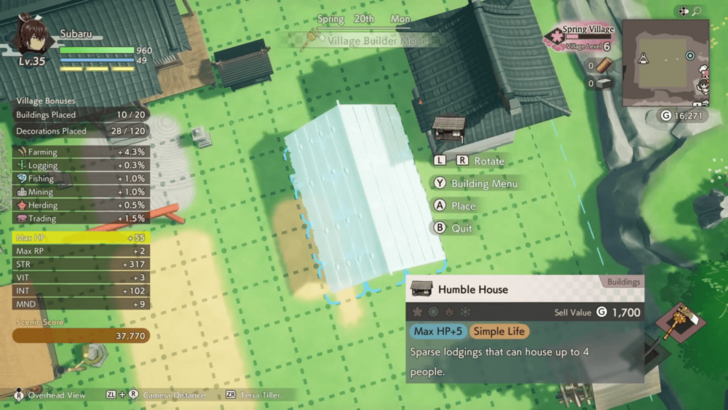
Village bonuses are obtained from buildings and decorations placed in development zones. Some items have multiple bonuses attached to them, while a few decorations such as the Straw Wall and Request Board do not have any bonuses to impart.
You can check the bonuses of each building and decoration through the Building Menu, construction menus, and the pop-up information when placing an object in a development zone. Village bonuses are highlighted in blue.
Bonuses Only Apply Once Per Item
Each building item or decoration can only give their bonuses once for each village they're placed in. Even if you place two of the same item in different development zones within the village, it will still only count once. Variety is key if you want to maximize your village bonuses.
However, having multiple of the same item still affects your scenic score, so having duplicate items isn't a total waste.
Check Decoration Details for Available Items
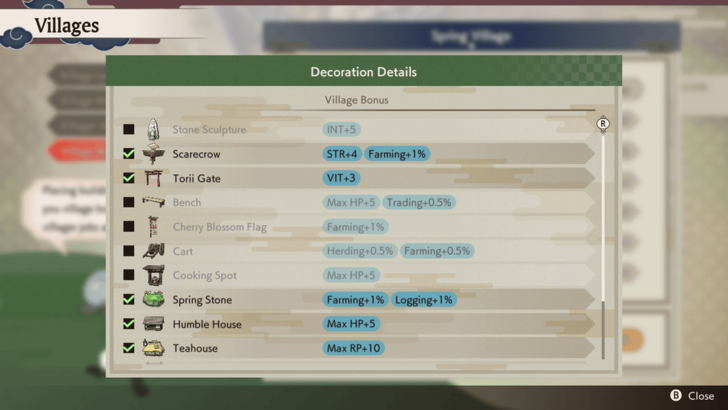
If you're not sure which items you've already placed in your village, you can go to the Village Bonuses in the Villages menu and press the button for Decoration Details. You will be shown a list of all buildings and decorations that you can currently construct and place into the village you're viewing.
Active bonuses from buildings and decorations that you've already placed in your village will be highlighted in this Decoration Details screen, while items that you are able to craft but have not yet placed in the village will be grayed out.
Some Decorations Only Work in Certain Villages
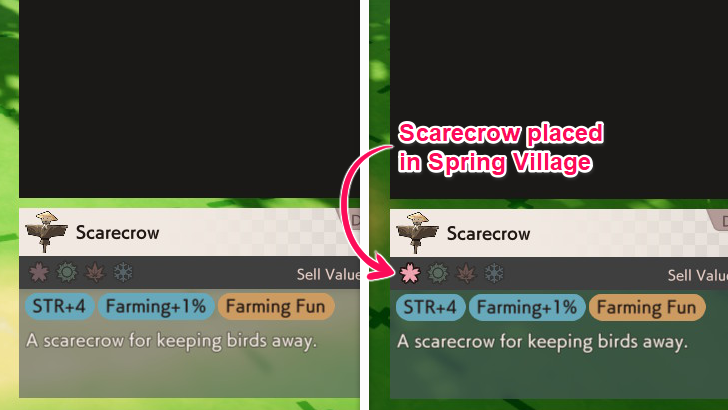
There are some decorations that only impart bonuses when placed in a specific village such as the Ocean Flag, which only works in the Summer Village. If it's placed in a different village, it won't add any village bonuses, but it can still contribute to the village's scenic score.
You can see the villages an item can work in by checking the icons above the listed bonuses of the item. The pink flower means it works in Spring Village, the teal sun is for Summer Village, the orange leaf is for Autumn Village, and the blue snowflake stands for the Winter Village.
If an icon is highlighted, it means you've already placed it in the signified village. If it's grayed out, it means you can still add it to that village to obtain a bonus.
Rune Factory: Guardians of Azuma Related Guides
All Village Building Guides
Comment



Author
Village Bonuses Guide

Rankings
- We could not find the message board you were looking for.
Gaming News





Popular Games

Genshin Impact Walkthrough & Guides Wiki
Umamusume: Pretty Derby Walkthrough & Guides Wiki
Pokemon Pokopia Walkthrough & Guides Wiki
Honkai: Star Rail Walkthrough & Guides Wiki
Monster Hunter Stories 3: Twisted Reflection Walkthrough & Guides Wiki
Arknights: Endfield Walkthrough & Guides Wiki
Wuthering Waves Walkthrough & Guides Wiki
Zenless Zone Zero Walkthrough & Guides Wiki
Pokemon TCG Pocket (PTCGP) Strategies & Guides Wiki
Monster Hunter Wilds Walkthrough & Guides Wiki










Recommended Games
Fire Emblem Heroes (FEH) Walkthrough & Guides Wiki
Diablo 4: Vessel of Hatred Walkthrough & Guides Wiki
Cyberpunk 2077: Ultimate Edition Walkthrough & Guides Wiki
Yu-Gi-Oh! Master Duel Walkthrough & Guides Wiki
Super Smash Bros. Ultimate Walkthrough & Guides Wiki
Pokemon Brilliant Diamond and Shining Pearl (BDSP) Walkthrough & Guides Wiki
Elden Ring Shadow of the Erdtree Walkthrough & Guides Wiki
Monster Hunter World Walkthrough & Guides Wiki
The Legend of Zelda: Tears of the Kingdom Walkthrough & Guides Wiki
Persona 3 Reload Walkthrough & Guides Wiki










All rights reserved
©2025 Marvelous Inc.
The copyrights of videos of games used in our content and other intellectual property rights belong to the provider of the game.
The contents we provide on this site were created personally by members of the Game8 editorial department.
We refuse the right to reuse or repost content taken without our permission such as data or images to other sites.