
List of All Controls
★ Characters and Gifts Guide
☆ All 16 Romance Options
★ Boss Taming Guide and Best Items to Give
☆ Check our Daily Routine Guide for your daily tasks!
★ Walkthrough and Complete Story Guide
☆ Village Building Guide
This is a guide on the game controls for Rune Factory: Guardians of Azuma (RFGoA). Read on for the controls and button mappings for Nintendo Switch controllers and gamepad and mouse and keyboard controls for PC.
List of Contents
List of Nintendo Switch Controls
Movement and Camera Controls
| Button | Function |
|---|---|
 |
Movement |
 |
Camera Controls |
Actions
| Button | Function |
|---|---|
 |
Weapon Attack |
 |
Kamiwaza/Special Attacks |
 |
Interact |
 |
Jump |
 |
Dodge |
 |
Dance Stance |
 |
Lock-On/Reset Camera |
 |
Aim Bow |
 |
Swap Weapons |
 |
Sacred Treasure Ring |
 |
Inventory |
 |
Camp Menu |
 |
Map |
 |
Rotate Party Members |
 |
Mini-Map Zoom |
Bow Aiming
| Button | Function |
|---|---|
|
Shoot Arrow |
Dance Stance
| Button | Function |
|---|---|
|
Kagura Dance |
|
Divine Dance |
|
Kamunagi |
|
Victory Dance |
Village Building
| Button | Function |
|---|---|
|
Equip/Unequip Terra Tiller |
|
Actions |
|
Cancel |
|
Lock Direction |
|
Zoom In/Out (Overhead View) |
|
Building Menu |
|
Remove |
|
Overhead View |
|
Call Woolby |
|
Rotate Object Left |
|
Rotate Object Right |
Fishing Controls
| Button | Function |
|---|---|
|
Cast/Reel In |
|
Cancel |
List of PC Gamepad Controls
Movement and Camera Controls
| Button | Function |
|---|---|
 |
Movement |
 |
Camera Controls |
Actions
| Button | Function |
|---|---|
 |
Weapon Attack |
 |
Kamiwaza/Special Attacks |
 |
Interact |
 |
Jump |
 |
Dodge |
 |
Dance Stance |
|
Lock-On/Reset Camera |
 |
Aim Bow |
 |
Swap Weapons |
 |
Sacred Treasure Ring |
 |
Inventory |
 |
Camp Menu |
 |
Map |
 |
Rotate Party Members |
 |
Mini-Map Zoom |
Bow Aiming
| Button | Function |
|---|---|
|
Shoot Arrow |
Dance Stance
| Button | Function |
|---|---|
|
Kagura Dance |
|
Divine Dance |
|
Kamunagi |
|
Victory Dance |
Village Building
| Button | Function |
|---|---|
|
Equip/Unequip Terra Tiller |
|
Actions |
|
Cancel |
|
Lock Direction |
|
Zoom In/Out (Overhead View) |
|
Building Menu |
|
Remove |
 |
Overhead View |
|
Call Woolby |
|
Rotate Object Left |
|
Rotate Object Right |
Fishing Controls
| Button | Function |
|---|---|
|
Cast/Reel In |
|
Cancel |
List of PC Mouse and Keyboard Controls
In Menus
| Button | Function |
|---|---|
 |
Accept |
 |
Cancel |
Movement
| Button | Function |
|---|---|
 |
Forward |
 |
Backward |
 |
Left |
 |
Right |
Camera Controls
| Button | Function |
|---|---|
 |
Camera Controls |
Actions
| Button | Function |
|---|---|
|
Weapon Attack |
 |
Kamiwaza/Special Attacks |
 |
Interact |
 |
Jump |
 |
Dodge |
 |
Dance Stance |
 |
Lock-On/Reset Camera |
 |
Lock-On: Next Target |
 |
Lock-On: Previous Target |
 |
Aim Bow |
 |
Shoot Arrows |
 |
Swap Weapons |
 |
Sacred Treasure Ring |
 |
Change to Ring 1 |
 |
Change to Ring 2 |
 |
Change to Ring 3 |
 |
Change to Ring 4 |
 |
Change to Ring 5 |
 |
Change to Ring 6 |
 |
Change to Ring 7 |
 |
Change to Ring 8 |
 |
Inventory |
 |
Camp Menu |
 |
Map |
 |
Rotate Party Members |
 |
Mini-Map Zoom |
Dance Stance
| Button | Function |
|---|---|
|
Kagura Dance |
|
Divine Dance |
|
Kamunagi |
|
Victory Dance |
Village Building
| Button | Function |
|---|---|
 |
Equip/Unequip Terra Tiller |
|
Actions |
|
Cancel |
|
Lock Direction |
|
Building Menu |
|
Remove |
 |
Overhead View |
|
Mouse Mode On/Off |
 |
Call Woolby |
|
Move Left |
|
Move Right |
|
Move Up |
|
Move Down |
|
Rotate Object Left |
|
Rotate Object Right |
Village Building (Mouse Mode)
| Button | Function |
|---|---|
|
Actions |
|
Rotate Camera Left |
|
Rotate Camera Right |
|
Pan Left |
|
Pan Right |
|
Pan Up |
|
Pan Down |
Fishing
| Button | Function |
|---|---|
|
Cast/Reel In |
|
Cancel |
Can You Change Controls?
Controls Can Be Changed
Most inputs in Rune Factory: Guardians of Azuma can be changed via the Controller Mapping screen in the game's Options menu. The mappings related to combat and village building can be changed depending on your preference.
Camera Can Also Be Configured
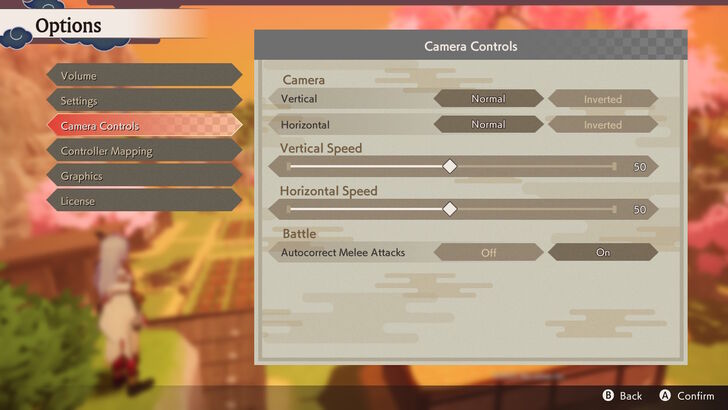
Camera movement can also be configured in the settings from the Camera Controls menu. Here, you can toggle between normal and inverted controls and adjust camera speed.
Rune Factory: Guardians of Azuma (RFGoA) Related Guides
Beginner's Guide and Tips and Tricks
Tips and Tricks Guides
Exploration Guides
Combat Guides
Story Progression Guides
| Story Progression Guides | |
|---|---|
| All Points of No Return | What Should You Sacrifice? |
| How to Get Married | Can You Have Children? |
| How to Get a Bird and a Dog | - |
Monster Guides
| Monster Guides | |
|---|---|
| How to Tame Monsters | How to Ride Monsters |
| Boss Taming Guide and Best Items to Give | Best Monsters to Tame |



Author
List of All Controls

Rankings
- We could not find the message board you were looking for.
Gaming News





Popular Games

Genshin Impact Walkthrough & Guides Wiki
Umamusume: Pretty Derby Walkthrough & Guides Wiki
Pokemon Pokopia Walkthrough & Guides Wiki
Honkai: Star Rail Walkthrough & Guides Wiki
Monster Hunter Stories 3: Twisted Reflection Walkthrough & Guides Wiki
Arknights: Endfield Walkthrough & Guides Wiki
Wuthering Waves Walkthrough & Guides Wiki
Zenless Zone Zero Walkthrough & Guides Wiki
Pokemon TCG Pocket (PTCGP) Strategies & Guides Wiki
Monster Hunter Wilds Walkthrough & Guides Wiki










Recommended Games
Fire Emblem Heroes (FEH) Walkthrough & Guides Wiki
Diablo 4: Vessel of Hatred Walkthrough & Guides Wiki
Cyberpunk 2077: Ultimate Edition Walkthrough & Guides Wiki
Yu-Gi-Oh! Master Duel Walkthrough & Guides Wiki
Super Smash Bros. Ultimate Walkthrough & Guides Wiki
Pokemon Brilliant Diamond and Shining Pearl (BDSP) Walkthrough & Guides Wiki
Elden Ring Shadow of the Erdtree Walkthrough & Guides Wiki
Monster Hunter World Walkthrough & Guides Wiki
The Legend of Zelda: Tears of the Kingdom Walkthrough & Guides Wiki
Persona 3 Reload Walkthrough & Guides Wiki










All rights reserved
©2025 Marvelous Inc.
The copyrights of videos of games used in our content and other intellectual property rights belong to the provider of the game.
The contents we provide on this site were created personally by members of the Game8 editorial department.
We refuse the right to reuse or repost content taken without our permission such as data or images to other sites.
Can you invert both x and y?