
 Best Naoe Build
 Best Yasuke Build
 Shrine Locations
 Kuji-kiri Locations
 Kata Locations
 Horse Archery Locations
 Hidden Trail Locations
 Fast Travel Viewpoint Locations
 Kakurega Locations


This survey will take about 1 minute.
Your answers will help us to improve our website.
Assassin's Creed Shadows (AC Shadows)
Difficulty Setting Differences and How to Change
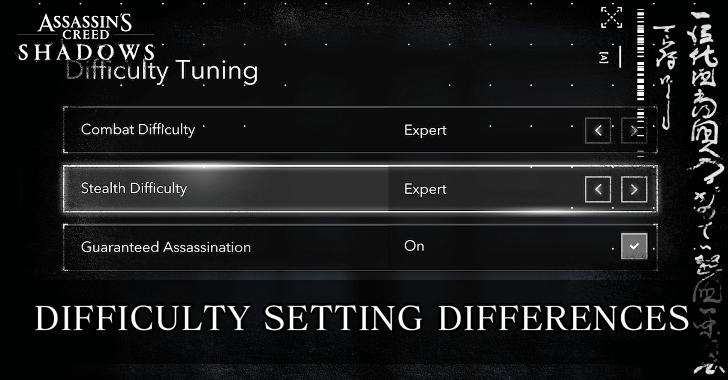
Assassin's Creed Shadows (AC Shadows) has multiple settings for combat and stealth difficulty that you can adjust. Read on to learn more about all the available difficulty settings, their differences, and how to change them.
List of Contents
All Difficulty Settings
Combat Difficulty Setting Differences
Assassin's Creed Shadows will have 4 combat difficulty settings to choose from: Story, Forgiving, Normal, and Expert.
| Combat Difficulty Differences | |
|---|---|
| Story | Both Naoe and Yasuke are one-man armies. Enemy reactions are very slow, allowing you to deflect or parry with ease, and they don't attack simultaneously. |
| Forgiving | Naoe takes on a stealthier playstyle, but she can still hold her own against small groups. Yasuke retains his one-man army status. Enemies are also less likely to gang up on you during combat. |
| Normal | Naoe is less effective in open combat and will have to rely on stealth to pull of missions. Yasuke can still be a powerful force but only against enemies of a similar level. |
| Expert | Enemies are stronger and they are all very aggressive. Requires you to keep your weapons upgraded to remain competitive in both stealth and combat encounters. |
Guaranteed Assassinations Can Make Higher Difficulties Easier
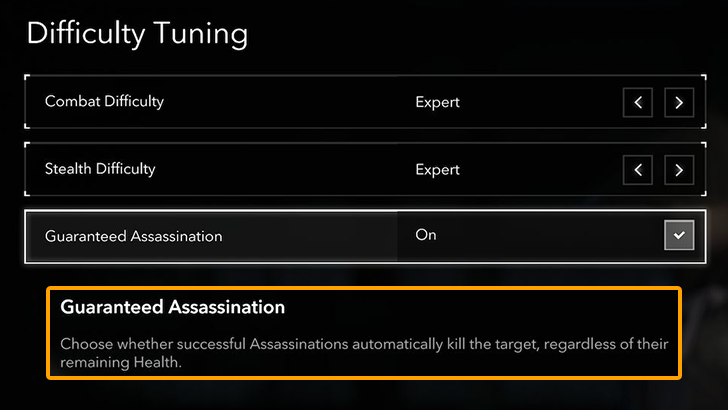
Playing as Naoe on higher difficulties means you need to keep your gear upgraded and your Assassin Mastery tree topped up in order to keep guaranteeing 1-hit assassinations. If you don't want to deal with this mechanic, you can turn on Guaranteed Assassinations.
How to Turn On Guaranteed Assassinations
Stealth Difficulty Setting Differences
Stealth difficulty can also be tweaked, with the game offering you 3 stealth difficulty settings to choose from.
| Stealth Difficulty Differences | |
|---|---|
| Forgiving | Stealth is easy and enemy reactions to sound, sight, and player activity are slow. |
| Normal | Stealth hinges on breaking line of sight, staying hidden, and moving slowly to avoid making loud sounds. Enemies are much more reactive to player activity. |
| Expert | Yellow cautious status are easier to trigger and even staying on roofs and in shadow doesn't guarantee safety. Requires a slow, methodical approach where you Eagle Vision tag all enemies before you start exploring. |
Gameplay Quality-of-Life Settings
AC Shadows will also feature a few quality-of-life (QoL) settings that you can toggle in order to make gameplay easier.
| Guided Exploration | When turned on, objectives are automatically marked. You no longer need to investigate and scout the locations of your quest targets making quests easier to complete. However, some achievements will be impossible to get when this is turned on. |
|---|---|
| Aim Assist | Makes certain activities like Horse Archery much easier. It also helps in general combat since bows, teppos, and tools are easier to use. |
| Area Loot | If turned on, you get all loot within an area in a single button prompt. Eliminates the need to look at every nook and cranny of a location to get loot. |
How to Change Difficulty
Go to Options then Change it via the Gameplay Tab
To change your difficulty settings while playing the game, navigate to Options via the System Menu, then go to Gameplay > Difficulty Tuning. From here, you can adjust Combat difficulty, Stealth difficulty, and Guaranteed Assassination settings.
| 1 | 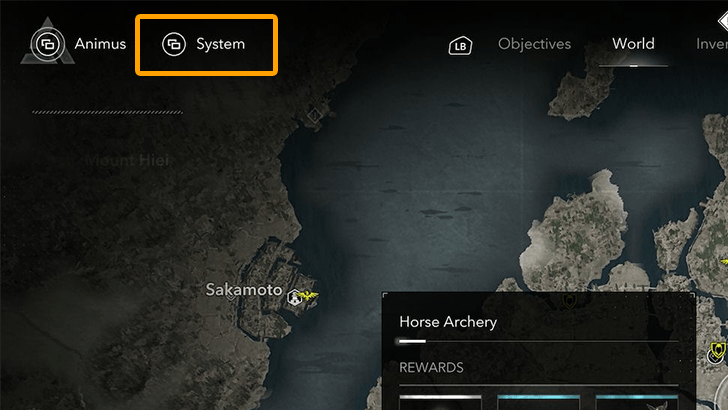 Open your world map by pressing  (PS5), (PS5),  (Xbox), or (Xbox), or  (PC). Then, hit / again (or (PC). Then, hit / again (or  on PC) to open the System Menu. on PC) to open the System Menu. |
|---|---|
| 2 | 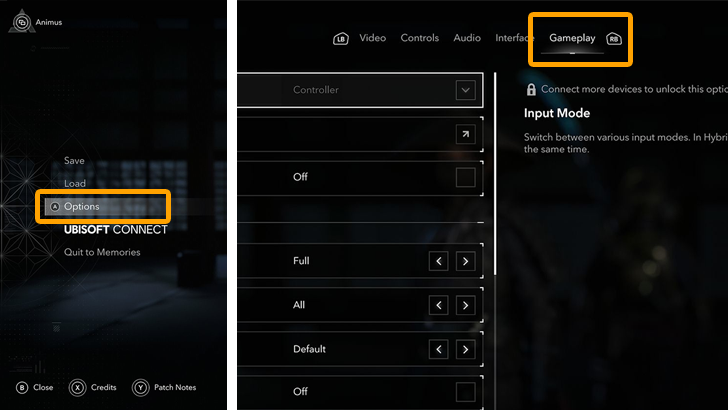 From here, select Options then go to the Gameplay tab. Here, you can adjust a few difficulty settings like Guided Exploration, Aim Assist, and Area Loot. |
| 3 | 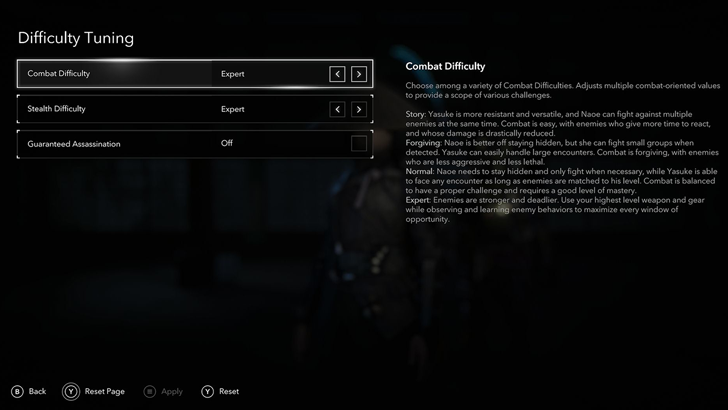 To adjust overall game difficulty, go to Difficulty Tuning then adjust the settings for Combat Difficulty, Stealth Difficulty, and Guaranteed Assassinations. |
Assassin's Creed Shadows Related Guides
AC Shadows Recommended Guides
AC Shadows Wiki
| All Categories | |
|---|---|
 Interactive Map Interactive Map |
 Quests Quests |
 Allies Allies |
 Tips and Tricks Tips and Tricks |
 Weapons Weapons |
 Armor Armor |
 Headgear Headgear |
 Trinkets Trinkets |
 Castles Castles |
 Temples Temples |
 Kofun Kofun |
 Abilities Abilities |
 Mounts Mounts |
 Choices Choices |
 Riddles Riddles |
 Trophies Trophies |
 News News |
|
Comment
Author
Assassin's Creed Shadows (AC Shadows) Walkthrough & Guides Wiki
Difficulty Setting Differences and How to Change

Please participate in our site
improvement survey
03/2026
improvement survey
03/2026
Would you assist in
improving Game8's site?
improving Game8's site?

×
We are listening to our users' valuable opinions and discussing how to act on them.
The information collected through this survey will be used for the purpose of improving our services. In addition, the information will only be disclosed a part of a statistic in a format that will not allow identification of personal information.
Begin Survey
Not Now
×
Please rate each item regarding Game8.co's Advertisements.
Amount of Ads
Very Dissatisfied
Somewhat Dissatisfied
Fine
Somewhat Satisfied
Highly Satisfied
Placement of Ads
Timing of Ad Display
Ad Loading Speed
Safeness of Ads
Content of Ads
×
Please rate each item regarding Game8.co's Quality of Articles.
Amount of information
Very Dissatisfied
Somewhat Dissatisfied
Fine
Somewhat Satisfied
Highly Satisfied
Frequency of updates
Speed of new information
Accuracy of articles
Understandibility of articles
Readability of sentences
×
Please rate each item regarding Game8.co's Usability of the Site.
Ease of finding information
Very Dissatisfied
Somewhat Dissatisfied
Fine
Somewhat Satisfied
Highly Satisfied
Loading Speed
Use of Color
Font Size
Visibility of Images
Easy to Understand Layout
×
Please rate each item regarding Game8.co's Message Boards, Comments.
Ease of Writing
Very Dissatisfied
Somewhat Dissatisfied
Fine
Somewhat Satisfied
Highly Satisfied
Readability
Ease in Finding Information
Comment Quality
Comment Quantity
Admin Response
×
Please rate each item regarding Game8.co's Site's new design.
Please rate our site's new design
Very Dissatisfied
Somewhat Dissatisfied
Fine
Somewhat Satisfied
Highly Satisfied
Do you think that the website's design change makes the site easier to use?
Has the new design made it easier for you to find information on the site?
Has the new design improved the overall visual appeal of the site?
How would you rate your overall satisfaction with the new design of the site?
×
How likely are you to recommend Game8 to someone you know?
Very Unlikely
0
1
2
3
4
5
6
7
8
9
10
Very Likely
If you have other opinions regarding potential improvement to the website, please share them with us. We would appreciate your honest opinion.
Note: This is a free response section, so you can proceed without entering anything.
Note: Please be sure not to enter any kind of personal information into your response.
Note: Please be sure not to enter any kind of personal information into your response.
×
Thank You
×
Thank you for participating in our survey! Your answers will help us to improve the quality of our website and services.
We hope you continue to make use of Game8.
We hope you continue to make use of Game8.
Close
Rankings
- We could not find the message board you were looking for.
Gaming News

![Everwind Review [Early Access] | The Shaky First Step to A Very Long Journey](https://img.game8.co/4440226/ab079b1153298a042633dd1ef51e878e.png/thumb)
![Monster Hunter Stories 3 Review [First Impressions] | Simply Rejuvenating](https://img.game8.co/4438641/2a31b7702bd70e78ec8efd24661dacda.jpeg/thumb)
Popular Games

Genshin Impact Walkthrough & Guides Wiki
Honkai: Star Rail Walkthrough & Guides Wiki
Umamusume: Pretty Derby Walkthrough & Guides Wiki
Pokemon Pokopia Walkthrough & Guides Wiki
Resident Evil Requiem (RE9) Walkthrough & Guides Wiki
Monster Hunter Wilds Walkthrough & Guides Wiki
Wuthering Waves Walkthrough & Guides Wiki
Arknights: Endfield Walkthrough & Guides Wiki
Pokemon FireRed and LeafGreen (FRLG) Walkthrough & Guides Wiki
Pokemon TCG Pocket (PTCGP) Strategies & Guides Wiki










Recommended Games
Diablo 4: Vessel of Hatred Walkthrough & Guides Wiki
Fire Emblem Heroes (FEH) Walkthrough & Guides Wiki
Yu-Gi-Oh! Master Duel Walkthrough & Guides Wiki
Super Smash Bros. Ultimate Walkthrough & Guides Wiki
Pokemon Brilliant Diamond and Shining Pearl (BDSP) Walkthrough & Guides Wiki
Elden Ring Shadow of the Erdtree Walkthrough & Guides Wiki
Monster Hunter World Walkthrough & Guides Wiki
The Legend of Zelda: Tears of the Kingdom Walkthrough & Guides Wiki
Persona 3 Reload Walkthrough & Guides Wiki
Cyberpunk 2077: Ultimate Edition Walkthrough & Guides Wiki










All rights reserved
© 2024 Ubisoft Entertainment. All Rights Reserved. Assassin’s Creed, Ubisoft, and the Ubisoft logo are registered or unregistered trademarks of Ubisoft Entertainment in the US and/or other countries.
The copyrights of videos of games used in our content and other intellectual property rights belong to the provider of the game.
The contents we provide on this site were created personally by members of the Game8 editorial department.
We refuse the right to reuse or repost content taken without our permission such as data or images to other sites.