
How to Play Music
★ Best Weapons | Best Backpack Component
☆ Outfits | Best Stats to Upgrade
★ Hats, Suits, Glasses, Waist & Chest Accessories
☆ Get all Unlockables and Upgrades
★ All Actors | Cameos
☆ List of Orders and Bosses

Music from various artists tied to the game can be played via the Music Player in Death Stranding 2: On the Beach (DS2). Read on to learn how to unlock the music player, how to play music, and how to get more tracks for your playlists.
| Related Music Guides | |
|---|---|
| How to Play Music | List of All Songs |
List of Contents
How to Play Music
Complete Order No. 011 to Unlock the Music Player
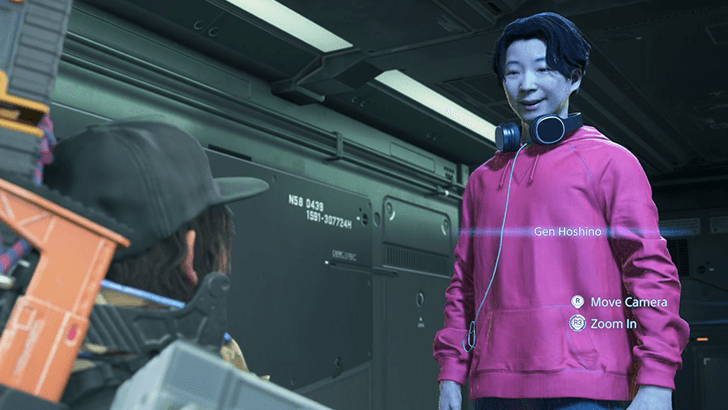
To unlock the built-in Music Player of your Ring Terminal, you'll first need to complete Main Order No. 011. Deliver the recording to the Musician (Gen Hoshino) and you'll be rewarded with the ability to play music on the fly.
Play Music via the Ring Terminal Menu
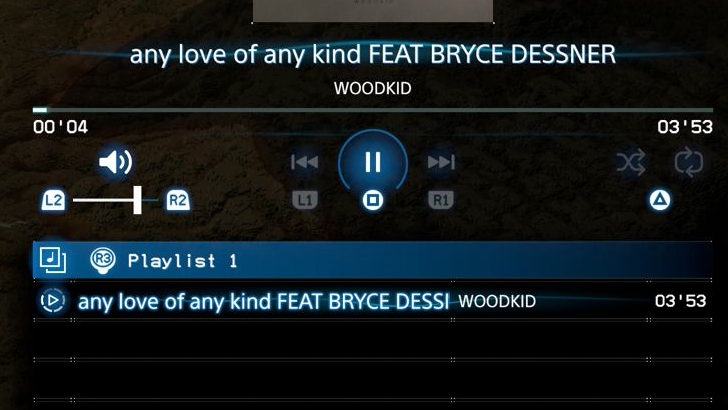
To access the Music Player, open your Ring Terminal (Options button) then press the Left D-pad to go to the Ring Menu. From here, scroll until you find the Music Player and open it to see all songs you can play.
Add songs to your playlist and, when ready, hit Square to start playing your chosen tracks. When the music player starts playing, you can exit back to the regular game and the songs will continue while you play.
| Music Player Controls | |||
|---|---|---|---|
 / /  Volume -/+ |
 Cycle Playlist |
||
 / /  Next/Prev. Track |
 Add/Remove Song |
||
 Play/Pause |
 Go to Current Song |
||
 Shuffle/Repeat |
 Listen to Sample |
||
Music Stops if You Enter an Area with Enemies
Entering an area with enemies or BTs will automatically pause the music player. You will need to leave the area or deal with all the nearby enemies to get your music player to resume playing.
How to Unlock Music Tracks
Can be Obtained by Raising Connection Levels
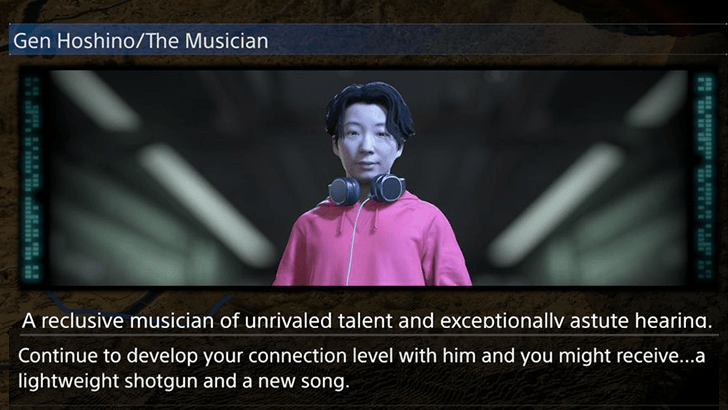
You'll be able to unlock more music by fulfilling orders for certain NPCs. Gen Hoshino, the Musician, is one possible character you can raise your connection level with in order to unlock more music for your collection.
Reward from Main Orders
Progressing main orders will also net you a few tracks including the music used in the reveal trailers of Death Stranding 2 (to the wylder by Woodkid). Progress through the main story to gain access to these tracks for your music player.
List of Orders (Story Walkthrough)
Death Stranding 2 Related Guides
Beginner's Guide: Tips and Tricks
All Beginner's Guides
Comment



Author

Rankings
- We could not find the message board you were looking for.
Gaming News




Popular Games

Genshin Impact Walkthrough & Guides Wiki
Umamusume: Pretty Derby Walkthrough & Guides Wiki
Pokemon Pokopia Walkthrough & Guides Wiki
Honkai: Star Rail Walkthrough & Guides Wiki
Monster Hunter Stories 3: Twisted Reflection Walkthrough & Guides Wiki
Arknights: Endfield Walkthrough & Guides Wiki
Wuthering Waves Walkthrough & Guides Wiki
Zenless Zone Zero Walkthrough & Guides Wiki
Pokemon TCG Pocket (PTCGP) Strategies & Guides Wiki
Monster Hunter Wilds Walkthrough & Guides Wiki










Recommended Games
Fire Emblem Heroes (FEH) Walkthrough & Guides Wiki
Diablo 4: Vessel of Hatred Walkthrough & Guides Wiki
Cyberpunk 2077: Ultimate Edition Walkthrough & Guides Wiki
Yu-Gi-Oh! Master Duel Walkthrough & Guides Wiki
Super Smash Bros. Ultimate Walkthrough & Guides Wiki
Pokemon Brilliant Diamond and Shining Pearl (BDSP) Walkthrough & Guides Wiki
Elden Ring Shadow of the Erdtree Walkthrough & Guides Wiki
Monster Hunter World Walkthrough & Guides Wiki
The Legend of Zelda: Tears of the Kingdom Walkthrough & Guides Wiki
Persona 3 Reload Walkthrough & Guides Wiki










All rights reserved
© KOJIMA PRODUCTIONS Co., Ltd. 2022 All Rights Reserved
The copyrights of videos of games used in our content and other intellectual property rights belong to the provider of the game.
The contents we provide on this site were created personally by members of the Game8 editorial department.
We refuse the right to reuse or repost content taken without our permission such as data or images to other sites.