
Should You Use Smart Steering?
★ 394 P Switches | 150 ? Panels | 200 Medallions
☆ Unlockables Guide | Mirror Mode
★ How to Get Kamek Fast
☆ Best Characters | Best Karts | Best Combo
★ How to Unlock All Outfits with Food locations!
☆ Ver. 1.1.2 Patch Update released on 7/25/2025!
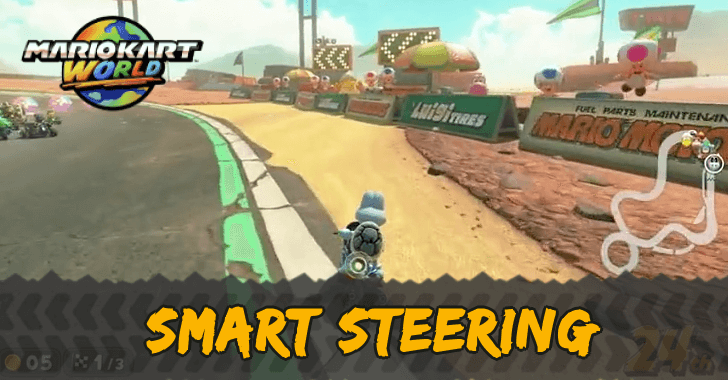
Don't use Smart Steering if you want to go off the course or use Ultra Mini Turbo in Mario Kart World. Learn the uses of Smart Steering and how to turn it off here!
List of Contents
Smart Steering Uses
You Cannot Go Out of Bounds
Smart Steering prevents you from going outside the course, which can help you at the start of the game. However, you should turn it off as you play more to make it easier to take shortcuts.
The Sensor Behind Your Kart Shows That Smart Steering is Active
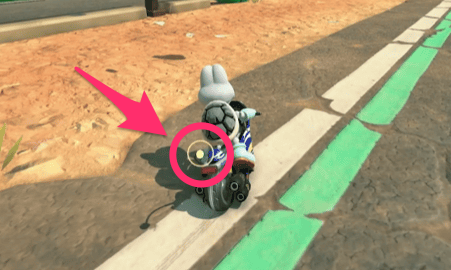
When Smart Steering is working, a sensor at the back of your Kart will light up,
You Cannot Do Ultra Mini Turbo
If Smart Steering is turned on, you cannot do an Ultra Mini Turbo, so if you want to go faster, you should turn the setting off.
How to Turn Off Smart Steering
You Can Change it in the Controller Settings
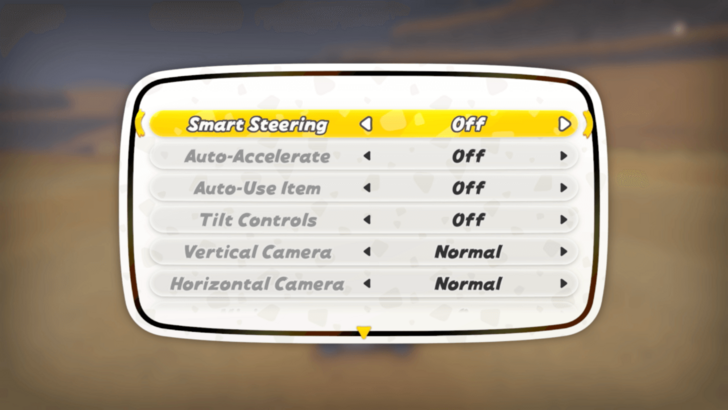
If you want to turn off Smart Steering, you can disable it in the controller settings. You can open the controller settings when you are picking a Kart or during a race.
| Where to Access Settings | How to Access Settings |
|---|---|
| Kart Selection |  Button Button |
| During a Race |  Button → Button Button → Button |
Smart Steering is Turned On by Default
Smart Steering is enabled by default, so if you are more comfortable with the setting off, make sure to go to the controller settings and disable it.
You Cannot Use Smart Steering in Time Attack
Smart Steering cannot be used in Time Attack mode, so you must get used to driving with the setting off if you want to record faster laps.
Mario Kart World Related Guides
All Tips and Tricks
Comment



Author
Should You Use Smart Steering?

Rankings
- We could not find the message board you were looking for.
Gaming News
![Animal Crossing: New Horizons Review [Switch 2] | Needlessly Crossing Over to a New Generation](https://img.game8.co/4391759/47d0408b0b8a892e453a0b90f54beb8a.png/show)



Popular Games

Genshin Impact Walkthrough & Guides Wiki
Honkai: Star Rail Walkthrough & Guides Wiki
Arknights: Endfield Walkthrough & Guides Wiki
Umamusume: Pretty Derby Walkthrough & Guides Wiki
Wuthering Waves Walkthrough & Guides Wiki
Pokemon TCG Pocket (PTCGP) Strategies & Guides Wiki
Abyss Walkthrough & Guides Wiki
Zenless Zone Zero Walkthrough & Guides Wiki
Digimon Story: Time Stranger Walkthrough & Guides Wiki
Clair Obscur: Expedition 33 Walkthrough & Guides Wiki









Recommended Games
Fire Emblem Heroes (FEH) Walkthrough & Guides Wiki
Pokemon Brilliant Diamond and Shining Pearl (BDSP) Walkthrough & Guides Wiki
Diablo 4: Vessel of Hatred Walkthrough & Guides Wiki
Super Smash Bros. Ultimate Walkthrough & Guides Wiki
Yu-Gi-Oh! Master Duel Walkthrough & Guides Wiki
Elden Ring Shadow of the Erdtree Walkthrough & Guides Wiki
Monster Hunter World Walkthrough & Guides Wiki
The Legend of Zelda: Tears of the Kingdom Walkthrough & Guides Wiki
Persona 3 Reload Walkthrough & Guides Wiki
Cyberpunk 2077: Ultimate Edition Walkthrough & Guides Wiki










All rights reserved
© Nintendo
The copyrights of videos of games used in our content and other intellectual property rights belong to the provider of the game.
The contents we provide on this site were created personally by members of the Game8 editorial department.
We refuse the right to reuse or repost content taken without our permission such as data or images to other sites.