
Drifting Guide: How to Drift Like a Pro
★ 394 P Switches | 150 ? Panels | 200 Medallions
☆ Unlockables Guide | Mirror Mode
★ How to Get Kamek Fast
☆ Best Characters | Best Karts | Best Combo
★ How to Unlock All Outfits with Food locations!
☆ Ver. 1.1.2 Patch Update released on 7/25/2025!
This is a guide for executing drifts to win races in Mario Kart 8. Learn how to perform a drift and get advanced drifting tips in this guide!
List of Contents
How to Perform a Drift
Drifting Basics
To perform a drift, hold down the R button and move the left joystick in the direction of the turn that you need to make. This will cause your character to do a short hop, then immediately start drifting as soon as you land. Releasing the R button will end the drift, so make sure to keep the button held down unless you want to end the drift early.
As a general rule, begin your drift by pressing and holding the R button while tilting the joystick in the opposite direction of the turn in order to create space. Then, adjust your drift by tilting the joystick toward the turn. Finally, to continue the drift, change back to the original direction.
For courses with numerous bends and sharp turns, you may choose to drift directly toward the corner for a tighter turn. Then, adjust your drift as needed.
Extending Your Drift Charges Your Mini-Turbo
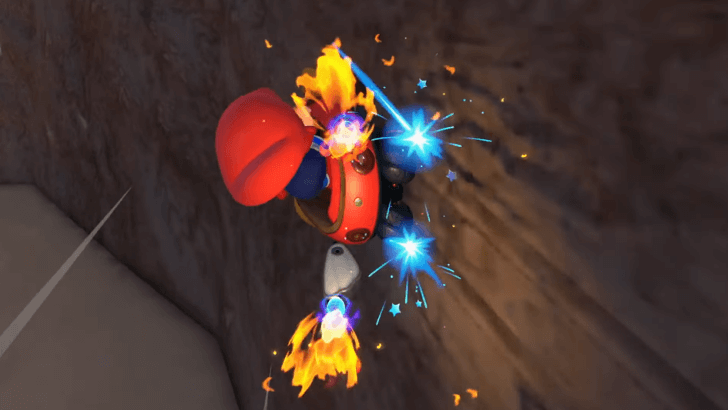
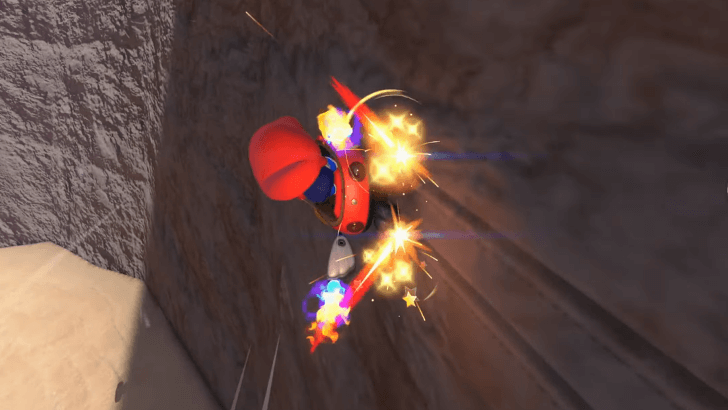
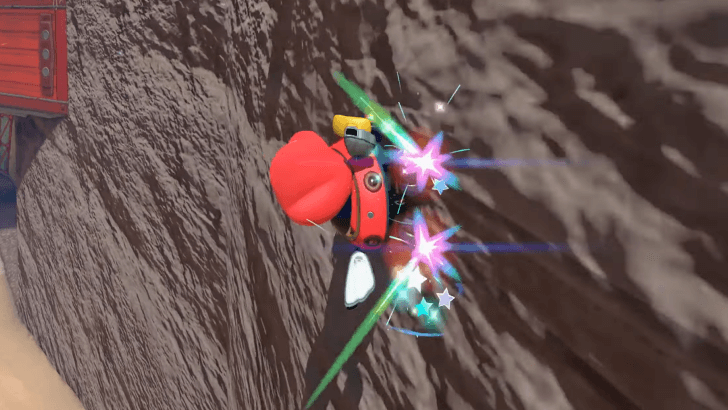
Mini-Turboes can also be charged via wall-riding!
Maintaining your drift charges your Mini-Turbo, which provides a momentary speed boost. The Mini-Turbo is only used when you end your drift.
There are three levels of the Mini-Turbo, each with a different duration. Mini-Turbo levels increase in duration as the level increases. The Mini-Turbo has the shortest duration. The Super Mini-Turbo has a longer duration, and the Ultra-Mini Turbo has the longest.
Each Mini-Turbo level has a distinct color, making it easy to distinguish one from another. Mini-Turbo will have blue sparks on your wheels, while the Super Mini-Turbo will have orange sparks. The Ultra-Mini Turbo will be colored pink, making it the most distinct color of all three.
Advanced Drifting Tips
| Insert Text |
|---|
|
|
 Turn Off Smart Steering
Turn Off Smart Steering
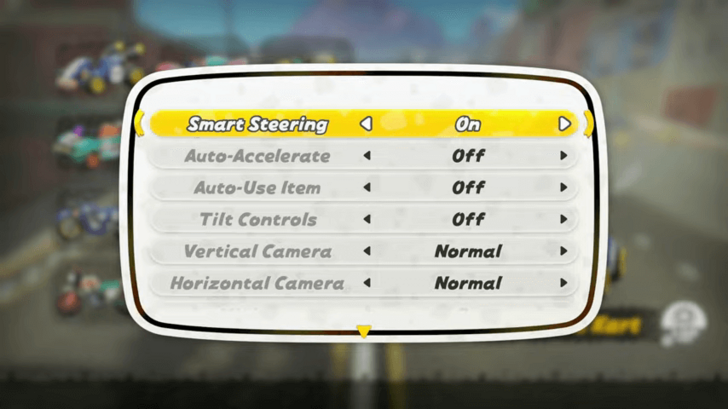
Although Smart Steering is a great option for beginners, it isn't recommended for intermediate to advanced players because it restricts your ability to gain an Ultra Mini-Turbo boost while drifting. Turn this option off as soon as possible so you can learn how to play the game without it.
Should You Use Smart Steering?
Utilize Jump Boosts
While Jump boosts can provide a speed boost after you land, you can also start drifting as soon as you land, skipping the initial hop
phase of the drift. This is especially useful when doing tight corners directly after a jump or a ramp.
How to Jump
Drifting After Rail and Wall Riding
You can also perform a drift immediately after a rail or wall ride upon landing. Since these techniques can be chained together during certain sections of some courses, you can drift afterwards to maintain momentum.
Utilize the Correct Mini-Turbo Levels
Although the Super Mini-Turbo and Ultra Mini-Turbo provide longer-lasting speed boosts, it is not always optimal to aim for them. This applies to most tracks. You'll find that optimization for some tracks requires only a mini-turbo or, at most, a super mini-turbo.
Delay Drift to Charge Mini-Turbo Faster
| Ordinary Drift | Delay Drift |
|---|---|
Press at the same time. and move and move  |
Press and move right before you hit the ground. |
Drifting normally is easier as you don't have to time your left joystick. All you have to do is press the R button and move your left joystick at the same time.
Delay Drifting, on the other hand, is when you have to move your left joystick the second before you hit the ground. Mastering the timing is the trickiest part.
Is Drifting Always the Right Move?
Drift Only When Necessary
Although mini-turboes offer a speed boost after drifting, drifting isn't always the right move. Snaking,
or drifting during straight sections of courses, can work for some, but it doesn't apply to all courses. Learn the ins and outs of each track and only drift as needed.
How to Do Snaking
Mario Kart Related Guides
Other Technique Guides
Comment



Author

Drifting Guide: How to Drift Like a Pro

Rankings
- We could not find the message board you were looking for.
Gaming News




Popular Games

Genshin Impact Walkthrough & Guides Wiki
Honkai: Star Rail Walkthrough & Guides Wiki
Arknights: Endfield Walkthrough & Guides Wiki
Umamusume: Pretty Derby Walkthrough & Guides Wiki
Wuthering Waves Walkthrough & Guides Wiki
Pokemon TCG Pocket (PTCGP) Strategies & Guides Wiki
Abyss Walkthrough & Guides Wiki
Zenless Zone Zero Walkthrough & Guides Wiki
Digimon Story: Time Stranger Walkthrough & Guides Wiki
Clair Obscur: Expedition 33 Walkthrough & Guides Wiki









Recommended Games
Fire Emblem Heroes (FEH) Walkthrough & Guides Wiki
Pokemon Brilliant Diamond and Shining Pearl (BDSP) Walkthrough & Guides Wiki
Diablo 4: Vessel of Hatred Walkthrough & Guides Wiki
Super Smash Bros. Ultimate Walkthrough & Guides Wiki
Yu-Gi-Oh! Master Duel Walkthrough & Guides Wiki
Elden Ring Shadow of the Erdtree Walkthrough & Guides Wiki
Monster Hunter World Walkthrough & Guides Wiki
The Legend of Zelda: Tears of the Kingdom Walkthrough & Guides Wiki
Persona 3 Reload Walkthrough & Guides Wiki
Cyberpunk 2077: Ultimate Edition Walkthrough & Guides Wiki










All rights reserved
© Nintendo
The copyrights of videos of games used in our content and other intellectual property rights belong to the provider of the game.
The contents we provide on this site were created personally by members of the Game8 editorial department.
We refuse the right to reuse or repost content taken without our permission such as data or images to other sites.