



This survey will take about 1 minute.
Your answers will help us to improve our website.
Dune: Awakening
Multiplayer Guide: How to Play with Friends
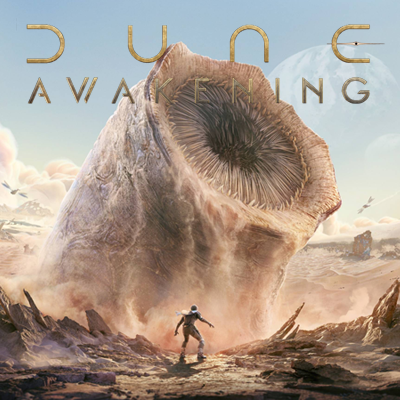
This guide will cover how to play multiplayer with friends using the friend in Dune: Awakening. Find out how to navigate the friend page to play with friends, and how the server structures will impact your gameplay, as well as available server regions in this article!
List of Contents
How to Play Multiplayer with Friends
Connect with Friends Through Steam
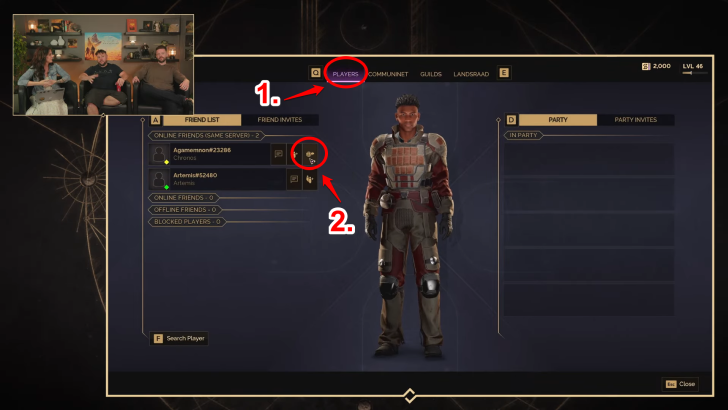
Friends on Steam are automatically added into the Friend Page on Dune: Awakening, and can be sent a request to join their world. Players can link up to their friends no matter what server or sietch they are in, provided there is space in the server. However, when trying to connect to a full server, players may have to wait in a queue before entering.
Any player can join their friends despite being in different servers though they will be unable to build for data control purposes on Funcom's end. That said, players are able to build on their friend's land if they are given permission.
Adding Friends on Steam
| 1 |  On the upper left corner of Steam is the Friends Tab, click it to open s new window on Steam. |
|---|---|
| 2 | 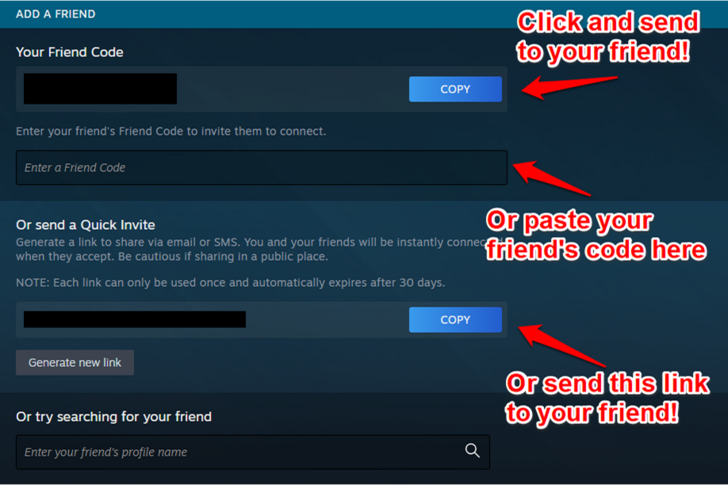 You can either send your code to your friend, or input your friend's code into Steam to add them. There is also a quick invite that will send the request for you for whoever opens the link! |
Steam Friend Code Sharing Board
Communicate Through Pings, Voice Chat, and Messages
Ping By Pressing Middle Mouse Button
You can ping anything in your sight using your middle mouse button. This will alert your party members through an audio and visual cue in their own screen.
Voice Chat By Pressing V
You can also use your microphone to talk directly to players nearby by holding the V key on your keyboard. This generally makes communication much faster and easier.
Message Privately Through
You can also privately message players and party members. Press the P key to open the list of players, Left Click the player you want to talk to and choose the Private Message button.
Is Dune: Awakening Multiplayer Only?
There is No Offline Play
As an MMO, it is not possible to play solo offline. That said, playing with groups or guilds is not a hard requirement, and so the game can be played solo.
How Do Servers Work
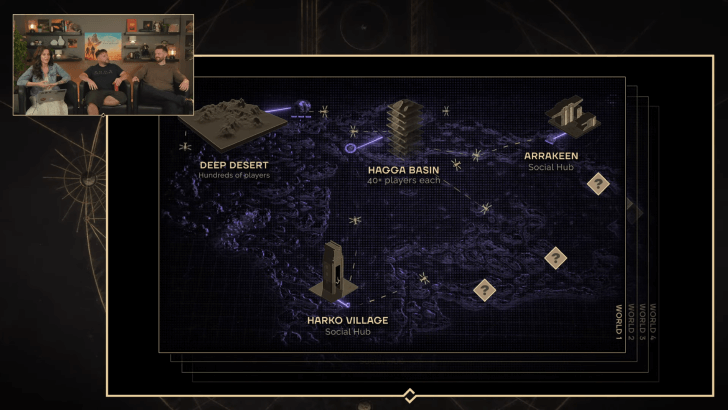
Dune: Awakening has a unique server structure to ensure smooth gameplay. Each server, called world, is home to several regions like the Deep Desert, Hagga Basin, Arrakeen, and Harko Village, and after the official launch of the game, more worlds available for players to connect to. Here are the important structures to remember:
Server Regions
 • West Coast US • Central US • East Coast US • South America • Europe • Asia • Australia |
As of now, these are only 7 regions where there is a server based in the area. You'll be given the option to choose servers but we recommend sticking with the server that will offer you the less ping for smoother gameplay.
Sietches
Although players might be in the same area, they might not necessarily have the same server because of how sietches work. Sietches are basically layers working dynamically by creating a new sietch each time it reaches its maximum capacity of 40 players. These sietches are considered persistent servers that consist of different biomes, and players take an active role in shaping the land.
Social Hub
Social hubs like the Arrakeen and Harko villages will be instances that can handle over a hundred players and can be used as hubs for trading, picking up contracts, or coordinating mass player movements for certain events. These areas are considered public areas for all players to enjoy, and have vehicles, building, and PvP disabled.
PVP Zone - The Deep Desert
The Deep Desert will focus on player-versus-player content with some of the fiercest climates in the game. This area will feature a massive open-space map with zero loading times, as several maps have been seamlessly connected to each other, and hundreds of players can face off against each other for certain control points or other points of interest.
Because of the Coriolis Storm and intense player activity in this area, its landscape changes frequently to keep the area fresh and new. These places have PvP enabled, as well as PvE, as hostile combatants will make themselves a problem.
Is there Crossplay?
No Crossplay Due to PC Only Release
As of now, there is no implementation of crossplay available because the game will only launch on PC (Steam). Though Funcom has plans to release on console, there is yet any confirmation whether that will feature crossplay and cross-progression with the PC release.
We'll update the page as we learn more information on the matter, so stay tuned!
Dune: Awakening Related Guides

| Dune: Awakening Wiki Contents | |
|---|---|
 Maps and Locations Maps and Locations |
 Builds Builds |
 Resources Resources |
 Uniques Uniques |
 Walkthrough Walkthrough |
 Weapons Weapons |
 Armor Armor |
 Skills Skills |
 Factions Factions |
 Classes Classes |
 Contracts Contracts |
 Characters Characters |
 Items Items |
 Vehicles Vehicles |
 Tools Tools |
 Base Structures Base Structures |
 Enemies Enemies |
 Decorations Decorations |
 Bugs and Error Codes Bugs and Error Codes |
 Cosmetics Cosmetics |
Comment
Author
Multiplayer Guide: How to Play with Friends

Please participate in our site
improvement survey
03/2026
improvement survey
03/2026
Would you assist in
improving Game8's site?
improving Game8's site?

×
We are listening to our users' valuable opinions and discussing how to act on them.
The information collected through this survey will be used for the purpose of improving our services. In addition, the information will only be disclosed a part of a statistic in a format that will not allow identification of personal information.
Begin Survey
Not Now
×
Please rate each item regarding Game8.co's Advertisements.
Amount of Ads
Very Dissatisfied
Somewhat Dissatisfied
Fine
Somewhat Satisfied
Highly Satisfied
Placement of Ads
Timing of Ad Display
Ad Loading Speed
Safeness of Ads
Content of Ads
×
Please rate each item regarding Game8.co's Quality of Articles.
Amount of information
Very Dissatisfied
Somewhat Dissatisfied
Fine
Somewhat Satisfied
Highly Satisfied
Frequency of updates
Speed of new information
Accuracy of articles
Understandibility of articles
Readability of sentences
×
Please rate each item regarding Game8.co's Usability of the Site.
Ease of finding information
Very Dissatisfied
Somewhat Dissatisfied
Fine
Somewhat Satisfied
Highly Satisfied
Loading Speed
Use of Color
Font Size
Visibility of Images
Easy to Understand Layout
×
Please rate each item regarding Game8.co's Message Boards, Comments.
Ease of Writing
Very Dissatisfied
Somewhat Dissatisfied
Fine
Somewhat Satisfied
Highly Satisfied
Readability
Ease in Finding Information
Comment Quality
Comment Quantity
Admin Response
×
Please rate each item regarding Game8.co's Site's new design.
Please rate our site's new design
Very Dissatisfied
Somewhat Dissatisfied
Fine
Somewhat Satisfied
Highly Satisfied
Do you think that the website's design change makes the site easier to use?
Has the new design made it easier for you to find information on the site?
Has the new design improved the overall visual appeal of the site?
How would you rate your overall satisfaction with the new design of the site?
×
How likely are you to recommend Game8 to someone you know?
Very Unlikely
0
1
2
3
4
5
6
7
8
9
10
Very Likely
If you have other opinions regarding potential improvement to the website, please share them with us. We would appreciate your honest opinion.
Note: This is a free response section, so you can proceed without entering anything.
Note: Please be sure not to enter any kind of personal information into your response.
Note: Please be sure not to enter any kind of personal information into your response.
×
Thank You
×
Thank you for participating in our survey! Your answers will help us to improve the quality of our website and services.
We hope you continue to make use of Game8.
We hope you continue to make use of Game8.
Close
Rankings
- We could not find the message board you were looking for.
Gaming News


![Slay the Spire 2 Review [Early Access] | Still the Deckbuilder to Beat](https://img.game8.co/4433115/44e19e1fb0b4755466b9e516ec7ffb1e.png/thumb)

![Resident Evil Village Review [Switch 2] | Almost Flawless Port](https://img.game8.co/4432790/e1859f64830960ce4248d898f8cd38d9.jpeg/thumb)
Popular Games

Genshin Impact Walkthrough & Guides Wiki
Honkai: Star Rail Walkthrough & Guides Wiki
Umamusume: Pretty Derby Walkthrough & Guides Wiki
Pokemon Pokopia Walkthrough & Guides Wiki
Resident Evil Requiem (RE9) Walkthrough & Guides Wiki
Monster Hunter Wilds Walkthrough & Guides Wiki
Wuthering Waves Walkthrough & Guides Wiki
Arknights: Endfield Walkthrough & Guides Wiki
Pokemon FireRed and LeafGreen (FRLG) Walkthrough & Guides Wiki
Pokemon TCG Pocket (PTCGP) Strategies & Guides Wiki










Recommended Games
Fire Emblem Heroes (FEH) Walkthrough & Guides Wiki
Diablo 4: Vessel of Hatred Walkthrough & Guides Wiki
Yu-Gi-Oh! Master Duel Walkthrough & Guides Wiki
Super Smash Bros. Ultimate Walkthrough & Guides Wiki
Pokemon Brilliant Diamond and Shining Pearl (BDSP) Walkthrough & Guides Wiki
Elden Ring Shadow of the Erdtree Walkthrough & Guides Wiki
Monster Hunter World Walkthrough & Guides Wiki
The Legend of Zelda: Tears of the Kingdom Walkthrough & Guides Wiki
Persona 3 Reload Walkthrough & Guides Wiki
Cyberpunk 2077: Ultimate Edition Walkthrough & Guides Wiki










All rights reserved
© 2025 Funcom. All Rights Reserved.
The copyrights of videos of games used in our content and other intellectual property rights belong to the provider of the game.
The contents we provide on this site were created personally by members of the Game8 editorial department.
We refuse the right to reuse or repost content taken without our permission such as data or images to other sites.