
List of Controls
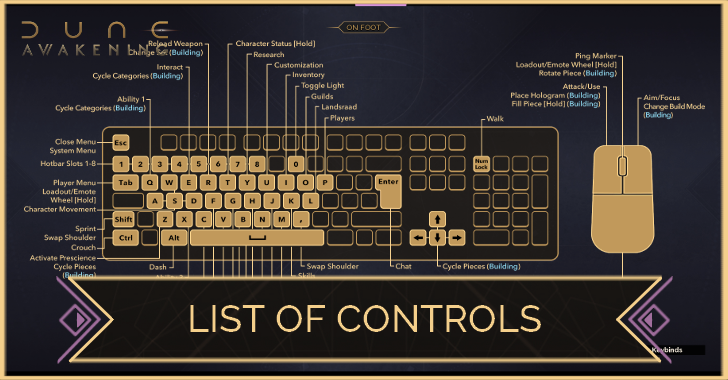
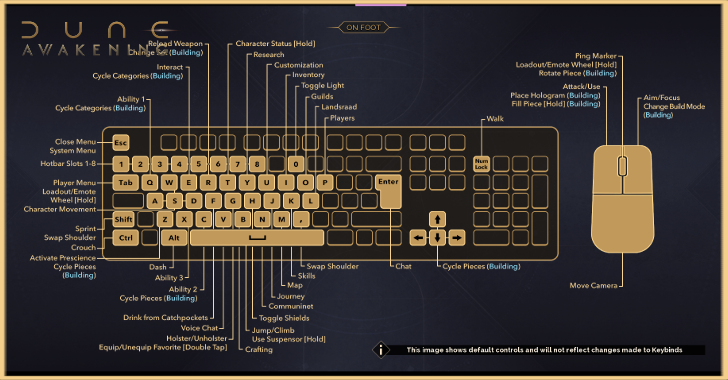
This is a guide to all the controls for PC for Dune: Awakening. See all of the general control list for exploration, combat, and vehicles!
List of Controls
| Note: This layout follows the default settings found in the game for PC Controls. Players have the option to edit these controls according to their preferred layout. |
On Foot
| Jump to a Section! | ||
|---|---|---|
| On Foot | Combat | Vehicles |
| Commands | PC |
|---|---|
| Jump/Climb/ Suspensors |
 |
| Move Forward |  |
| Move Back |  |
| Move Left |  |
| Move Right |  |
| Dash | Left Bracket |
| Sprint |  (Left) (Left) |
| Crouch |  (Left) (Left) |
| Walk | Num Lock |
| Interact |  |
| Ping |  |
| Open Chat |  |
| Voice Chat |  |
| Status Menu |  |
| Radial Menu | (Hold) |
| Drink from Catch Pockets |  |
| Swap Shoulder Camera | (Left) |
| Hotbar Slot 1 |  |
| Hotbar Slot 2 |  |
| Hotbar Slot 3 |  |
| Hotbar Slot 4 |  |
| Hotbar Slot 5 |  |
| Hotbar Slot 6 |  |
| Hotbar Slot 7 |  |
| Hotbar Slot 8 |  |
| Toggle UI Visibility | F6 |
| Building Category Previous |  |
| Building Category Next |  |
| Building Sub Category Previous |  |
| Building Sub Category Next | |
Combat
| Jump to a Section! | ||
|---|---|---|
| On Foot | Combat | Vehicles |
| Commands | PC |
|---|---|
| Attack/Use |  |
| Aim/Focus |  |
| Swap Shoulder | |
| Reload |  |
| Ability 1 | |
| Ability 2 | |
| Ability 3 |  |
| Activate Spice Prescience | |
| Toggle/Recharge Shields |  |
Vehicles
| Jump to a Section! | ||
|---|---|---|
| On Foot | Combat | Vehicles |
General
| Commands | PC |
|---|---|
| Interaction Wheel |  |
| Exit | |
| Ability 1 | |
| Ability 2 | |
| Ability 3 | |
| Headlights | |
Ground
| Commands | PC |
|---|---|
| Forward | |
| Break/Reverse | |
| Steer Left | |
| Steer Right | |
| E-Brake | |
Air
| Commands | PC |
|---|---|
| Fly Forward | |
| Fly Reverse | |
| Strafe Left | |
| Strafe Right | |
| Ascend | |
| Descend | (Left) |
| Free Look | |
| Harness Release | |
| Vulture Mode | |
Is There Controller Support Available?
Partial Controller Support On Steam
Players can connect their Xbox controller to Dune: Awakening to have partial controller support.
However, additional input from other peripherals, such as the mouse and keyboard, may be needed for certain aspects.
Can You Change The Controls?
Controls Are Customizable
Players have the option to customize their controls in the Menu. Under the Controls tab, you can edit the controls to your preferred layout.
Dune: Awakening Related Guides

Best Guides for Beginners
 Best Class Tier List
 Best Base Locations
 Best Items to Craft Early
 Best Skills to Unlock
 Best Uniques to Craft
 Beginner's Guide
 How to Import Character
 Which Homeworld?
 How to Play with Friends
 How to Fast Travel
 How to Move Your Base
 Water Farming Guide
 Spice Farming Guide
 List of Controls
 Trophy Guide
 Best Graphic Settings
 Roadmap and DLCs
 How to Save
 Death Penalty: What Happens When You Die?
 How Do Coriolis Storms Work?
 What is the Max Level?
 How to Repair Items
 How to Pay Taxes
 How to Hide Your Helmet
 How to Delete a Character
 Salvage Guide: What to Do with Old Gear
 How to Increase Inventory Slots
 How to Unlock Skill Slot
 XP Farming Guide: How to Level Up Fast
 Solari (Money) Farming Guide
 How to Escape Quicksand
 Should You Lock or Unlock Research?
 Research Intel Farming Guide
 All Trainer Locations
 How to Activate Shield
 How to Unstuck Character
 How to Respec Skills
 How to Avoid Fall Damage
 What Does Radiation Do?
 Discord Launch Quest
 How to Emote
 Storage Circuits Guide
 Generator Not Working Fix
 Best Weapons to Equip
 Best Armor Type
Server Guides
 Server Status Server Status |
 Can You Change Servers? Can You Change Servers? |
 Private Server Guide Private Server Guide |
Core Game Mechanics
 Combat Guide and Tips Combat Guide and Tips |
 Base Building Guide Base Building Guide |
 Crafting Guide Crafting Guide |
 Difficulty Guide Difficulty Guide |
 PVP Guide PVP Guide |
 PvE Content Guide PvE Content Guide |
 Landsraad Guide Landsraad Guide |
 Hydration Guide Hydration Guide |
 Respawn Timers Respawn Timers |
 Upcoming Changes Upcoming Changes |
- | - |
Message Boards
 Character Creation Sharing Board Character Creation Sharing Board |
 Steam Friend Code Board Steam Friend Code Board |
 Guild Recruitment Board Guild Recruitment Board |
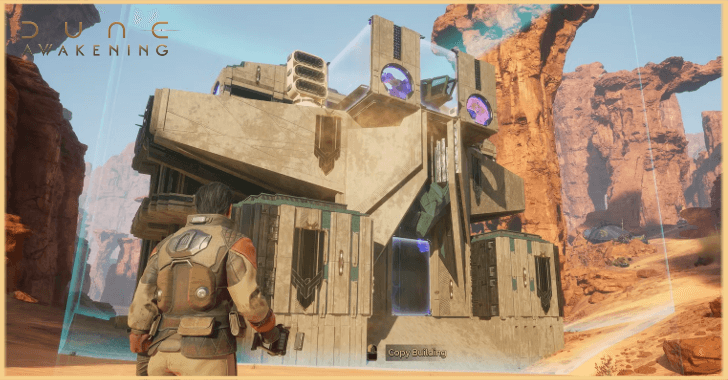 Base Design Sharing Board Base Design Sharing Board |
- | - |
Contests
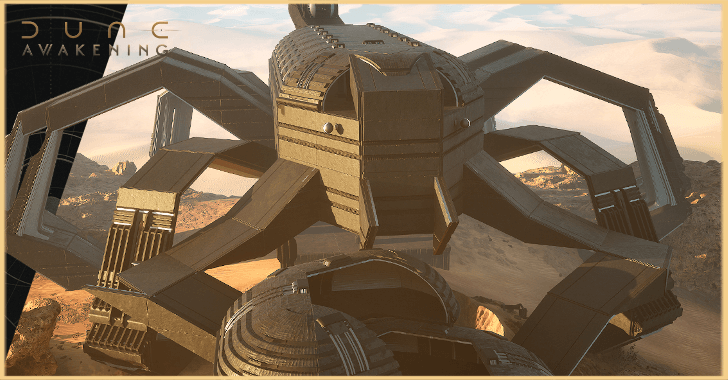 First Building Contest First Building Contest |
- | - |
| - | - | - |
Comment



Author

List of Controls

Rankings
- We could not find the message board you were looking for.
Gaming News





Popular Games

Genshin Impact Walkthrough & Guides Wiki
Umamusume: Pretty Derby Walkthrough & Guides Wiki
Crimson Desert Walkthrough & Guides Wiki
Monster Hunter Stories 3: Twisted Reflection Walkthrough & Guides Wiki
Honkai: Star Rail Walkthrough & Guides Wiki
Pokemon Pokopia Walkthrough & Guides Wiki
The Seven Deadly Sins: Origin Walkthrough & Guides Wiki
Wuthering Waves Walkthrough & Guides Wiki
Zenless Zone Zero Walkthrough & Guides Wiki
Arknights: Endfield Walkthrough & Guides Wiki










Recommended Games
Fire Emblem Heroes (FEH) Walkthrough & Guides Wiki
Diablo 4: Vessel of Hatred Walkthrough & Guides Wiki
Cyberpunk 2077: Ultimate Edition Walkthrough & Guides Wiki
Yu-Gi-Oh! Master Duel Walkthrough & Guides Wiki
Super Smash Bros. Ultimate Walkthrough & Guides Wiki
Pokemon Brilliant Diamond and Shining Pearl (BDSP) Walkthrough & Guides Wiki
Elden Ring Shadow of the Erdtree Walkthrough & Guides Wiki
Monster Hunter World Walkthrough & Guides Wiki
The Legend of Zelda: Tears of the Kingdom Walkthrough & Guides Wiki
Persona 3 Reload Walkthrough & Guides Wiki










All rights reserved
© 2025 Funcom. All Rights Reserved.
The copyrights of videos of games used in our content and other intellectual property rights belong to the provider of the game.
The contents we provide on this site were created personally by members of the Game8 editorial department.
We refuse the right to reuse or repost content taken without our permission such as data or images to other sites.