
1.0.2 Update and Patch Notes
★ Missions: Normal | Basic | Affinity
☆ Tier List: Characters, Classes, Skells
★ Best Divisions | How to Change Divisions
☆ Character Customization and Fashion Gear
★ 104 FN Site Locations | 99 Lobster Locations
☆ All Heart to Heart Locations
Xenoblade Chronicles X: Definitive Edition version 1.0.2 update was released on April 24, 2025, and is now live! See the full list of patch notes, a summary of all changes, and how to update the game to 1.0.2!
1.0.2 Update Summary
Various Bug Fixes
Version 1.0.2 fixes various bugs from minor ones like typos, visual consistencies, UI bugs, and language bugs, to major ones, such as effects from augments not being applied and crashes on certain parts of the game.
Split Backup Request Mission Names
The names of the two Backup Request normal missions (Phog's and Boze's) have been updated to make them easier to distinguish from each another! As of writing, the two Backup Request mission still have the same name. This may be addressed at another patch!
1.0.2 Full Patch Notes
Bug Fixes
|
・Fixed an issue where the application would crash during skell flight in affinity mission: A Girl's Wings. ・Fixed an issue where the host player's position and appearance would not be displayed when joining Online Missions. ・Fixed an issue where the destination marker for Material Tracking and Squad Tasks would not be displayed. ・Fixed an issue where the sound effects were playing in mono in some movies. ・Fixed an issue where a dummy character would be generated and data would be corrupted when changing out Recruited Blades for normal characters. If data is already corrupted, it can be fixed by applying this update. ・Fixed an issue where environment music would start from beginning after end of combat. ・Fixed an issue when fighting an enemy with debuff immunity where the name of the debuff the enemy is immune to would not be displayed when attempting to apply the debuff with Soul Voice. ・Fixed an issue where the combat log was not properly displaying during Overdrive. ・Fixed an issue where "Divine Nupopon incarnate" would not appear during the cutscene in Normal Mission The Divine Nupopon. ・Fixed an issue where players could still control the main character after the fade to black after clearing the second half of Chapter 13. ・Fixed an issue where the effects of the Augments "Overdrive Green Bonus" and "Overdrive Blue Bonus" were not being applied. ・Fixed an issue where damaged parts were being displayed on Skell models. ・Fixed an issue where the Port Side of the Ma-non Craft would be closed-off when loading an autosave after opening it. ・Fixed an issue where English text was displayed in the German version. ・Fixed an issue where the Japanese voice for "Eleonora" was playing in English, French, Italian, German, and Spanish languages. ・Fixed an issue where a dummy character was generated and data was corrupted when the recruitment/release of Recruited Blades overlapped with a save. ・Fixed an issue where "00" was displayed when activating Overdrive when the effect of the augment "Overdrive Count Up" was three digits or more. ・Fixed an issue in Online Missions where parts were restored when entering or exiting a Skell. ・Fixed an issue where the application would freeze if a character was added to a party immediately after a Recruited Blade returned. ・Fixed an issue where "????" was displayed in the "Fashion Gear" list. ・Fixed an issue where Skell weapons multiplied when performing a battle trait upgrade following certain steps. ・Fixed an issue where slot openings were not properly reflected when performing certain steps at L's shop. ・Made other text corrections, such as typos. ・Fixed confirmed vulnerability bugs. |
Changes and Additions to Functions
|
・Added tips that are displayed when opening related tips on some menu screens such as the Class Change screen. ・Buff and debuff icons are now displayed in Online Missions. ・There were two basic missions with the title Backup Request, and it was difficult to distinguish between them, so the quest names have been split-up. |
How to Update to 1.0.2
Step-by-Step Guide to Update to 1.0.2
| # | Steps |
|---|---|
| 1 | 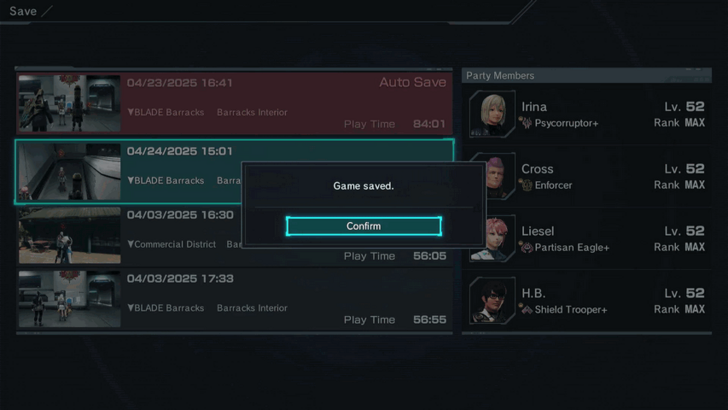 Save your progress and close your game. Then make sure your Nintendo Switch is connected to the internet. |
| 2 | 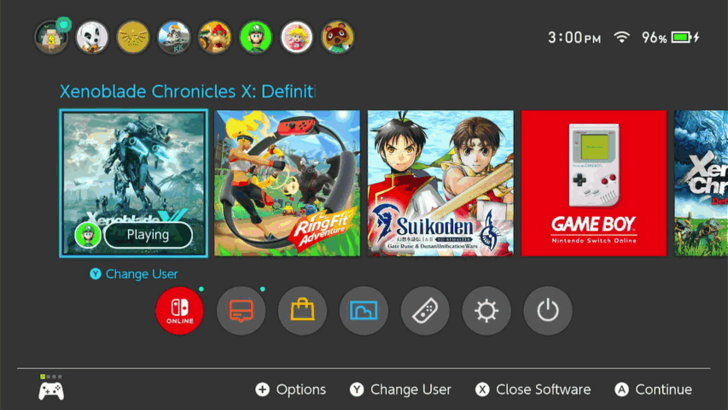 Navigate to your Switch's HOME menu, hover over Xenoblade Chronicles X: Definitive Edition, and press the Minus  or Plus or Plus  buttons on your controller to open the Options menu. buttons on your controller to open the Options menu. |
| 3 | 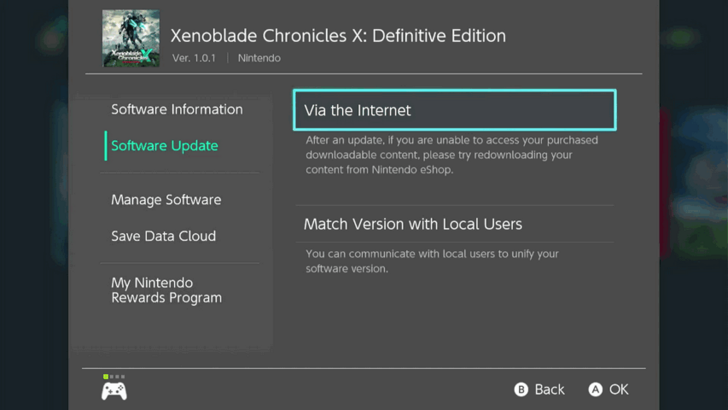 Navigate to Software Update and select Via the Internet. Wait for a couple of seconds to let the system finish downloading the files. |
| 4 | 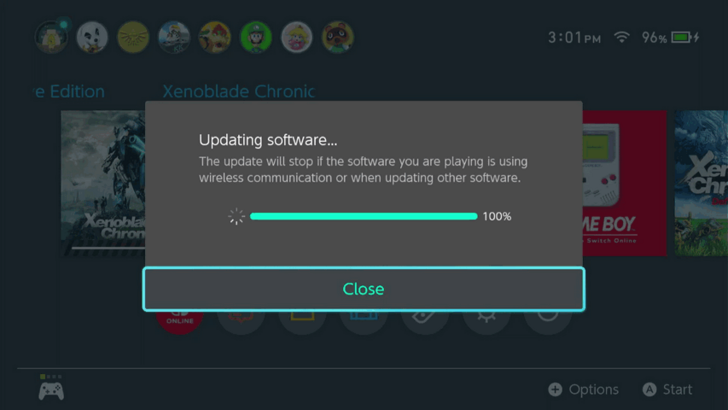 Once the game's updated, you can continue playing Xenoblade on version 1.0.2! You can check the game's current version in the Options menu, and checking the version number on the top left, below the game's name. |
Xenoblade Chronicles X: Definitive Edition Related Guides

Latest News Articles and Game Info
-
![]()
1.0.2 Patch Notes
Updated 4/24/2025
See a summary and the full list of patch notes for version 1.0.2!
-
![]()
Will it be on Switch 2?
Updated 4/2/2025
Learn if and when the game will be on the Switch 2!
-
![]()
New Features and Changes
Updated 4/16/2025
See new features and added content!
-
![]()
Available Platforms and Consoles
Updated 2/4/2025
Know which platforms the game will be released on!
-
![]()
Is There Romance?
Updated 3/24/2025
Check out if the game has some romance elements!
-
![]()
List of Voice Actors and Cast
Updated 3/29/2025
See the English and Japanese Voice actors!
-
![]()
How Long to Beat
Updated 4/15/2025
Find out how long does it take to beat the game!


Other News
Comment



Author
Xenoblade Chronicles X: Definitive Edition Walkthrough & Guides Wiki
1.0.2 Update and Patch Notes

Rankings
- We could not find the message board you were looking for.
Gaming News

![The Liar Princess and the Blind Prince Review [PC] | Lovely to Look at but Tedious to Play](https://img.game8.co/4442586/8d95f5faf05780f1765ce7e0938bd825.jpeg/show)
![The Seven Deadly Sins: Origin [First Impressions] | A Promising Start](https://img.game8.co/4440581/584e0bfb87908f12c4eab6e846eb1afd.png/thumb)
![The Liar Princess and the Blind Prince Review [PC] | Lovely to Look at but Tedious to Play](https://img.game8.co/4442586/8d95f5faf05780f1765ce7e0938bd825.jpeg/thumb)
![Marathon Cryo Archive Map Teased as [REDACTED] on Selection Screen](https://img.game8.co/4442236/6357203e58172f6de57f1991e7c39b22.png/thumb)
Popular Games

Genshin Impact Walkthrough & Guides Wiki
Umamusume: Pretty Derby Walkthrough & Guides Wiki
Pokemon Pokopia Walkthrough & Guides Wiki
Honkai: Star Rail Walkthrough & Guides Wiki
Monster Hunter Stories 3: Twisted Reflection Walkthrough & Guides Wiki
Arknights: Endfield Walkthrough & Guides Wiki
Wuthering Waves Walkthrough & Guides Wiki
Zenless Zone Zero Walkthrough & Guides Wiki
Pokemon TCG Pocket (PTCGP) Strategies & Guides Wiki
Monster Hunter Wilds Walkthrough & Guides Wiki










Recommended Games
Diablo 4: Vessel of Hatred Walkthrough & Guides Wiki
Cyberpunk 2077: Ultimate Edition Walkthrough & Guides Wiki
Fire Emblem Heroes (FEH) Walkthrough & Guides Wiki
Yu-Gi-Oh! Master Duel Walkthrough & Guides Wiki
Super Smash Bros. Ultimate Walkthrough & Guides Wiki
Pokemon Brilliant Diamond and Shining Pearl (BDSP) Walkthrough & Guides Wiki
Elden Ring Shadow of the Erdtree Walkthrough & Guides Wiki
Monster Hunter World Walkthrough & Guides Wiki
The Legend of Zelda: Tears of the Kingdom Walkthrough & Guides Wiki
Persona 3 Reload Walkthrough & Guides Wiki










All rights reserved
© Nintendo / MONOLITHSOFT. Xenoblade Chronicles and Nintendo Switch are trademarks of Nintendo.
The copyrights of videos of games used in our content and other intellectual property rights belong to the provider of the game.
The contents we provide on this site were created personally by members of the Game8 editorial department.
We refuse the right to reuse or repost content taken without our permission such as data or images to other sites.