
List of Ingredients
★ Latest: April 15 (Ver. 0.1.5) Update | Roadmap
☆ Share Zois and Builds in our Canvas Sharing Board!
★ Start Here: Beginner's Guide | Build Mode | Controls
┗ Money Cheat | Best Cities to Live In | Best Jobs
★ Careers, Skills, Traits, Desired Lives, Ambitions
☆ All Cities: Dowon & Bliss Bay
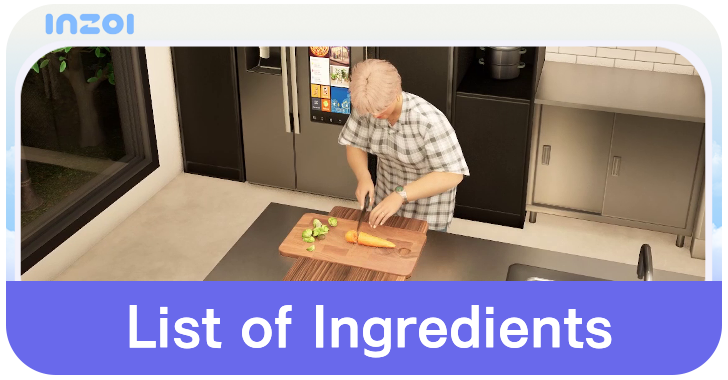
A list of Ingredients in inZOI. See how to get all Ingredients and how to use them to make Cooking Recipes.
List of Contents
List of Ingredients
All Ingredients and How to Get
| Ingredient | How to Get |
|---|---|
 Fish Fillet Fish Fillet
|
Catch a fish, then take out it out from your inventory and click on it to select Fillet |
 Tomato Tomato
|
Purchase from the Pocket Market App |
How to Get Ingredients
Order from the PocketMarket App
The best way to get Ingredients is through the PocketMarket App on the smartphone. Click the Smartphone icon on the bottom menu or press the P key to open the Smartphone window.
Select the PocketMarket app and choose the Cooking Ingredients icon. Choose the ingredient to purchase and press the Buy button.
Obtain Fish from Fishing
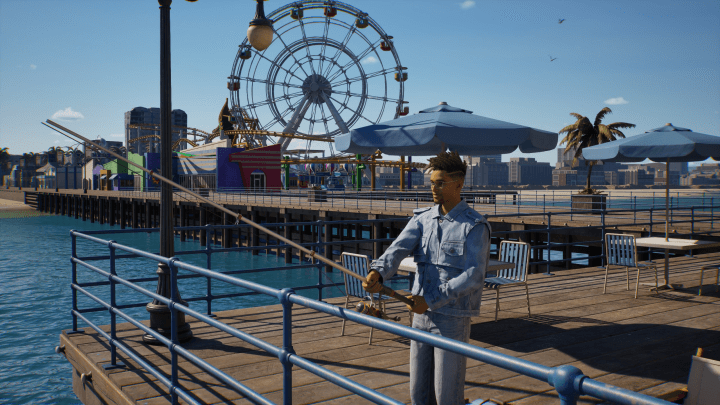
Catching fish is as simple as going to a fishing spot and using the Catch Fish action. There are several fishing spots in each playable city, and Zois can fish there as much as they please.
Fishing Spots are indicated by a small cooler bag sitting near the water. Interacting with the bag will bring up Fishing Actions.
Fishing does not require any equipment nor is a skill, so the fish you can obtain are random.
How to Use Ingredients
Create Cooking Recipes
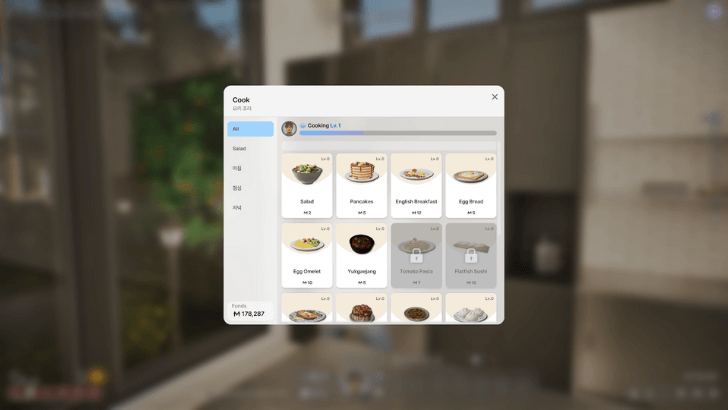
You can use the Ingredients that you have gathered to create Cooking Recipes. Open the refrigerator or use an Electric Oven range inside your house and choose the Make Food action.
From there, you can check which Cooking Recipes require a specific ingredient and furniture to create them.
inZOI Related Guides

Guides by Category
| All Categories | |
|---|---|
 News and Game Info News and Game Info |
 Tips and Tricks Tips and Tricks |
 Cheats Cheats |
 Careers and Jobs Careers and Jobs
|
 Skills Skills |
 Desired Lives Desired Lives |
 Ambitions Ambitions |
 Traits Traits |
 Ingredients Ingredients
|
 Cities Cities |
 Build Mode Build Mode
|
 Furniture Furniture
|
 Bugs and Troubleshooting Bugs and Troubleshooting
|
 Families Families
|
 Message Boards Message Boards
|
|
Comment



Author

List of Ingredients

Rankings
- We could not find the message board you were looking for.
Gaming News
![Neverness to Everness (NTE) Review [Beta Co-Ex Test] | Rolling the Dice on Something Special](https://img.game8.co/4414628/dd3192c8f1f074ea788451a11eb862a7.jpeg/show)


Popular Games

Genshin Impact Walkthrough & Guides Wiki
Honkai: Star Rail Walkthrough & Guides Wiki
Arknights: Endfield Walkthrough & Guides Wiki
Umamusume: Pretty Derby Walkthrough & Guides Wiki
Wuthering Waves Walkthrough & Guides Wiki
Pokemon TCG Pocket (PTCGP) Strategies & Guides Wiki
Abyss Walkthrough & Guides Wiki
Zenless Zone Zero Walkthrough & Guides Wiki
Digimon Story: Time Stranger Walkthrough & Guides Wiki
Clair Obscur: Expedition 33 Walkthrough & Guides Wiki








Recommended Games
Fire Emblem Heroes (FEH) Walkthrough & Guides Wiki
Pokemon Brilliant Diamond and Shining Pearl (BDSP) Walkthrough & Guides Wiki
Diablo 4: Vessel of Hatred Walkthrough & Guides Wiki
Super Smash Bros. Ultimate Walkthrough & Guides Wiki
Yu-Gi-Oh! Master Duel Walkthrough & Guides Wiki
Elden Ring Shadow of the Erdtree Walkthrough & Guides Wiki
Monster Hunter World Walkthrough & Guides Wiki
The Legend of Zelda: Tears of the Kingdom Walkthrough & Guides Wiki
Persona 3 Reload Walkthrough & Guides Wiki
Cyberpunk 2077: Ultimate Edition Walkthrough & Guides Wiki










All rights reserved
© Krafton ALL RIGHTS RESERVED
The copyrights of videos of games used in our content and other intellectual property rights belong to the provider of the game.
The contents we provide on this site were created personally by members of the Game8 editorial department.
We refuse the right to reuse or repost content taken without our permission such as data or images to other sites.
The copyrights of videos of games used in our content and other intellectual property rights belong to the provider of the game.
The contents we provide on this site were created personally by members of the Game8 editorial department.
We refuse the right to reuse or repost content taken without our permission such as data or images to other sites.