
Radar Icons and What They Mean
★ See our Story Walkthrough and Side Story guides!
┣ Unlock the Final Chapter and get the True Ending!
┗ Learn how to beat the Secret Boss!
☆ Easily farm Money, EXP, JP, and Octopuff Travelers!
★ Best Character Tier List | Best Secondary Jobs
☆ All Guild Locations | All Altar Locations
There are multiple radar icons in Octopath Traveler 2. Check out what each of the radar icon means, what happens when your radar turns red, and how to toggle the radar map.
List of Radar Icons
All Radar Icons and Meaning
| Radar | Radar Meaning |
|---|---|
 Objective Marker |
If the player is too far, continue to the destination marker, and the entrance icon will be displayed in green. |
 Side Story |
Icon indicating where to start a side story. |
 Save Point |
Icon indicating where to save your progress. |
 Hidden Item |
Icon indicating where to find a hidden item. |
 Other |
Exits to neighboring areas. |
Minimap Radar Turning Red
Increased Encounter Rate When Running

The minimap radar turns red when you run on the field by holding the B button (Switch) or the Circle button (PlayStation).
The minimap turning red indicates an increased encounter rate with enemies within the area.
How to Use the Radar
Press R or R1 Button
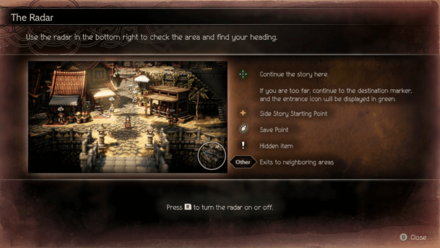
Players can turn the radar on or off by pressing the R button (Switch) or R1 button (PlayStation).
Can Be Seen at the Bottom Right
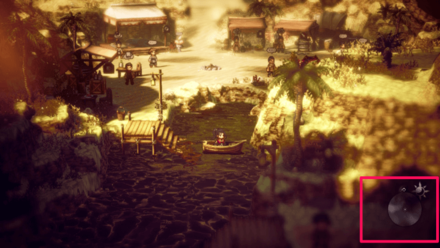
The radar can be seen at the minimap located at the bottom right of the screen and players can use this to check the area and find their heading.
Octopath Traveler 2 Related Guides

Octopath Traveler 2 Tips and Tricks



Author

Radar Icons and What They Mean

Rankings
- We could not find the message board you were looking for.





Popular Games

Genshin Impact Walkthrough & Guides Wiki
Umamusume: Pretty Derby Walkthrough & Guides Wiki
Crimson Desert Walkthrough & Guides Wiki
Monster Hunter Stories 3: Twisted Reflection Walkthrough & Guides Wiki
Honkai: Star Rail Walkthrough & Guides Wiki
Pokemon Pokopia Walkthrough & Guides Wiki
The Seven Deadly Sins: Origin Walkthrough & Guides Wiki
Wuthering Waves Walkthrough & Guides Wiki
Zenless Zone Zero Walkthrough & Guides Wiki
Arknights: Endfield Walkthrough & Guides Wiki










Recommended Games
Fire Emblem Heroes (FEH) Walkthrough & Guides Wiki
Diablo 4: Vessel of Hatred Walkthrough & Guides Wiki
Cyberpunk 2077: Ultimate Edition Walkthrough & Guides Wiki
Yu-Gi-Oh! Master Duel Walkthrough & Guides Wiki
Super Smash Bros. Ultimate Walkthrough & Guides Wiki
Pokemon Brilliant Diamond and Shining Pearl (BDSP) Walkthrough & Guides Wiki
Elden Ring Shadow of the Erdtree Walkthrough & Guides Wiki
Monster Hunter World Walkthrough & Guides Wiki
The Legend of Zelda: Tears of the Kingdom Walkthrough & Guides Wiki
Persona 3 Reload Walkthrough & Guides Wiki










All rights reserved
© 2023 SQUARE ENIX CO., LTD. All Rights Reserved.
The copyrights of videos of games used in our content and other intellectual property rights belong to the provider of the game.
The contents we provide on this site were created personally by members of the Game8 editorial department.
We refuse the right to reuse or repost content taken without our permission such as data or images to other sites.