
How to Switch Navigators
★ New Events: Battle Rush EX, Encirclement Breakthrough Battles, Total War
★ New MS and Pilot: Gundam Unit 5 (Bst) and Fold Romfellow
★ Tier Lists: Mobile Suits (PvE / PvP) and Pilots (PvE / PvP)
★ Check out our Arena Strategy Guide!
★ Answer our survey for Gundam UCE or try our gacha simulators!
Switch your navigators in Gundam UCE depending on your preference! Read on to learn how to switch Navigators, as well as why you should switch navigators in the first place.
List of Contents
How to Switch Navigators
Go to the Menu and Select Your Preferred Navigator
| 1 | 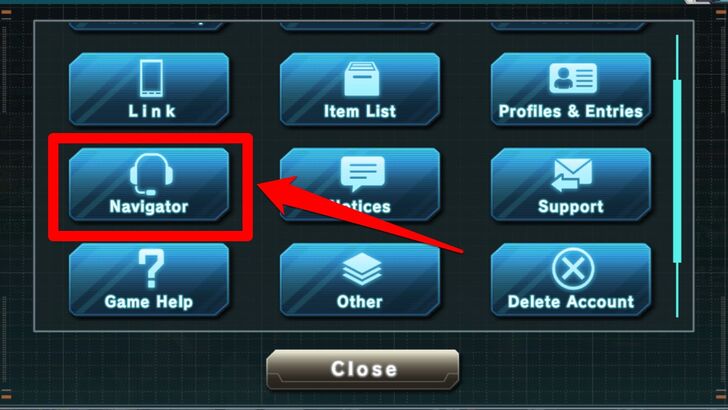 From the Home Screen, go to Gundam UCE's main menu (the sandwich icon on the lower right-hand corner of the Home Screen). Once the main menu pops up, look for the icon that looks like a headset. This is the Navigator settings button. Tap it. |
|---|---|
| 2 | 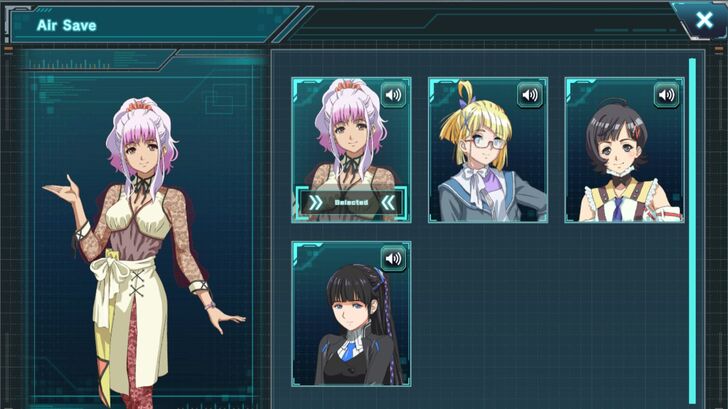 The Navigator menu will come out, where you will be presented with the current roster of in-game Navigators. Tap the portrait of the Navigator you like on the right. On the upper-right corner of their portrait, there is a sound preview button you can tap to hear their voice in Japanese (the Navigators have no English dubbing at the moment). |
| 3 | 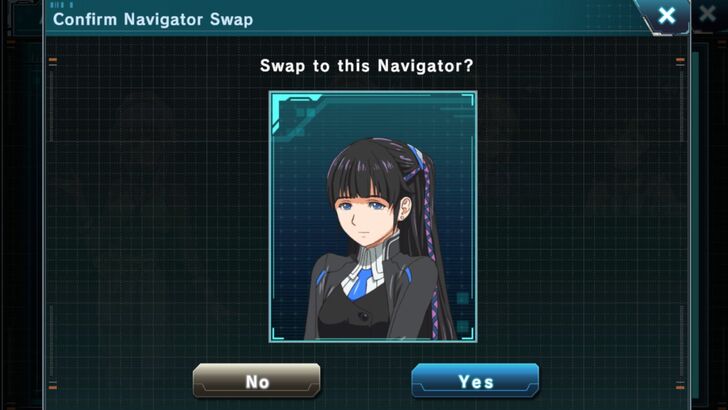 The game will ask you to confirm the Navigator you've chosen. Tap "Yes." |
| 4 | 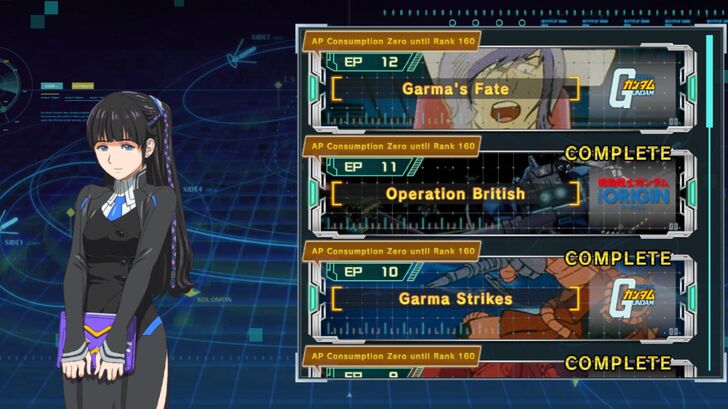 Congratulations! Your Navigator will now appear in various menus throughout the game. |
Why Switch Navigators
Choose the Navigator With the Personality You Prefer
Every Navigator in Gundam U.C. Engage has a different personality and a different set of lines that cater to the preferences of many players.
The default Navigator, Air Save, is a sweet, professional Navigator, while Fia Storage is a confident and smart navigator in glasses. Mari Preserve, meanwhile, is more open with her feelings and is energetic in her voice lines, while Vetra Custody is a timid but refined lady who is gentle and gets scared easily.
To interact with these Navigators, simply tap them whenever you encounter them in menus to hear them say something that suits their personality.
Mobile Suit Gundam U.C. Engage Related Guides
All Tips and Tricks Guides
 Arena Beginner's Guide (PvP)
 Arena Guide
 How to Get Started With the Arena?
 Beginner's Guide: Tips and Tricks
 Beginner Mistakes to Avoid
 Daily Tasks Checklist
 Intermediate Guide
 How To Pair Pilots and Mobile Suits
 Team Building Guide


Author

How to Switch Navigators
Rankings
- We could not find the message board you were looking for.
Gaming News

![Resident Evil Village Review [Switch 2] | Almost Flawless Port](https://img.game8.co/4432790/e1859f64830960ce4248d898f8cd38d9.jpeg/thumb)


Popular Games

Genshin Impact Walkthrough & Guides Wiki
Resident Evil Requiem (RE9) Walkthrough & Guides Wiki
Honkai: Star Rail Walkthrough & Guides Wiki
Monster Hunter Wilds Walkthrough & Guides Wiki
Umamusume: Pretty Derby Walkthrough & Guides Wiki
Pokemon TCG Pocket (PTCGP) Strategies & Guides Wiki
Arknights: Endfield Walkthrough & Guides Wiki
Wuthering Waves Walkthrough & Guides Wiki
Zenless Zone Zero Walkthrough & Guides Wiki
Digimon Story: Time Stranger Walkthrough & Guides Wiki









Recommended Games
Fire Emblem Heroes (FEH) Walkthrough & Guides Wiki
Yu-Gi-Oh! Master Duel Walkthrough & Guides Wiki
Super Smash Bros. Ultimate Walkthrough & Guides Wiki
Diablo 4: Vessel of Hatred Walkthrough & Guides Wiki
Pokemon Brilliant Diamond and Shining Pearl (BDSP) Walkthrough & Guides Wiki
Elden Ring Shadow of the Erdtree Walkthrough & Guides Wiki
Monster Hunter World Walkthrough & Guides Wiki
The Legend of Zelda: Tears of the Kingdom Walkthrough & Guides Wiki
Persona 3 Reload Walkthrough & Guides Wiki
Cyberpunk 2077: Ultimate Edition Walkthrough & Guides Wiki










All rights reserved
Game Copyright© SOTSU・SUNRISE All rights reserved.
The content we provide on this site were created personally by members of the Game8 editorial department.
We refuse the right to reuse or repost content taken without our permission such as data or images to other sites.
© SOTSU・SUNRISE (Provider)
I saw on the Gundam Wiki that there appears to be a 5th navigator named Sarria Cabinet but she doesn't appear anywhere in the game? By chance, do you know anything about this navigator? Here's a picture of the lineup I grabbed from the wiki. Sarria Cabinet is the one on the very right.