
List of Controls
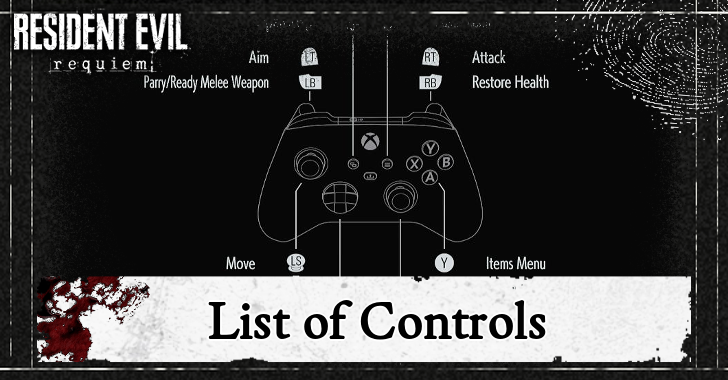
This is a list of controls for Resident Evil Requiem (RE9). Read on to see the list of controls for PlayStation, Xbox, and PC, basic settings, and learn how to change them!
List of Controls
Default Controls
| Function | PS5 | Xbox | PC |
|---|---|---|---|
| Items Menu |  |
 |
Tab |
| Interact |  |
|
F |
| Cancel |  |
 |
Mouse 2 (Right-Click) / Esc |
| Reload |  |
|
R |
| Select Weapon | Left/Down/Right | Scroll Wheel / Number Keys (1-6) | |
| Flashlight | Up | G | |
| Move |  |
 |
W/S/A/D |
| Run or Walk |  |
 |
Shift |
| Quick Turn | + |
+ |
X |
| Look |  |
 |
Mouse |
| Crouch |  |
 |
Ctrl |
| Aim |  |
 |
Mouse 2 (Right-Click) |
| Parry/Ready Melee Weapon |  |
 |
Space |
| Attack |  |
 |
Mouse 1 (Left-Click) |
| Restore Health |  |
 |
Q |
| Open Map |  |
 |
M |
| Pause Menu |  |
 |
P |
How to Change Control Settings
Choose Custom B and C if You Prefer Customized Controls
If you are not a fan of the default option, you can customize your controls with the Custom B and C options. Go to the Button Configuration to edit your preferred controls.
All Basic Settings
List of Basic Settings
| Character Controls | |
|---|---|
| Movement Type | Change the default movement to be run or walk. |
| Run Type | Choose between Toggle or Hold to be able to run. Pick Toggle if you want to run or walk with a press of a button. Pick Hold if you want to hold the button to run. |
| Repeated Input Type | Choose between Tap Repeatedly or Hold to change the method for repeated input actions. |
| When Aiming | |
| Aim Assist | Setting to automatically aim at the enemy with your weapon. Turn it on if you are not good at aiming. You can also choose the Assist Level when turning it on. |
| Reticle Deceleration | Adjusts how much the reticle slows down when it's over the target. |
| Reset Scope Magnification | Turn the scope magnification reset after aiming on/off. |
| Dot Sight Perspective | Turn on/off the function that switches from third-to first-person perspective when aiming a weapon with a dot sight attached. |
Turn On Aim Assist If You Struggle with Aiming
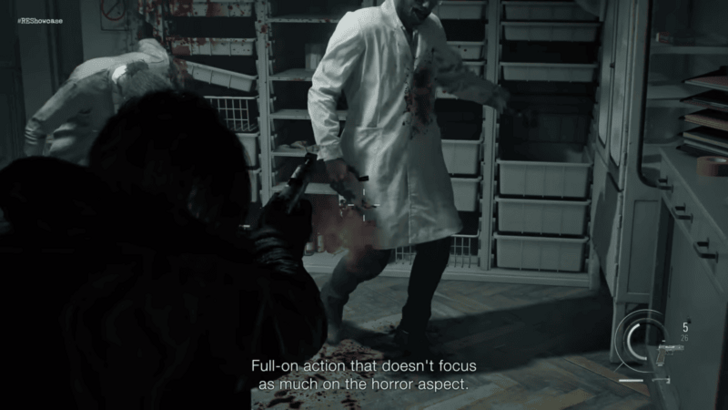
We recommend turning the aim assist on if you are struggling with aiming your weapons at your enemies. This will let you automatically target the enemy when you aim your gun.
Select Default Movement to Walk on Stealth Sections
It is better to set the default movement to walk, as it will give you more control and make less noise during the stealth sections of the game.
Resident Evil Requiem Related Guides

All Tips and Tricks
Comment



Author


Premium Articles
Rankings
- We could not find the message board you were looking for.
Gaming News



![Death Stranding 2: On The Beach [PC] Review | A Port That Delivers](https://img.game8.co/4447392/15310a0c9aa1b6843bb713b2ea216930.jpeg/thumb)

Popular Games

Genshin Impact Walkthrough & Guides Wiki
Umamusume: Pretty Derby Walkthrough & Guides Wiki
Pokemon Pokopia Walkthrough & Guides Wiki
Honkai: Star Rail Walkthrough & Guides Wiki
Monster Hunter Stories 3: Twisted Reflection Walkthrough & Guides Wiki
Arknights: Endfield Walkthrough & Guides Wiki
Wuthering Waves Walkthrough & Guides Wiki
Zenless Zone Zero Walkthrough & Guides Wiki
Pokemon TCG Pocket (PTCGP) Strategies & Guides Wiki
Monster Hunter Wilds Walkthrough & Guides Wiki










Recommended Games
Fire Emblem Heroes (FEH) Walkthrough & Guides Wiki
Diablo 4: Vessel of Hatred Walkthrough & Guides Wiki
Cyberpunk 2077: Ultimate Edition Walkthrough & Guides Wiki
Yu-Gi-Oh! Master Duel Walkthrough & Guides Wiki
Super Smash Bros. Ultimate Walkthrough & Guides Wiki
Pokemon Brilliant Diamond and Shining Pearl (BDSP) Walkthrough & Guides Wiki
Elden Ring Shadow of the Erdtree Walkthrough & Guides Wiki
Monster Hunter World Walkthrough & Guides Wiki
The Legend of Zelda: Tears of the Kingdom Walkthrough & Guides Wiki
Persona 3 Reload Walkthrough & Guides Wiki










All rights reserved
©CAPCOM U.S.A., INC. ALL RIGHTS RESERVED.
The copyrights of videos of games used in our content and other intellectual property rights belong to the provider of the game.
The contents we provide on this site were created personally by members of the Game8 editorial department.
We refuse the right to reuse or repost content taken without our permission such as data or images to other sites.