
Difficulty Setting Differences and How to Change
Resident Evil Requiem (RE9) has four difficulty settings that you can choose from. Learn the features of each difficulty, the best difficulty setting, and see if you can change the difficulty here!
List of Contents
Difficulty Differences
All Difficulties and Their Features
| Difficulty | Features |
|---|---|
| Casual | ・Enemies don't deal as much damage and don't have that much health. ・There are plenty of resources to obtain, like Ammo and Healing items. ・Heavy aim assist |
| Standard (Modern) | ・Fair amount of resources to get. ・Enemies have decent amount of health and damage. ・You can set the difficulty to Casual in the game over screen once you die. |
| Standard (Classic) | ・The game autosaves less. ・Ink Ribbons are required to save the game manually during Grace's playthrough. |
| Insanity | ・Unlocks after completing the game for the first time. ・Fewer resources to obtain. ・Enemies have higher health and deal a lot of damage. ・Same saving mechanic as Standard (Classic). ・Some puzzles and collectibles might be different. |
Standard Modern Vs. Standard Classic
Standard Modern and Standard Classic are both normal difficulties of RE Requiem, but are different from each other. Standard Modern offers similar playthrough to Modern RE titles and remakes, while Standard Classic is simlar to older RE titles.
Out of the two difficulties, Standard Modern is easier compared to Standard Classic. You can save on Typewriters without limit in Standard Modern, and you can also change the difficulty to Casual when you get stuck on a difficult enemy. There are fewer autosave prompts in Standard Classic and you will be required to have Ink Ribbons on Grace's playthrough to save manually. Also, you won't be able to change the difficulty if you die multiple times.
Best Difficulty Settings
Casual is Best for First-Timers
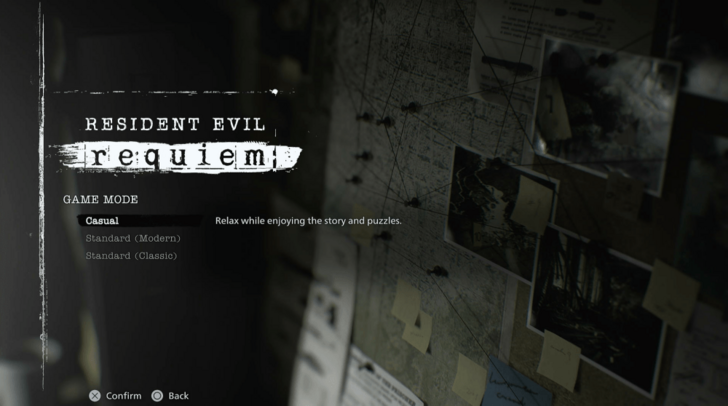
If you're new to Resident Evil, survival horror, or shooter genre, the Casual Difficulty is the best one for you. This difficulty contain tons of resources to loot and enemies takes less bullets to kill them, offering a very forgiving playthrough for those who haven't experienced Resident Evil or other similar games.
Standard Modern is for Modern RE Players
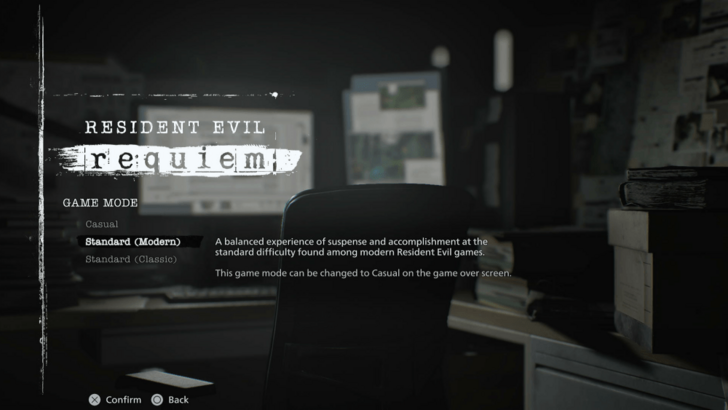
Standard Modern is the most balanced difficulty in the game, best for experienced players of Modern RE titles. You will get fair amount of resources and enemies have slightly more damage and health in this difficulty, enough to make you think about spending resources and strategize on how to beat the enemies.
You can still change the difficulty to Casual in the game over screen, allowing you to switch to an easier difficulty if this difficulty doesn't match your preference. However, note that you can't go back to Standard Modern once you switch, which will affect the achievements you can get after finishing the game.
Standard Classic is Intended for Long-Term Fans
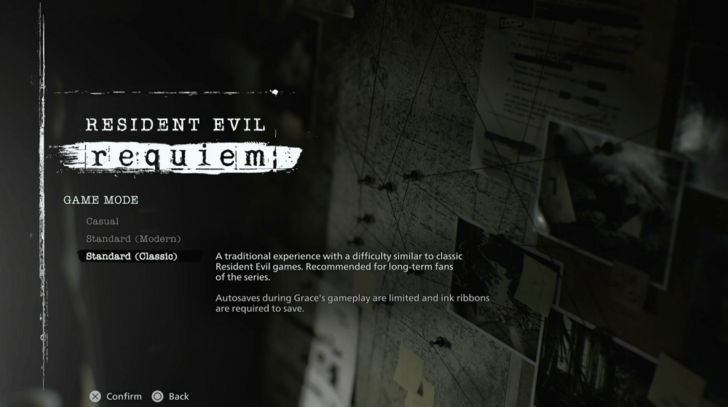
The Standard Classic Difficulty is the best difficulty for the longest fans of the franchise or anyone with good amount of experience with older RE titles. It is the hard difficulty of RE Requiem, with less Autosaves and requires Ink Ribbons to save on Grace's playthrough.
Choose Insanity on Repeated Playthroughs
Players who completed their first playthrough on any difficulty can unlock Insanity difficulty. It's better to play through the Insanity Difficulty on a New Game Plus save as you will be able to use your previous loadout to the new one.
You are required to clear the Insanity Difficulty if you want to finish the game with 100% completion.
Can You Change Difficulty?
Standard Modern Can Be Changed to Casual
Standard Modern can be changed to Casual after dying a few times during the playthrough. You can choose not to change it if you want and just try again.
If you choose to change it to Casual, you won't be able to change it again to Standard Modern. This can affect the achievements you can get as you play through the game.
Casual and Standard Classic Can't Be Changed
The Casual and Standard Classic difficulties can't be changed after choosing at the start of the playthrough. It is best to pick the difficulty that suits your preference at the start to enjoy the game better.
Resident Evil Requiem Related Guides

All Tips and Tricks
Comment



Author

Difficulty Setting Differences and How to Change

Premium Articles
Rankings
- We could not find the message board you were looking for.
Gaming News



![Death Stranding 2: On The Beach [PC] Review | A Port That Delivers](https://img.game8.co/4447392/15310a0c9aa1b6843bb713b2ea216930.jpeg/thumb)

Popular Games

Genshin Impact Walkthrough & Guides Wiki
Umamusume: Pretty Derby Walkthrough & Guides Wiki
Pokemon Pokopia Walkthrough & Guides Wiki
Honkai: Star Rail Walkthrough & Guides Wiki
Monster Hunter Stories 3: Twisted Reflection Walkthrough & Guides Wiki
Arknights: Endfield Walkthrough & Guides Wiki
Wuthering Waves Walkthrough & Guides Wiki
Zenless Zone Zero Walkthrough & Guides Wiki
Pokemon TCG Pocket (PTCGP) Strategies & Guides Wiki
Monster Hunter Wilds Walkthrough & Guides Wiki










Recommended Games
Fire Emblem Heroes (FEH) Walkthrough & Guides Wiki
Diablo 4: Vessel of Hatred Walkthrough & Guides Wiki
Cyberpunk 2077: Ultimate Edition Walkthrough & Guides Wiki
Yu-Gi-Oh! Master Duel Walkthrough & Guides Wiki
Super Smash Bros. Ultimate Walkthrough & Guides Wiki
Pokemon Brilliant Diamond and Shining Pearl (BDSP) Walkthrough & Guides Wiki
Elden Ring Shadow of the Erdtree Walkthrough & Guides Wiki
Monster Hunter World Walkthrough & Guides Wiki
The Legend of Zelda: Tears of the Kingdom Walkthrough & Guides Wiki
Persona 3 Reload Walkthrough & Guides Wiki










All rights reserved
©CAPCOM U.S.A., INC. ALL RIGHTS RESERVED.
The copyrights of videos of games used in our content and other intellectual property rights belong to the provider of the game.
The contents we provide on this site were created personally by members of the Game8 editorial department.
We refuse the right to reuse or repost content taken without our permission such as data or images to other sites.