





This survey will take about 1 minute.
Your answers will help us to improve our website.
FF7 Remake
How to Download the Demo and Demo Walkthrough & Guide
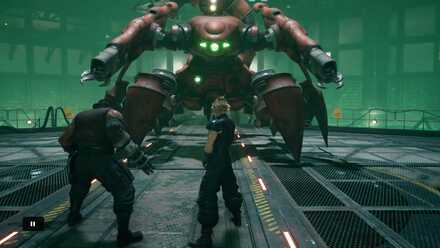
This is a walkthrough of the FF7 Remake Demo. Read on to find out how to download the FF7 Remake Demo, everything we learned in the demo, all Maps and Items obtainable in the demo, and more.
List of Contents
- FF7 Remake Demo
- Things you can do in the FF7 Remake Demo
- How to Download the FF7 Remake Demo
- Open the PlayStation Store
- Go to “What's Hot”
- Download the Demo
- Wait for the Download to Complete
- Start the Game
- FF7 Remake Demo Walkthrough
- Maps and Obtainable Items
- From the Train to the Mako Reactor
- Inside the Mako Reactor
- Escaping from the Mako Reactor
- Tips and Strategies
- Boss Strategy Guide
- Scorpion Sentinel
FF7 Remake Demo
| Release Date | 2020/03/02 |
|---|---|
| Download File Size | 7.5 GB |
| Dates of Availability | 2020/03/02 ~ ??? |
The FF7 Remake Demo became available on 2020/03/02. It's not known how long it will remain in the PlayStation Store, so be sure to go ahead download and play the Demo as soon as possible.
As the Demo's file size is a bit on the large size, be sure to start the Demo download early, well before you plan to start playing it.
Things you can do in the FF7 Remake Demo
- Play the game through the explosion of the Mako Reactor No. 1
- Practice the FF7 Remake Battle System
- Understand how equipment and other core mechanics of gameplay work
How to Download the FF7 Remake Demo
Open the PlayStation Store
From the PS4 Home menu, access the PlayStation Store.
Go to “What's Hot”
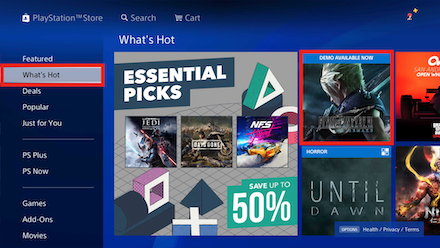
Check the “What's Hot” tab of the PlayStation Store page and select the FF7 Remake Demo.
Download the Demo
Click the Download button to begin downloading the FF7 Remake Demo.
Wait for the Download to Complete
And now comes the waiting game. An absurd amount of time like 30 hours may be displayed at first, but in our team's case, the download wrapped up after only one hour.
Start the Game
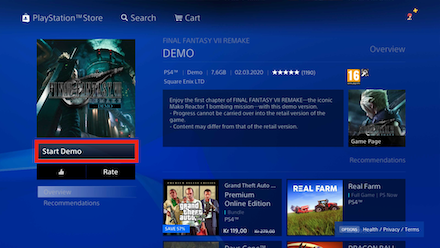
After the download has completed, you will at last be able to start playing the Demo.
FF7 Remake Demo Walkthrough
Maps and Obtainable Items
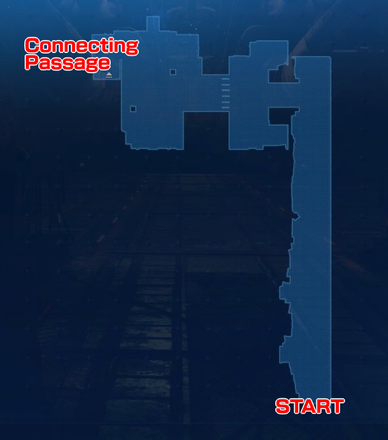
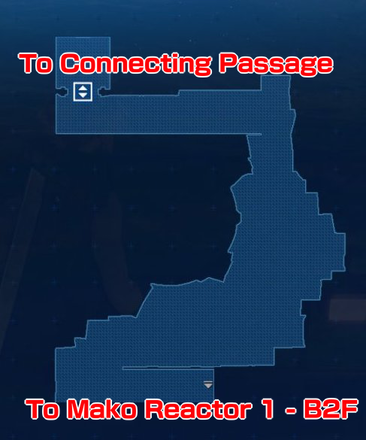
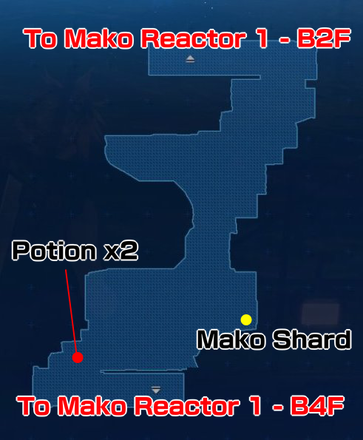
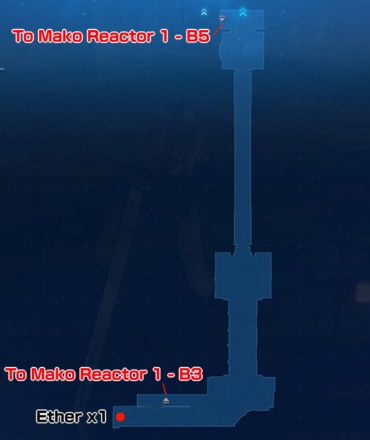
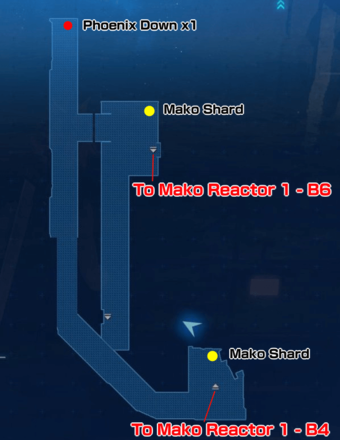
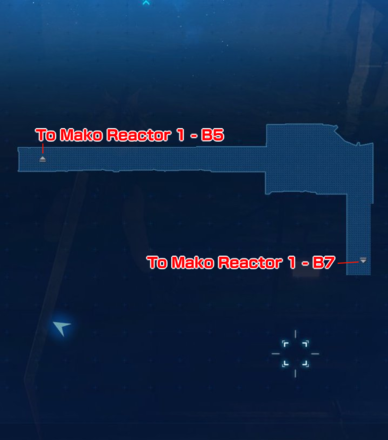
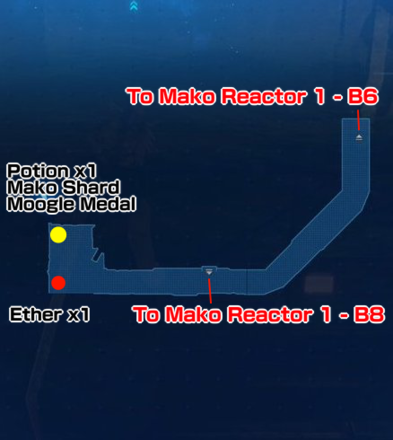
Maps
| List of Maps | |||
|---|---|---|---|
 |
 |
||
 |
 |
 |
 |
 |
 |
 |
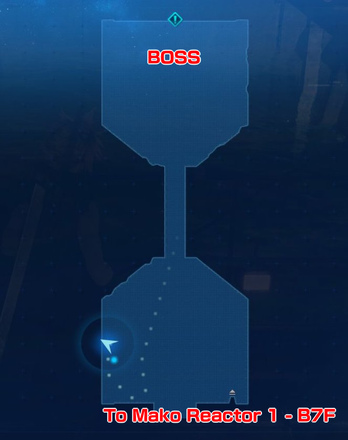 |
| Key | |
|---|---|
| Red Dot (Treasure Chest) | These items are set. The listed item will always be found here. |
| Yellow Dot (Shinra Box) | These items are random. Items other than those listed may be found here. |
Obtainable Items
| Before the Mako Reactor | ||
|---|---|---|
| Potion x6 | Ether x1 | Mako Shard x3 |
| Inside the Mako Reactor | ||
| Potion x1 | Ether x1 | Mako Shard x1 |
| Phoenix Down x1 | - | - |
From the Train to the Mako Reactor
| 1 | After getting off the train and going forward a short distance, you'll engage in battle with two Security Officers. |
|---|---|
| 2 | When reaching the turnstile at the station, you'll again encounter two Security Officers. An ATB tutorial will begin. |
| 3 | After going through the turnstile, battle with two more Security Officers. |
| 4 | On the floor above, there are two treasure chests. Obtainable Items: (Potion x2) (Hand Grenade x2) |
| 5 | After leaving the room, a tutorial will begin. |
| 6 | After continuing forward and initiating a cutscene, approach Barret on your right hand side and the door will open. |
| 7 | After continuing ahead, a battle with a Security Officer and a Guard Dog will begin. |
| 8 | Get on the elevator and go up by pressing the button on the far side. |
| 9 | Continue ahead, and when you approach your teammates, a battle with two Security Officers and a Guard Dog will begin. |
| 10 | Go under the wire mesh and battle with two Security Officers. In the same area, you can find a treasure chest (Potion x2) |
| 11 | Hold the △ button to interact with the lever on the far side and open the door. |
| 12 | When you reach a wall, turn right to enter the Mako Reactor. |
Inside the Mako Reactor
| 1 | After entering the Mako Reactor, at the door right at the entrance, talk to Biggs to unlock the door, at which point you'll start a battle with 4 Security Officers. |
|---|---|
| 2 | The next door will open on talking with Jessie. |
| 3 | Press the button in the elevator to ride, and after getting off you'll immediately face two Sentry Rays and three Monodrives. |
| 4 | When continuing ahead, you'll encounter a laser trap, so watch your timing to avoid it. |
| 5 | On continuing ahead, you'll battle a Sweeper. |
| 6 | Continue further ahead, and go down the ladder on your left. ※You can go down the ladder quickly with the R1 button. |
| 7 | Go straight ahead to the far end and obtain a Phoenix Down from the chest. |
| 8 | Take the ladder down and encounter a Sentry Ray and two Monodrives. |
| 9 | Continue ahead and go down the ladder. If you continue without going down the ladder, you'll be forced to fight four Monodrives, and obtain two Potions. |
| 10 | After continuing ahead, you'll start a battle with the Boss, Scorpion Sentinel. |
Escaping from the Mako Reactor
| 1 | Continue along the road while checking the remaining time shown at the top of the screen. ※Remember to sprint by holding either the R1 or R2 button. |
|---|---|
| 2 | After climbing up the ladder, you can turn right to destroy some boxes that have re-spawned. You can obtain another Moogle Medal. |
| 3 | Run back past the ladder you came up towards the staircase, and at the top of the staircase you'll start a battle with two Monodrives. |
| 4 | After climbing the ladder and watching a cutscene, move left and save Jessie. |
| 5 | Slide down the ladder and continue along the path to find a treasure chest with two Potions just to the right of a ladder going up. |
| 6 | Continue up until you reunite with Barret, you'll fight with two Security Officers and a Monodrive. |
| 7 | Going further in, you'll battle with a Sweeper. |
| 8 | After climbing the stairs, you'll battle with four Monodrives. |
| 9 | Continuing further along, you'll engage a Shock Trooper in combat. Watch out – this is the first standard enemy you'll face who puts up a real fight! |
| 10 | Further ahead, you'll battle first with two Shock Troopers and two Sentry Rays, then with one more Shock Trooper. |
| 11 | On riding the elevator at the far end, the playthrough of the Demo will end. |
Tips and Strategies
Open Trasure Chests and Shinra Boxes
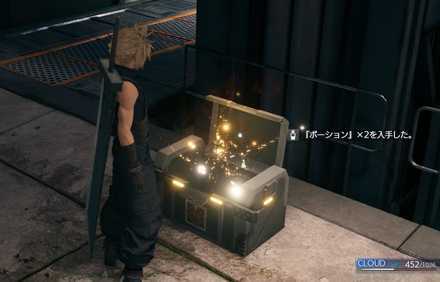
You can find items from treasure chests and Shinra Boxes placed around the map. Check our maps above to find the locations of all obtainable items.
Watch out for Guard Dogs
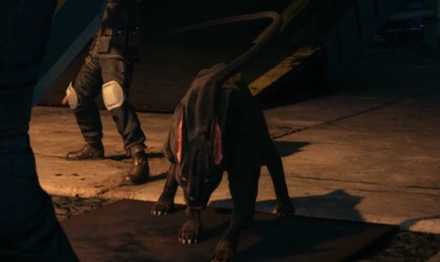
The Guard Dogs that often accompany Security Officers have high HP and can cause problems, so use focus attacks on them to force them to Stagger so you can finish them off.
Focus Gauge and How to Stagger Enemies
Use Magic on Sweepers
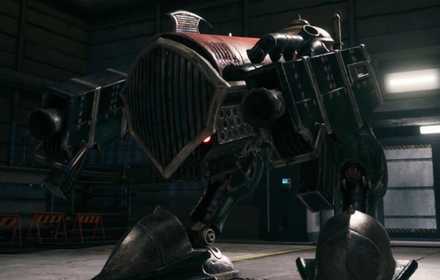
The Sweeper enemies that appear in the second half are weak to Magic attacks. Stagger them and hit hard with Magic to take them out.
Use Counters against Shock Troopers
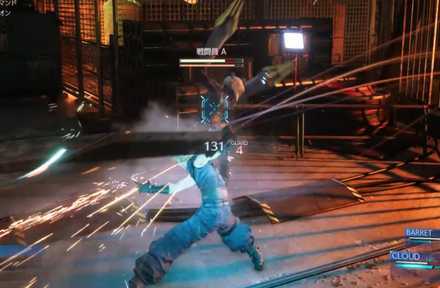
The Shock Troopers who show up during the escape from the Mako Reactor are some of the strongest regular enemies appearing so far. They will often block your attacks, so using counters to turn the situation in your favor is a must.
| How to Counter Attacks |
|---|
| 1. With Cloud, press △ to switch into Punisher Mode |
| 2. Hold down R1 and wait for the opponent's attack |
| 3. Cloud will Counter automatically when the attack hits |
Boss Strategy Guide
Scorpion Sentinel
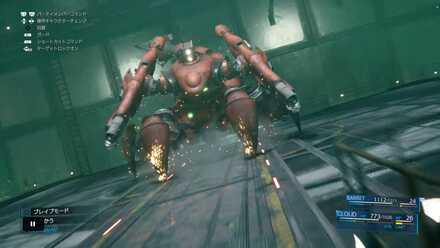
The Boss Scorpion Sentinel is weak to Thunder Magic. As Barret can use Thunder Magic, either change characters and battle as Barret, or use L2 or R2 to give commands to your party members.
In a pinch, Cloud will give hints for how to defeat the Boss, so as long as you follow what he says, this battle should go off without a hitch.
How to Beat Scorpion Sentinel
Related Links
Comment
17  Anonymous almost 6 years
Anonymous almost 6 yearsthanks for collecting all these stuff.. here for the download, finally can play the game :)
Author

How to Download the Demo and Demo Walkthrough & Guide

Please participate in our site
improvement survey
03/2026
improvement survey
03/2026
Would you assist in
improving Game8's site?
improving Game8's site?

×
We are listening to our users' valuable opinions and discussing how to act on them.
The information collected through this survey will be used for the purpose of improving our services. In addition, the information will only be disclosed a part of a statistic in a format that will not allow identification of personal information.
Begin Survey
Not Now
×
Please rate each item regarding Game8.co's Advertisements.
Amount of Ads
Very Dissatisfied
Somewhat Dissatisfied
Fine
Somewhat Satisfied
Highly Satisfied
Placement of Ads
Timing of Ad Display
Ad Loading Speed
Safeness of Ads
Content of Ads
×
Please rate each item regarding Game8.co's Quality of Articles.
Amount of information
Very Dissatisfied
Somewhat Dissatisfied
Fine
Somewhat Satisfied
Highly Satisfied
Frequency of updates
Speed of new information
Accuracy of articles
Understandibility of articles
Readability of sentences
×
Please rate each item regarding Game8.co's Usability of the Site.
Ease of finding information
Very Dissatisfied
Somewhat Dissatisfied
Fine
Somewhat Satisfied
Highly Satisfied
Loading Speed
Use of Color
Font Size
Visibility of Images
Easy to Understand Layout
×
Please rate each item regarding Game8.co's Message Boards, Comments.
Ease of Writing
Very Dissatisfied
Somewhat Dissatisfied
Fine
Somewhat Satisfied
Highly Satisfied
Readability
Ease in Finding Information
Comment Quality
Comment Quantity
Admin Response
×
Please rate each item regarding Game8.co's Site's new design.
Please rate our site's new design
Very Dissatisfied
Somewhat Dissatisfied
Fine
Somewhat Satisfied
Highly Satisfied
Do you think that the website's design change makes the site easier to use?
Has the new design made it easier for you to find information on the site?
Has the new design improved the overall visual appeal of the site?
How would you rate your overall satisfaction with the new design of the site?
×
How likely are you to recommend Game8 to someone you know?
Very Unlikely
0
1
2
3
4
5
6
7
8
9
10
Very Likely
If you have other opinions regarding potential improvement to the website, please share them with us. We would appreciate your honest opinion.
Note: This is a free response section, so you can proceed without entering anything.
Note: Please be sure not to enter any kind of personal information into your response.
Note: Please be sure not to enter any kind of personal information into your response.
×
Thank You
×
Thank you for participating in our survey! Your answers will help us to improve the quality of our website and services.
We hope you continue to make use of Game8.
We hope you continue to make use of Game8.
Close
Rankings
- We could not find the message board you were looking for.
Gaming News


![Slay the Spire 2 Review [Early Access] | Still the Deckbuilder to Beat](https://img.game8.co/4433115/44e19e1fb0b4755466b9e516ec7ffb1e.png/thumb)

![Resident Evil Village Review [Switch 2] | Almost Flawless Port](https://img.game8.co/4432790/e1859f64830960ce4248d898f8cd38d9.jpeg/thumb)
Popular Games

Genshin Impact Walkthrough & Guides Wiki
Honkai: Star Rail Walkthrough & Guides Wiki
Umamusume: Pretty Derby Walkthrough & Guides Wiki
Pokemon Pokopia Walkthrough & Guides Wiki
Resident Evil Requiem (RE9) Walkthrough & Guides Wiki
Monster Hunter Wilds Walkthrough & Guides Wiki
Wuthering Waves Walkthrough & Guides Wiki
Arknights: Endfield Walkthrough & Guides Wiki
Pokemon FireRed and LeafGreen (FRLG) Walkthrough & Guides Wiki
Pokemon TCG Pocket (PTCGP) Strategies & Guides Wiki










Recommended Games
Fire Emblem Heroes (FEH) Walkthrough & Guides Wiki
Diablo 4: Vessel of Hatred Walkthrough & Guides Wiki
Yu-Gi-Oh! Master Duel Walkthrough & Guides Wiki
Super Smash Bros. Ultimate Walkthrough & Guides Wiki
Pokemon Brilliant Diamond and Shining Pearl (BDSP) Walkthrough & Guides Wiki
Elden Ring Shadow of the Erdtree Walkthrough & Guides Wiki
Monster Hunter World Walkthrough & Guides Wiki
The Legend of Zelda: Tears of the Kingdom Walkthrough & Guides Wiki
Persona 3 Reload Walkthrough & Guides Wiki
Cyberpunk 2077: Ultimate Edition Walkthrough & Guides Wiki










All rights reserved
© SQUARE ENIX CO., LTD. All Rights Reserved.
CHARACTER DESIGN:TETSUYA NOMURA/ROBERTO FERRARI
The copyrights of videos of games used in our content and other intellectual property rights belong to the provider of the game.
The contents we provide on this site were created personally by members of the Game8 editorial department.
We refuse the right to reuse or repost content taken without our permission such as data or images to other sites.
I know I'm late with the demo and the game is already here... But, still like to try the demo first. Thanks for the download guide.